3D LED Sign With WLED – No Soldering Required!
by dbmaking in Circuits > LEDs
112 Views, 1 Favorites, 0 Comments
3D LED Sign With WLED – No Soldering Required!


Have you ever needed a visual sign to tell others, “Do not disturb, I'm recording!”? Or maybe you're looking for a dynamic, customizable decoration to spice up your livestream or studio setup? In this project, I’ll walk you through creating a stunning 3D-printed LED sign, wirelessly controlled via WLED, completely portable with a power bank and best of all, no soldering required! You'll not only build something useful, but you'll also learn to personalize effects and segment letters using the powerful LED Map feature.
Supplies


To begin, gather all the 3D-printed components: the main body of the text and the diffusers for each letter. You’ll also need a 5V WS2812b LED strip, a WLED-compatible controller, and a power bank with USB ports of at least 2-3A output.
️ MATERIALS LIST:
➡️Aliexpress Links
WS2812B LED Strip 60 LEDs/meter 5V: https://s.click.aliexpress.com/e/_DeomxJb
WLED Controller: https://s.click.aliexpress.com/e/_oCQuYI1
Power Bank 20000 mA:https://s.click.aliexpress.com/e/_ooEzMXW
USB C - USB A Cable: https://s.click.aliexpress.com/e/_oCSTjI9
Two-component epoxy glue: https://s.click.aliexpress.com/e/_oEdX0nW
➡️Amazon Links
WS2812B LED Strip 60 LEDs/meter 5V: https://amzn.to/4fXf8sZ
Power Bank 23800 mA: https://amzn.to/3RsCxaO
USB C - USB A Cable: https://amzn.to/43sfGn6
Two-component epoxy glue: https://amzn.to/45ue39y
➡️Download File 3D:Makerworld
➡️Download documentation: LedMAp
🧱 Assemble the 3D Structure


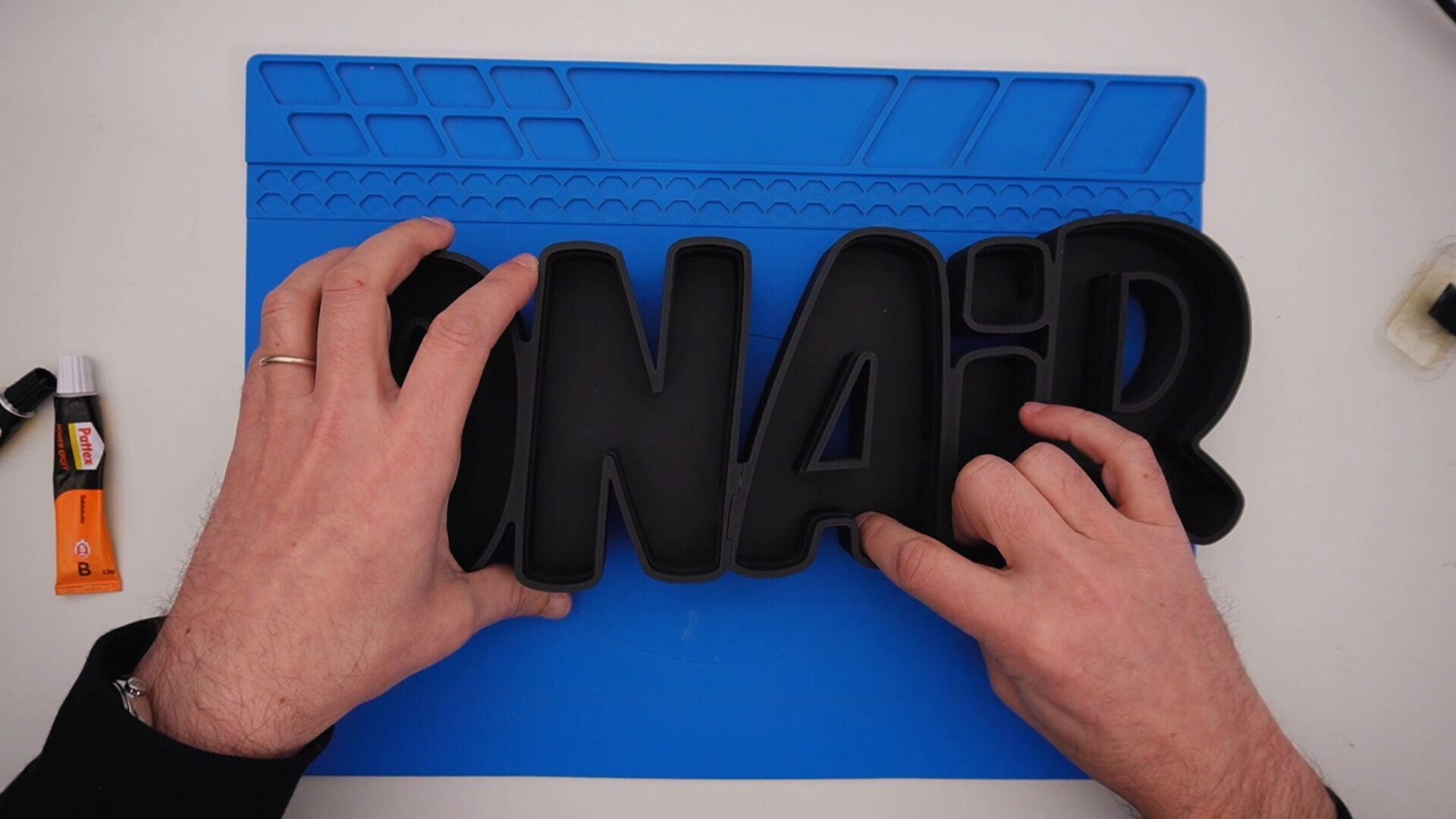
Join the two parts that make up the body by applying a two-component adhesive along the guides for a solid bond.
The diffusers use a friction-fit system, which still allows you to easily remove them in the future if needed.
If you want to see how I made it, here’s the link to the design video:
➡️ How to Create a 3D Light-Up Sign with Fusion 360 and WLED!
---> Select YouTube audio track in English <---
💡Apply the LED Strip


Insert the LED strip starting from the letter “R” and continue in order along the entire text, first on the top part and then on the bottom, routing the cable through the hole at the back.
The LEDs should be applied using the double-sided adhesive already attached to the strips, gradually removing the protective backing.
Make sure the LEDs are oriented toward the center of the text to ensure an even distribution of light.
🔌Connect to Power and Controller


Attach the LED strip to your controller, and then power it via the USB power bank. Mount the controller externally to access its power button easily.
🛠️ Improve Light Reflection


To reduce shadowy areas inside the letters, attach thin white reflectors (3D-printed or paper) to the interior base. This improves light diffusion, especially with solid color modes.
🧠 Use LED Map for Letter Control

Instead of creating multiple physical segments, remap your LED strip using LED Map. This lets you treat non-sequential LEDs as a continuous virtual segment perfect for giving each letter its own effect or color.
You can download the LED map for this project in Step 1 under "Download Documentation".
🎨 Customize Colors and Effects


Create individual segments in WLED for each letter, assign different effects or static colors, and save them as presets. You can then create dynamic playlists to animate your text with progressive effects.
🚀 Final Result


Now your 3D sign is alive, dynamic, and fully customizable! Use it to indicate your recording status, add style to your workspace, or experiment with endless lighting effects. If you're feeling creative, try designing themed animations for holidays or events.
➡️Useful Links:
WLED Tutorial on ESP32 – Installation and Configuration for LED Strips
🏁 Conclusion
As you’ve seen, creating a 3D illuminated sign using an LED strip and WLED control is not only a project within everyone’s reach, but also offers tons of creative possibilities. From a simple “on air” indicator for a studio, it can become a fully portable, smart, and highly customizable decorative element.
We’ve seen how, with just a few components a WS2812B strip, a controller, and a power bank you can build something eye-catching, perfect for anyone wanting to add a techy and original touch to videos, livestreams, or home spaces. Thanks to WLED’s LED Map feature, each individual letter can be controlled independently, with no soldering required, massively expanding the potential for visual customization.
My hope is that this project has inspired you to experiment, to modify it, and maybe even to take it to the next level. You could change the shape, the message, the colors or even combine it with sensors or wireless remotes (which we’ll explore in the next tutorial 😉).
If you found this project inspiring or helpful, don't forget to leave a ❤️!