3D Printed UAV | Flying 3D Printed
by Gino_Centi in Workshop > Electric Vehicles
7005 Views, 31 Favorites, 0 Comments
3D Printed UAV | Flying 3D Printed

I have built a 3D printed UAV (Unmanned Aerial Vehicle). This is a submission to the 2026 Butwin Elias Science and Technology award. Without this contest this project would have never happened. My name is Gino Centi and it has been my dream for as long as I can remember to design my own functioning plane. After designing every part of this plane myself and it to come out the way it did has been a dream come true.
Supplies
Building a plane requires a lot of materials and there are many viable options to choose from. I bought mostly from packs of parts to cut down on costs.
Motors, Servos, Propellers, ESC.
This bundle contained one A2212 Brushless Motor along with two propellers, two SG90 Lightweight Servos, a mounting plate for the motor as well as screws to mount the motors. This pack included two propellers each of which opposites of the other. It also included an ESC, or electronic speed controller. I bought two of these packs to get the parts for my original build but I ended up using a different design which meant only 3 sg 90 servos were required and only one brushless motor.
Batteries
Two batteries were included in this pack which is what is needed to supply both of the motors.
Reciever and Transmitter
One controller (Transmitter) and one radio reciever. The reciever has multiple ports to plug servos and motors into.
Threaded inserts
This is a bag of threaded inserts fit to the size of the screws for the motors and servos.
Soldering Iron
https://hakkousa.com/products/soldering/blue-508-soldering-iron.html
This was needed to connect the threaded inserts to the 3d printer filament.
Push Rods
The push rods I used were just wooden sticks that I connected to bailing wire. They were sturdy and acted as a cheap alternative.
Bailing Wire
This connected the servos to the ailerons and elevator. Getting stronger bailing wire would remove the use of wooden sticks to connect the two together.
Bambu PLA Aero
This is a 1 kilogram roll of 3D printer filament suited for printing aircraft, it is just enough to print all of the parts necessary for this project.
Bambu P1S 3D Printer
This was the printer I used for printing the parts. Other printers work as well.
The parts needed for this project are not the cheapest things that one can be, especialy the 3D printer. I used my schools 3D printer, so it was technicaly free for me. This cut the cost down by over $1,000
Helpful but not necessary tools:
Sand paper
Useful for removing excess printing material left on the print. Sanding down the parts that slide together also helps a lot.
Hammer
The servos are hard to get in by hand as well as the pins and a hammer will help them go in if used carefuly.
Tweezers
Will help remove excess printing material in places unreachable by the sand paper, but they came in one of the packs I bought for the project.
Wire cutters
To cut the bailing wire.
Coming Up With the Design and Necessary Parts
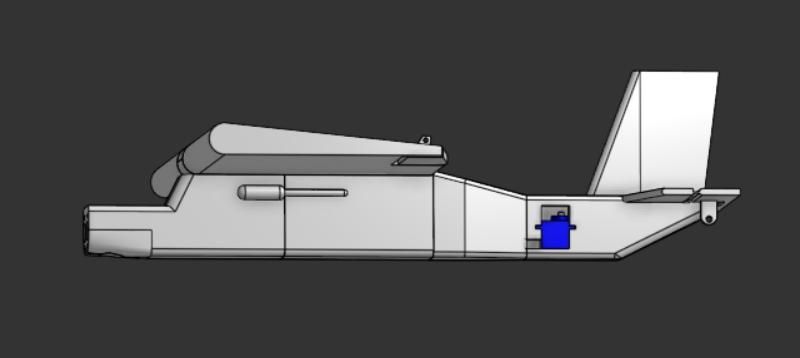

The most important phase of building a plane is the design phase. This step is crucial because it determines everything about the plane such as what motors and servos it will use all the way up until if what you designed will actually fly. Aircraft need to be designed in a way so the balance inside of them is perfect. The center of gravity should be aligned with the center of lift, and you need to have a stabilizer in the back so the plane flies straight and doesn't spin out mid air. I got inspiration from other design online and somewhat based my design off of them. I also needed a base of parts, I looked online and picked out some parts that i would design my plane around. I modeled the design through Onshape, a free 3D design software. I went through 3 major design phases which took a ton of time and effort. My first design was fully developed by me with no inspiration from anything else. It involved a motor in the back of the plane that would push the plane instread of a motor in the front pulling the plane. This design was cool but I soon realised it would be impractical and I was not even sure if it would work. I then did some research which brought me to my second design. I found a 3d printed UAV online that i liked and decided to base my plane off of that, this plane was proven to work, but it was very big and when I went to print it I realised it would not work as I could not fit it onto the build plate of the printer. I was also not sure if I would have enough filament to print the entire thing if I could somehow get it to fit onto the build plate. After spending countless hours on the first two designs I slowly realised that i would need to do something completely different. I needed something relatively small so I made my own design once again and based it very lightly off of a cessna which is a small plane that real people fly in. The only things I took inspiration off of the cessna was the nose of the plane and the wings on top of the aircraft. This design would be good since it kept the center of gravity on the bottom of the plane which meant the plane would fly straighter than other designs while rolling back to level flight by itself after a turn.
Setting Up the Avionics Systems

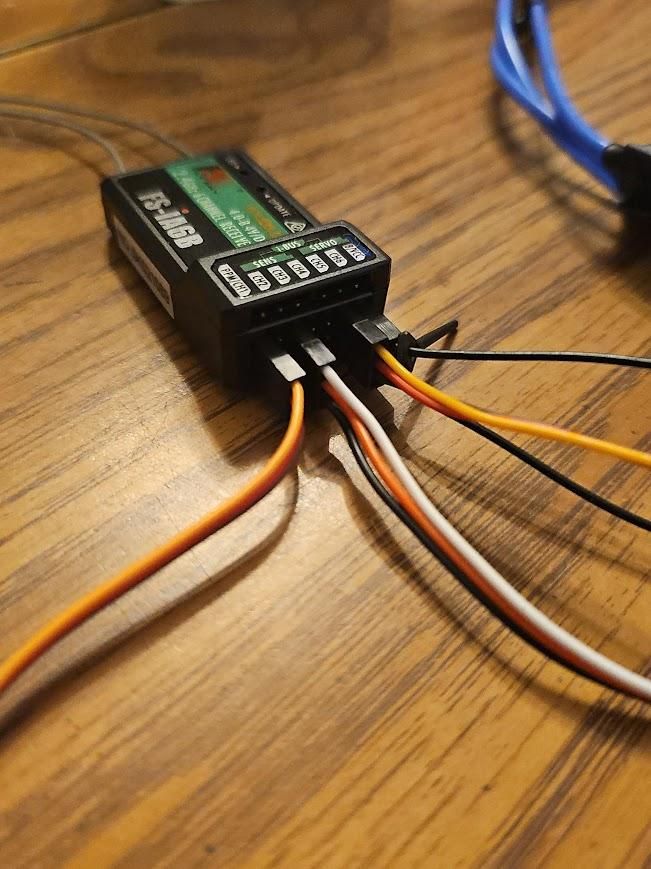
After I obtained all of the parts that were necessary I put them together and tested them out to make sure that they worked and that they would work on the plane I was using. After deciding on my third design I knew what parts I needed and hooked them up accordingly to a reciever. This reciever recieved radio signals from a transmitter, which was the controller. I plugged the brushless motor into an electronic speed controller (ESC), which was then connected to the right reciever channel. I connected a battery to the ESC which would send power to the entire system. I plugged in the servos for the planes ailerons and coded them into a dual input channel. This meant that when I moved the one servo, the other servo would move with it while being connected to a different channel. I did not need to reverse the input of one of the servos because the design of my aircraft meant that they would automaticaly spin in opposite directions, this now meant that I had established a working aileroc system. I did the same thing for the elevator servo, only it was one servo needed and I did not need to make a dual input channel. I also tested the motor which was working great. After confidently testing these parts I could not design my plane in accordance with the parts at hand.
Designing the Plane

Using onshape I designed the plane into 8 parts, the nose, the main fuselage, the ending of the fuselage, the tail, the vertical stabilizer, a wing connecter, and the two wings. The nose would hold the motor, the battery, and the ESC. It would also connect to the wing connector. The wing connector sat on top of the nose part and acted as a bridge to the wings. The wings created lift and the ailerons which were connected to the wings enabled the aircraft to roll left and right. Connected to the back of the main fuselage was what I called the main fuselage. It housed the reciever, which is where all of the wires are connected to. There was a hole the the back of this for the elevator servo wire to be fed through, there was also a small hole in the top where the aileron servos would go through. Connected to the back of this by pins was the fuselage end, which connected it to the tail. The tail has the elevator and allows the plane to pitch up and down. The tail then connects the vertilar stabilizer, stabilizing the plane and ensuring it fly straight and not rotate mid air.
Below are the STL files:
Nose:
Fuselage:
End Fuselage:
Tail:
Wing Connecter:
Left Wing:
Right Wing:
Vertical Stabilizer:
Tail Pins(NEED 3X):
Printing the Plane
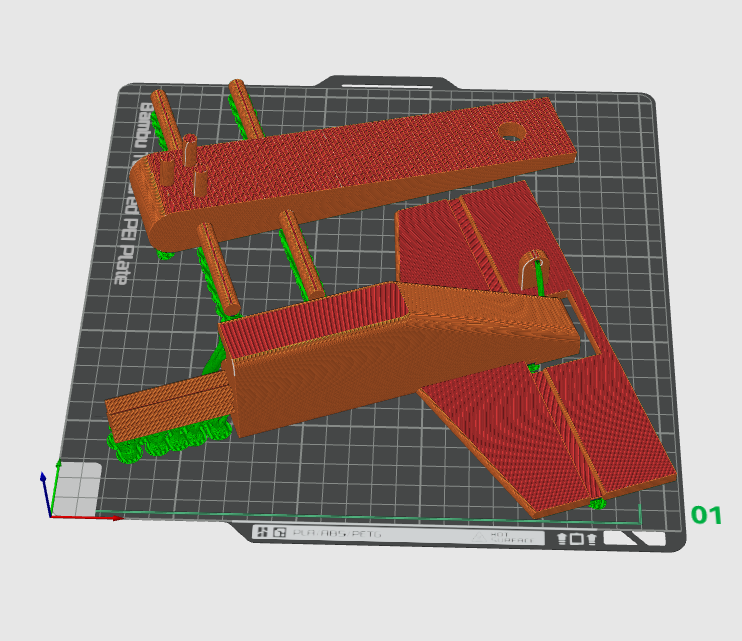

After all of the parts were designed it was time to send them to the printers. I printed them by using a BAMBU LAB P1S printer. I used their PLA AERO filament, which was lightweight and meant to make aircraft like mine. I exported the 3d parts as STL files and uploaded them to BAMBU STUDIO. From here I made the infil 15% and triangular. Triangular infil is the strongest infil pattern which is why I chose it. I put as many parts as I could on the build plate to save time and the first batch I made was the main fuselage parts excluding the tail. When I went to assemble them I snapped the pins because of their light infil. I re-printed the parts with these infil density problems and changed the areas that needed to be stronger to an infil density of 50 percent. This helped a lot and I got the part I needed connected, but it snapped when i disconected it. I gave up on the pins for this piece and decided to use tape instead to connect those two parts.
Assembling the Plane

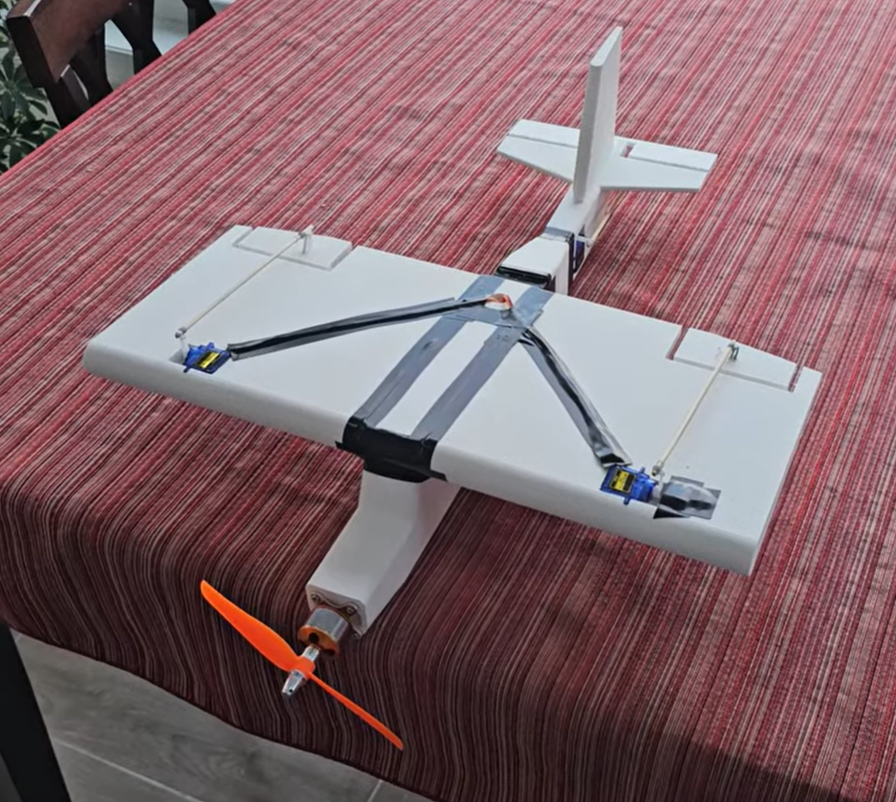
After printing the plane I needed to assemble the plane. In the nose I used a sautering iron to attatch threaded inserts to the 3d print. I had holes in the print to guide them in and they went in perfectly. I then screwed the motor intor these threaded inserts and the motor was attatched. Through the back of the nose I put through a hole in the bottom the wires of the ESC. I connected the wires to the motor and then pulled the ESC ion order to make the wires stay inside and make the plane more neat and aerodynamic. The battery went in through the back of the nose and the ESC sat on top in-between the battery and the roof of the nose piece. The battery was plugged into the ESC on the back side of the nose. On the same side the reciever needed to be connected and The ESC was connected to channel three on the reciever, the channel that was connected to the throttle stick on the controler. Connected to the dual channels one and six were the aileron servos, these servos would be wired through a hole in the top of the wing connecter and the main fuselage. The main fuselage now needed to be connected and I had to do this using my plan B. Since the pins snapped on my first try I needed to be very careful when assembling everything else. My wing connecter snapped when connecting the the nose piece and I used superglue to ensure it would be okay. Everywhere I could I used super glue to strengthen the connections to make sure they wouldnt break. In the tail section I put in the servo and connected it to the elevator by using bailing wire. I was skeptical at first if it would actually work but it did end up moving the elevator and I had a working system. The servo sat in the tail and the wire went through the fuselage end and the tail to connect it to the reciever. The wings were the last part to be printed so my last step was to attatch the servos to the ailerons and wings.
Testing the Avionics


Now that the plane was assembled it was practically ready to fly. In order to make sure it was flight worthy I conducted one final test of the avionics, as shown HERE.
This video demonstrates how the servos connect to the ailerons and elevator in order to make it move. By conducting this test I was sure that my plane was ready to fly and I was confident in the planes abilities. The center of gravity was in the perfect spot and everything was in line to test it out.
Flight

Since the plane was ready to fly, it was time for it to do what it was meant to do. I took the plane to an open field so that their were no obstacles in its flight path. Because of the planes design I had to perform a hand launch as the method of takeoff, this made the takeoff harder than if the plane were to have landing gear. It was also my first time ever flying an rc plane so I did not know what to expect upon throwing it. When I was ready to launch the plane I faced the direction of the wind in order to give the plane more airspeed immediately to generate more lift. I threw the plane into the wind and it immediately caught it. I held back on the elevator stick which I soon found out was not needed because it caused the plane to do a backflip upon launch. This then caused the plane to nosedive into the ground and the nose to snap off along with the motor.
I fixed the nose of the airplane by taping it back in place and it proved sturdy as the next flight went the same way, only I had my dad throw the plane instead of me so I could have two hands on the controller at all times. The propeller snapped off on both attempts and I just had to replace it, luckily there were two propellers in each of the packs I had bought, this meant I was able to have four crashes in which the propeller snapped off. The third test flight I realized that the extra elevator input was maybe not needed and I decided to give it a shot.
In this flight the plane showed that it could fly straight, only I forgot to give it power and it ended up crashing into the ground. This for sure demonstrated that the center of gravity was perfect and that the plane was generating lift. Knowing this I tried flying one last time with one more spare propeller. I launched the plane from a higher starting point and it flew. This flight along with the other two are shown in this video.
The plane took off better than ever and it was flying. I was scared the plane would get to the road and end up crashing into the water and be gone forever or it would hit the road and be completely destroyed. Because of this I banked the plane to the left. This caused it to crash into a tree right next to it which I was not thinking about. This completely put the plane out of commision as almost every part of the plane broke upon impact.
Conclusion and Overview

The most important part of this project was getting the plane to fly. My plane demonstrated that it was able to fly, not only this, but it did so in a way that showed it was stable and controlable. I have never attempted to fly an rc plane before, trying to fly my first rc plane as one I made completely on my own was probobly not the best idea. The flight was not the best, but the fact that it flew made this project worth everything to me. I have spent well over 100 hours working on this project. With my knowledge of how the plane flies now I am confident I could get it to stay in the air for way longer than previously. It has been my dream for the longest time to be an aerospace engineer, and now I feel that I have almost completed that dream. The plane is functional and under the hands of an experienced pilot is able to fly great. As previously stated this project is a submission to the 2026 Butwin Elias Science and Technology award, without this project I would have never attempted this project. Because of this competition I was able to better afford my project and have something to work towards. I have gotten farther than my younger self has ever imagined and I am extremely happy with what I have accomplished no matter how I place in the contest. I set out on a goal, to make a 3d printed rc airplane designed completely by myself, and while this was a little far fetched of me, I am extremely happy to have gotten it done.