AI Exam Stress Detector
by aishwarynarayan in Workshop > Hydroponics
33 Views, 1 Favorites, 0 Comments
AI Exam Stress Detector

The AI Exam Stress Detector is an innovative project developed using PictoBlox and Artificial Intelligence. It detects the stress level of students during examinations by analyzing facial expressions through a webcam. The system uses AI-based emotion recognition to identify emotions such as fear, sadness, anger, and happiness. Based on the detected emotion, it calculates the stress percentage and provides smart suggestions to help students stay calm and focused. This project promotes mental wellness and demonstrates the practical use of AI in education and student health monitoring.
Supplies
Material Used:
- Pictoblox - A Coding Software
- Face Detection Extension
- Text-to-Speech Extension
Open PictoBlox
.png)
Open PictoBlox
Create a New Project
Select:
- Stage Mode
- Python not required for this version
Add Extensions
.png)
.png)
Click Add Extension and add:
- Face Detection
- Text to Speech
Variables to Create

Create these variables:
- emotion
- stress
- status
- faces
Start Camera

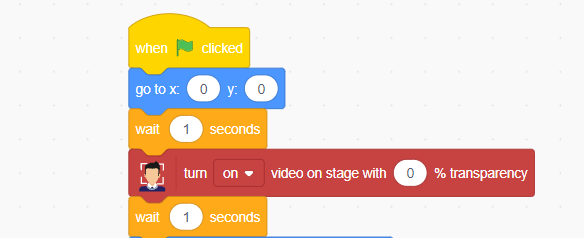
when green flag clicked
turn video ON
set video transparency to 0
Detect Face
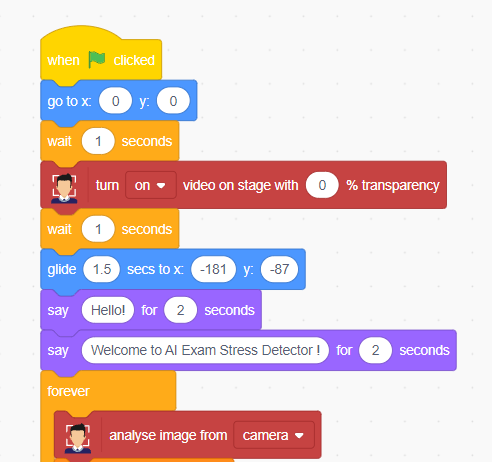
forever
if <face detected?> then
Detect Emotion

set [emotion] to (detected emotion)
Stress Calculation Logic : Happy

if <(emotion) = [happy]> then
set [stress v] to (10)
set [status v] to [CALM]
Neutral

if <(emotion) = [neutral]> then
set [stress v] to (40)
set [status v] to [NORMAL]
SAD

if <(emotion) = [sad]> then
set [stress v] to (70)
set [status v] to [STRESSED]
Angry

if <(emotion) = [angry]> then
set [stress v] to (80)
set [status v] to [HIGH STRESS]
Fear

if <(emotion) = [fear]> then
set [stress v] to (90)
set [status v] to [PANIC]
Show Stress on Screen

say (join [Stress Level : ] (stress))
say (join [Status : ] (status))
Smart Suggestions : High Stress

if <(stress) > (70)> then
speak [Please relax and take deep breaths]
Medium Stress

if <(stress) > (40)> then
speak [Stay calm and focused]
Low Stress
