AI Vs the Black Death: Building a Medieval Doctor Machine
by Ranvi25 in Circuits > Microcontrollers
186 Views, 2 Favorites, 0 Comments
AI Vs the Black Death: Building a Medieval Doctor Machine


What if you could visit a doctor during the Black Death?
In this project, I built a fully interactive Medieval AI Doctor Simulator using an ESP32 and a TFT display. Using only two buttons, the device guides the user through a diagnosis process and delivers results based on both historical beliefs and modern medical understanding.
With animated analysis, a risk detection system, and a clean interface, this project recreates how people once understood disease — and contrasts it with what we know today.
A mix of history, electronics, and “AI-like” logic — all in one device.
This Project falls under the Middle-Ages category.
Downloads
Supplies
Before starting, make sure you have all the required parts:
- ESP32 microcontroller
- TFT display (ILI9341 SPI)
- 2 push buttons
- Breadboard-(ESP32 wide breadboard or use 2 with a gap)
- Jumper wires
Wire the TFT Display

Connect your TFT display to the ESP32 using SPI:
- VCC → 3.3V
- GND → GND
- CS → GPIO 5
- RESET → GPIO 4
- DC → GPIO 2
- MOSI (SDI) → GPIO 23
- SCK → GPIO 18
- LED → 3.3V
- MISO (optional) → GPIO 19
Make sure all connections are secure, as loose wires can cause display issues.
Connect the Buttons
Each button connects between a GPIO pin and ground:
- Button 1 → GPIO 25 → GND
- Button 2 → GPIO 26 → GND
The ESP32 uses internal pull-up resistors, so no external resistors are needed.
Install and Configure the Display Library
- Open Arduino IDE
- Go to Library Manager
- Install the TFT_eSPI library
Then configure it:
- Open User_Setup.h
- Enable:
- Set your pins:
Save the file before continuing.
Upload the Code
Upload the main program to your ESP32.
Once uploaded, the display should turn on and show the main menu.
If the screen stays blank:
- Check wiring
- Confirm correct driver (ILI9341)
- Restart Arduino IDE
Using the Device
The interface is controlled using only two buttons:
- Button 1 → Scroll up
- Button 2 → Scroll down
- Hold Button 1 → Select
The system will guide you through:
- Selecting a symptom
- Choosing duration
- Choosing severity
AI Diagnosis Process
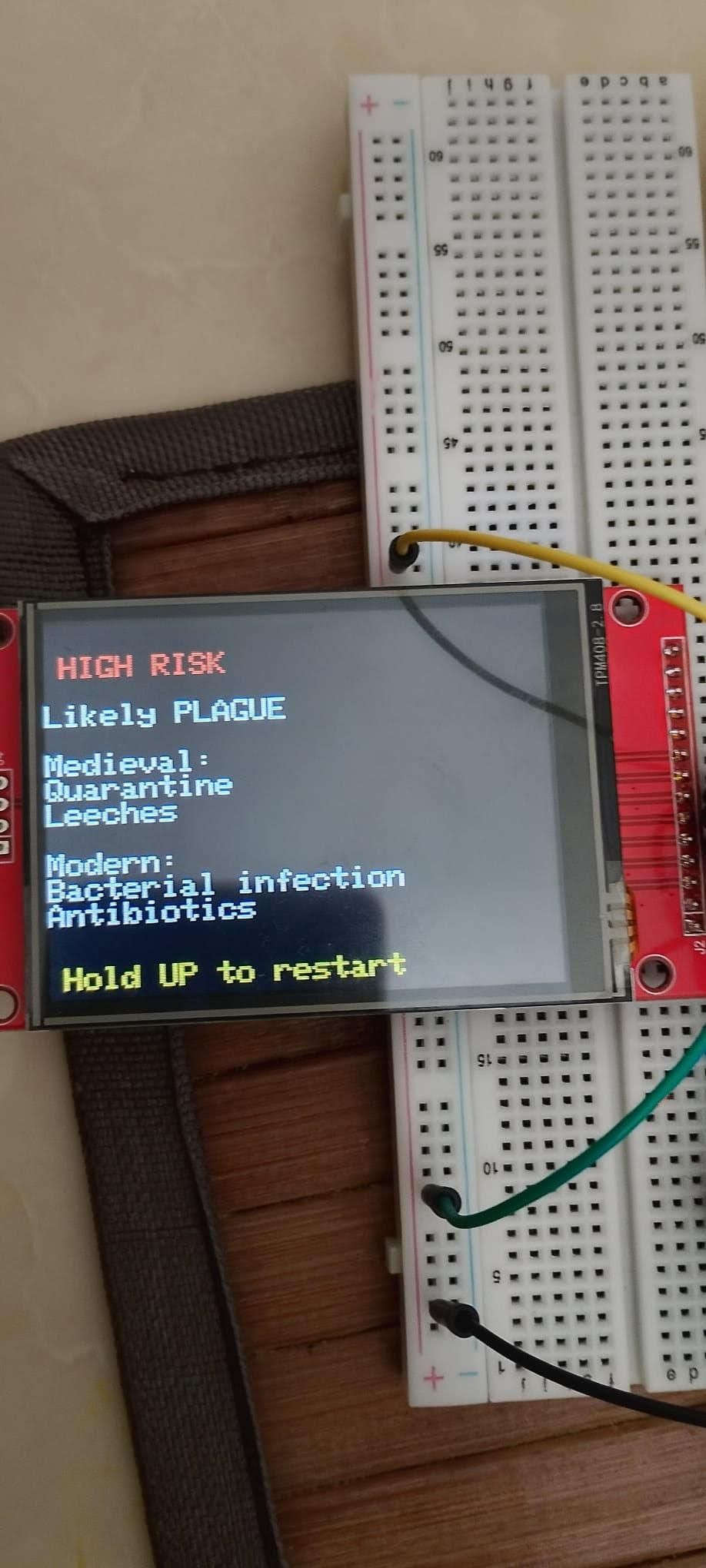
After entering inputs, the system:
- Simulates analysis with animated screens
- Displays a progress bar
- Generates a diagnosis based on a decision system
It evaluates:
- Symptom type
- Duration
- Severity
Then assigns a risk level:
- Low Risk
- Medium Risk
- High Risk
Understanding the Results
The device presents:
- Risk level
- Medieval treatment (historically accurate)
- Modern medical explanation
This highlights the contrast between past and present medical knowledge.
Final Thoughts
This project demonstrates how a simple microcontroller can simulate intelligent behavior through structured logic.
It also provides an engaging way to explore how medical understanding has evolved over time.
Full Code
#include <TFT_eSPI.h>
TFT_eSPI tft = TFT_eSPI();
const int btnUp = 26; // swapped
const int btnDown = 25;
int step = 0;
int selection = 0;
unsigned long pressStart = 0;
bool holding = false;
// Data
String symptoms[] = {"Fever", "Cough", "Black Spots"};
String duration[] = {"1-2 days", "3-5 days", "1+ week"};
String severity[] = {"Mild", "Severe"};
int maxItems[] = {3, 3, 2};
int s, d, sev;
String titles[] = {"Symptom?", "Duration?", "Severity?"};
// ===== STARTUP =====
void startupScreen() {
tft.fillScreen(TFT_BLACK);
String title = "PLAGUE AI";
tft.setTextSize(3);
tft.setTextColor(TFT_RED);
tft.setCursor(40, 60);
for (int i = 0; i < title.length(); i++) {
tft.print(title[i]);
delay(150);
}
tft.setTextSize(2);
tft.setTextColor(TFT_WHITE);
tft.setCursor(60, 110);
tft.println("Initializing...");
tft.drawRect(20, 180, 280, 20, TFT_WHITE);
for (int i = 0; i <= 280; i += 10) {
tft.fillRect(20, 180, i, 20, TFT_RED);
delay(40);
}
delay(300);
tft.fillScreen(TFT_RED);
delay(120);
tft.fillScreen(TFT_BLACK);
tft.setTextColor(TFT_GREEN);
tft.setCursor(30, 120);
tft.println("System Ready");
delay(800);
}
// ===== UI =====
void drawUI() {
tft.fillScreen(TFT_BLACK);
tft.setTextSize(2);
tft.setTextColor(TFT_CYAN);
tft.setCursor(10, 10);
tft.println("PLAGUE AI SCANNER");
tft.setTextColor(TFT_WHITE);
tft.setCursor(10, 50);
tft.println(titles[step]);
tft.fillRoundRect(20, 100, 280, 60, 8, TFT_WHITE);
tft.setTextColor(TFT_BLACK);
tft.setCursor(40, 120);
tft.println(getOption());
tft.setTextColor(TFT_YELLOW);
tft.setCursor(10, 200);
tft.println("Hold UP to select");
}
String getOption() {
if (step == 0) return symptoms[selection];
if (step == 1) return duration[selection];
if (step == 2) return severity[selection];
return "";
}
// ===== THINKING =====
void thinkingText() {
String msgs[] = {
"Scanning symptoms...",
"Comparing records...",
"Checking infection...",
"Evaluating risk..."
};
for (int i = 0; i < 4; i++) {
tft.fillScreen(TFT_BLACK);
tft.setCursor(20, 120);
tft.setTextColor(TFT_GREEN);
tft.setTextSize(2);
tft.println(msgs[i]);
delay(600);
}
}
// ===== PROGRESS =====
void progressBar() {
tft.fillScreen(TFT_BLACK);
tft.setTextColor(TFT_GREEN);
tft.setCursor(40, 40);
tft.println("Analyzing Patient");
for (int i = 0; i <= 100; i += 5) {
tft.drawRect(20, 120, 280, 20, TFT_WHITE);
tft.fillRect(20, 120, i * 2.8, 20, TFT_GREEN);
tft.setCursor(120, 160);
tft.println(String(i) + "%");
delay(70);
}
}
// ===== SUMMARY =====
void showSummary() {
tft.fillScreen(TFT_BLACK);
tft.setTextSize(2);
tft.setTextColor(TFT_WHITE);
tft.setCursor(10, 20);
tft.println("Patient Summary:");
tft.println("\nSymptom: " + symptoms[s]);
tft.println("Duration: " + duration[d]);
tft.println("Severity: " + severity[sev]);
delay(2000);
}
// ===== RESULT =====
void showResult() {
tft.fillScreen(TFT_BLACK);
int risk = 0;
if (s == 2) risk += 2;
if (sev == 1) risk += 2;
if (d == 2) risk += 1;
tft.setTextSize(2);
tft.setCursor(10, 20);
if (risk >= 4) {
tft.setTextColor(TFT_RED);
tft.println("HIGH RISK\n");
tft.setTextColor(TFT_WHITE);
tft.println("Likely PLAGUE\n");
tft.println("Medieval:");
tft.println("Quarantine\nLeeches\n");
tft.println("Modern:");
tft.println("Bacterial infection\nAntibiotics");
}
else if (risk >= 2) {
tft.setTextColor(TFT_ORANGE);
tft.println("MEDIUM RISK\nPossible illness");
}
else {
tft.setTextColor(TFT_GREEN);
tft.println("LOW RISK\nMinor condition");
}
tft.setTextColor(TFT_YELLOW);
tft.setCursor(10, 220);
tft.println("Hold UP to restart");
}
// ===== SETUP =====
void setup() {
pinMode(btnUp, INPUT_PULLUP);
pinMode(btnDown, INPUT_PULLUP);
tft.init();
tft.setRotation(1);
startupScreen();
drawUI();
}
// ===== LOOP =====
void loop() {
if (digitalRead(btnUp) == LOW && digitalRead(btnDown) == HIGH && !holding) {
selection--;
if (selection < 0) selection = maxItems[step] - 1;
drawUI();
delay(200);
}
if (digitalRead(btnDown) == LOW && digitalRead(btnUp) == HIGH) {
selection++;
if (selection >= maxItems[step]) selection = 0;
drawUI();
delay(200);
}
if (digitalRead(btnUp) == LOW && digitalRead(btnDown) == HIGH) {
if (!holding) {
pressStart = millis();
holding = true;
}
tft.setCursor(10, 230);
tft.setTextColor(TFT_GREEN);
tft.println("Selecting...");
if (millis() - pressStart > 800) {
if (step == 0) s = selection;
if (step == 1) d = selection;
if (step == 2) sev = selection;
step++;
selection = 0;
holding = false;
if (step > 2) {
thinkingText();
progressBar();
showSummary();
showResult();
delay(5000);
step = 0;
}
drawUI();
delay(300);
}
} else {
holding = false;
}
}