Amphibious Clinic Pavilion: a Flood-Response Healing Hub
by arjun-kulkarni in Design > Architecture
33 Views, 0 Favorites, 0 Comments
Amphibious Clinic Pavilion: a Flood-Response Healing Hub
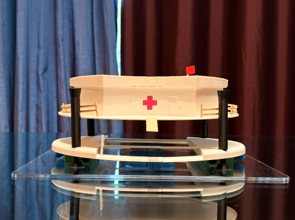


When floods hit a community, the crisis doesn't end when the water rises, it actually begins. Roads are submerged, hospitals become unreachable, and the people who need help most are the hardest to reach. Emergency responders are forced to make impossible choices about who gets care.
The Amphibious Clinic Pavilion is a floating, mobile medical facility designed to solve this. It rises with floodwaters, navigates through submerged streets using integrated thrusters, rescues people from debris and current, and provides emergency medical care entirely off-grid. When a community's infrastructure fails, this arrives.
This project was designed in Autodesk Fusion across 39 iterations and fabricated as a 1:50 scale physical prototype using 3D printing, laser-cutting, and hand-made detailing.
Key systems:
- Amphibious guide post + sliding mechanism
- Turbine propulsion
- Rooftop solar array
- Emergency clinic module
- Rescue gangway with railing
- Perimeter rescue deck
- A tether/mobility unit to keep rescuers from flowing away
Image 1: Front face of the physical model
Image 2: Render of the finished model
Image 3: AI-generated concept art
Supplies

3D Printing
- Bambu Lab X1C 3D printer
- White PLA filament for the clinic building, deck footprint, pontoon ring
- Black PLA filament: guide posts, sliding collars, supplementary pontoons
- Blue and green PLA filament: thruster cylinders and equipment housing modules
- Wood PLA filament: gangway/ramp, fencing, flagpole
Laser Cutting
- Laser cutter
- Clear acrylic sheet: base plate
Hand Fabrication Materials
- Small piece of red fabric: flag
- Small printed red paper: red cross on clinic
Assembly
- Superglue: bonding all printed and fabricated components
- Sandpaper: Sanding on printed surfaces to smooth things out
Image: AI-generated representation of materials used
The Problem: Healthcare in a Flood


Major flooding is one of the most common and deadliest natural disasters worldwide. In the aftermath of events like 2017’s Hurricane Harvey in Houston, the Queensland, Australia floods in 2022, and repeated Midwest river flooding, the pattern is consistent: hospitals are evacuated, roads are impassable, and emergency medical access collapses exactly when it is most needed.
Historically, emergency response relies on helicopters, small rescue boats, and temporary tent hospitals set up on dry land at the flood perimeter. Each of these solves only one piece of the problem. None is a complete, mobile, self-sustaining medical facility that can operate within the flooded zone itself.
I’ve designed this within Houston's Harris County, Texas. This is the most flood-affected major urban area in North America, with over 150,000 structures flooded during Hurricane Harvey alone. Average peak water depth in residential areas is 4-8 feet.
The pavilion is designed to deploy from a staging area near the flood perimeter, navigate through streets with 3-8 feet of standing water, position itself in a neighborhood, and serve as both a medical facility and a visible symbol of relief, which restores a sense of safety and presence when communities need it most.
Image 1: AI-generated image of the facility (early iteration)
Image 2: Aerial image of Houston's Hurricane Harvey
Design Principles


The Amphibious Clinic Pavilion is not just a technical engineering solution, but it is a healing environment. The design is guided by three principles:
- Amphibious resilience over flood-resistance: Traditional flood-response buildings fight against water through stilts, levees, and sealed walls. The Pavilion works with the water, rather than fighting it. It rises, floats, and navigates. This is a fundamentally different design philosophy: the flood is not an obstacle, it is the operating environment.
- Biophilic and human-centered form: The building uses a circular organic plan, not a rectangular box. A circular form has no front or back, making it accessible from any direction. The curved shape flows naturally through water with reduced debris resistance. Soft curves and an open perimeter deck create a more welcoming environment for people in distress. Research in trauma-informed design shows that curved, non-institutional forms reduce anxiety in emergency care settings.
- Visual presence as community healing: A pavilion floating through a flooded neighborhood, bearing a red cross and powered by solar panels, is a visible signal that help exists. In disaster psychology, this kind of visible institutional presence is one of the most powerful early interventions for community trauma. It is designed to be seen.
Image 1: AI-generated early design sketch
Image 2: AI-generated concept visualization showing the full-colour mock-up
Image 3: Hand-drawn concept sketch from a top-view
Modeling in Fusion
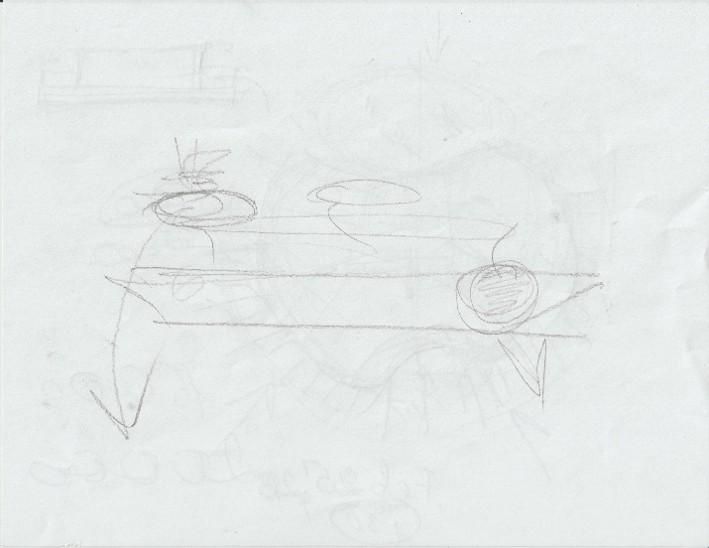
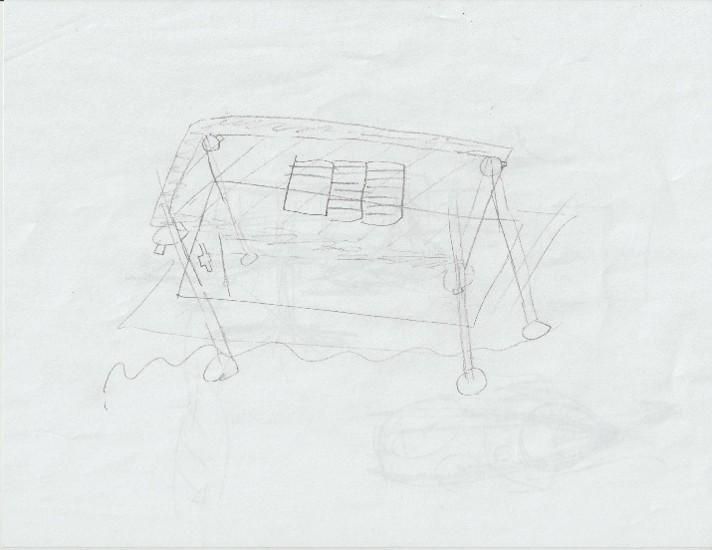


The design was developed entirely in Autodesk Fusion, reaching version 39 over the course of the project. The design process began with hand sketches establishing the core concept, then progressed through Fusion's modeling tools, building each system as a separate component, and using superglue to connect them.
The model is structured in 10 main components (the actual model may slightly differ from this):
- Base Plate: Laser-cut acrylic
- Deck Footprint: 3D print
- Pontoon Ring: 3D print
- Guide Posts (x4): 3D print
- Sliding Inner Posts: 3D print
- Clinic Building: 3D print
- Clinic Fencing: 3D print
- Gangway: 3D print
- Turbines + Equipment: 3D print
- Flag: Red Fabric
I used Fusion's component system to model each part independently.
Images show the build progression over the course of the project.
Amphibious Foundation: the Guide Post System


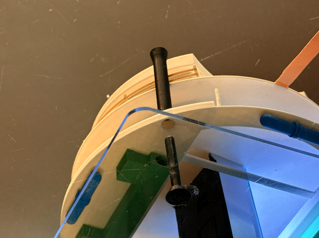
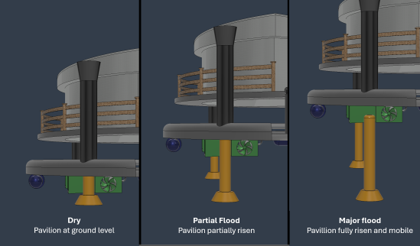

The defining innovation of the Amphibious Clinic Pavilion is the guide post and sliding system. This is the mechanism that allows the entire structure to rise and fall with floodwater while remaining stable and controlled.
Four large vertical steel guide posts are anchored into the ground at the flood site. The floating platform passes around these posts through oversized sliding tubes. As water rises, the platform rises with it, guided vertically by the posts, prevented from drifting laterally. As water recedes, the platform descends back to ground level. If the water rises too much, then the whole clinic detaches and can move freely in the water to reach survivors.
This is the same engineering principle used in real amphibious buildings in the Netherlands, like the Buoyant Foundation Project, and the amphibious home retrofits developed for flood-prone regions of Bangladesh and Vietnam.
The guide posts are 914.40 mm diameter cylindrical columns in the digital model. The gap between the upper clinic deck and the lower pontoon deck visually demonstrates the sliding mechanism. The clinic module can be understood as sitting at its "risen" position, with the guides extending below.
How I Modeled the Guide Post System in Fusion
The guide post and sliding inner tube are two separate components, so the inner tube can visually and mechanically "slide" within the outer post.
- Model the sliding inner post: Create a new Component in your design (right-click in the browser > New Component). Inside that component, create a sketch on the ground plane. Draw a circle at your desired post center with a diameter of about 610 mm (full scale). Extrude upward to the full height of the post (tall enough to extend above the maximum water level). Extrude downward a slightly larger circle with a taper going outward, to create the base. Add a slight fillet at the top of the post.
- Model the outer tube: Create a second new Component. In a new sketch on the same plane, draw two circles centered at the same point: the inner circle matches the post diameter, and the outer circle is slightly larger. Extrude this ring upward to the height of your sliding collar. This thin-walled cylinder represents the tube that surrounds the post and is attached to the floating platform. Extrude both circles (inner and outer) at the top and add a slight outer taper to add the cap of the tube.
- Assemble and position: Use the Circular Pattern feature with the central y-axis being the axis, and selecting the inner post and outer tube bodies as the objects. Set the amount to 4, so that there is are 4 guide posts in total. Use the As-Built Joint feature to select the two components with the Slider motion and allow the posts to slide up and down. Ground the outer tubes to parent to avoid them moving. Add realistic motion limits to avoid the tube sliding too far.
- Apply appearances: Set the outer post to a dark steel appearance. Set the sliding collar to bright yellow.
Images 1 & 2: Guide posts extended and retracted on model
Image 3: Guide post extended on physical model
Image 4: Comparison of guide post lengths
Image 5: Modelling the As-Built Joint on the guide posts
Floating Platform

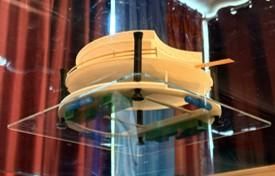

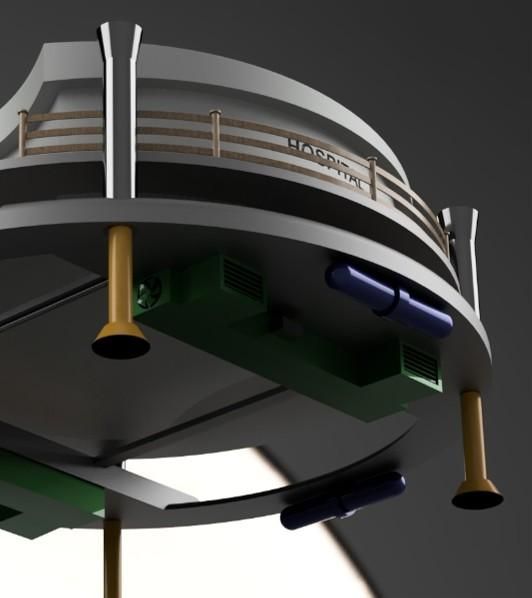
Below the main deck, the circular pontoon ring provides distributed buoyancy around the full perimeter of the platform. Rather than using a central pontoon mass (which creates instability at the edges), the perimeter ring keeps the structure level in current and wave action. There are also 4 backup pontoons in blue to ensure greater stability in case of winds or heavy waves.
The deck is supported by a cross-beam structural frame that transfers load from the clinic module down to the pontoon ring. This frame is visible in the underside of the physical model.
Mounted at the sides of the underside is a hydrokinetic turbine. As the pavilion moves through floodwater (either under its own propulsion or due to current), water flow through the channel spins the turbine and generates electrical power. This is designed as a secondary energy source that charges the on-board battery system during transit. In addition, if the model wants to use that power to move, the turbines can spin and generate propulsion for forward, backward, and rotating movement.
In the physical model, the turbine is represented by the green components, and the supplementary pontoons are represented by the blue components.
Image 1: Render of digital model underside
Image 2 & 3: Physical model underside
Power Systems



The Amphibious Clinic Pavilion is designed for complete energy independence during disaster response. It cannot rely on grid power or fuel resupply during a flood event, since those sources may not be available.
It includes three integrated power systems:
- Solar: 21 panels on the roof provide primary electrical power for clinic operations, lighting, navigation electronics, and thruster charging. At 400 W per panel (standard commercial specification), the 21-panel array generates up to 8.4 kW, which is sufficient for continuous clinic lighting, medical equipment, and charging systems.
- Hydrokinetic turbine: The turbine beneath the deck generates supplemental power during transit or when positioned in a current. This is designed as a 1-5 kW supplemental source as a backup.
- Battery storage: The battery boxes visible on the underside platform store energy for night operations and peak-demand periods. The design uses a modular configuration so individual battery units can be swapped or upgraded.
Together, these three systems provide 24-hour energy autonomy without any external fuel supply. This is a critical design requirement for a structure operating in an emergency environment. It is also fully renewable energy.
How I Modeled the Solar Panels in Fusion
The solar panel array uses Fusion's Rectangular Pattern feature to efficiently place 21 identical panels without modeling each one individually.
- Model a single panel: Create a new sketch on the roof surface. Draw a rectangle representing one panel's footprint. Extrude it upward by a few millimeters to create a thin flat body. This is your base panel.
- Apply Rectangular Pattern: With the panel body selected, go to Create > Pattern > Rectangular Pattern. Set the pattern type to Bodies. Set Direction 1 along the roof's short axis (Y), with a quantity of 3 and spacing matching your desired gap between panels. Set Direction 2 along the long axis (X), with a quantity of 7. Adjust spacing until the array fits within your roof footprint without overhanging.
- Apply appearance: Select all panel bodies, right-click > Appearance, and apply a blue glass appearance to mimic the look of the glass on actual solar panels.
Image 1: Digital render showing the solar panels on the roof
Image 2: Digital render showing the hydrokinetic turbine (in green)
Image 3: Physical model showing the solar panels on the roof
Image 4: Showing how to construct the Rectangular Pattern to make the solar panels
The Clinic
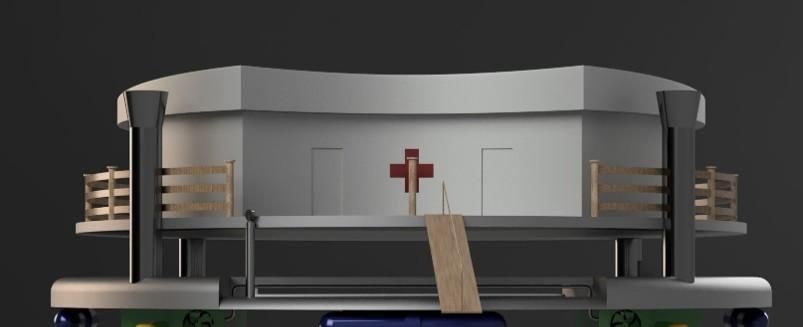

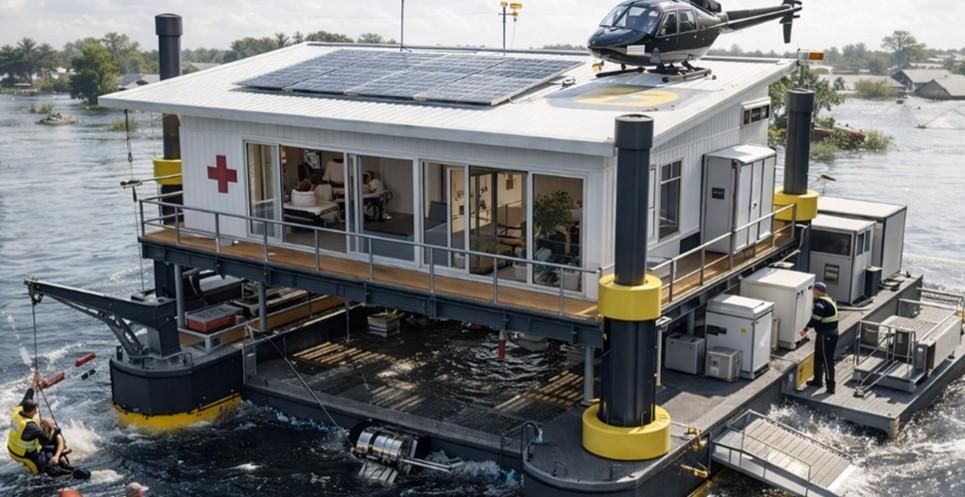
The clinic module is a single-story emergency treatment facility designed for flood-emergency aid and short-term care. The curved building features four doors around the facility to allow for easy access from any direction.
Uses of the interior:
- Primary aid and stabilization area, with beds
- Medical supply storage
- Staff coordination area
- Emergency communications station
The clinic is designed not just as a medical facility, but as a community healing space. In the immediate aftermath of a flood, the presence of a visible, organized, lit medical facility in a neighborhood serves as a psychological signal that help has arrived, care is available, the community is not alone. Design research shows that environments which feel calm, human-scaled, and non-institutional significantly reduce stress response in survivors.
The circular organic form is designed to feel welcoming rather than clinical. After being mentored by an architect who came to our class, they recommended this layout for these exact reasons. The perimeter deck provides space for fresh air, families waiting, and relief operations.
The red cross on the building face ensures the structure is identifiable from air, water, and shore at all times.
Image 1: Digital render showing the front of the building
Image 2: Physical model showing the front of the building
Image 3: AI-generated mock-up which shows parts of the interior
Rescue and Mobility Systems

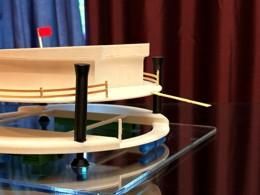

The Amphibious Clinic Pavilion is not just a passive floating building, but rather an active rescue platform. Four mobility and rescue systems are integrated into the design:
- Turbine propulsion: Two turbine systems (same as the electricity-generating ones) are mounted on the underside of the platform. They provide directional thrust and can rotate to maneuver in confined spaces, such as in navigating flooded streets, positioning at rescue sites, and docking against elevated structures. In the physical model, these are the green elements on the underside of the lower platform.
- Rescue gangway: A hinged gangway extends from one side of the platform, allowing survivors to board from flooded ground, rooftops, or rescue boats at varying water levels. The hinge allows adjustment for different water heights. The gangway also slides on a railway to maneuver to a better angle.
- Perimeter rescue deck: The circular perimeter lower ring acts as a rescue platform, as survivors can be pulled directly from the water onto the ring, which sits close to the water surface.
- Pull tug: An extendable rope that can connect to rescuers in the water allows them to travel and reach survivors without floating off or being swept in debris or waves. It can retract to pull the rescuer and survivors back to the pavilion.
Image 1: Digital render showing all safety features aforementioned
Image 2: Physical model showing the gangway and safety features
Image 3: AI-generated visualization showing safety features
Physical Model Fabrication

The physical model was fabricated on an approximately 18-inch base, using a hybrid strategy that matched each method to the geometry it handles best.
Fabrication Breakdown
3D Printing (PLA)
- Components: Clinic building, deck footprint, pontoon ring, guide posts, turbine, equipment, fencing, gangway
- Why: Organic curves, repetitive detailed elements, cylindrical geometry, additive manufacturing requirement
Laser-Cut Acrylic
- Components: Base plate
- Why: Large flat geometry - crisp edges, clean surface
Hand Fabrication
- Components: Flag (fabric)
- Why: Flexible small component
Assembly
- Components: Superglue bonding
- Why: All components needed to stick together after fabrication
Image: Physical model showing these parts
Final Physical Model
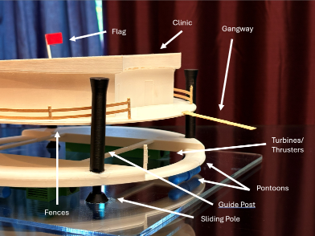

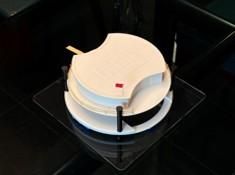
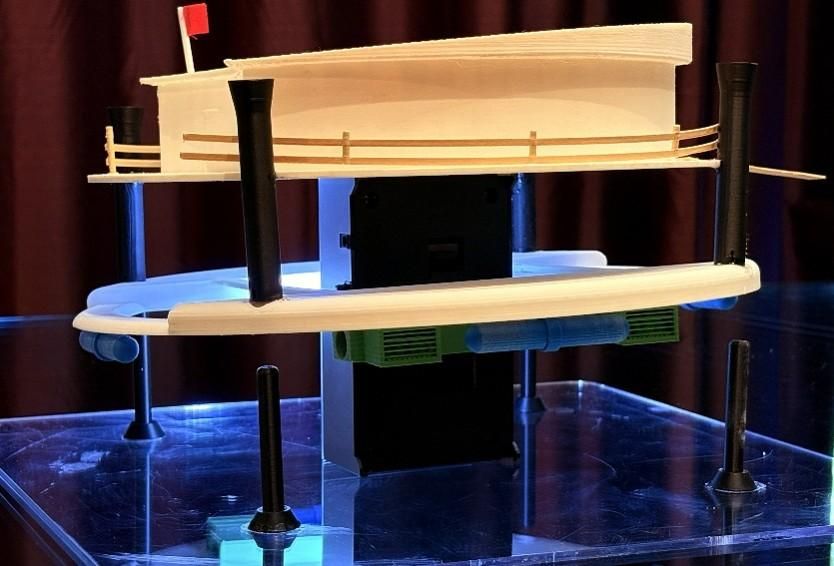
The completed model brings together all systems in a single integrated prototype. The white clinic module sits on the deck above the mechanical platform, with the guide posts passing through both levels. The acrylic base represents the water surface, with the blue and green mechanical components of the underbelly visible through the clear platform.
The flag signals emergency presence. The solar grid reads clearly from above. The perimeter railings and gangway show access and safety. The blue thruster cylinders and green equipment housings give the underside a mechanical density that communicates system complexity.
The physical model answers the design prize question directly: every element you see is modeled, printed, or fabricated with a specific engineering rationale. Nothing is decorative.
Image 1: Diagram of features in model
Image 2 & 3: Images of physical model
Community Impact
The Amphibious Clinic Pavilion represents a new category of disaster response infrastructure. It is not a temporary tent. It is not a helicopter. It is not a static elevated building. It is a mobile, self-sustaining, amphibious medical facility that can go where people are to give help, when roads and systems have failed.
Community impact in a flood event:
- Reaches survivors in the flood zone without requiring road access
- Provides emergency medical care within hours of deployment
- Serves as a visible anchor of relief, reducing community panic and improving response
- Operates entirely off-grid for as long as needed
- Can move between neighborhoods as the flood zone shifts
Healing beyond the physical: When a community is flooded, the psychological damage can outlast the physical damage by years. Visible, organized, capable emergency response in the immediate hours and days after a disaster is one of the strongest predictors of long-term community recovery. This model is designed to be that presence.
From model to reality: A full-scale version would require marine-grade pontoon fabrication, Coast Guard navigation compliance, and certified medical interior fit-out. The modular component structure means systems can be upgraded independently. The design is intentionally buildable, since every feature uses existing marine, medical, and construction technology.
Next steps for real-life building: Structural buoyancy calculations, site-specific flood depth modeling for Houston deployment, and integration with FEMA emergency response protocols.
Image 1: Physical design's floating mechanism
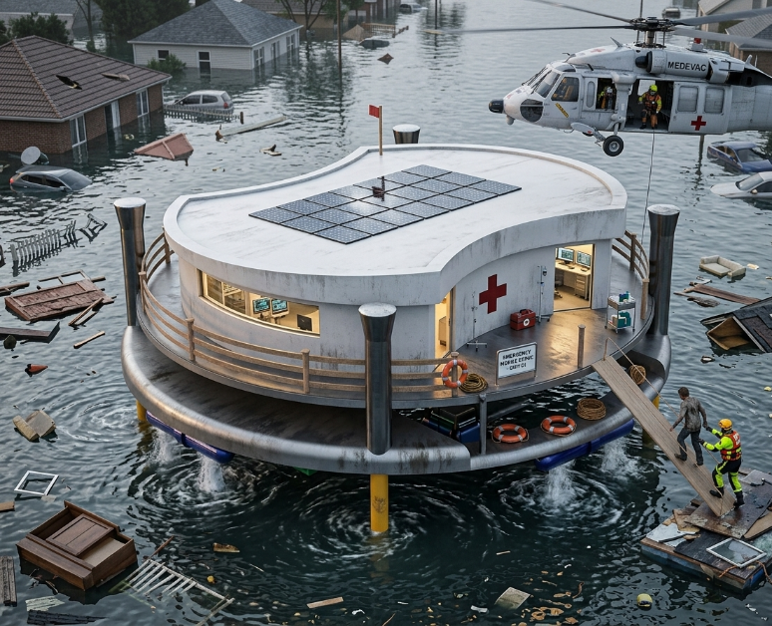
Image 2: AI-generated real-world mock-up of design