Arduino Powered Game Of; Reverse Simon Says. Prototype Built on TinkerCAD.
by shnrssn in Circuits > Arduino
82 Views, 1 Favorites, 0 Comments
Arduino Powered Game Of; Reverse Simon Says. Prototype Built on TinkerCAD.

I enjoy taking classic games and giving them a new twist, and this one just works so well that it should have been thought of a long time ago. The game will give you light to copy by pressing one of the buttons for that light. After round 2, the lights will illuminate the correct order but to pass the round the player must press all the buttons in reverse order. I know if I add bigger buttons and place it into a case or something it would look better. But I am a strong believer in function over beauty.
Supplies
- Arduino
- Breadboard
- Wires
- (4) 220 Ohm Resistors
- (4) 10k Ohm Resistors
- (4) LED (Red, Yellow, Green, Blue)
- (4) Push Button Switches
- Speaker
Come Up With a Game
Step one was the hardest part, lock in an original game, that can easily be played and easy to build.
Prototype

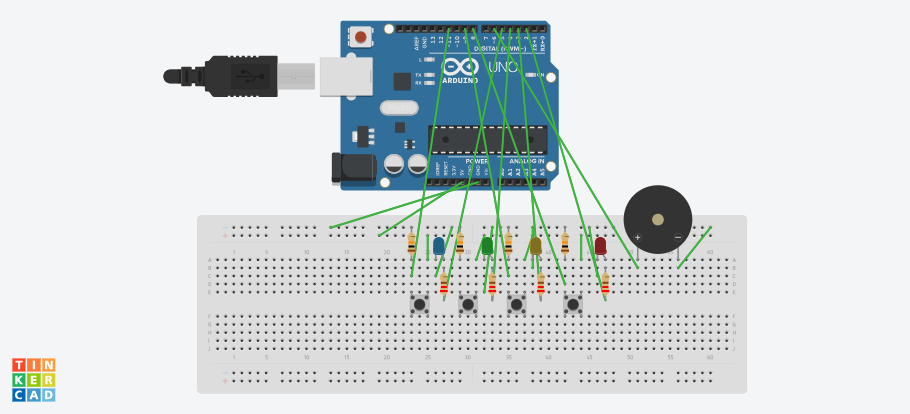
Use TinkerCAD to prototype the build using the wiring layout below.
LEDs: Connect Anodes (long legs) to Digital Pins 2, 3, 4, 5 through 220 OHM resistors. Connect Cathodes (short legs) to GND.
- Pin 2: Red
- Pin 3: Yellow
- Pin 4: Green
- Pin 5: Blue
Buttons: Connect one side of each button to 5V. Connect the opposite side to Digital Pins 8, 9, 10, 11 with a 10k OHM pull-down resistor to GND.
- Pin 8: Red Button
- Pin 9: Yellow Button
- Pin 10: Green Button
- Pin 11: Blue Button
Buzzer: Connect positive pin to Digital Pin 6, negative pin to GND.
Upload File on Arduino
Use the file I uploaded or the code below to get code to work.
#include <Arduino.h>
const int ledPins[4] = {2, 3, 4, 5}; // Red, Yellow, Green, Blue
const int buttonPins[4] = {8, 9, 10, 11}; // Corresponding buttons
const int buzzerPin = 6;
const int tones[4] = {262, 330, 392, 494}; // C4, E4, G4, B4
#define MAX_LEVEL 30
int sequence[MAX_LEVEL];
int currentLevel = 1;
const unsigned long TIMEOUT_MS = 3000;
void playNote(int index, int duration) {
digitalWrite(ledPins[index], HIGH);
tone(buzzerPin, tones[index], duration);
delay(duration);
digitalWrite(ledPins[index], LOW);
delay(50);
}
void playGameOver() {
for (int i = 0; i < 3; i++) {
tone(buzzerPin, 150, 200);
for (int j = 0; j < 4; j++) digitalWrite(ledPins[j], HIGH);
delay(200);
for (int j = 0; j < 4; j++) digitalWrite(ledPins[j], LOW);
delay(100);
}
}
void playVictory() {
int victoryNotes[] = {440, 554, 659, 880};
for (int i = 0; i < 4; i++) {
digitalWrite(ledPins[i], HIGH);
tone(buzzerPin, victoryNotes[i], 150);
delay(150);
digitalWrite(ledPins[i], LOW);
}
}
int getButtonPressed() {
unsigned long startTime = millis();
while (millis() - startTime < TIMEOUT_MS) {
for (int i = 0; i < 4; i++) {
if (digitalRead(buttonPins[i]) == HIGH) {
playNote(i, 200);
while (digitalRead(buttonPins[i]) == HIGH); // Debounce / wait for release
return i;
}
}
}
return -1; // Timed out
}
void setup() {
for (int i = 0; i < 4; i++) {
pinMode(ledPins[i], OUTPUT);
pinMode(buttonPins[i], INPUT);
}
pinMode(buzzerPin, OUTPUT);
// Seed random generator using unconnected analog pin reading
randomSeed(analogRead(A0));
}
void loop() {
// Generate random step for current level
sequence[currentLevel - 1] = random(0, 4);
// 1. Play the forward sequence to the player
delay(600);
for (int i = 0; i < currentLevel; i++) {
playNote(sequence[i], 350);
delay(150);
}
// 2. Expect REVERSE input from the player
for (int i = currentLevel - 1; i >= 0; i--) {
int expected = sequence[i];
int pressed = getButtonPressed();
if (pressed != expected) {
playGameOver();
currentLevel = 1; // Reset game
delay(1000);
return;
}
}
// Round cleared
playVictory();
currentLevel++;
if (currentLevel > MAX_LEVEL) {
currentLevel = 1; // Max level completed
}
delay(800);
}
Downloads
Build

Assemble parts
Test
Test for proof of concept
Play
Have fun.