Cap Collective, a Circular Recycle System for Bottle Caps(and Other Plastics of Course)
by 30dimrekatai in Workshop > Energy
131 Views, 3 Favorites, 0 Comments
Cap Collective, a Circular Recycle System for Bottle Caps(and Other Plastics of Course)
Only a mere 3% of bottle caps these days are recycled, the most commonly marine life killing plastic product, the most commonly thrown away plastic, and being most produced in single use bottles. Over 60 billion are produced in the USA in a year alone who have plastic caps. Only 1.8 billion of those are actually recycled. Though that barely touches their 162000 tonnes of CO2 per 60 billion. That is the same as putting on average, 37500 cars on the road loaded with gasoline. Though, that is a huge amount, considering only 3% are recycled. There is a solution to it though. With the simple recycling of this plastic, the right machines, and some little dedication, people can easily turn these small little plastics into useful, innovative, and great products.
Supplies





You'll need some things for recycling and making products:
- A heat press, a general 100 dollar one will do
- A shredder
- Cutting tools like box knives
- Laser cutter(Optional)
- Molds(Optional)
- Sander(Optional)
- Injection molder(Optional)
- 3D filament maker(Optional)
- 3D printer(Optional)
- Around 500 plastic bottle caps, or more depending on your project
Many are optional, but they are tools and machines that help you best refine your plastic into something.
Molds can be made with Autodesk's Fusion 360.
Any household cutting tool will do, same with sand paper to sand products.
Reffer to the websites below to look for these supplies, we used these specifically and they worked well.
- Sustainable Design Studio, best for the injection molder and 3D filament maker, also for their shredders.
- Trotec Laser Cutters, the Speedy 50 is best for budget, but you can scale higher for bigger plastic use like murals
- Bambu Lab is renound for its 3D printers, the A1 is a great model, but X1 Carbon will also be better for higher quality prints
To be clear, this isn't one thing I made, it is more of a method to make products, which overall saves the world with recycling plastic into products.
Collect Some Caps

The "Collective" begins with the people. Before melting anything, you must establish a steady, reliable stream of clean material.
- Collection Hubs: Set up bins at local cafes, schools, or community centers to intercept caps specifically, as they are often separated from bottles during professional recycling and lost.
- Sorting by Polymer: Most caps are made of HDPE (High-Density Polyethylene) or PP (Polypropylene). Sorting by type is critical to maintain the structural integrity and predictable melting point of your final products.
- Cleaning: Ensure all caps are free of adhesive residue, paper liners, or leftover liquids. These impurities will burn at high temperatures, ruining the clarity and strength of your melt.
- Circular Strategy: Partner with the businesses where you collect the caps. By returning finished products (like recycled coasters or signage) back to the cafes that provided the material, you create a visible loop that encourages community participation.
Quick Read: Intercept caps at local hubs, sort them by plastic type (HDPE/PP), and clean them thoroughly to prevent burning. Establish a loop by giving recycled products back to your donors.
Safety

- Active Ventilation: Never operate these machines in a closed room. Use a high-CFM exhaust fan or a DIY fume hood to move air outside.
- Respiratory Protection: Even with active fans, wear a VOC-rated respirator to protect against invisible off-gassing that occurs when plastic is heated.
- Thermal Monitoring: Use an IR thermometer to verify that your machines are not exceeding the safe melting point, usually between 180°C to 210°C.
- Circular Strategy: Maintain your machines regularly. A well-tuned machine lasts longer and uses less energy, reducing the overall carbon footprint of your recycling process.
Quick Read: Use high-airflow ventilation and VOC respirators. Keep temperatures between 180°C and 210°C using an IR thermometer to avoid toxic fumes and fire hazards.
Using the Heat Press

The heat press is the tool that will allow for all your collected caps to be melted down into literal sheets. Depending on the heat press you have, it can be easily melted and thinned out even, but all you need to do is to melt plastic into base material which you can use for all applications. That is why it is the most crucial step for using it in many projects. This will allow you to make 'bricks' of what which you can recycle plastics into base material.
To get your heat press working:
- Turning it on. Very stupid step, but crucial, how else will the machine work if it isn't on? There should be a red I/O button, or any other ON/OFF button/switch.
- Set temperature, time, and type. There are usually 4 buttons on a heat press, unless it is a very proffessional one, you can click the SET button. Once clicked, it might take you through the below factors randomnly, but here is what you need to set: The temperature, it ususally is minimum 180, but you can use the UP or DOWN arrow to add to the count. Also there could be LEFT and RIGHT arrows, but that is dependant on your heat press
- Now, wait until the heat press gets to target temperature after clicking the DOWN arrow for countdown
WARNING
ALWAYS MAKE SURE TO MONITOR YOUR HEAT PRESS. A THERMAL RUNAWAY MAY HAPPEN WHERE IT EXCEEDS THE SET TEMPERATURE AND THEN DOESN'T COOL.
Preparing the Shredder


The shredder is a high-torque machine designed to break down bulky plastic items into small, manageable flakes that melt evenly.
- The Process: Clear the blades of residual plastic, toggle the motor to ensure correct rotation, and slowly feed caps into the hopper. Do not overfeed, as this can stall the motor.
- What to do with this machine: Turn your sorted waste into "plastic confetti." This shredded material is the essential "feedstock" required for the injection molder and filament maker.
- Circular Strategy: Standardize your flake size. Consistent flakes lead to more predictable melts, which reduces the number of failed prints or moldings that would otherwise need to be re-shredded.
Sustainable Design Studio also has good shredder models.
Quick Read: Grind caps (or other plastics) into small flakes. Feed the hopper slowly to protect the motor. Consistent flake size ensures higher quality in later manufacturing steps.
The Injection Molder and Molding


This machine uses a heated barrel and a manual or pneumatic plunger to force molten plastic into a precision mold.
- Heat the barrel to the specific melting point, load your shredded flakes into the hopper, and wait for them to reach a molten state. Clamp your mold securely and inject until the cavity is full.
- What to do with this machine: Produce specific, finished parts like carabiners, beams, or small tools. It is the best machine for high-volume production of identical, high-strength items.
- Circular Strategy: Design molds for items that are themselves recyclable. For example, if you make a recycled plastic wrench, ensure it is made of a single polymer (mono-material) so it can be tossed back into the shredder at the end of its life.
Quick Read: Melt flakes in the barrel and plunger-inject them into a mold. Great for mass-producing small tools. Design "mono-material" parts that can be easily re-recycled.
3D Filament Maker


The filament maker is an extruder that pulls molten plastic through a specific nozzle diameter, usually 1.75mm, to create recycled "ink".
- Maintain steady heat zones along the barrel and adjust the winder speed to ensure the filament diameter stays consistent. Guide the extruded plastic onto a take-up reel.
- What to do with this machine: Close the loop on 3D printing by creating your own sustainable filament. This saves money and ensures your prototypes don't rely on virgin plastic.
- Circular Strategy: Use this machine to recycle failed 3D prints from other projects. By shredding old prototypes and running them through the filament maker, you turn "mistakes" back into usable material.
Quick Read: Extrude molten plastic through a 1.75mm nozzle to make 3D printer filament. Use it to turn failed 3D prints back into fresh printing material.
Laser Cutting

A laser cutter uses a high-powered light beam to vaporize material along a programmed path. When used with recycled plastic sheets (made in Step 2), it allows for incredibly intricate designs and perfectly interlocking parts. You will also need to use possibly Fusion 360 and Trotec Ruby to both make models, and then have a software which you can communicate with the cutter.
Instructions:
- Focus the Beam: Adjust the laser head height so the focal point is exactly on the surface of your plastic sheet.
- Set Power/Speed/Material: Use lower power and higher speeds for recycled plastic to prevent excessive melting or "flaring" at the edges.
- Ventilation: Ensure the exhaust system is active to remove the fumes generated by the burning plastic.
For a full tutorial, use this official Trotec tutorial.
What to do with this machine: Cut the flat sheets you created earlier into precise 2D shapes. This is perfect for making signs, clock faces, or flat-pack furniture components.
Making Molds


Mold making is the process of creating the "negative" space that defines the shape of your final product. This often involves using software like Fusion 360 to design a cavity that can be filled by the injection molder.
Instructions:
- Design in CAD: Use Fusion 360 to create a two-part mold design with "gates" for the plastic to enter and "vents" for air to escape. This software is THE best for making accurate, quick, and even complex leveled geometry.
- Fabrication: Use a CNC mill or 3D printer to create the physical mold halves. This can be done back in step
- Prep for Use: Apply a release agent to the inner surfaces so the plastic doesn't stick to the mold after cooling.
What to do with this machine: While "the machine" here is often a CNC or a 3D printer, the goal is to create the hardware necessary for the injection molder to function. Without a good mold, the injection molder has no purpose.
This Project's Next Steps


Description: This final phase focuses on the integration of automation and data to optimize the recycling workflow. By adding sensors and logic controllers to your machines, you can track efficiency and automate tedious tasks.
Moving Forward Steps:
- Sensor Integration: Identify a manual task (like counting or weighing) and select the appropriate sensor (Infrared, Ultrasonic, or Load Cell).
- Logic Setup: Program a microcontroller (like an Arduino) to process the sensor data.
- Data Analysis App: Develop a separate app to build for the data analysis and AI model. This will allow you to track how much plastic you are processing in real-time.
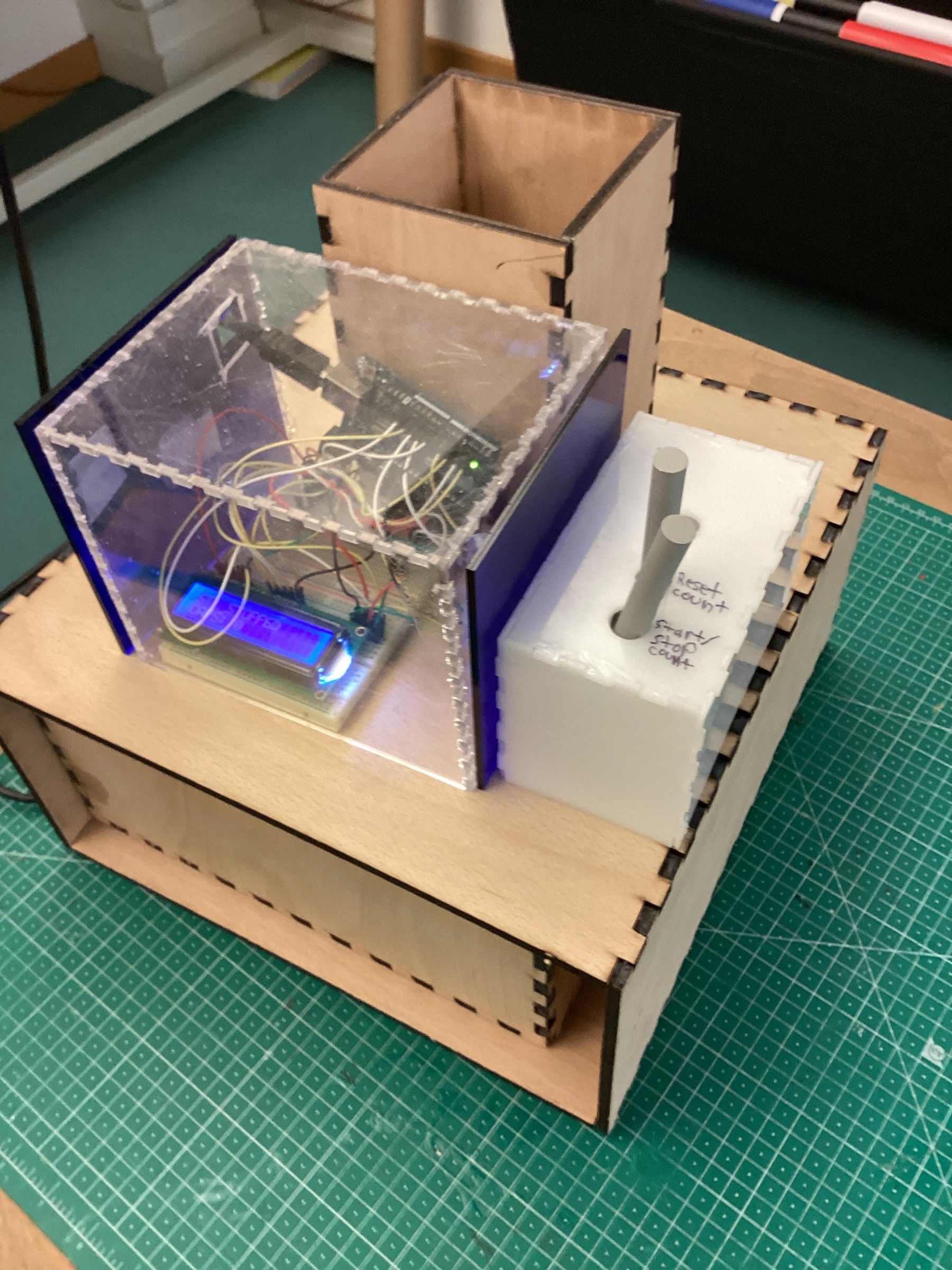
Example Machine: The Bottle Cap Counter Imagine a machine where whole caps fall through a narrow chute. A simple Infrared (IR) "beam-break" sensor is mounted across the chute. Every time a cap passes, it breaks the beam, and the microcontroller adds "1" to the total count displayed on an LCD screen. This data is then sent to your custom app to track your daily recycling goals and provide metrics for the AI model to predict future material needs. This is exactly what we did.
Use automation to remove human error from your production line. This allows you to scale up from a hobbyist setup to a small-scale manufacturing facility.
To truly "make a better world," focus production on items that solve community problems.
- Educational Kits: Produce recycled rulers, protractors, and math manipulatives for local schools.
- Assistive Devices: Create simple ergonomic grips or bottle openers to assist those with limited mobility.
- Environmental Tools: Manufacture sturdy "trash grabbers" or seedling pots to support local cleanup and reforestation efforts.
Technology Integration
The final phase focuses on automation and data to optimize the recycling workflow.
- Sensor Integration: Use Infrared (IR) "beam-break" sensors to count flakes or caps as they fall through a chute.
- Logic Setup: Program a microcontroller, like an Arduino, to process this sensor data and display counts on an LCD screen.
- Data Analysis App: Develop a separate app to track recycling goals and provide metrics for an AI model to predict future material needs.
- Goal: This allows you to scale from a hobbyist setup to a smart, small-scale manufacturing facility that provides real-time impact data.
Fusion 360 Integration

As said, Fusion is the BEST tool to design molds with or things you will 3D print with the recycled filament. Here is an example:
- Using it to create molds via subtraction of shapes inside one
- Using it to design new machines for adding on to this system, such as the bottle cap counter's models.
Because of how creative you can get with Fusion, you can make different machines that you can manage to make with this software.
Example Products
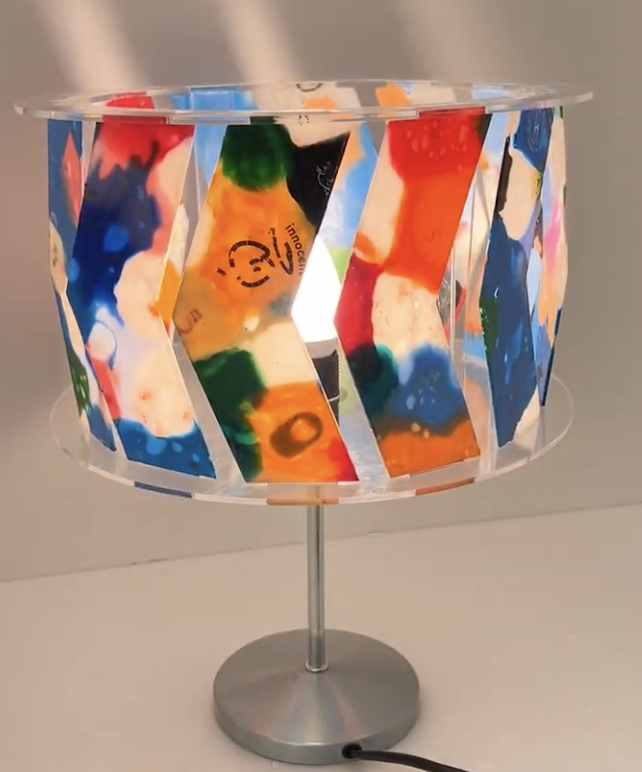

Here are some example products to make with the plastics, and steps are also below:
A coaster:
- Collect plastic locally, bins, friends, etc (look at Step 1)
- Shred into tiny bits and flakes via shredder (look at Step 4)
- Melt, just put the plastics under the heatpress, put at according temperature, and melt (look at Step 3)
- Design, use Fusion 360 to have a DXF file to lasercut (Step 11)
- Lasercut around it, prepare the laser and set the material parameters via Trotec Ruby (Step 7)
- Done!
A lamp:
- Collect, (Step 1)
- Shred, (Step 4)
- Melt, (Step 3)
- Design, (Step 11)
- Lasercut, (Step 7)
- Done!
It is usually these steps to follow, as for most products, but it depends how you design it and your Fusion 360 skills.