Chaos to Calm: the AI Day-Mapper
by Ranvi25 in Circuits > Computers
72 Views, 0 Favorites, 0 Comments
Chaos to Calm: the AI Day-Mapper


“Time stays long enough for those who use it.” – Leonardo Da Vinci
Time. It’s a confusing thing. We all have the same 24 hours, yet for so many of us, those hours feel like a source of constant anxiety. We face the "Fear of the Mess"—that paralyzing feeling when your to-do list is a chaotic pile of thoughts rather than a plan. When you don't know where to start, you end up doing nothing, and that breeds the even bigger fear: The Fear of Not Doing Enough.
I wanted to bridge the gap between "Chaos" and "Calm."
My project, Face your Chaos, is an AI-powered "Time Architect." I designed this tool to act as a digital brain that takes your messy, unorganized thoughts and instantly structures them into a beautiful, aesthetic visual calendar.
By using Generative AI (via Replit) and a sleek Streamlit interface, I’ve created a way to "Face the Fear" of a wasted day. Instead of staring at a blank screen in a panic, you simply tell the AI your "vibe" for the day, and it builds the architecture of your time for you.
Supplies
The tools you will need:
- A way to code - E.G iPad, Laptop, Desktop
- A Replit account (Don't worry they're free and easy to make)
- A willingness to make your day Calm without needing to get Hundreds of subscriptions for different calendar apps.
Designing for Calm (UI/UX Strategy)
Before writing a single line of code, I had to define the "Looks" of the application. The goal was to combat the Fear of Chaos by creating an interface that felt light, professional, and structured.
1. The Layout Strategy
I opted for a Bento Box layout—a modern design trend that uses distinct, rounded tiles to separate information.
- The Input Zone: A prominent, focused area for "brain-dumping" tasks.
- The Visual Grid: A clean calendar view that replaces an overwhelming list with a spatial map of time.
2. Visual Language & Color Palette
To reduce anxiety, I designed a Dark Mode theme. Dark interfaces are less fatiguing and create a sense of focused "deep work."
- Primary Background: Deep Charcoal and Midnight Blue for a grounding effect.
- Accent Colors: Soft Violet (for creativity) and Mint Green (for success/completion).
- Typography: I chose Inter, a typeface designed for maximum legibility on digital screens.
3. The "Toki" Influence
I studied how top-tier productivity apps (like Toki) handle natural language. I planned for a minimalist interaction model: the user provides the "mess," and the UI provides the "order" without extra buttons or menus getting in the way.
The Technical Implementation (Replit & Python)

To move from an idea to a fully functional application, I utilized Replit’s cloud-based development environment. This allowed for a seamless integration between the backend AI logic and the frontend user interface.
- State Management: I used Python to handle the data flow. When a user inputs their "messy" thoughts, the script sends a structured request to the Replit AI model.
- Prompt Engineering: I developed a specific system prompt that forces the AI to act as a Deterministic Scheduler. This ensures the output isn't just a list, but a correctly formatted Markdown or JSON object that the UI can render into a visual grid.
- The Interface: Using the Streamlit framework, I built a responsive web container. I chose a minimalist, high-contrast design to ensure that the user experience (UX) is calming and accessible—directly countering the "Fear of Chaos."
Downloads
Designing for Clarity (The Custom UI/UX)
Designing for Clarity (The Custom UI/UX)
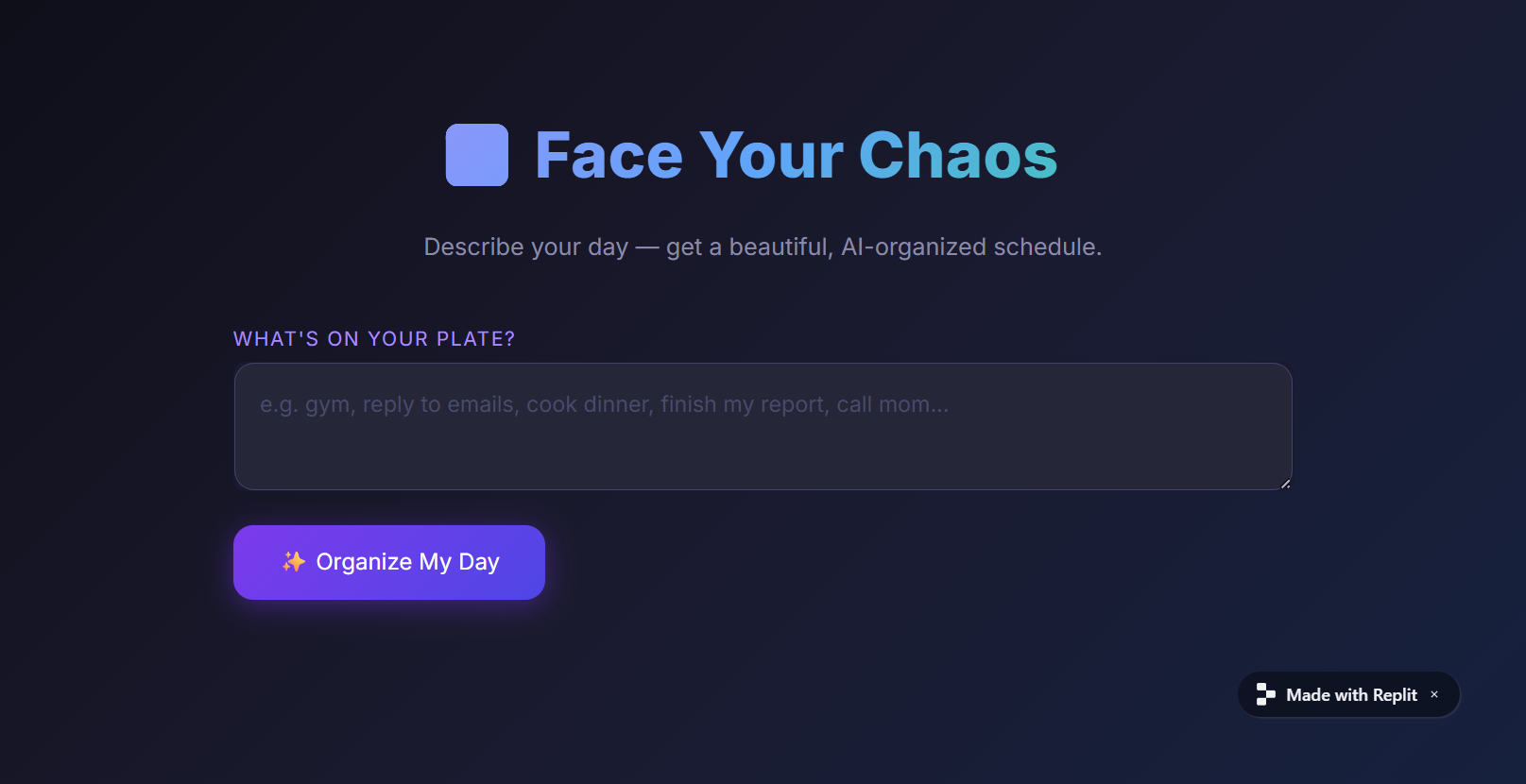
At this point while I was pretty happy, I had a simple AI agent that does the tasks I need it to, but a major part of the "Fear of the Mess" is visual overwhelm. If the tool looks cluttered, it adds to the anxiety. To counter this, I used custom CSS injection to completely override the default Streamlit interface.
- The Color Theory: I used a deep, dark theme (#0f0f1a to #16213e) with high-contrast violet and emerald accents. Dark modes are proven to reduce eye strain and provide a "calming" effect for users who are already feeling stressed.
- Typography: I imported the Inter font family via Google Fonts. Clean, sans-serif typography is essential for readability in a scheduling app.
- The Glassmorphism Effect: The text areas and buttons use semi-transparent backgrounds and subtle borders (rgba(255,255,255,0.05)). This creates a modern "layered" look that makes the interface feel light and manageable.
- The Hero Header: I designed a custom gradient title using -webkit-background-clip: text. This gives the app a professional "branded" feel, making the user feel like they are using a high-quality tool.
How to implement the styling:
To keep the project organized and scalable, I didn't just dump the styling into my main script. I used a Modular Design approach.
- style.css: I created a dedicated stylesheet for the "class" look. This file handles all the gradients, the Inter font imports, and the custom button animations.
- I used Computational Logic and Iterative Design to build the UI.
To maintain a professional project structure, I separated the styling into a standalone style.css file. This follows the Separation of Concerns principle. Even though the Python backend handles the logic, the frontend automatically pulls the 'class' look from this external stylesheet, ensuring the app stays fast and the code stays clean.
Downloads
Calm in the Chaos
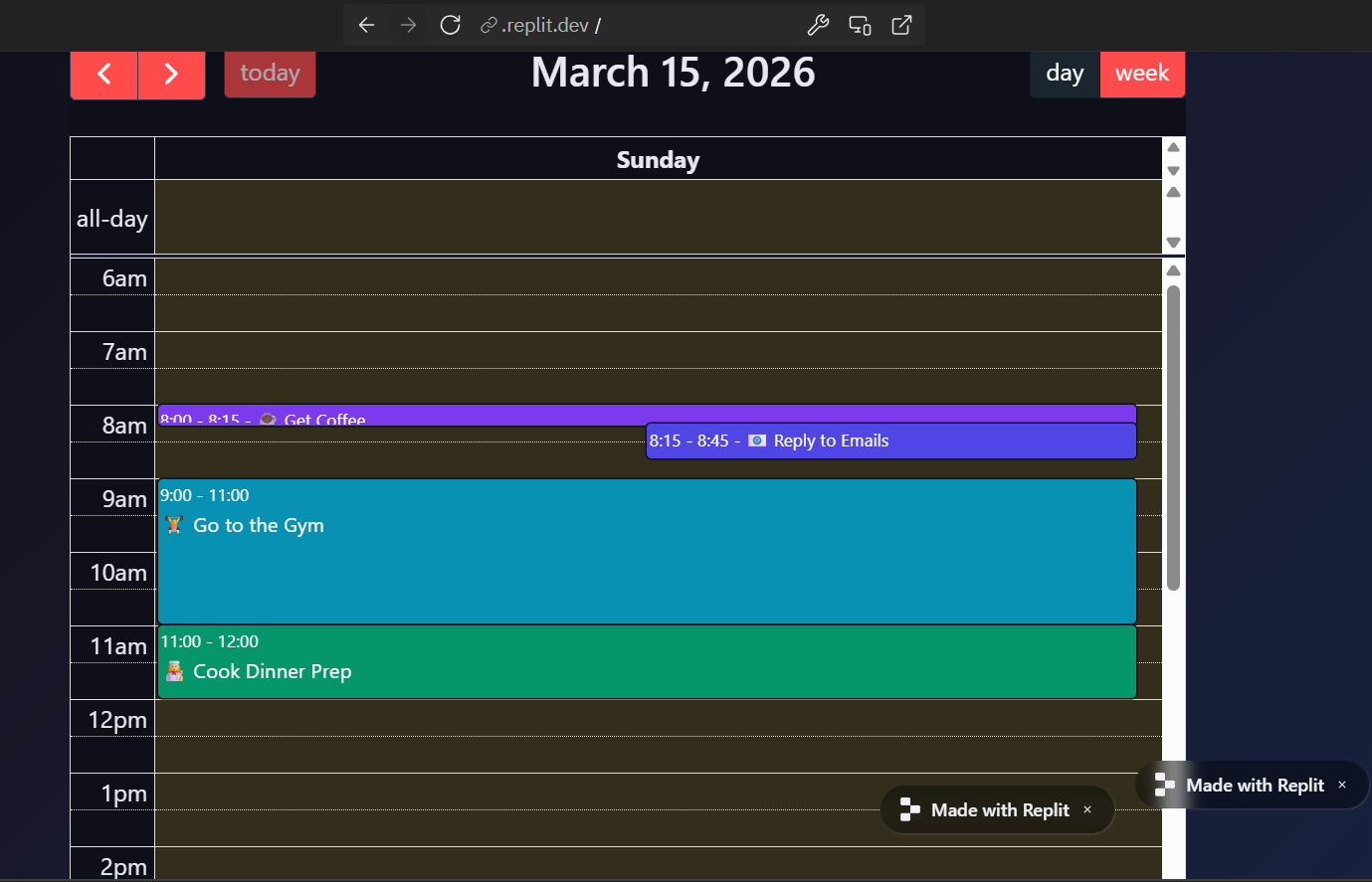
I built this to face the Fear of Overwhelm. For many, a long to-do list isn't a plan—it's a source of anxiety. I designed this AI to turn 'brain-dump' chaos into a visual, manageable architecture of time.And I really Hope that this simple AI agent can help many people to control over their time