Connect 4

This project focuses on designing and building a life-size Connect 4 game using learned fabrication and engineering skills. The product is intended to provide a fun, interactive experience for children, families, and general fun-seekers. The design incorporates wood fabrication, electronics, 3D printing, and custom graphics. The game must follow school constraints while maintaining durability and accurate game mechanics.
Supplies


Connect 4 Frame
(2) 10" × 11" sheets of ¼-inch plywood
(1) sheet of ¼-inch plywood, any length × 11"
Wood glue
Laser cutter
Blue spray paint
Connect 4 Chips
42 wooden circles (cut from frame plywood)
Laser cutter
Electronics (Arduino UNO)
Arduino UNO
4 LED lights
Wires
Resistors
Breadboard
Logos and Files
Connect 4 Logo (3D Model): Onshape link
Connect 4 Logo (Printed Image): Image file .webp
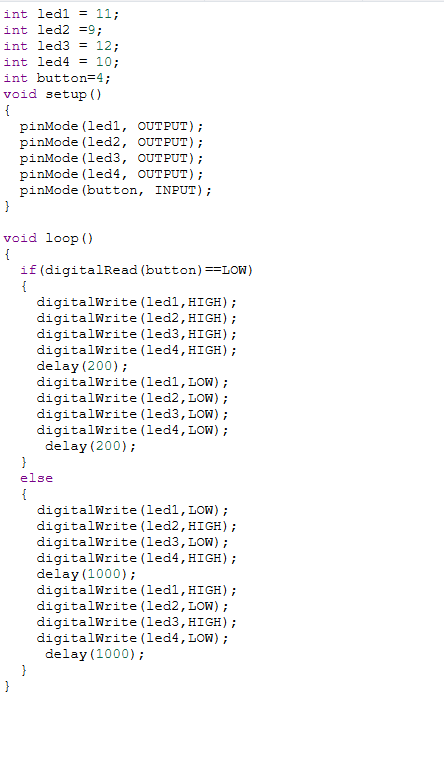
Arduino Code: Provided in the image
Downloads
.webp)
Cut and Lasercut

Cut two 10" × 11" plywood pieces.
If they are not the correct size, trim them to exact dimensions.
Create a laser-cut blueprint for a 6 × 7 grid of circles (standard Connect 4 layout).
Laser cut the grid into both plywood sheets. (if doesnt cut, use twice)
Save all wooden circles—these will be used as the game pieces.
LINKS:
connect 4 FINAL FRRR is the cutout of the circles USE FIRST
Tip: Ensure the plywood lies flat on the laser bed to avoid misalignment.
Downloads
Making the Board

Take the long piece of ¼-inch plywood (any length × 11").
Laser cut strips using the provided file; these strips create spacing between the two board panels so the pieces can slide down.
Evenly glue the strips between the two 10" × 11" boards. ( like provided image)
Clamp and move on while the glue dries.
Downloads
Making the Pieces

Collect the 42 wooden circles.
Divide them into two sets of 21.
Spray paint each set a different color, red and yellow are recommended.
Print the Logos (2D + 3D)
Print the 2D logo image (file labeled “OIP”).
3D print the Connect 4 logo using the Onshape model link.
Coding on the Arduino

Supplies Needed:
- Arduino UNO
- 4 LEDs
- Wires
- Resistors
- Breadboard
- Assemble the circuit following the reference photo.
- Upload the provided code to the Arduino.
- Test the LEDs and adjust the code as needed.
Downloads
Final Assembly

Glue the printed logo and 3D printed logo to the front of the board.
(Optional) Add wooden side supports if you want the board to stand upright.
Place or mount the Arduino in a clean, easy-to-access spot.
Double-check glue joints before using the game.
Testing and Troubleshooting
Troubleshooting
Pieces don’t fit into slots:
Lightly sand the edges and repaint.
Glue joints uneven:
Re-clamp and add more glue if needed.
LEDs not working:
Check resistor placement and Arduino battery.
Additional Ideas (To add your own touches)
Add a reset latch to drop all pieces at once.
Paint the board with stripes, patterns, or gloss finish.
Add a carrying handle.