How to Charge a Laptop From a DIY 18650 Power Bank
355 Views, 1 Favorites, 0 Comments
How to Charge a Laptop From a DIY 18650 Power Bank
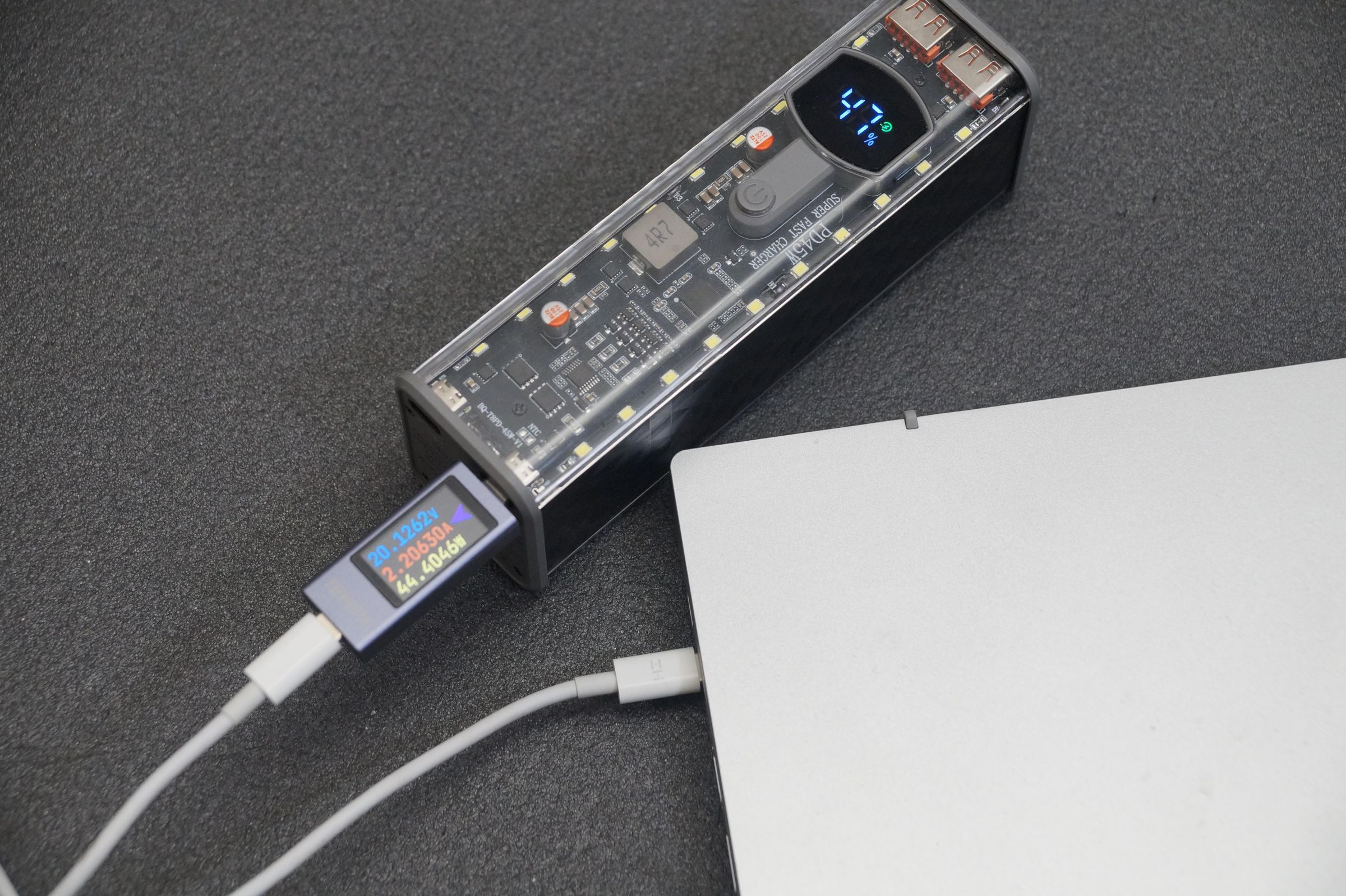
In this project, I tested a DIY 8×18650 USB-C PD power bank to see if it can really charge a laptop in real use.
The power bank is marked as a 45 W USB-C PD model with a 20,000 mAh / 74 Wh battery rating, USB-C output up to 45 W, and USB-C input up to 65 W.
I tested two practical methods: direct USB-C Power Delivery charging for a laptop with USB-C input, and charging through a USB-C PD trigger adapter for a laptop with a traditional barrel plug.
The goal was to check real voltage, real power, charging behavior and the limitations of this type of DIY power bank.
Supplies
For this test I used:
- DIY 8×18650 USB-C PD power bank case
- 8×18650 lithium-ion cells
- USB-C to USB-C cable
- USB-C power meter / tester
- Laptop with USB-C Power Delivery charging
- Laptop with a barrel charging connector
- USB-C PD trigger adapter with a barrel plug
- Original laptop charger for comparison
Important note: for a proper long-term battery build, use matched 18650 cells in good condition. Avoid mixing damaged, unknown or heavily mismatched cells.
Check the Power Bank Specifications


The first thing I checked was the label on the power bank.
The model I tested is marked as:
- Model: T8
- Capacity: 3.7 V / 20,000 mAh / 74 Wh
- USB-C output: 5 V to 20 V, up to 45 W
- USB-C input: 5 V to 20 V, up to 65 W
- PD45W, UFCS33W and QC24W markings
This means the power bank should be able to negotiate 20 V over USB-C Power Delivery, which is required for many laptops.
The case also has two USB-A ports, two USB-C ports, a small display and a built-in LED strip. The transparent cover makes it easy to see the internal board and layout.
Install the 18650 Cells

This DIY power bank case is designed for 8×18650 lithium-ion cells.
For this test, I used cells I had available. This was enough for checking the USB-C PD output and laptop charging behavior, but for regular long-term use I would recommend using matched cells with similar capacity and internal resistance.
Battery safety is very important in any DIY power bank project. Do not use damaged cells, do not mix unknown cells for a permanent build, and always check the polarity before inserting the batteries.
Test Direct USB-C Laptop Charging


The first charging method is the easiest one.
This method works if your laptop already supports USB-C Power Delivery charging.
The setup was:
Power bank → USB-C power meter → USB-C cable → laptop
The power bank successfully negotiated around 20 V through USB-C PD. During the test, the USB-C power meter showed around 20.1 V, about 2.2 A and around 44 to 45 W going into the laptop.
In another load test, I also saw almost 48 W, which is very close to the claimed 45 W output.
To make sure the laptop was really charging, I also checked BatteryMon. It showed that the battery status was Charging, with a charging rate of about 30 W.
So this method works. A DIY 45 W USB-C PD power bank can charge a laptop that supports USB-C charging.
But there is one limitation: my laptop’s original charger is rated up to 65 W. That means the power bank can charge the laptop, but it may not be enough under heavy load. It is much better for light work, emergency charging, sleep mode or charging while the laptop is powered off.
Test the USB-C PD Trigger Adapter


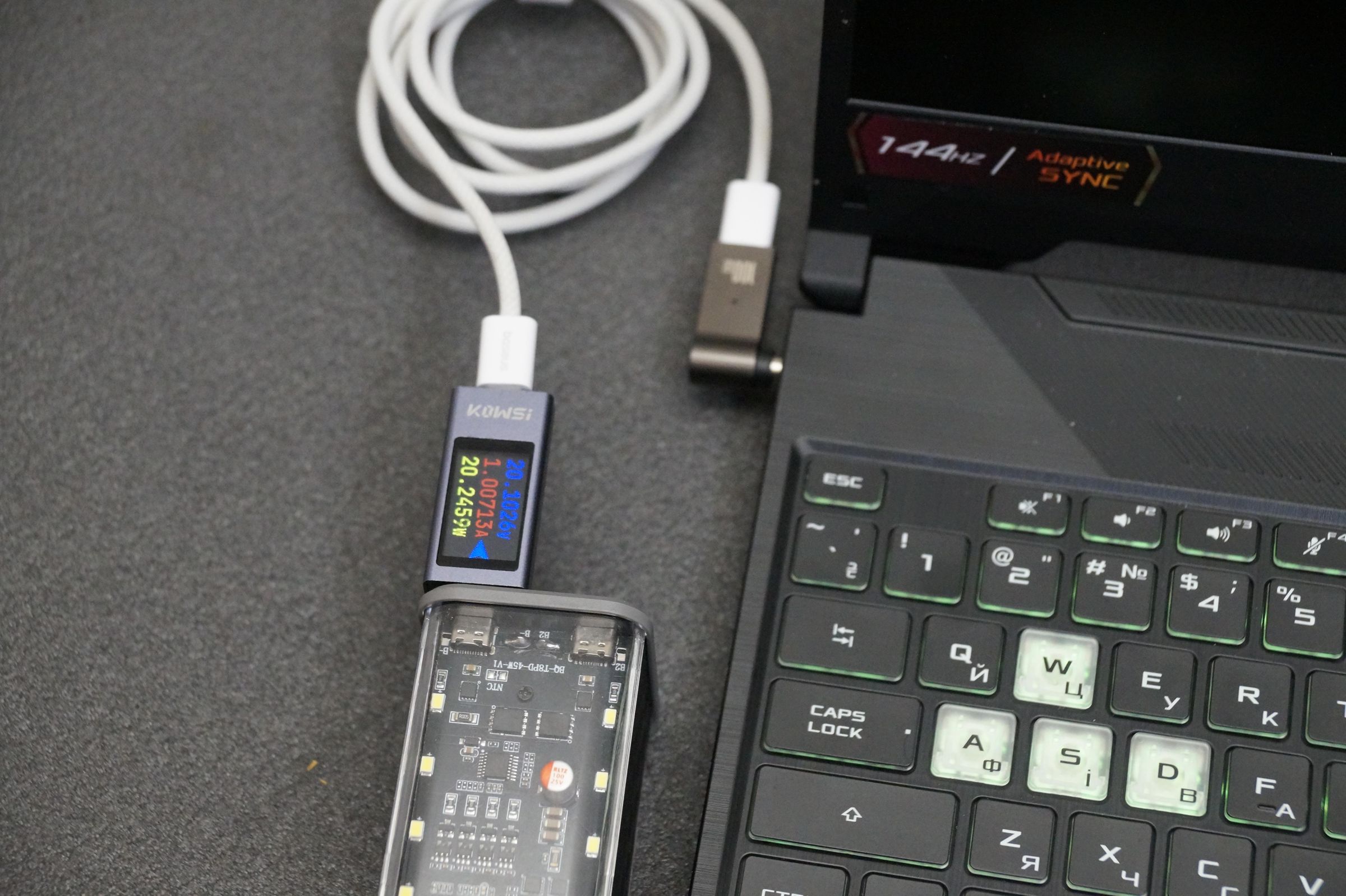

The second method is for laptops that do not support USB-C charging and use a round barrel plug.
For this test, I used a USB-C PD trigger adapter. The adapter is marked as 100 W, but this does not mean the whole setup becomes a 100 W charger.
The adapter only requests a USB-C PD voltage, usually around 20 V, and sends it to the laptop through the barrel connector. The real power limit is still the power bank.
The setup was:
Power bank → USB-C power meter → USB-C cable → PD trigger adapter → laptop barrel plug
I connected the adapter to an ASUS TUF Gaming laptop. The laptop detected the charger and showed a charging notification.
During this test, the USB-C meter showed around 20.1 V, about 1.0 A and around 20 W.
So the method works, but with more limitations. A gaming laptop usually needs much more than 45 W. This is not a replacement for the original charger. It is more of an emergency method, or something that may work better when the laptop is off, sleeping, idle or under very light load.
Compare the Two Methods

Direct USB-C PD charging is the best method if the laptop supports it.
In my test, this method reached around 44 to 45 W, and the laptop really charged. This is useful for ultrabooks, lightweight laptops and emergency charging.
The PD trigger adapter method also worked, but it was more limited. The ASUS laptop detected the charger, but the power level was much lower during the test.
The adapter was marked as 100 W, but the power bank itself was still limited to 45 W. So the adapter does not increase the available power. It only converts USB-C PD output into a barrel-plug output.
For a USB-C laptop, I would use the direct USB-C method. For a barrel-plug laptop, the PD trigger adapter can be useful, but only as a backup or emergency solution.
Safety Notes

This is a DIY battery device, so be careful.
Use good-quality 18650 cells in good condition. Do not mix damaged, unknown or heavily mismatched cells. Always check polarity before inserting the batteries.
For the PD trigger adapter method, check the voltage and polarity of your laptop charger before connecting anything. Many laptops use around 19 V to 20 V, but connector size, polarity and power requirements can be different.
A wrong connector, wrong voltage or unstable power source can damage the laptop.
Also remember that 45 W is not enough for every laptop. Even if the laptop detects the charger, that does not automatically mean the setup is suitable for heavy load or long-term use.
Conclusion

This test showed that a DIY 8×18650 USB-C PD power bank can really charge a laptop, but the result depends on the laptop and the charging method.
The best result came from direct USB-C Power Delivery charging. The power bank delivered around 44 to 45 W, and the laptop battery was actually charging.
The USB-C PD trigger adapter method also worked, but it had more limitations. It can be useful as an emergency solution for laptops with a barrel connector, but it is not a full replacement for the original charger, especially for gaming laptops or high-power machines.
My conclusion is simple: this type of DIY power bank can be useful for ultrabooks, lightweight laptops and emergency charging. For larger laptops, a proper 65 W, 100 W or stronger USB-C PD power bank is a better choice.
I also made a full video test with both methods, real measurements and laptop charging behavior:
How to charge a laptop from a power bank – 2 methods and tests