I Built a 4-channel Temperature Logger With Arduino (logs to SD Card + LCD)
by DiscoLapy in Circuits > Arduino
174 Views, 1 Favorites, 0 Comments
I Built a 4-channel Temperature Logger With Arduino (logs to SD Card + LCD)





I built a 4-channel temperature logger a 4-Channel Temperature Data Logger based on widely accessible, cheap, and simple components. The data are written on a SD card and displayed on LCD displays. In this tutorial, I show you step by step how to design and integrate this device.
Creative Commons Attribution-ShareAlike 4.0 International (CC BY-SA 4.0)
Copyright (c) 2023 DiscoLapy
Preparation - Requirements

In this tutorial, it is shown how to build a 4-Channel Temperature Data Logger based on widely accessible, cheap, and simple components. The data are written on a SD card and displayed on LCD displays. In this tutorial, I show you step by step how to design and integrate this device. Before starting with technical implementation. Here were my original fundamental requirements:
- Measure temperature at 4 locations with accuracy of half degree and data acquisition every ~ 3 seconds.
→ A reasonable compromise that allows this are 4 x DS18B20; small waterproof, 1-wire digital temperature sensors.
- Use throughout the whole project only widely accessible, cheap, and simple components.
→ “Brain” of the device is an Arduino UNO microcontroller.
- Write measured temperatures into a file on a SD card and with acquisition time tag.
→ Micro SD Card and DS3231 Real Time Clock Module (which can maintain information about absolute time) are used.
- Easy way of activating and deactivating data writing on my SD card.
→ Toggle switch is used.
- Visualize measured temperatures, absolute time, and indication about data recording status.
→ Two simple LCD displays with an i2C interface are used.
All Parts

So those are the main components used. The full list is of course much longer, wires, pullup resistors, breadboard of initial testing, etc. those parts will be mentioned in the following text.
If you want to know a bit more about components and their testing and connecting with microcontroller, have look on the following links:
- Real-Time Clock DS3231 Precision RTC Module: https://lastminuteengineers.com/ds3231-rtc-arduino-tutorial/
- Temperature sensor DS18B20: https://lastminuteengineers.com/ds18b20-arduino-tutorial/
- LCD display: https://lastminuteengineers.com/arduino-1602-character-lcd-tutorial/
- Micro SD Card Module: https://lastminuteengineers.com/arduino-micro-sd-card-module-tutorial/
In this tutorial, shown development of a 4 channel temperature data logger. Based on integration of the above listed components together.
Wiring


Wiring
In this part is outlined how the components are wired together. For initial setup development, I recommend using breadboard. And implement components one by one (test individually).
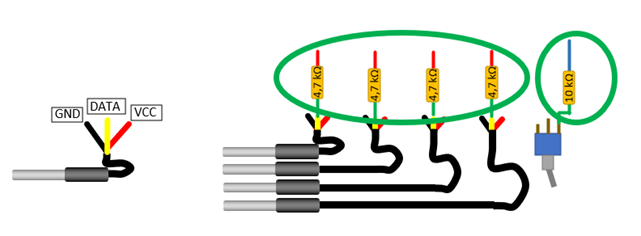
Note that additional 4 x 4,7 kΩ resistors for DS3231 sensors and 1 x 10 kΩ resistor for the toggle switch are needed, see picture below (in green oval). Next, let us arrange the components and use breadboard so that all wiring integration steps could be done without mowing the components. In the setup, we can group devices into 3 groups based on communication bus:
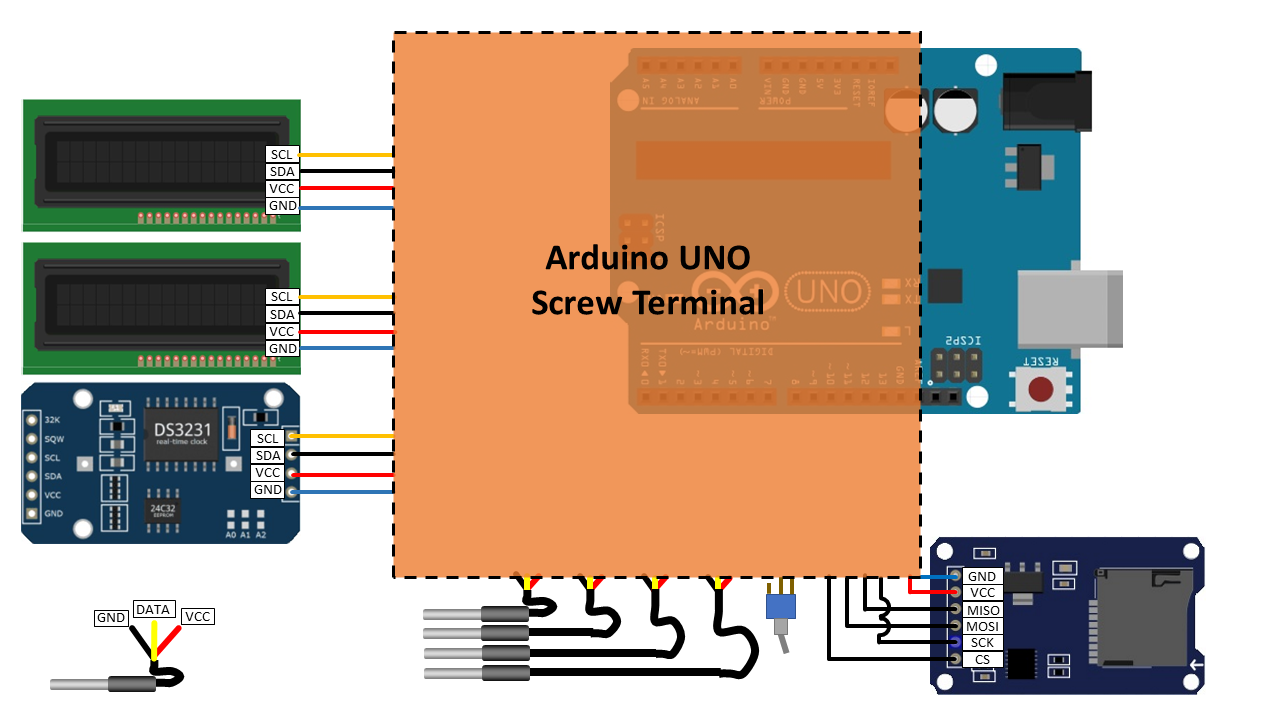
- i2C bus (Inter Integrated Circuit) is used to connect 2 x LCD display and TRC DS3231; to Arduino the bus is connected to pins: SCL-A5 (analog IN) and SDA-A4 (analog IN), 5V power, GND
- SPI bus (Serial Peripheral Interface) is used exclusively for the Mini SD Card module: VCC->5V Arduino; MISO -> Arduino DIGITAL pin 12; MOSI -> Arduino DIGITAL pin 11; SCK -> Arduino DIGITAL pin 13; CS -> Arduino DIGITAL pin 10;
- Digital pins are used to connect individually the temperature sensors: Arduino pin 2, 3, 4 ,5 and the toggle switch is connected to Arduino Digital pin 8.
Wiring Sensors

Here is the detail of the wiring diagram with toggle switch and one temperature sensor. Note that to avoid any sensor identification procedure, I implemented sensors in a way they are connected individually to an Arduino digital pin.
Use Screw Shield

To have a robust setup (once my writing worked on 100%) I decided to encapsulate the part in an orange rectangle on an Arduino screw shield (screw Shield 1.0 Robotale), see below:
Make the Connections on Arduino Uno Screw Shield


In this way, all my peripheral devices are interfaced with Arduino UNO via screw terminals. This can be useful for example if some component needs to be changed (instead of desoldering-soldering action). Most of the connections on the Arduino shield are soldered (e.g. pull-up resistors) and secured with Heat Shrink Sleeve; this makes the setup very reliable. The connections on the screw Shield are shown below, together with real implementation (well could be done probably in a better way but it works well: -). Note that I used both sides of the shield, so it is quite compact:
Code and 3D Printed Housing
Next, I again tested all the components and made a 3D printed housing. Parts are screwed to this 3D printed housing with M2 and M3 screws.
The Arduino code can be downloaded with comments from: github.com/DiscoLapy/TDL
Video with step by step procedure can be found on YouTube DiscoLApy Channel: https://youtu.be/3VZtUH4VaHU
Housing files for 3D printer are here: https://www.printables.com/model/1665229-housing-for-a-4-channel-temperature-data-logger-di
Let me know if something needs to be more detailed. I would really appreciate any feedback.