Quarky Intellio Rover Assembly Guide, Build an Audio-Vision AI Robot
by theSTEMpedia in Circuits > Robots
1232 Views, 4 Favorites, 0 Comments
Quarky Intellio Rover Assembly Guide, Build an Audio-Vision AI Robot


Intellio Rover is a programmable rover built using Quarky Intellio, an ESP32-S3-based AI and AR module with an inbuilt camera, microphone, speaker, and battery. The rover uses LEGO-compatible structural parts, DC motors, and a servo to enable autonomous movement, vision-based detection, and interactive behaviors. It supports Block coding and Python, making it suitable for learning robotics, edge AI, and computer vision applications, including integrations with tools and libraries such as OpenCV, etc., for advanced vision-based projects in makerspaces and classrooms.
Please follow the steps given below to construct the Quarky Intellio Rover.
You can also refer to the YouTube video “Quarky Intellio Rover Assembly Guide” for a step-by-step visual explanation.
To purchase the Quarky Intellio Rover Kit and begin your robotics journey, visit the link: Explore the Quarky Intellio Rover Kit.
Note: In the instruction steps, the images in the top-right corner show the parts used for the corresponding assembly step.
Supplies
.jpg)
Box 1:
- 1x Quarky Intellio
- 1x USB-C Cable
- 1x Set of AR Markers
- 1x Set of Recognition Markers
- 1x Set of Construction Parts
- 1x Getting Started Guide (Instruction Manual)
Box 2:
- 1x Quarky Mini Expansion Board
- 1x Mini Expansion Connector
- 1x 180° Servo Motor
- 2x Motors
- 2x Set of Wheels
- 1x Set of Axles and Gears
- 1x Set of Construction Parts
PictoBlox Software: Download here: https://thestempedia.com/product/pictoblox/download-pictoblox/
Helpful Tip Before You Start
During assembly, some small connector pins may fit tightly and can be difficult to remove by hand. In such cases, use the Pin Separator Tool to remove the pin easily and safely. Refer to the GIF below to understand the correct way to use the tool before starting the assembly.
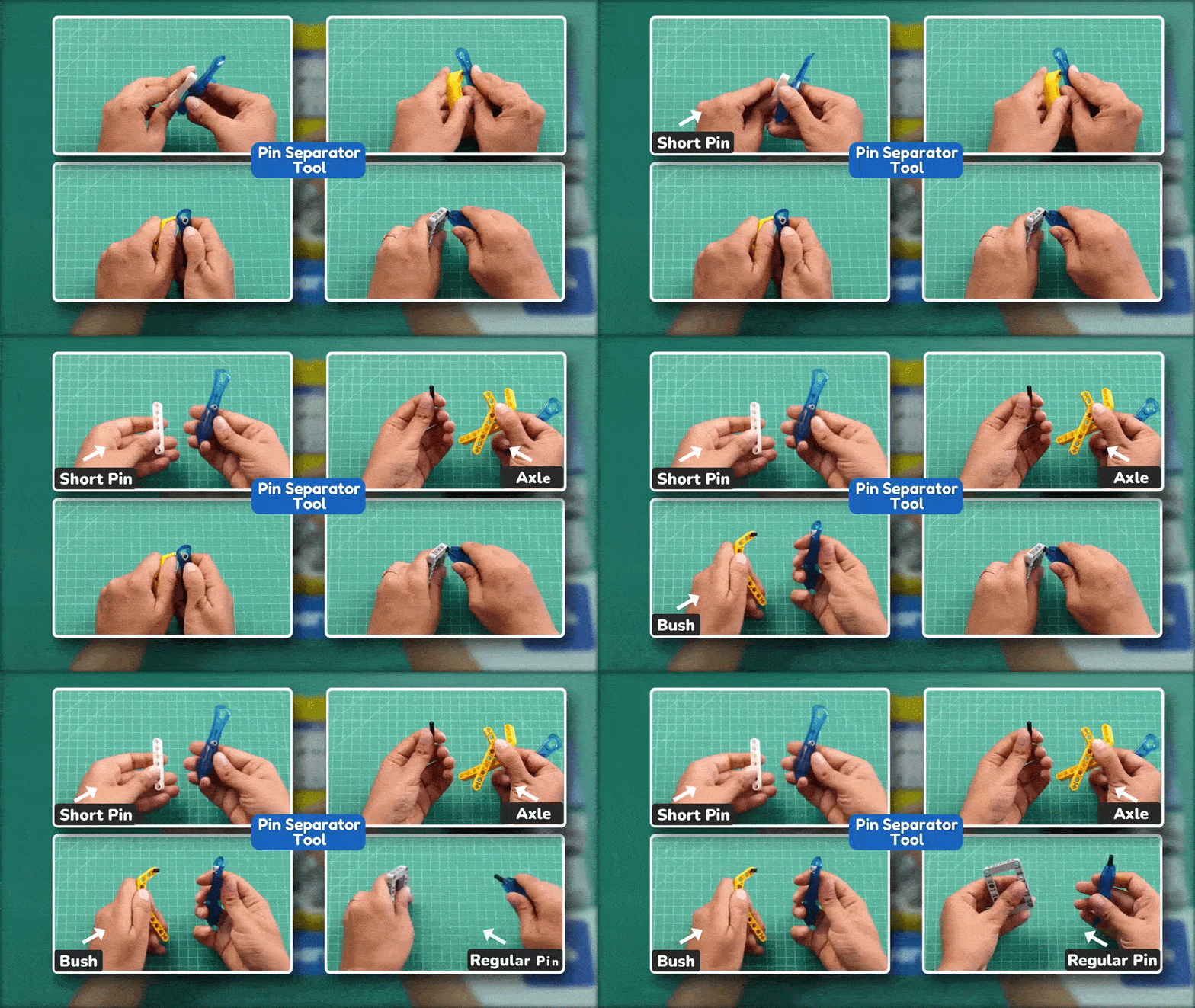
Please follow the step-by-step instructions below to construct the Rover Robot. In each step, the required parts are listed on the right.
Let’s Start With the Main Assembly

- Identify 1x DC Motor and 1x Connector Pin 2L.
- Insert Connector Pin 2L into the bottom-most front hole of the DC Motor.
Mount Motor on Frame.

- Align the centre hole of the Frame (7×11) with the pin attached to the motor.
- Press the Frame (7×11) onto the pin until the motor is fixed at the centre.
Attach Frame Structure

- Insert 2x Connector Pin 2L into the two corner holes of the Frame (7×11).
- Place the Frame (5×7) over the pins.
- Press the Frame (5×7) down to attach it firmly to the Frame (7×11).
Insert Gear Assembly

- Slide the Bevel Gear 12 Tooth onto the Axle with Stop 3L, with the teeth facing the stop end.
- Insert the axle assembly through the side hole of the Frame (5×7) and into the motor.
Add T-Shape Beam

- Insert 1x Connector Pin 2L into the top-right hole near the motor.
- Attach 1x T-Shape Beam (3×3) onto the pin as shown.
After attaching, rotate the T-Shape Beam towards the motor so that it aligns with the motor as shown in the image.
Repeat Left Side Assembly

- Insert 1x Connector Pin 2L into the top-left hole near the motor.
- Attach the second T-Shape Beam (3×3) onto the pin horizontally.
After attaching, rotate the T-Shape Beam towards the motor so that it aligns with the motor as shown in the image.
Secure Motor With Pins

Turn the assembly upside down so that the Frame (7×11) is on top and the Frame (5×7) is at the bottom, as shown in the image.
Then insert 2x Connector Pin 3L into the two highlighted holes on the top side.
Insert Axle Through Frame

- Insert 1x Axle 12L through the side holes of the Frame (5×7) and the motor assembly.
- Attach 1x Bush onto the exposed axle end to secure it in place.
Add Bevel Gear

Slide 1x Double Bevel Gear 20 Tooth onto the Axle 12L and align it with the Bevel Gear 12 Tooth.
Complete Axle Assembly

- Push the Axle 12L fully through the frame until it comes out from both sides.
- Make sure the Double Bevel Gear 20 Tooth meshes properly with the Bevel Gear 12 Tooth.
Prepare Servo Motor

Attach 1x Thin Beam (1×3) onto the motor shaft. Keep the Thin Beam (1×3) straight and centred on the shaft.
Fix Pins on Servo

- Insert 2x Connector Pin 2L into the side holes of the motor. Attach 2x Pin with a Hole onto the exposed ends of the pins, facing outward.
Verify Servo Assembly

Check that 2x Pin with a Hole is fixed firmly on both sides of the motor and facing outward.
Add Connectors to Servo

Attach 2x Cross Pin Connector to the top pins of the Cross Pin Connector facing outward, as shown.
Insert Split Connectors

- Insert 4x Connector Pin 2L into the holes of the Cross Pin Connector.
- Attach the 2x Cross Fork onto the connector pins.
- Press both Cross Fork pieces firmly so they face outward on both sides.
Mount L-Shape Beam (Right)

- Insert 1x Short Connector Pin into the remaining lower side hole of the motor.
- Attach 1x L-Shape Thin Beam (1×3) onto the pin, facing outward as shown.
Mount L-Shape Beam (Left)
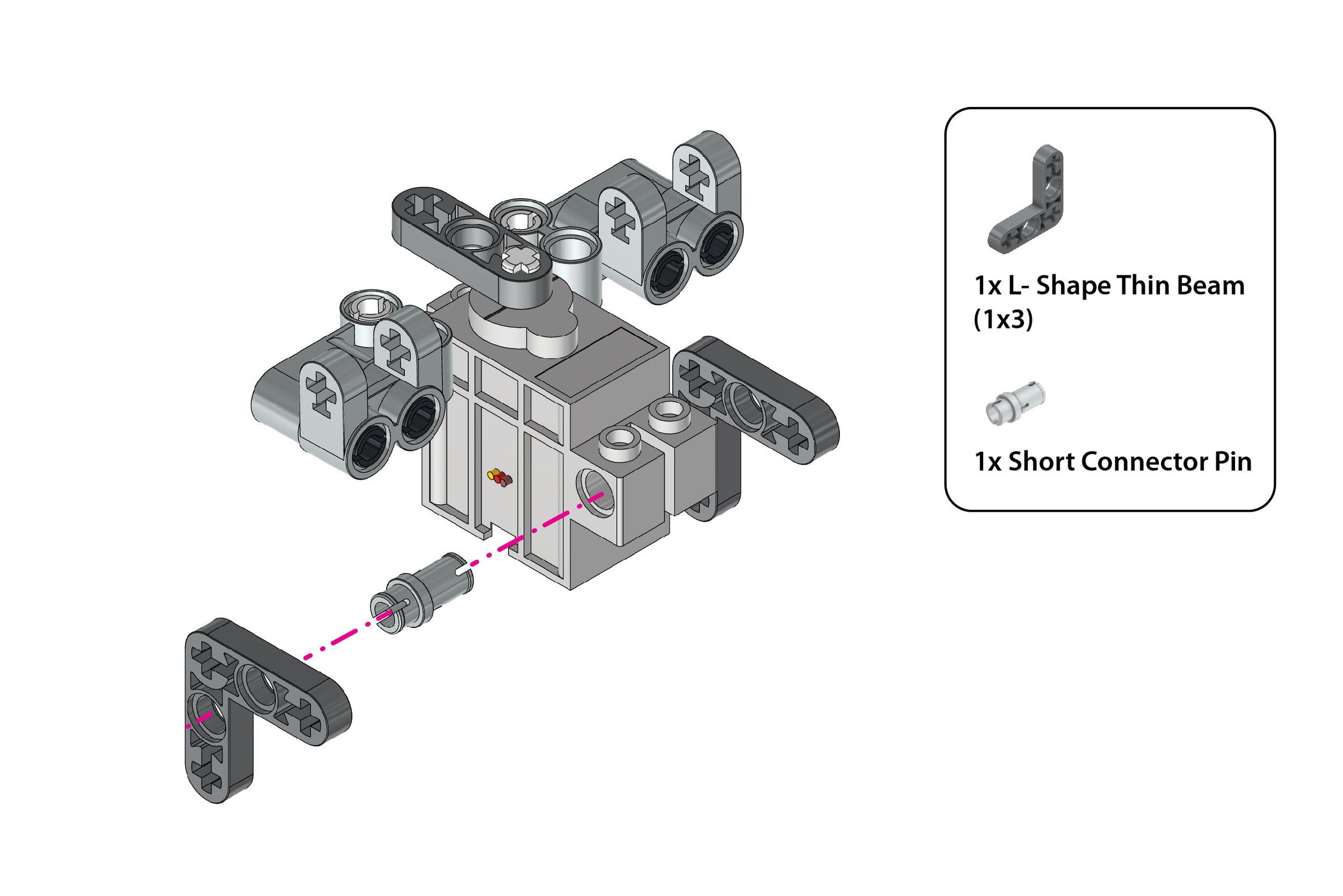
Repeat the same on the other side of the 180° Servo Motor as illustrated.
Insert Axle Through Beams

Insert 1x Axle 7L through the aligned holes of both L-Shape Thin Beam (1×3).
Secure Axle (Right Side)

- Insert 1x Short Connector Pin into the side hole of the Cross Fork.
- Attach 1x Cross Fork to the exposed end of the Axle 7L and L-Shape Thin Beam (1×3).
Secure Axle (Left Side)
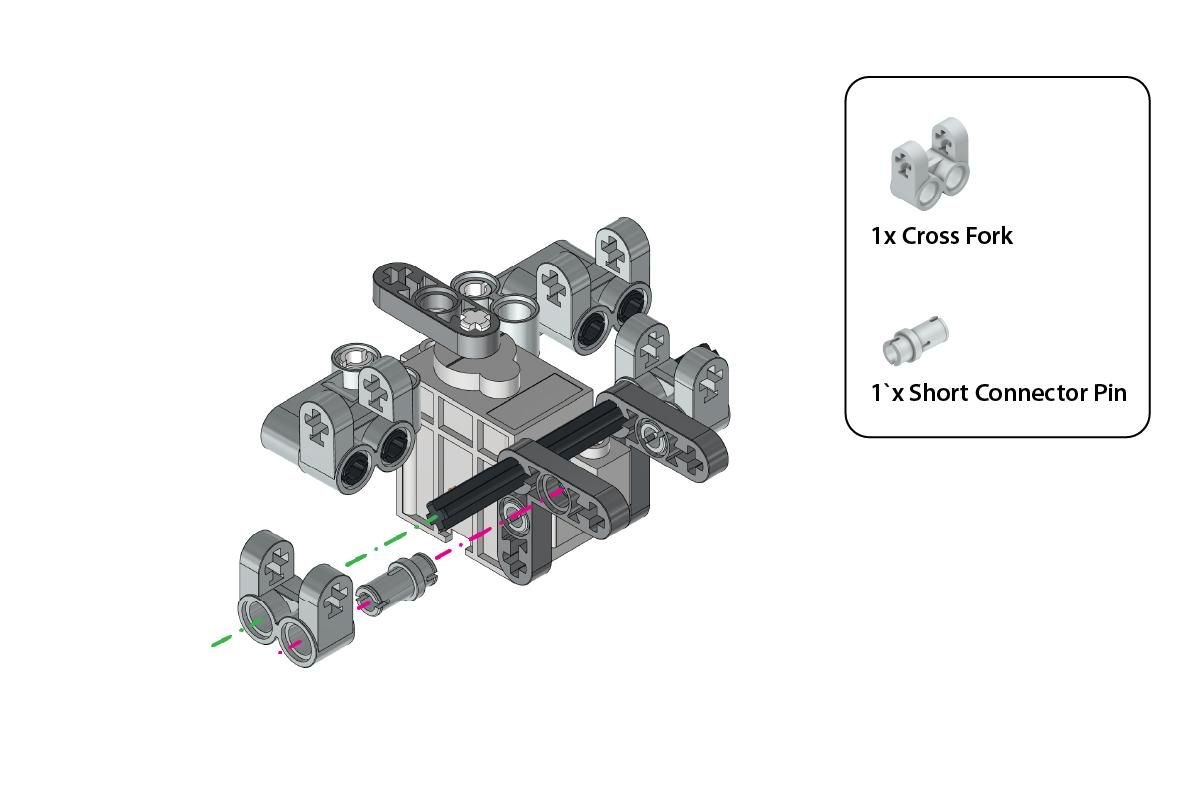
Repeat on the other Side.
Add Bushes to Axle

Attach 2x Bush onto both exposed ends of the Axle 7L to lock the assembly in place.
Attach Cross Beam

Attach 1x Cross Beam (1×3) to the central holes in the Cross Fork of the motor assembly as illustrated.
Secure Beam With Axles

Insert 2x Axle 2L through the side holes of the Cross Fork to secure the Cross Beam (1×3).
Attach Servo to Main Assembly

Align the motor assembly with Connector Pin 3L on the Cross Beam (1×3) as shown in the figure.
Attach Bent Beam (Left)

Attach the 1x Double Bent Beam (3×7) to the Frame (5×7) using 1x Connector Pin 2L and 1x Axle Connector Pin, as shown in the figure.
Attach Bent Beam (Right)

Repeat the same on the other side using the same components, as shown in the figure.
Verify Sub-Assembly

The base frame is ready for the next steps in assembly.
Mount Sub-Assembly

Ensure the motor assembly is securely attached to the Double Bent Beam by connecting it to the Cross Fork at the marked locations, as shown in the figure.
Secure Sub-Assembly

Insert 2x Axle 2L through the holes on both sides of the Cross Fork to secure the structure in place.
Attach Beam and Connectors

- Attach 1x Beam (1×7) to the structure using 2x Double Connector Pin.
- Secure the Beam (1×7) by inserting 1x Axle Connector Pin through the hole of the Thin Beam of the Servo Motor, and the Beam (1×7) as shown in the figure.
Mount L-Shape Beam (Right Side)

- Insert 3x Connector Pin 2L into the marked holes of the Frame (7×11) and Double Bent Beam (3×7) assembly, as shown in the figure.
- Attach 1x L-Shape Beam (2×4) to the structure using 1x Connector Pin 2L for secure fitting.
Mount L-Shape Beam (Left Side)

Repeat the same on the other side of the assembly, ensuring proper alignment and secure fitting as shown in the figure.
Install Right Wheel

- Slide 1x Axle with Stop 4L through the assembly.
- Attach 1x Wheel with Tyre (43mm) onto the axle.
- Secure the wheel by adding 1x Bush and 2x Thin Bush on either side of the wheel.
Install Left Wheel

- Insert 1x Axle with Stop 4L through the assembly for the second set of wheels.
- Attach 1x Wheel with Tyre (43mm) onto the axle.
- Secure the wheel with 1x Bush and 2x Thin Bush on each side of the wheel.
Attach Rear Frame

Secure the 1x U-Frame (4×5) to the Frame (5×7) using 2x Connector Pin 2L, ensuring proper alignment as shown in the image.
Attach the Bent Beam

Attach the 1x Bent Beam (3×7) to the frame using 1x Connector Pin 2L and 1x Axle Connector Pin for secure placement.
Add the Beam
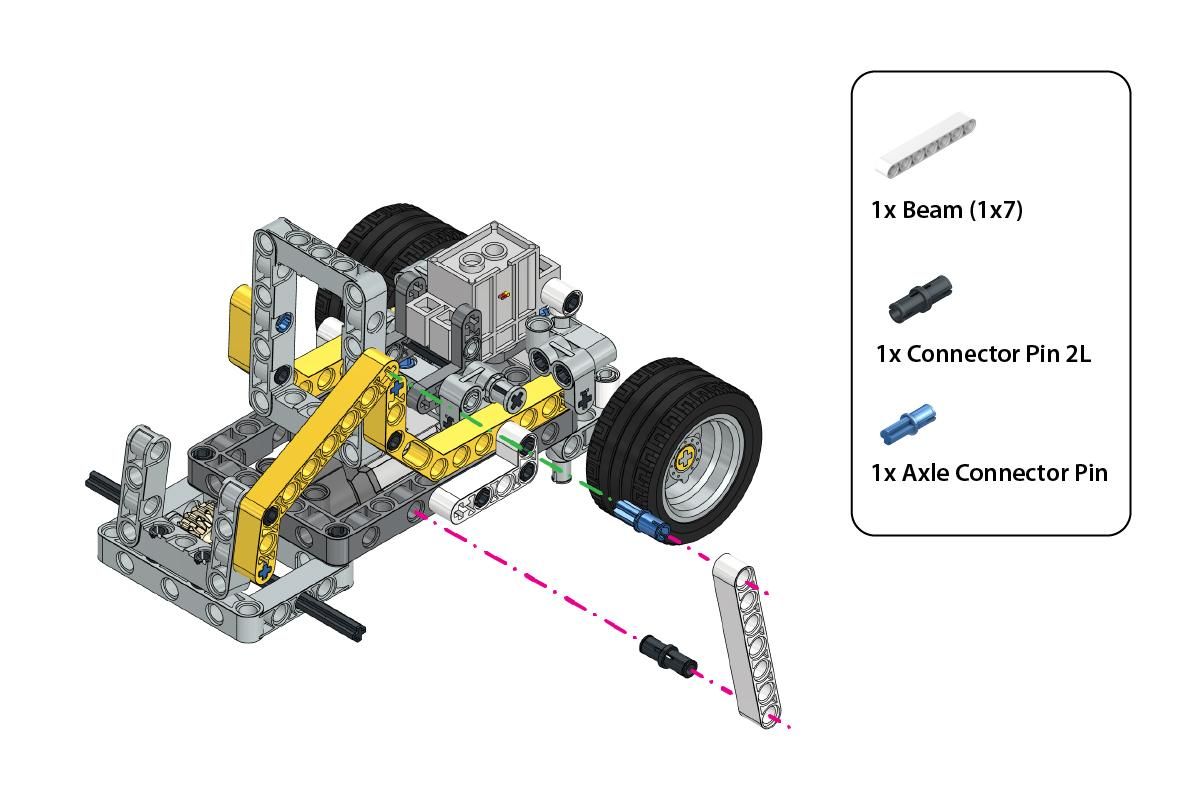
Connect 1x Beam (1×7) to the existing structure using 1x Connector Pin 2L and 1x Axle Connector Pin, ensuring proper alignment as shown in the image.
Attach Bent Beam

Attach the 1x Bent Beam (3×7) using 1x Connector Pin 2L and 1x Axle Connector Pin to complete the structure as shown in the image.
Add the Beam.

Attach the 1x Beam (1×7) using 1x Connector Pin 2L and 1x Axle Connector Pin to the structure as shown in the image.
Install Rear Wheels

Attach the 2x Wheels with Tyre (56mm) and 2x Bush to the axles as shown in the image.
Attach Expansion Board.

Secure the Mini Expansion Board using 2x Short Connector Pins, ensuring a stable connection.
Attach the Intellio Module

Attach the Intellio Module to the enclosure using 4x Short Connector Pins as shown in the image.
Mount Intellio Device

Attach the Intellio Module to the robot frame as shown, securing it in place using the previously added structure.
Verify Final Assembly

After completing the previous step, the assembly should look as shown.
Connect Wiring

Connect the Mini Expansion Connectors and Motor Connection on the Mini Expansion Board and Quarky Intellio as per the wiring diagram.
Complete Rover Assembly

The assembly of Quarky Intellio Rover is now complete.
Setup PictoBlox Environment

- Open PictoBlox, create a new project in block mode, click on Board, and select Quarky Intellio.
- Connect Intellio to the PictoBlox. Follow the step-by-step instructions in the Quarky Intellio Connection Guide to establish the connection.
- If you face any issues while connecting Quarky Intellio, refer to the troubleshooting guide below: Quarky Intellio Connections Guide Troubleshooting.
- Add the required extension: Quarky Mini Expansion Board.
Initialize Rover Program

Create the following script to initialize the Rover when the flag is clicked.
Add Keyboard Controls for Rover


Create the following script to provide controls to your keyboard keys. This will allow you to operate the Rover.
For the Up, Down, Left, Right Arrow Keys, code the blocks provided in image a.
For the "0" "space" "e" Keys on the Keyboard, use the script as shown in image b.
Explore Our Quarky Intellio Rover Kit
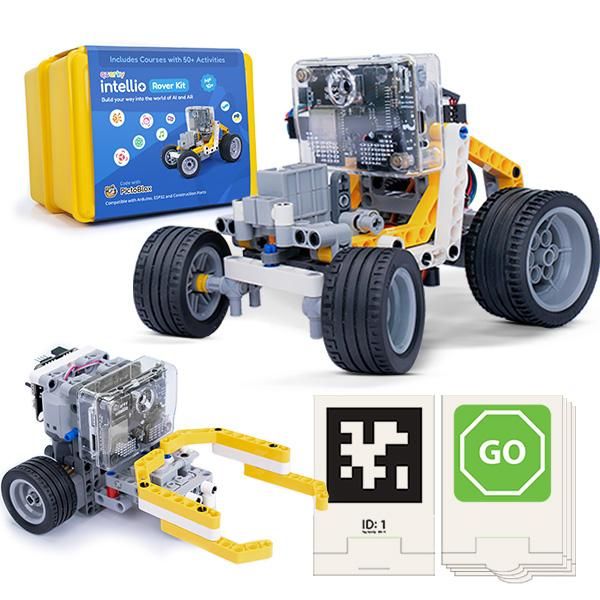
Explore the endless possibilities with the Quarky Intellio Rover Kit. You can find out more about the kit and other exciting project ideas developed using Intellio. To purchase the Quarky Intellio Rover Kit and begin your robotics journey, visit the link: Explore the Quarky Intellio Rover Kit.