Life Sized Plinko Board Game
by atldale1 in Workshop > Woodworking
106 Views, 0 Favorites, 0 Comments
Life Sized Plinko Board Game

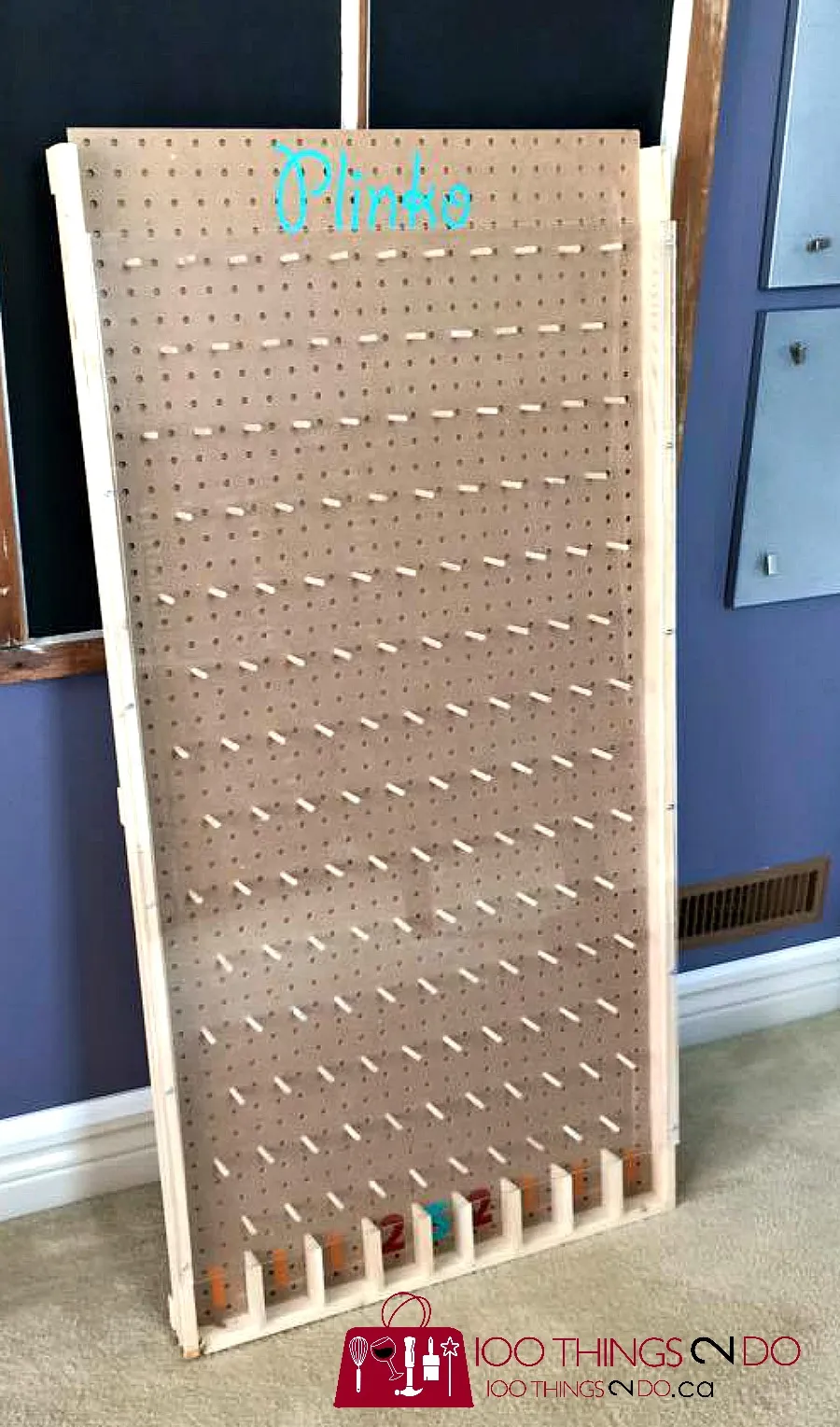
My teammates and I were tasked with the creation of a life sized board game. We decided to create a Plinko board because of the unique outcomes it can produce, the vast amount of designs we could add to it, and we overall wanted the challenge of completing it. This was a very fun and challenging task to complete in the time period, but we finished in time! The file below is an example that we used to help us create our board.
Downloads
Supplies

The tools and machines we needed were a pencil, paint brush, wood glue, ruler, 3D Printer, Laser Engraver, Miter Saw, Bandsaw, Table Saw, Orbital Sander, and a Belt Sander. The materials we used were Five 2'x1' (1/8" thick) wooden scraps, one scrap 3'x8' (1' thick, used to cut out many other pieces) wooden board, one scrap 3'x3' ( 1/8" thick, used to cut out two sets of pieces) wooden board, two 20"x 3.5" (5/8" thick) wooden planks, two 36" length x 1.5" diameter wooden dowels, one 13.5"x1" (1/2" thick) wooden piece, one 3"x2' plastic see through film, one Arduino board, one motion detector, 1 buzzer, 5 wires, a roll of scotch tape, two 1.5" diameter 36" dowels, one 1"x11" (1/2" thickness) wooden plank, black spray paint, large piece of cardboard, protective eyewear, mask, and gloves.
SAFETY


Always wear safety glasses when performing cuts on wood using dangerous machines. These machines are not forgiving and will cut you if you do not take the right precautions. We will be using a variety of tools in this step by step process and all of them should be handled with care. Please always be mindful and be as safe as possible when using any machine with a chance of harm.
Gather Five 2'x1' (1/8" Thick) Backboards

Gather your wooden backboard to start sanding them and laser engraving them. Sand down every inch of every backboard until smooth.
Downloads
Laser Engraving


Laser engrave four out of the five boards using a Laser Engrave Machine. Laser engrave "Pli" on the top right of one board. Laser engrave "nko" on the top left of the board adjacent to the board with "Pli" on it. When lined up and finalized they should read out Plinko across both boards. Then choose four designs to line up in the middle of the overall board. We choose a Georgia theme with the Georgia Bulldogs logo, Atlanta United logo, Peach, and Atlanta braves logo. Insert the designs into AutoCAD. Laser engrave the first design in the bottom right of the board with "Pli" already engraved on it. Laser engrave the second design on the bottom left of the board with "nko" already engraved on it. Laser engrave the third design on the top right of one of the remaining boards. Laser engrave the last design on the top left of one of the remaining blank boards. Laser engravers are individual to each workshop and all four of the designs plus the "Plinko" at the top might look different, but it is okay if they look different. The "Plinko" that we engraved over the top of our board covers around ten inches in length across and two inches in width down. The designs in the center of the boards range from around seven-ten inches in length across, and around five-ten inches in width down. The settings may need to be adjusted due to a difference in the equipment used. The links for each design are provided below.
Laser Engraving Pt.2


Next, we will laser engrave the holes needed for the dowels we will add later. There will be 4 rows of holes with a total of 4 complete holes and 4 half holes on each of the 4 boards already laser engraved on. Each hole has a diameter of 1.5 inches. The top left board with design one and "Pli" across the top middle should have a full hole 6 inches to the right (reading from the left most point of the board to the right for every hole) and 6 inches down (top to bottom). It should have a half hole 6 inches down and 12 inches to the right (sitting on the right edge of the board). It should have a full hole 12 inches down and 3 inches to the right. It should have another full hole 12 inches down and 9 inches to the right. It should have a full hole 6 inches to the right (reading from the left most point of the board to the right for every hole) and 18 inches down (top to bottom). It should have a half hole 18 inches down and 12 inches to the right (sitting on the right edge of the board). Lastly, it should have a half hole 24 inches down 3 inches to the right, and a half hole 24 inches down and 9 inches to the right. Reflect the design of the holes across the Y-axis 180 degrees to get the exact holes for the top right board with "nko" on it. Reflect the design on the original board with the original holes (top left board) across the X-axis 180 degrees to get the bottom right board. Reflect the design on the original board 180 degrees over the Y and X axis to get the design for the bottom right. EXCEPT the bottom left and right boards do not have their given last 2 bottom rows of holes and half holes AFTER being reflected. The files for the holes will be provided below. *Run the Laser engrave machine multiple times on the holes to ensure they cut through the board.*
Glue Backboards Together.

Place the four boards that have been laser engraved correctly face down on a flat surface. Ensure holes are lined up perfectly. Then use a ruler and pencil to find the exact middle of the last blank backboard (six inches to the middle left to right, and twelve inches down). Mark the middle on both sides. Next, using a paintbrush add wood glue to one side of the last, blank backboard, and line up the middle of the last board to the center of all four boards. Glue the last board on top of the four face down boards in the direct middle and let dry for thirty minutes to an hour.
Cut Out Wooden Triangles


In this step, we will cut out the necessary triangles that go on the board using a variety of different tools. We are going to use the scrap 3'x8' (1' thick, used to cut out many other pieces) piece of wood. First, start at the top left using a ruler and mark a line down 12 inches. Then go to the middle of the line (6 inches down from the top) and measure out three inches to the right, Mark a small dot. Connect the top and bottom of the twelve inch line to the middle dot three inches to the right. Repeat this entire process five times on the same scrap piece until there are 6 triangles marked on the piece of wood. Then using the table saw cut the scrap piece of wood into two pieces (this makes it easier to cut out the triangles). Next, using the band saw cut out all six triangles slowly and safely. Cut out on the outer edge of the pencil when referring to the triangle so none of the actual triangles are mistakenly cut. After repeating this process until all triangles needed are created, you should still have around half of the scrap piece remaining.
Cut Out Wooden Triangles/rectangles


In this step we will cut out the piece that contains half of a triangle and half of a rectangle connected. These triangles should also start with a twelve inch line going down on the remaining scrap piece of wood. Measure and mark the middle of the line (six inches down), then from left to right mark out four inches. Connect the top of the line to the center with a diagonal line. Then, at the bottom of the twelve inch line, draw a straight horizontal line left to right four inches. Connect the middle point (three inches right of the middle of the line) to the end of the line at the bottom of the shape (twelve inches down, four inches right). This should create a half triangle, half rectangular shape to be placed at the bottom of the overall board. Next, using the band saw cut out both triangles/rectangles slowly and safely. Cut out on the outer edge of the pencil when referring to the triangles/rectangles so none of the actual triangles are mistakenly cut. Repeat this process until all (2) triangles/rectangles needed are created. Set these pieces aside to be used later.
Downloads
Cut Out Remaining Pieces


In this step we are going to cut out the remaining wood pieces that we cut out from the scrap 3'x8'x1'. We are going to cut out the poles at the bottom of the design that separate each dropdown or each pocket that the Plinko chip could fall into. On the remaining piece of scrap wood, mark a line of around 18 inches straight down on the left side of the board. Then, at the top of the line mark left to right one inch. At the bottom of the line mark left to right one inch. Connect the right ends of the two horizontal lines with a vertical line. All of this should be written in pencil to mark the lines. Next, mark a horizontal line from the left line of the rectangle to the right line of the rectangle 6 inches down. Do the same exact thing twelve inches down. next, using the bandsaw cut out the entire edge of the rectangle. Remember, cut on the outer edge of the pencil lines so that no piece is accidentally cut when using the machine. When you have the 18"x1" pole, then cut out the two lines which cut the entire thing into three pieces. These cuts with the band saw should be exactly on the line since both sides are being used. They are both very short cuts which lowers the margin of error allowed, but make sure to stay focused and complete the cut cleanly for the best results. After this, you should have three 6"x1"x1" poles. Set these three pieces aside for later.
Downloads
Cut Out Wooden Dowels


.jpeg)
Using the two 36" length x 1.5" diameter wooden dowels, mark every two inches on the dowels. horizontally in a circle. Then, using the table saw, cut out each line. The first dowel should give you eighteen 2" length x 1.5" diameter dowels. The following the exact same steps, cut out three more 2" dowels on the complete dowel. This will give you twenty one 2" in length x 1.5" diameter dowels. Set these aside for later.
Downloads
Cut Out Wooden Legs


In this step, we will cut out the wooden legs used to support the entire board. These legs were made to allow the board sit at an angle, so the Plinko chip would stay in the board and not fly out. Grab the two 20"x 3.5" (5/8" thick) wooden planks. Start by using a semicircle protractor and line up the bottom corner of the wooden leg to the 45 degree angle mark. Make a straight line up and down using a pencil on the top corner to wherever it stops on the wood. The, repeat the same step on the other side of the same plank. Repeat this same marking process on the other wooden plank. Then, change the angle on the miter saw from zero to 45 (shown in pictures above). Line up the edge of the blade to the exact corner where the pencil markings were then proceed to make the cut. Repeat this process for the other wooden plank. Set these wooden legs aside.
Spray-painting


.jpeg)

In this step, we will be spray-painting the necessary pieces needed to add to the overall design and look of the board. First, we sanded down every inch of the two 20"x 3.5" (5/8" thick) wooden planks (Legs), all 6 triangles cut out in step 5, both triangle/rectangle shapes cut out in step 6, all of the wooden poles used to separate the slots at the bottom of the board cut out in step 7, and the one 13.5"x1" (1/2" thick) wooden piece noted in the supplies list. After we were done sanding I took eyewear, a mask, a large thick piece of cardboard, and the Rust-Oleum black spray-paint. Coat every piece in black spray-paint, then sit and let dry in the sun for 30 minutes to an hour. After dry, set these pieces aside for later.
3D Printing


In this step, we will be creating the Plinko chip to use for the game by 3D printing it. Most likely the 3D printer that we used and anyone trying to recreate it have differences, so it is difficult to give correct instructions under the circumstance of valuable differences in the 3D printing process. Although we included the STL file below and dimensions to ensure the greatest amount of accuracy between Plinko chips (The chips being slightly different does not have a great influence on the success of the overall project). The dimensions for our chip were 1 and 1/4 inch diameter (5/8 of an inch radius) and 1/4 of an inch thickness. We ran our 3D print through MakerBot then created the chip. After creating the chip using an individual 3D printer, set aside for later.
Downloads
Cut Out Last Wooden Pieces


In this step we will be cutting out the last wooden pieces of the build. We will use the one scrap 3'x3' ( 1/8" thick, used to cut out two sets of pieces). The first set of pieces (or piece) is a 5"x12" board that is used to hold the coding portion of the build, so that the motion detector has a spot to detect when the winning dropdown happens, which then allows the buzzer to go off. Starting at the top left corner of the scrap piece, use a pencil and measure and mark twelve inches down. Then, at the bottom of the line mark five inches right. At the right edge of the 5 inch line, make a vertical line going to the top of the board. This should create your 5"x12" board. Then, using the band saw, cut on the outer edge of the pencil mark to create a lower chance of mistakes. The second set of pieces are 12 2"x2" (1/8" thick). Using a pencil and ruler, create 12 2"x2" squares anywhere on the board. Then, using the band saw cut out all 12 pieces on the outer edge of their pencil lines (Notice a common theme when using the bandsaw?). Set these pieces aside for later. We did not use 2"x2" wooden plates because we just used scrap pieces found in the back since we were short on time, but if I were to create the board again these would be the dimensions I use.
Coding


We coded using the materials, 1x Arduino board, 5x Wires, 1x Motion detector, 1x Buzzer, and scotch tape that we used to attach it to the board. The code we used on the website TinkerCAD was:
void setup()
{
pinMode(2,INPUT);
pinMode(8, OUTPUT);
Serial.begin(9600);
}
void loop()
{
if(digitalRead(2)==HIGH)
{
Serial.println("MOTION FOUND");
digitalWrite(8,HIGH);
delay(200);
digitalWrite(8,LOW);
delay(100);
}
else
{
Serial.println("MOTION NOT FOUND");
}
}
This code should allow you to have a functional motion detector connected to a buzzer, but depending on differences in our set up and materials, the code may differ. After using the code and connecting all the wires in the correct spots to the Arduino board, Buzzer, and Motion Detector, everything should be working. Test the motion detector by waving your hand above it, if the buzzer goes off it works, but if it doesn't the code or wires may need to be tweaked accordingly.
Add All Triangles and Triangle/rectangle Pieces to the Board.


In this step, start by adding wood glue to the back of the first triangle. Align the top left corner of the triangle to the top left point of the board and glue down (with the triangle point in the middle of the piece pointing right). Put a weight on the triangle and let dry for 30 mins. In the same orientation, add wood glue to the second triangle and make it to where the bottom point of the first triangle and the top point of the second triangle are vertically touching. Add wood glue to the third triangle and add it again directly below the last triangle placed vertically. Now, grab the first triangle/rectangle piece and add wood glue on the back. Line up the triangle side to be facing up and touching the last triangle, while also aligning the bottom left corner of the piece to the bottom left corner of the board. Repeat the same process on the right side of the board but flip every piece 180 degrees over its Y-axis. Add wood glue to each and add correspondingly as each piece is on the left side. (CHECK PICTURES ABOVE TO MAKE SURE EACH PIECE IS DONE RIGHT)
Adding Wooden Dowels

.jpeg)

The materials needed for this step are wood glue, a paint brush or wood glue brush, the 21 wooden dowels cut out in step 9, and the 12 wooden 2"x2" plates in step 13. After gathering these, start by adding wood glue to one flat side of the first 2"x2" and apply it on the back side of the board in the center of one of the holes. Add wood glue to the flat side of the second board and apply it directly on the back of the second hole. (Some of the holes on the board do not need any wooden plates on the back due to the backboard on the back applied in step 5). Continue the process of adding wood glue to the 2"x2" wooden plate and covering the back of the dowel holes. After covering all holes that need to be covered using the 12 wooden plates, sit and let dry for 30 minutes. Then apply a second coat of wood glue to the first hole and stick the wooden dowel in. Repeat the same exact process 20 more times until every dowel is glued down in an individual hole. Sit and let dry for 30 minutes.
Add 3 Sets of Wooden Pieces


The materials needed for this step are the one 1"x11" (1/2" thickness) wooden plank (supplies), the a 5"x12" board cut out in step 13, the three 6"x1"x1" poles cut out in step 8, wood glue, and a paint or wood glue brush. Start by lining up the 1"x11" wooden plank horizontally flat, on the bottom of the board, in between the two triangle/rectangle wooden parts. Line it up in the direct middle of the board where the bottom of the piece is at the bottom edge of the entire board. Then, apply wood glue to the long side of the piece and glue to the board. Please check picture to ensure accuracy. Sit and let dry for 30 minutes (hold down if you have to). Then, grab the three 6"x1"x1" poles. Apply wood glue to one side of the pole, then glue it down on the middle of the board (left to right), sitting on top of the last piece glued down. Then, glue the next 6"x1"x1" pole 4.5 inches right of the middle of the board. Repeat the process of adding glue and gluing down the wooden pole 4.5 inches to the left. Let sit and dry for 30 minutes. These three 6"x1"x1" pole should create four dropdown holes that the Plinko chip can fall into. Then, grab the wooden 5"x12" board and apply glue on one of the long thin sides. Glue the board attached to both pieces just glued down (Look at picture above). Sit and let dry for one hour.
Add Plastic Film, Coding Parts, and Winning Dropdown

.jpeg)
The materials needed in this step are the one 3"x2' plastic see through film, one Arduino board, one motion detector, 1 buzzer, 5 wires, a roll of scotch tape, a sharpie, and a hot glue gun. Add hot glue to both ends of the plastic see through film and glue onto the triangle/rectangular pieces. (see picture above before completing this step). Then, using the code and picture provided in step 14, assemble the coding portion of the build using the materials: one Arduino board, one motion detector, 1 buzzer, and 5 wires. After each wire is placed in the correct spot on every piece, test the code to make sure it works. Next, add the Arduino board to the bottom of the 5"x12" glued down in step 17. Use as much tape as needed to firmly tape it down and make sure it wont fall. Use the wires attached to the buzzer and motion detector to transfer the motion detector and buzzer onto the top of the piece (LOOK AT PICTURE), then tape down all wires. Make sure everything is stable and taped down correctly. Lastly, using a sharpie, write "WINNING SLOT" with an arrow indicating which spot you want it to be. We chose the middle right slot, but choose whichever slot the motion detector is set up in front of.
Add Wooden Legs

Start by gathering the materials needed for this step: Wooden legs cut out in step 10, paint brush, pencil, and wood glue. Stand the board up and attach one of the legs to see where it should be so that the legs correctly reach the ground. Mark the line needed with a pencil. Add wood glue to the side of the first leg with a 45 degree andgle. The glue should go on the angled part. Then, attach the leg to the board where the pencil mark is and hold for 30 minutes. It's an awkward angle so you are going to have to sit and hold it so that the legs are very steady and can hold the weight of the board. Grab the second leg and repeat the same process on the other side. After holding the second leg for 30 minutes, sit and let both dry for an hour. Lastly, stand the board up and make sure the legs can support the weight. The board should be angled so that when the chip drops down, it will not fall out at all.
ENJOY PLAYING PLINKO!!!

Have fun with the new board you created!