Make It Heal - the Haven Pavillion
by Alexander-Mermegas in Design > Architecture
261 Views, 15 Favorites, 0 Comments
Make It Heal - the Haven Pavillion


When disaster strikes, rebuilding must go beyond fixing physical structures-a sense of safety, emotional wellbeing, and dignity must be restored. For the Autodesk's "Make it Heal' task, my group and I have contructed a public pavilion designed to foster social recovery, resilience, and reflection.
Our Pavillion provides a sense of safety and therapeutic comfort by utilizing a fluid, circular structure. This shape provides people with natural lighting and continuous ventillation. Beyond the environmental benefits, the ring shape excludes sharp corners, promoting calmness and comfort.
Group Members
Team Captain - Alexander Mermegas
Tatum Vandewettering
AlexaRay Fischetti
Nicole Surowiec
Supplies
Materials
- PLA
- Cardboard
- Durlar Translucent Plastic
- Museum Board
- Model Trees
- Balsa Wood Sticks
- Model Figurines
Sketch/Brainstorming
- Paper
- Artist Pencils
- Pen
- Ruler
- Eraser
Tools
- X-Acto Knife
- Cutting Guide
- Cutting Mat
- Hot Glue
- Wood Glue
- 3d Printer
- Laser Cutter
- Scissors
- Drill
Apps
- Google Earth Pro
- Autocad
Sketching/Brainstorming Building
(2).jpg)
.jpg)
To begin our project, my team and I brainstormed a sustainable, architectural design to address the core goals of the "Make it Heal" challenge. To do this, we focused heavily on the structure, shape, and layout so we could foster immediate emotional recovery and physical well-being. With lots of discussion and various configurations, we have sketched a dual-building layout with a large cirular main pavilion connected to a smaller circular pavilion.
Drawing
- The bigger building incorporates 4 floors, in total being a height of 55 feet tall. The 1st floor is 20 feet containing a cafeteria with food, 2nd floor is 15 feet containing hotel rooms for people to stay at along with a gym and daycare for well being, 3rd floor is 10 feet primarly being rooms, and the 4th floor is 10 feet acting as an open lounge. The entire pavillion is 250 ft by 200 ft.
- The smaller building incorperates 3 floors, in total being a height of 45 feet tall. The 1st floor is 20 ft containing a reception, and the 2nd & 3rd floor both contain hospital rooms for patients, the second floor being 15 feet, and the 3rd floor being 10 feet. The second floor is also connected to a 30 foot long bridge with the other end leading to the main building. This medical facility is 75x75 feet, creating a perfectly circular shape.
Parti Diagram
- A parti diagram is a quick, conceptual sketch or abstract diagram that represents the "big idea" or primary organizing principle of an architectural design. We first created a parti diagram to get a better understanding of how we want our building to look, and this allowed us to piece together our structure.
- The dashed lines represent each floor/part of the building. We used different colors so it is more visible on which parts are seperated. The arrows show how the building is put together, revealing where there are connections.
Floor Plans for Main Building
.jpg)
(1).jpg)
(2).jpg)
(3).jpg)
With our structural forms decided, we moved on to drafting precise scale floor plans. Spatial layout planning allowed us to organize the interior spaces to ensure maximum efficiency, accessibility, and comfort for the residents. We intentionally designed a circular footprint to keep paths predictable and to eliminate dark, dead-end corridors.
While drafting our floor plans, we perfectly aligned the elevators and stairwells across all floors to ensure structural accuracy, making sure each staircase included a landing area. For the guest rooms each floor, we intentionally stacked the bathrooms vertically from floor to floor to consolidate the plumbing into a single, vertical shaft. This engineering choice helps minimize complex pipe routing and leak risks. Additionally, this layout centralizes the building's ventilation systems.
Floor-by-floor Breakdown
- The 1st floor is designed as a welcoming social area with a reception desk right by the front entrance. To make a lively hub, we laid it out like a food court with eight different food stores, plenty of seating, and convenient stations for drinks, condiments, and tray drop-offs. A gift shop is located in the back with souvenirs, snacks, and cold drinks to make it an inviting space where people want to spend time. Most importantly, when disaster strikes, this entire floor doubles as a safe, comforting shelter where people have access to food.
- The 2nd floor serves as the main residential zone, featuring thirty bedrooms each including its own bathroom, lining the outer perimeter. Inside the main walkway ring, there are twelve kitchens and a housekeeping room around the central elevators and stairs for easy access. The front curve of this floor is dedicated to community wellness, incorporating a gym and a daycare center with its own reception and main playroom.
- The third floor is completely dedicated to residents, extending the outer ring with more bedrooms creating a total of 42 bedrooms. The inner utility ring expands to hold ten kitchens, a housekeeping area, a storage room, and ice/cold drink sections on each corner. Moving the larger community spaces like the gym and daycare to the 2nd floor allows this layer to be a dedicated area for resident rooms.
- The 4th floor is an open-air rooftop area designed for community use and relaxation. It features a large open grass area on the bottom and a bar setup with seating on the top. The right side contains a garden area with plants, while the left side features a garden terrace with additional seating spots.
Floor Plans for Medical Building
(1).jpg)
(30).jpg)
The secondary building functions as a medical facility, keeping emergency care organized in a separate circular structure.
Floor-by-floor Breakdown
- The 1st floor serves as the main medical center, featuring an emergency room (ER) and a central check-in desk directly across from the entrance. The layout includes a row of examination rooms along the right side, two private bedrooms (BR) for men and women, and a staircase and elevator setup located on the left for transportation
- The 2nd & 3rd floors are identical and transition into an inpatient floor for recovery and monitoring. The layout includes a nursing station surrounded by multiple inpatient rooms along the sides, two larger private bedrooms at the bottom, and the aligned staircase and elevator system at the top.
Choosing a Site

We selected Negishi Forest Park in Japan because it is prone to natural disasters, and the park’s vast, open space offers the location for a community shelter and recovery center. By placing our facility within this open landscape, we can easily support large groups of people and give the community a reliable, comforting place to rebuild.
Using Google Earth Pro, we mapped out a topgraphic site analysis of Negishi Forest within a 1315x1245 foot grid area to evaluate the terrain. Using Google Earth Pros tools, we were able to add colored contour lines to pinpoint the elevation changes across the lanscape by 5ft. Blue being the lowest point of 105 feet, and red being the highest points of 190 feet, represents the peaks of the elevation. Creating this site to a smaller scale can help us find the flatest, best area of the park to place our building complex.
Preparing CAD Models for the Building
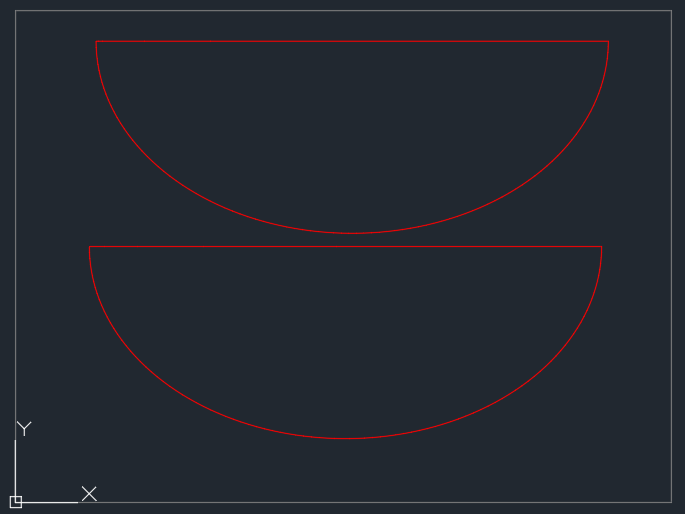
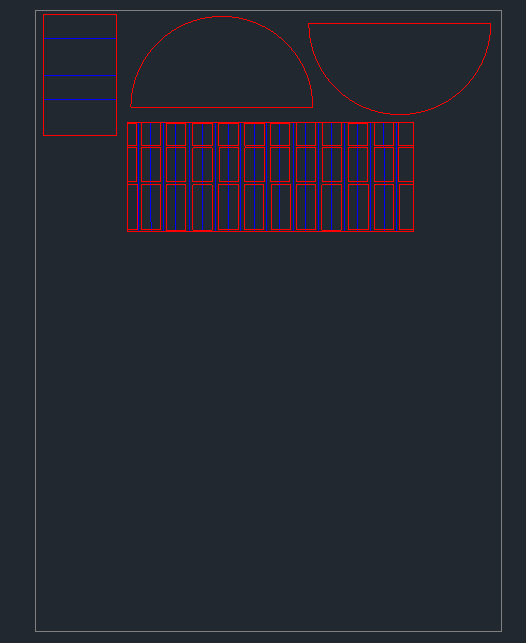
To bring our digital designs into the physical world, we used AutoCAD to make our building through laser cutting. We scaled the templates to a 1:32 scale, allowing us to test the proportions in a concrete model.
Drafting the Production Templates:
- In our CAD drawings, we separated cutting paths from folding paths using a clear color-coding system. The red lines represents where the material is completely cut out, while the blue internal lines act as score lines. These score lines cut only halfway through the material, allowing our group to cleanly curve into the smooth oval shapes.
- We intentionally drafted only half of the main building shell. By leaving one side open, anyone viewing the physical model can easily peer inside to see the internal floor arrangements, staircase alignments, and room layouts. This will be done by inserting our floor plans on each floor.
- Because our main pavilion is significantly longer and wider than the medical building, its outer shell could not fit onto the laser cut. We splitted the main pavilion's curved wall into two separate pieces so it could fit.
Preparing CAD Model for the Site


To construct the physical terrain model for Negishi Forest Park, we used AutoCAD to convert the topographic map into layers. This method allows us to transform a flat site plan into an accurate 3D landscape.
Tracing and Isolating the Terrain
- We imported our site map into AutoCAD and traced every contour line from the topographic overview. This gave us clean paths that follow the elevation changes of the park's natural hills and nature.
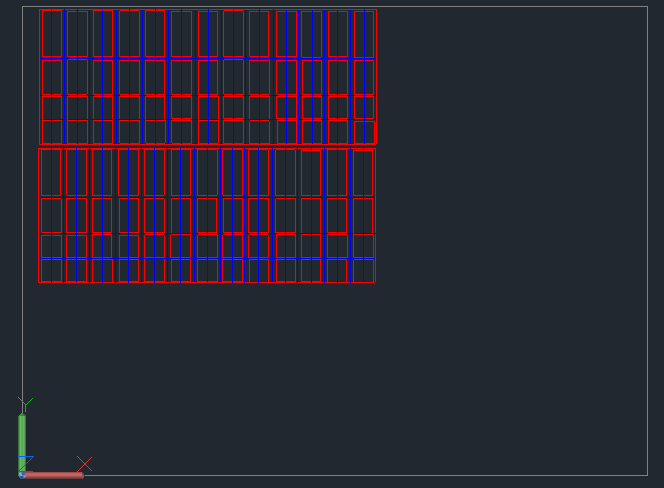
- Separating the Layers: Once the entire map was traced, we isolated each individual contour line and split them onto their own separate sheets. Each sheet represents a specific elevation level, and will be all pieced together to represent a similar elevation of the park.
- Systematic Labeling: To keep assembly organized, we numbered each isolated shape from lowest to highest elevation (A, B, C, D, ...). This helps us ensure that when the physical sheets are laser-cut, they can be layered/glued in the correct order without any mess ups.
Applying the 1:64 Scale Factor
For the physical terrain base, we put it into a 1:64 scale. This will make our model roughly 20.5x19.5 inches.
This site will have its own properly scaled building 3d printed with less detail, but will focus more on the environment of the area. We will do this by adding trees, and tiny buildings all across the site to show everyone how it would look like from a farther perspective.
Preparing CAD Model for the Site (P2)


The last step of preparing the Site for lasercutting is to put it in red lines. For the last couple of layers, we put it together in one sheet so we can save material.
Buildings for the Site
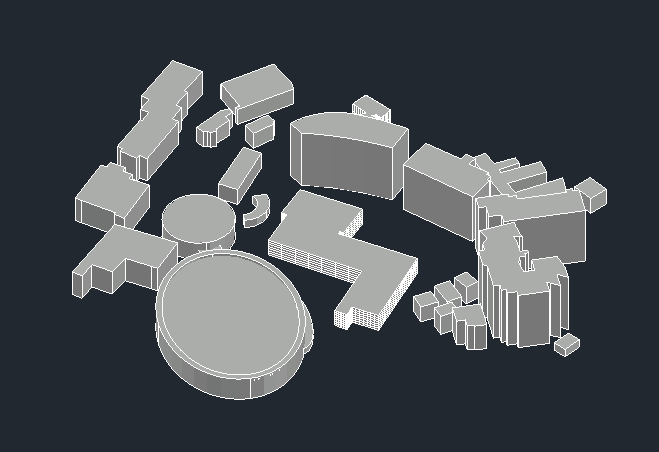

We used AutoCAD to model the actual structures located on the Negishi Forest Park site alongside our new pavilion. We replicated the massing and shapes of the surrounding buildings to show how our project fits into the environment. These buildings are put in a 1:64 scale to fit perfectly inside the site, which is also 1:64 scale.
Building Assembly
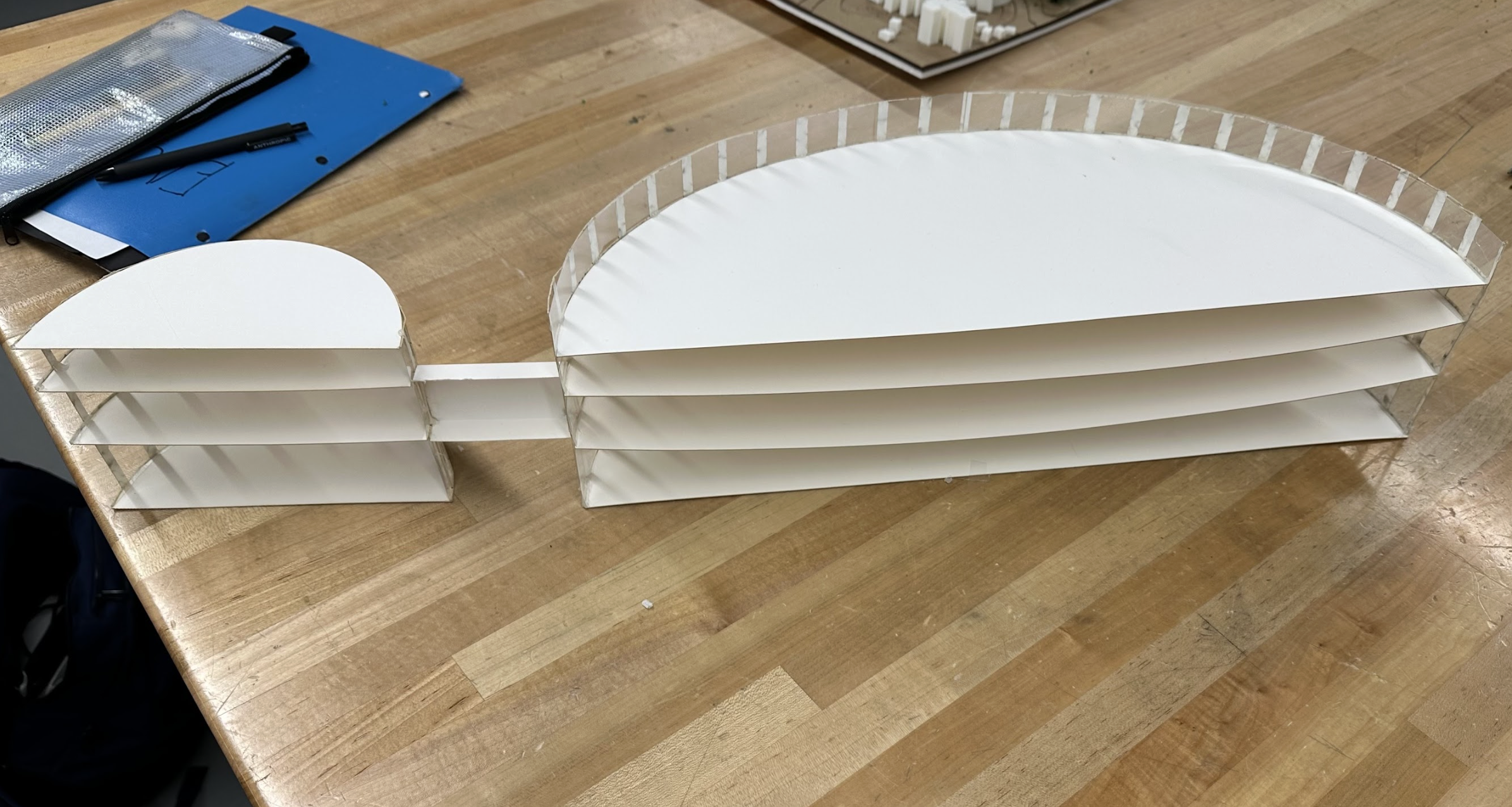

- We used hot glue as our primary adhesive, providing a bond to hold the curved walls securely to each horizontal floor plate. This ensured that the precise curvatures into our AutoCAD templates held their structural during assembly.
- To simulate glass and windows, we added clear Duralar plastic sheets along the curved outer shells of the pavilion and medical building. This film acts as a transparent wall, allowing viewers to see directly through the building. Using an X-Acto knife, cutting mat, and cutting guide, we were able to cut the sheets to fit perfectly.
Site Assembly


To construct the site, we stacked and glued the individual laser-cut sheets to form the 3D topography. This process brought the hills and valleys of Negishi Forest Park into real life.
Layering and Final Component Placement
- We integrated a dense foam base underneath the entire assembly to provide support, preventing the stacked sheets from warping.
- We used a paintbrush to coat each layer with wood glue evenly. This bonded the topographic cutouts from base layer A to the highest peaks.
- Once the terrain was dry, we referenced our digital map buildings to the 3D-printed buildings and our recovery pavilion complex directly onto the landscape. Using stick glue, we fixed each structure precisely into its real location to help complete the site.
Finalizing the Building


To complete the building, we formatted the final floor plans into the pavilion and included scale figures to bring a sense of realism and human proportion to the interior spaces.
- We imported our hand-drawn floor plans into Adobe Express to precisely resize it to correctly fit the model. We then printed it out, cut it out excess paper, and applied each sheet using stick glue.
- To give viewers an understanding of the building's true size and volume, we placed tiny scaled figures throughout all the floors. We added these figures with hot glue to ensure they dont fall out.
Finalizing the Site

To complete the environmental design of Negishi Forest Park, we added vegetation to mimic the actual landscape of the site.
Drilling And Placement
- To secure the model trees, we used a drill with a fine bit to create tiny holes throughout the site. These holes were sized to match the exact size of the model tree stems, ensuring a perfect fit.
- We mapped out the drill points across the hills and open spaces to mimic where the trees are located in the real park.
Reflection
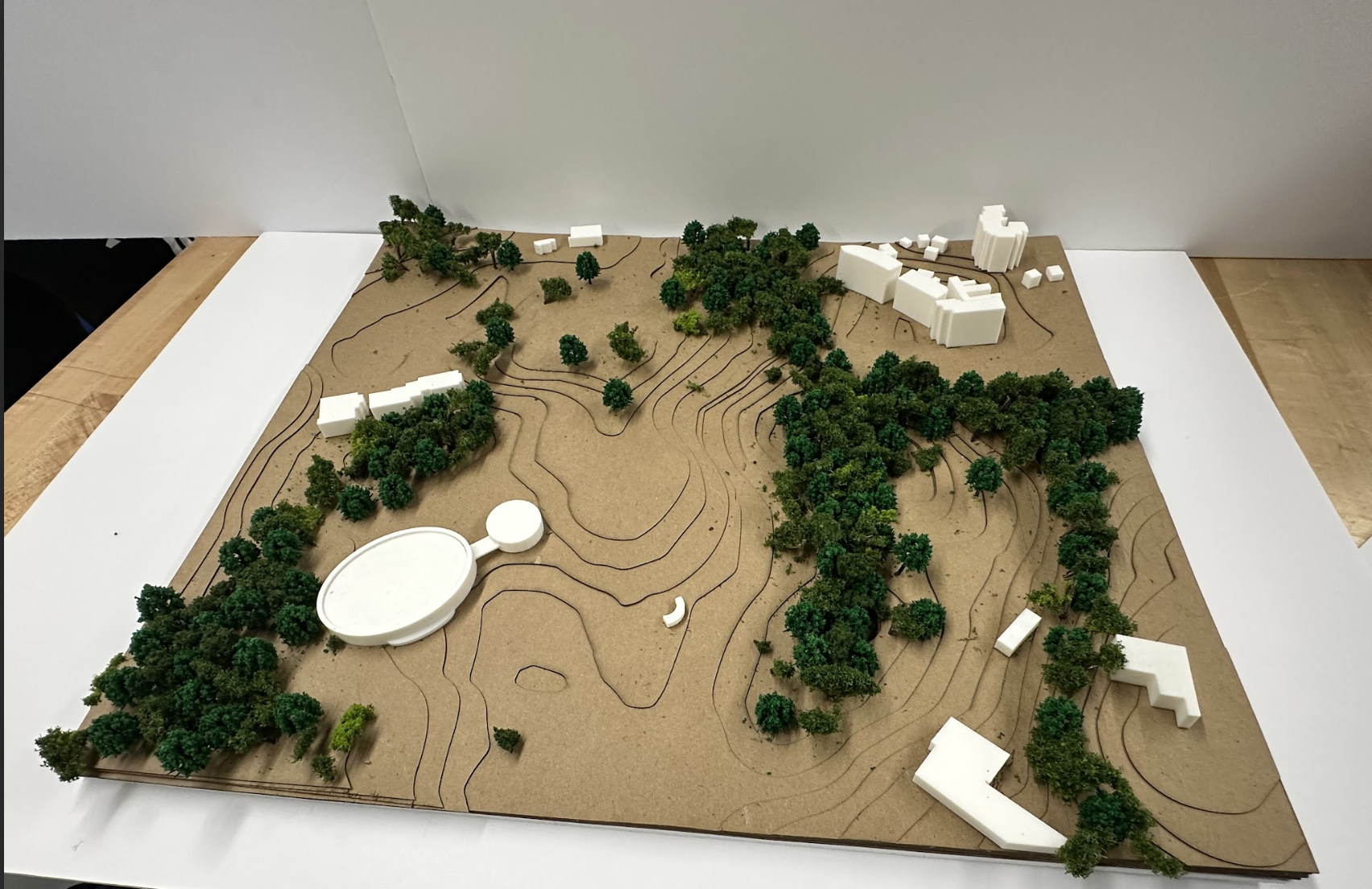
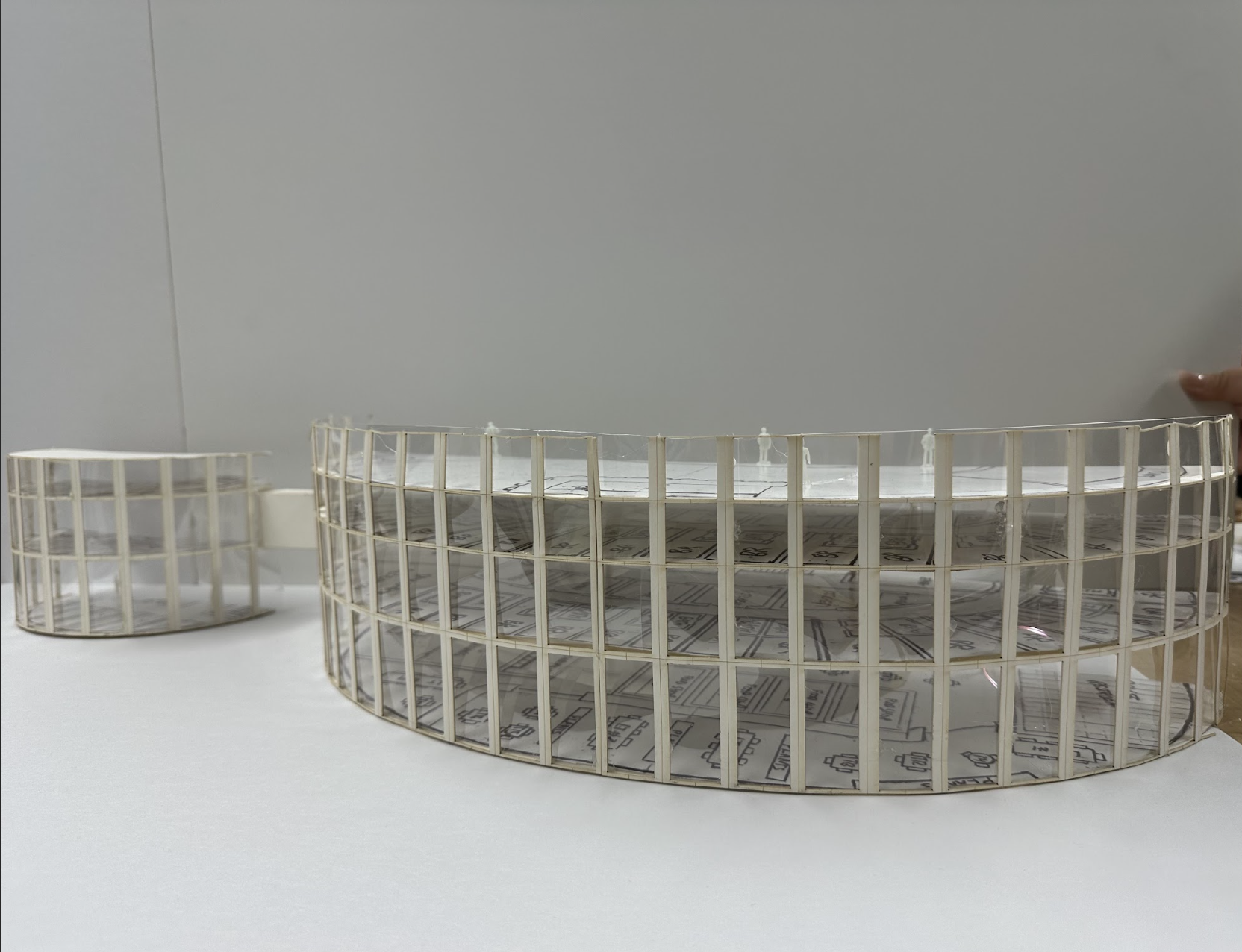
This physical model serves as a blueprint for a communities resilience, demonstrating how architecture can support a population during times of crisis. Beyond its role as a disaster recovery center, it also highlights how a structure can turn from everyday community spaces into emergency shelters. By showcasing this in a physical form, the project shows the role that thoughtful architecture plays in planning and disaster preparedness.
Instead of just making one building, our team also made a detailed 1:32 scale model of the inside of our pavilion, plus a separate 1:64 scale model of the surrounding park. Figuring out how to split the curved walls in CAD so they would fit on the laser cutter taught us a lot about how to solve real-world building problems.
Ultimately, adding the final details—such as hand-brushing the wood glue to prevent the topography from warping, drilling precise holes for the trees to anchor, and placing miniature scale figures—showed us that architecture is about more than just drawing buildings. It taught us how site terrain, technical execution, and interior detailing must all piece together to design a space that serves as a community.