Modular Adaptive Joystick Controller With Plug-In Attachments
by sonomaacademy1 in Circuits > Assistive Tech
47 Views, 2 Favorites, 0 Comments
Modular Adaptive Joystick Controller With Plug-In Attachments

We made a modular adaptive joystick controller designed to give users multiple ways to control a device based on their physical abilities. The main part of the project is a joystick with a large stable base and a button on the side.
We also created separate plug-in attachments, including a sip-and-puff controller, an IR sensor, and an extra button. Each attachment sits on its own smaller base and uses Velcro, so it can be moved, removed, or added to the main joystick setup. The attachments plug into the main joystick hub, making the design customizable and easier to adapt for different users.
Many people need assistive technology that can be adjusted to fit their specific needs. Instead of making one fixed controller, we wanted to create a system that could be changed depending on what type of input worked best for the user. The modular design makes it easier to test different control options without rebuilding the entire project.
The goal of this project was to make something that is:
- Accessible
- Customizable
- Stable
- Easy to modify
- Simple to connect and disconnect
Supplies

- Joystick module / Smaller base pieces for attachments (3d Printed)
- Push buttons
- Sip-and-puff sensor or switch
- IR sensor
- Wires
- Microcontroller, such as Arduino or similar board
- Breadboard or soldering materials
- Large base material, such as wood, acrylic, or cardboard
- Velcro strips
- USB cable or power source
- Hot glue, screws, tape, or other fasteners
- Computer for coding and testing
Downloads
3D Print the Main Base


After finishing the digital design, we 3D printed the main joystick base. Once it printed, we tested whether the joystick and button fit correctly.
During this step, we checked:
- If the joystick opening was the right size
- If the button could fit on the side
- If the base was stable
- If the print was strong enough to hold the parts
After the main base was printed, we placed the joystick into the center of the base and added the side button.
We secured the parts so they would not move around during use. The joystick became the main control, while the side button added another way for the user to select or activate something.
This was the first working version of our controller.
Attachments

Once the main joystick was built, we designed separate bases for the attachments. These included:
- A sip-and-puff attachment
- An IR sensor attachment
- An extra button attachment
Each attachment had its own 3D-printed base. We did this so the attachments could be placed in different positions instead of being permanently attached to the joystick.
This made the controller more flexible because every user might need the attachments in a different place.
Next, we added Velcro to the bottom of each attachment base. We also added Velcro to the main setup area so the attachments could stick in place.
Velcro allowed the attachments to be:
- Added
- Removed
- Repositioned
- Swapped out
This was an important improvement because it made the controller adaptable. Instead of rebuilding the controller, users could just move or replace an attachment.
Wire and Connect Everything to the Main Hub
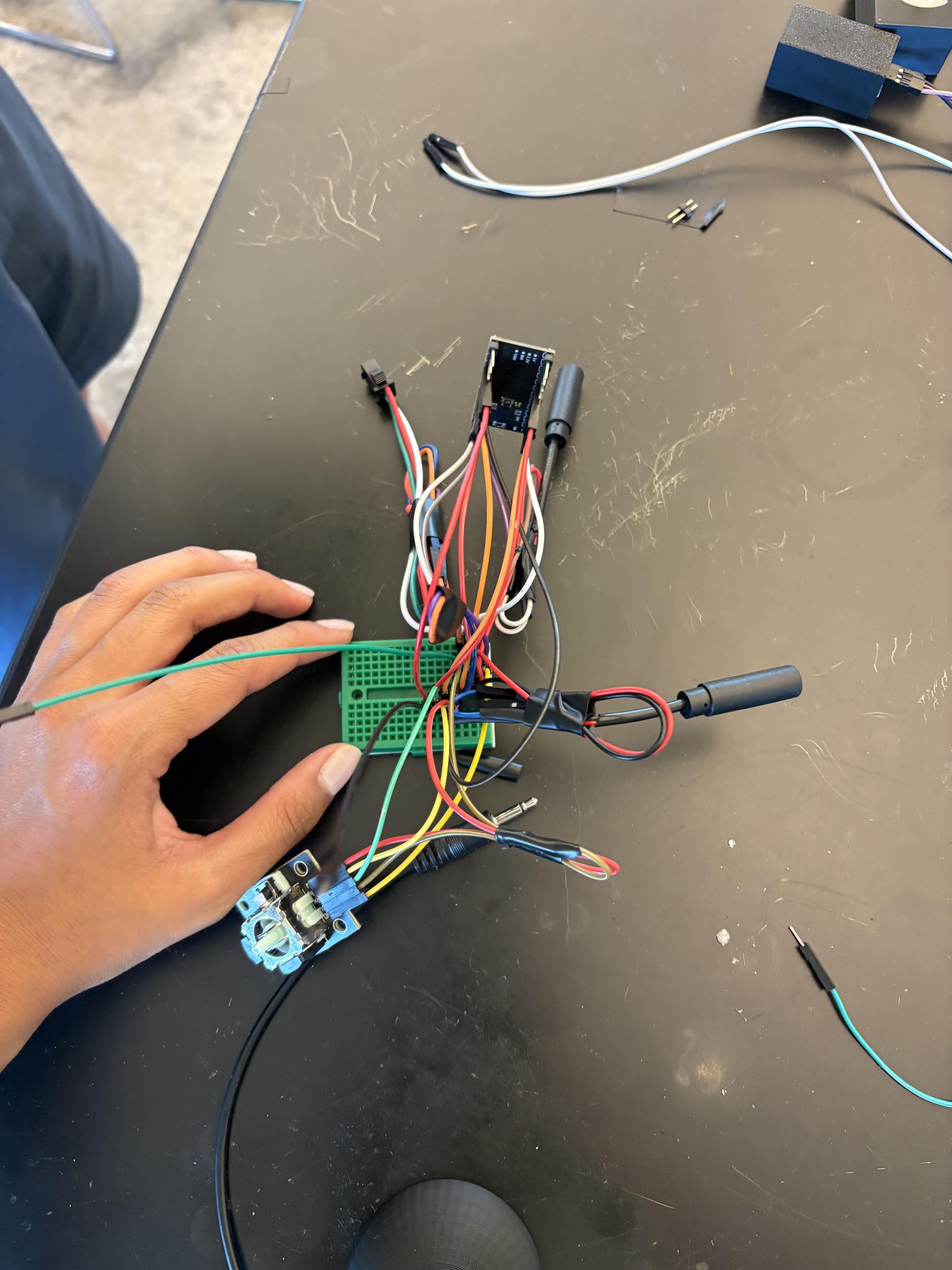

After the 3D-printed parts were assembled, we wired everything through the main hub. The wires were placed inside the main hub so the controller looked cleaner and the connections were more organized.
We connected the main joystick, side button, sip-and-puff attachment, IR sensor attachment, and extra button attachment into the hub. This allowed the hub to act as the center of the whole controller system.
The attachments were designed to plug into the main hub, so they could be added or removed without rebuilding the controller. This made the system more modular and easier to customize for different users.
One challenge was fitting and organizing all of the wires inside the hub. We had to make sure the wires did not get tangled or disconnected while the controller was being used.
To solve this, we kept the wiring inside the main hub and made each attachment connect back to the same central system. This made the final prototype cleaner, stronger, and easier to use.
What this step accomplished:
- Organized the wires inside the main hub
- Connected all input devices to one central system
- Made the attachments plug-in and removable
- Kept the outside of the prototype cleaner
- Made the final controller more modular and customizable
DEMO!
https://drive.google.com/file/d/1x71HhQYIo64F6rGuKHBL594EueJ2_KtH/view?usp=sharing