Nesting Dice Set


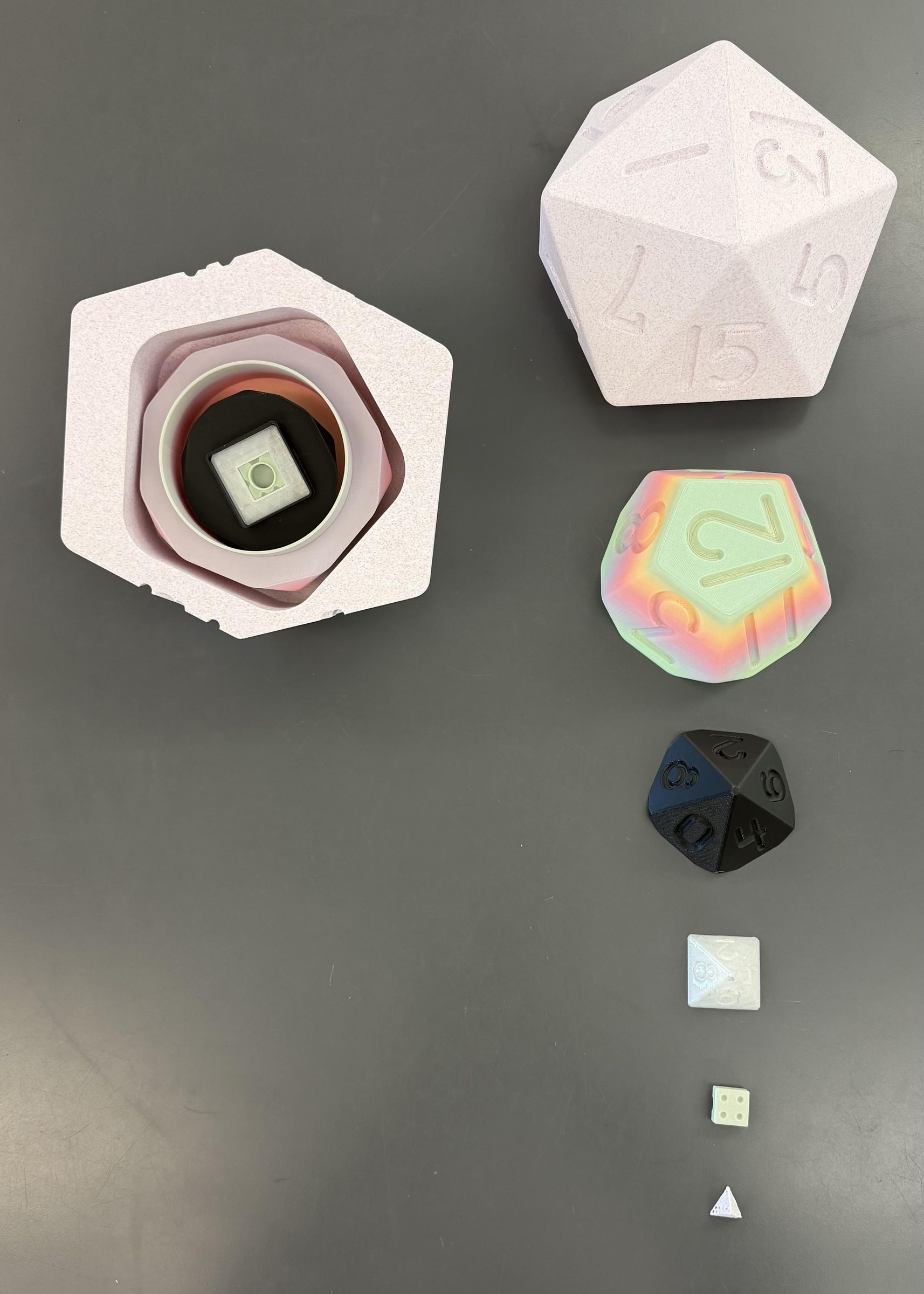
The Nesting dice set is a revolutionary toy design created and designed by Stella Weston.
It combines the two legendary concepts that have never before been combined into one pure machination. The nesting dice set, which took the famous Russian nesting doll and turned it into a set of dice, including a d4, a d6, a d8, a d10, a d12, and the world-renowned d20, revolutionizing the ease of which one plays with dice and manages their dice sets, while cleverly ensuring the downfall of the Russian nesting doll market. The only thing you need to make this masterpiece yourself is your wits, a 3d printer, and knowledge of modeling.
Supplies
3d printer
PLA filament
Modeling software (fusion 360)
Time
The Nesting Phase
Get your hands on a 3d printer or 3d printer-adjacent device, and ensure it is fully loaded with fillament.
Download and ensure your favorite modeling software is ready and up-to-date. I personally recommend Fusion 360.
Optional but highly recommended: Download a model of a dice set. You do not necessarily need to; however, doing so makes this process significantly easier.
Below I attached the model I used initially to model my dice.
The Courtship Phase




Now, with the modeling software, you must now either import the dice set model that was downloaded, or forge your own path and make your own model of a dice set.
Once the dice set has been completed, you should then arrange them into a particular pattern, most considerably the order you wish to have them. Personally, I put them into a pattern where the die with the least amount of sides (the d4) was put in the middle, and slowly gained more sides as it went outward.
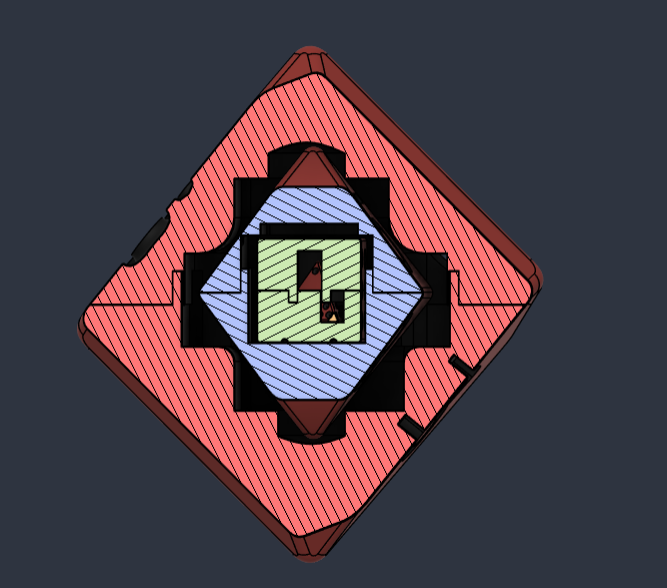
Next, you would take your middle, the d4 in my case, and put it to the side. You then take the next layer and cut it in half using the modeling software. For me, I used a d6. Next, you would scale up the d6 until the d4 fits comfortably inside of it. Then, if your inner shape is a symmetrical shape, with one side down and one side up, then you would be able to extrude the flat face into the shape into the interior of the dice it is going to, for instance, the d4’s triangular shape cutting out the inside of the d6’s square shape. Your result should be something similar to the picture below. You can then either extrude the bottom to cut out the top of the die in a similar fashion, or make a hole on the other half that accommodates the d6.
Now, this process is prone to accidentally making holes in the exterior of the shell. If this problem does present itself, you can either take it on yourself to fill in these holes, or undo the original cut and scale up the exterior. (Notice how in the 3rd picture has a hole in it that I did not notice until later)
Now, you realize from that picture that the shape doesn't actually accommodate the d4 inside. This is because you need to extend the hole by either cutting into the sides or using push/pull. Be mindful about creating more holes in that way, however.
Then, you need some way for the top half and the bottom half to hold themselves together. I personally recommend using a friction-based holding mechanism, as that would be easiest; however, if these were at a larger scale, then I would recommend making a screw component. But instead, what I did was I thin-extruded the top to cut out a shape in the bottom, and then did the same thing but with actual material, creating a shape that looks something like the 4th image.
This is to ensure that the structure can hold itself together when constructed, instead of being just 2 separate parts.
Next, you can repeat this process with the next die. I went with the d8 next, which is not as simple of a shape as the d4 or d6. It was relatively simple to put the d6 inside the d8; I simply did the same process as shown earlier.
However, since the way I cut the d8 in half, it was significantly more difficult to put it in the next shape, the d10. It may be easier to use different methods, but what I was able to do was to hide the bottom of the d8 and use the surface still present in the middle to extrude down, and then extruding further down with the center.
Next, what I did was I scaled up the d10 so that it was easier, and I pushed in the walls to expand them. I also made a hole with a rounded bottom in the bottom to more easily contain the die. You may use many other methods; some may be more effective than my strategy. I essentially shoved the d8 into the d10 until it fit.
At this point, it should come relatively natural to you, having done this process so many times over. The d12 and d20 are nothing compared to the early steps.
Once you have completed this process with all dice, you should now be almost ready to print. The final step is to arrange the parts with one side facing down, and the other the open side.
Now, select all these items and make them all a set of components, and select that set of components to be exported as your preferred 3d print file. I chose 3mf for its ease of use.
The Laying Phase
.jpeg)
.jpeg)
.jpeg)
With your files ready, take them to the 3d printer you acquired earlier, and print them. With the sizing of things, make sure that you either scale everything by the same amount, or make sure that their sizes are not changed. Based on the size of your creation, it may be easier to print the parts in separate prints. Optionally, you may also want to make several smaller prints to ensure your design is functional. If these smaller prints have errors in them, make sure that the errors are not a part of the model you are printing.
To make each die stand out more, I recommend using different colors of filament for each one.
Now that everything is printed, you should make sure to enjoy your final product! Below, I have attached my 3d print file I used to print the final product.