Pandabyte DHT11 Sensor Module: Temperature and Humidity Guide
by pandabyte in Circuits > Arduino
56 Views, 0 Favorites, 0 Comments
Pandabyte DHT11 Sensor Module: Temperature and Humidity Guide
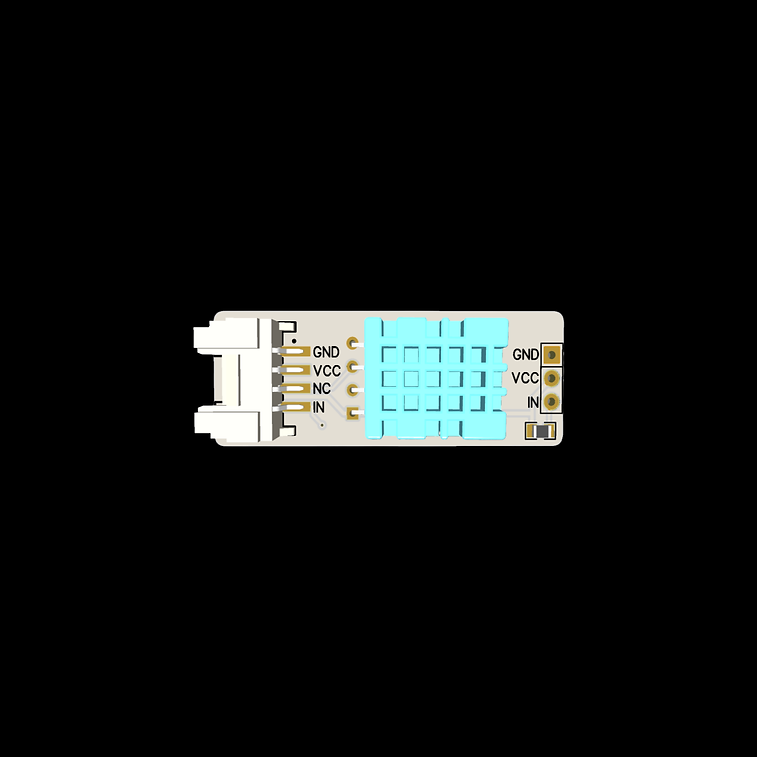
Pandabyte DHT11 Sensor Module is a simple environmental sensing module used for learning temperature and humidity measurement with microcontrollers such as Arduino compatible boards, ESP32, or Raspberry Pi Pico.
The module uses the DHT11 digital temperature and humidity sensor to measure surrounding environmental conditions.
A key feature of this module is that it supports two connection methods:
- Traditional 3-pin header for standard jumper-wire connections
- OR
- 4-pin Grove connector for quick plug-and-play prototyping without complex wiring
In this guide, you will learn:
- Module pin configuration
- Temperature measurement
- Humidity measurement
- Circuit connections
- Arduino programming examples
Supplies

Hardware:
- PandaByte DHT11 Sensor Module
- Development Board (We will use PandaByte xC3m ESP32C3 Dev board)
- Grove Shield/Expansion Board
- Cables: Dupont, USB, and Grove
Software:
- Arduino IDE
- DFRobot DHT11 Library
- https://github.com/DFRobot/DFRobot_DHT11
Circuit Connections
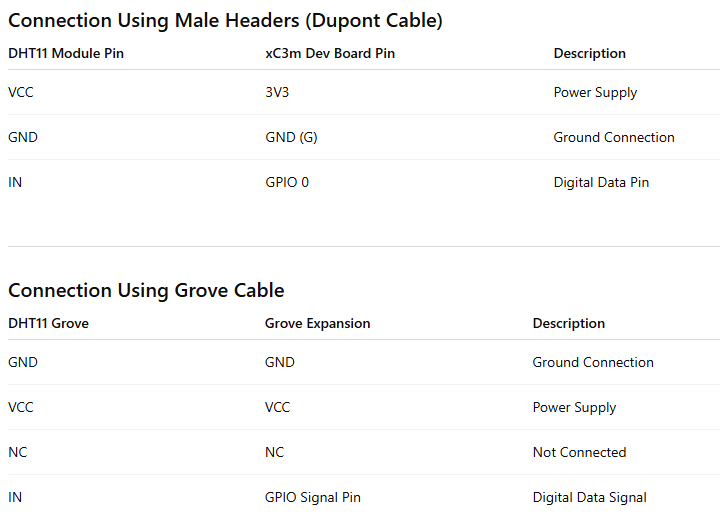
Perform the connection based on the table.
Install the Library
Open Arduino IDE
Go to:
- Sketch → Include Library → Manage Libraries
Search for:
- DFRobot_DHT11
Install the library
Programming
Program: Read temperature and humidity values from the DHT11 sensor and display them on Serial Monitor.
Output
- The Serial Monitor will display:
- temperature in °C
- humidity percentage (%)
Important Info
The module uses the DHT11 digital temperature and humidity sensor.
The DHT11 sensor provides:
- temperature readings
- relative humidity readings
The sensor communicates using a digital single-wire protocol.
The IN pin must be connected to a digital GPIO pin.
Typical DHT11 specifications:
- Temperature range:
- 0 °C to 50 °C
- Humidity range:
- 20% to 90% RH
Sampling rate is relatively slow. Reading once every 2 second is recommended.