Professional Line Follower V1


Line follower robots are one of the most exciting entry points into robotics, but pushing them to high-speed performance is where the real engineering challenge begins. In this project, I designed and built a compact yet powerful high-speed line follower robot based on the STM32F103 microcontroller, optimized for precision, speed, and flexibility.
Unlike basic line followers, this robot is equipped with an array of 12 IR sensors, allowing it to detect the line with high accuracy even at sharp turns and high velocities. To achieve fast and responsive motion, I used Pololu N20 10:1 high-speed micrometal gear motors, driven by dual onboard 1.8A motor drivers, all integrated into a custom-designed PCB.
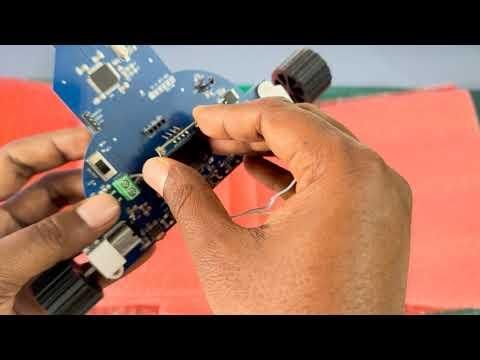
What makes this robot especially versatile is its rich set of features for both development and control. It includes an OLED display for real-time feedback, four tactile buttons for manual operation and tuning, and support for both Bluetooth control and IR remote control via a built-in IR receiver. This combination makes it not only a competitive racing robot but also an excellent platform for experimentation, debugging, and learning advanced control techniques.
Whether you are a robotics enthusiast aiming to build a competition-grade line follower or someone interested in mastering embedded systems with STM32, this project will guide you through both hardware design and practical implementation.
This is totally Open Source.
Supplies


Here’s the list of all the parts and tools you’ll need to bring this Line Follower to life! I tried to keep the design simple and based on easily available components so anyone can recreate it. You can substitute equivalent parts if you already have something similar in your toolbox.
If you plan to order the PCB with assembly service from JLCPCB, you don’t need to buy the individual electronic components separately — they will be assembled for you. The only items you’ll need to source yourself are listed below. The complete BOM list is also attached.
Hardware Components:
- N20 Micro Metal Gear Motor 6V, 1000RPM (Aliexpress.com)
- Solarbotics RW2 Wheel (Pololu.com)
- Pololu Micro Metal Gearmotor Bracket (Pololu.com) (Aliexpress.com)
- 7.4V 2 Cell Lipo Battery (Aliexpress.com) (not sure about the size)
- LTH1550-01 Photointerrupter Sensor (Aliexpress.com)
- 0.96-inch I2C OLED Display (Aliexpress.com)
Tools:
- Any Soldering Iron (Aliexpress.com)
- Any 3D Printer (Aliexpress.com)
- ST Link V2 Programmer (Aliexpress.com)
[Note: Some of the links in the parts list are affiliate links. If you choose to buy through them, it won’t cost you anything extra, but it helps support my projects. Thanks for your support!]
Downloads
Schematic Design


This high-speed line follower robot is built with performance, precision, and flexibility in mind. The system integrates multiple sensors, efficient motor control and power management, and real-time feedback for optimal line tracking.
The following are the main design blocks in the schematic.
Microcontroller
At the core of the robot is the STM32F103RBT7 microcontroller. This ARM Cortex-M3–based MCU was selected for its high processing speed, reliability, and widespread availability, making it ideal for real-time control applications like line following. Two external crystal oscillators are added to the design.
Line Detection System
The robot uses 12 IR sensors (LTH1550-01) arranged in an array to detect the line position accurately. This high sensor count enables better resolution and stability, especially at high speeds and sharp turns. But increasing the number of sensors definitely increases the complexity of the code. Each sensor includes an IR LED and a IR receiver.
Motor and Driver
For propulsion, the robot uses N20 micro metal gear motors, known for their compact size and high RPM capabilities. Each motor is controlled using a dedicated DRV8838DSGR motor driver IC, ensuring efficient and precise motor control with low power loss.
Display and Debugging
A 0.96-inch I2C OLED display is included for real-time debugging and system monitoring. It allows the user to visualize sensor readings, motor status, and tuning parameters directly on the robot.
Power Management
The system is powered by a 2-cell (7.4V) LiPo battery, providing a good balance between weight and performance. Two voltage regulators are used for stable operation:
- SSP1117-3.3V → Supplies 3.3V to the microcontroller
- ZLDO1117QK50TC → Supplies 5V to sensors and peripherals
This separation ensures noise-free and reliable power distribution across sensitive components.
Remote Control Capability
To enable wireless control, the robot includes an IRM1838B IR receiver module. This allows the user to remotely start, stop, or adjust operation modes, adding flexibility during testing and competitions.
Overall, this design focuses on high-speed performance, accurate line detection, and user-friendly debugging features. With a powerful microcontroller, precise sensors, and efficient motor drivers, the robot is well-suited for competitive line-following applications.
The design was made in EasyEDA. The complete schematic is attached below.
PCB Design & Assembly


The PCB for this project was designed using EasyEDA, an online and user-friendly EDA tool that integrates schematic capture, PCB layout, and component libraries in a single platform. I chose EasyEDA because of its intuitive interface, extensive component database, and seamless integration with manufacturing services, which significantly speeds up the design-to-production workflow. While designing the PCB, I focused on both functionality and aesthetics—ensuring clean signal routing, proper power distribution, and noise minimization, while also keeping the layout compact and visually organized. Special attention was given to motor driver traces and power lines to handle current efficiently, and to sensor routing for accurate signal reading.
For fabrication, I used JLCPCB due to their affordability, fast turnaround time, and reliable quality, which makes them a popular choice among hardware developers. One major advantage of using EasyEDA is its direct integration with JLCPCB, allowing me to easily export and order the PCB without compatibility issues.
To further simplify the build process, I opted for JLCPCB’s assembly service (PCBA). This service allowed most of the surface-mount components to be pre-assembled professionally, saving significant time and reducing the chances of manual soldering errors. The assembled board arrived with all essential components mounted, except for larger or external parts such as the motors, OLED display, and IR sensors, which were later soldered manually. This hybrid approach provided both convenience and flexibility during final assembly.
Overall, using EasyEDA along with JLCPCB’s manufacturing and assembly services made the entire PCB development process faster, more reliable, and beginner-friendly while still maintaining a professional-quality result.
3D Design & Mechanical Assembly


To improve both the durability and performance of the robot, I designed several custom mechanical parts using Tinkercad. This allowed me to create lightweight, precise, and fully customized components tailored to my PCB and overall robot structure.
Sensor Protection
A custom sensor cover was designed to shield the IR sensors from external interference, such as ambient light and physical disturbances. This helps ensure more reliable and consistent line detection, especially in competitive environments.
Battery Housing
I also designed a dedicated battery case to securely hold the 2-cell LiPo battery in PCB. This not only protects the battery but also helps maintain proper weight distribution for better stability and balance during high-speed movement.
Ball Caster Mechanism
For smooth movement, I created a 3D-printed ball caster using two metal balls. This reduces friction and allows the robot to glide more efficiently, improving maneuverability and speed.
Custom Wheels
I also design wheels for N20 motors. If you don't like to buy the wheel, then you can use this 3D-printed wheel. But this wheel has a gripping problem, and you can improve it by using a silicon tube.
All of these parts were 3D printed based on my designs, and the design files are attached so others can easily replicate or modify them for their own projects.
Overall, using Tinkercad for 3D design made it easy to rapidly prototype and customize mechanical components, resulting in a more robust, efficient, and competition-ready robot.
Programming


This code for the robot has been developed using the STM32 Cube IDE. I have uploaded the program to the board using a ST Link V2 programmer. If you have never used ST Link before, you can see some online tutorials on it.
The full source code is provided in my GitHub Repository. Here is the link: https://github.com/taifur20/Line_Follower_V1
The code is developed based on the PID algorithm. For better performance, you may need to change or tune the PID parameters for your case. Based on the track complexity and the track width, your logic may be changed or updated. You may also add some new logic.
Calibration & Run


In the attached videos, I demonstrated how to configure and tune the line follower. The sensor value can also be easily read with the help of the button and the display.
For the proper calibration, you need to place the robot on the actual track and press the up button. The robot will first turn to the right and then turn to the left to read the minimum and maximum values in that environment and decides the threshold.