Read Modbus Smart Meters Over Wi-Fi (No Ethernet Cabling Needed)
by skezz000000 in Circuits > Electronics
85 Views, 0 Favorites, 0 Comments
Read Modbus Smart Meters Over Wi-Fi (No Ethernet Cabling Needed)

I needed to pull power usage data from a standard KELE electric meter in a utility closet. The meter outputs Modbus RTU via RS485, but running a new Ethernet cable through the building’s fire-rated walls was going to be an expensive nightmare.
Instead of drilling holes and pulling wire, I used an industrial wireless serial server to grab the Modbus data, convert it to JSON, and shoot it over the existing Wi-Fi network. Here is how you can set up a transparent wireless bridge for any RS485 smart meter in about 15 minutes.
Supplies
- A standard RS485 Smart Electric Meter (I am using a KELE meter)
- Wireless Serial Server
- Short twisted pair copper wire (for RS485)
- A 12V DC power supply
The RS485 Hardware Wiring

The hardware setup is straightforward. You only need to bridge the serial connection and provide power.
- Locate the RS485 terminal block on your electric meter.
- Run a short piece of twisted pair wire from the meter to the serial server. Make sure you connect A to A (or D+) and B to B (or D-). Do not cross them.
- Connect your 12V DC power supply to the power terminals on the gateway.
- Once powered on, attach the Wi-Fi antenna. The device will boot up and create its own default AP (Access Point) for initial configuration.
Wireless Network & Serial Configuration
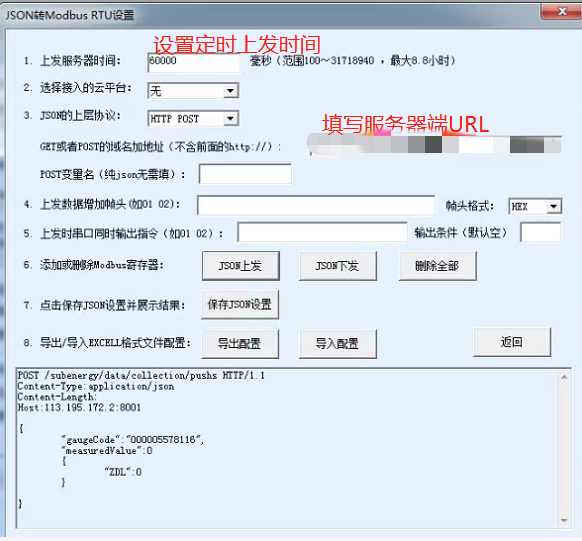
Connect your laptop to the default Wi-Fi network of the gateway, open your browser and log in to the Web UI. We need to set the gateway serial settings to match the factory defaults of the meter.
- Navigate to the Serial Port Parameters section.
- Set the Baud Rate, Data Bits, and Parity to match your meter (typically 9600, 8, None, 1).
- Go to the Wi-Fi Settings and switch the module to STA Mode (Station Mode).
- Scan for your local building Wi-Fi and enter the password. The gateway will now act as a wireless client on your main network.
Modbus to JSON Conversion Setup

This is the most crucial step if you want to push data directly to a web server or cloud dashboard without writing complex Python parsing scripts.
Select the Advanced or Cloud tab in the gateway interface. Configure protocol conversion to decode the raw Modbus RTU hex data into clean JSON payloads.
You will need to specify the Holding Registers you want to read (Voltage, Current, Total kWh, etc.) as per your meter datasheet. Enter here your target Cloud server IP or MQTT broker address.
Viewing the Live Data


Save the configuration and reboot the serial server.
The gateway will connect to your local Wi-Fi, poll the electric meter via RS485, and automatically HTTP POST (or MQTT publish) the JSON payload to your server.
As you can see in my web server logs and cloud display, the real-time energy data is flowing smoothly. No drilling, no cable pulling, and you get enterprise-grade telemetry from a dusty utility closet using just Wi-Fi.