Rebuilding an Amplifier: Scan, Etch & Solder Your Own PCB | CvSU - Main Campus S.Y. 2025-2026 | BSECE 2-2: Group 2
by jannapaulheenece2-2 in Circuits > Speakers
216 Views, 1 Favorites, 0 Comments
Rebuilding an Amplifier: Scan, Etch & Solder Your Own PCB | CvSU - Main Campus S.Y. 2025-2026 | BSECE 2-2: Group 2


Cavite State University - Don Severino Delas Alas Campus
Bachelor of Science in Electronics and Communications Engineering
S.Y. 2025-2026
ECEN 70A - ELECTRONICS 2 (ELECTRONICS CKT ANALYSIS & DESIGN)
Instructed by: Engr. Edwin Arboleda
PROJECT MEMBERS:
- Alexander Martirez - Mastermind
- Almarie Chalzae Lopez - Innovator
- Samuel Bryan Daduya - Builder
- Norraine Nikka Guanzon - Tech Lead
- Janna Paulheen Landicho - Analyst
- Zean Kimberly Villaluz - Support
“Built together, stronger together.”
BS ECE 2-2
Project Description:
Audio amplifiers play a vital role in bringing music and audio to life by boosting low-level signals into powerful outputs capable of driving speakers. In this project, we built a custom 30W + 30W stereo audio amplifier system from the ground up, combining traditional amplifier circuitry with modern audio features such as Bluetooth connectivity, an FM tuner, and an auxiliary (AUX) input.
Our journey began by studying an amplifier schematic and testing the design in NI Multisim. Simulating the circuit before assembly allowed us to observe its behavior, identify potential issues, and make adjustments to improve its performance and stability.
Whether you are interested in learning electronics, improving your soldering skills, or building your own audio system, this project provides a practical and engaging introduction to amplifier design and construction. By following these steps, you can create a versatile audio amplifier that combines multiple audio input options into a single, functional sound system.
TESTING OF AMPLIFIER YOUTUBE LINK: https://youtube.com/shorts/C-meVW6VNSM?si=Po72cjEKiDKCvs5L
Supplies
PCB & Circuit Materials
- Copper clad board (single-sided)
- Etching solution: ferric chloride
- Printed PCB layout (laser print)
- Glossy paper / transfer paper (for toner transfer method)
- PCB resist marker (alternative to printing)
- Drill bits (small sizes like 0.8mm–1.5mm)
- Sandpaper (for cleaning copper surface)
Electronic Assembly Materials
- Solder wire (lead or lead-free)
- Flux
- Jumper wires / hookup wires
- Heat shrink tubing or electrical tape
- Terminal blocks
- Thermal paste
- Heat sinks
- Screws, nuts, spacers
- 22AWG solid wire red
- 22AWG stranded wire
- 9V battery for multi-tester
Cleaning & Finishing Materials
- Isopropyl alcohol (for cleaning flux residue)
- Cotton buds / cloth
PCB Fabrication Tools
- Drill machine (mini drill or rotary tool)
- Plastic container (for etching)
- Gloves (for handling chemicals)
Soldering Tools
- Soldering iron (25W–60W)
- Soldering iron stand
- Desoldering pump (solder sucker)
- Desoldering wick
- Tip cleaner (sponge or brass wool)
Electrical Tools
- Digital multimeter (very important for testing)
- Power supply (bench supply or adapter)
- Oscilloscope (optional but useful for amplifier testing)
Power
- Transformer 15V 750 mA
- Mini speaker
Others
- Case 150 mm (width) × 200 mm (length)
- Bluetooth Module
- Selector Switch
- FM Tuner
- Auxiliary Input
- Laptop for Multisim Testing
- Oscilloscope for Testing
Components List on the Amplifier KIT:
Transistors:
- Q1 – 2N3053
- Q2 – 2N3053
- Q3 – 0139
- Q4 – 0139
- Q5 – 0139
- Q6 – 0139
- Q7 – BC2 (likely BC207 / BC208 type)
- Q8 – 0139
- Diodes:
- D1
- D2 – Zener diode (≈3V–8V range)
- Input/Output:
- MIC input
- Speaker output
- Tuner / Tape / Rec selector switch
- Variable Resistors:
- VR1
- VR2
- VR3
- VR4
Resistors:
- 51K
- 470Ω
- 12K
- 27K
- 390K
- 680K
- 8Ω
- 2K2
- 1K2
- 1K9
- 10K
- 2K2
- 390Ω
- 820Ω
- 5Ω
- 2K2
- 47Ω
- 3K3
- 700Ω
Capacitors:
- 220µF
- 470µF
- 1000µF
- 100µF
- 47µF
- 1µF
- 4.7µF
- 0.01µF
- 0.022µF
- 0.0033µF
- 0.0022µF
- 0.001µF
Selector switch:
- TUNER
- TAPE
- REC
- Others:
- MIC jack
- Speaker output terminal
- Power supply filter capacitor
- Ground connections
Run the Schematic Design Into NI Multisim
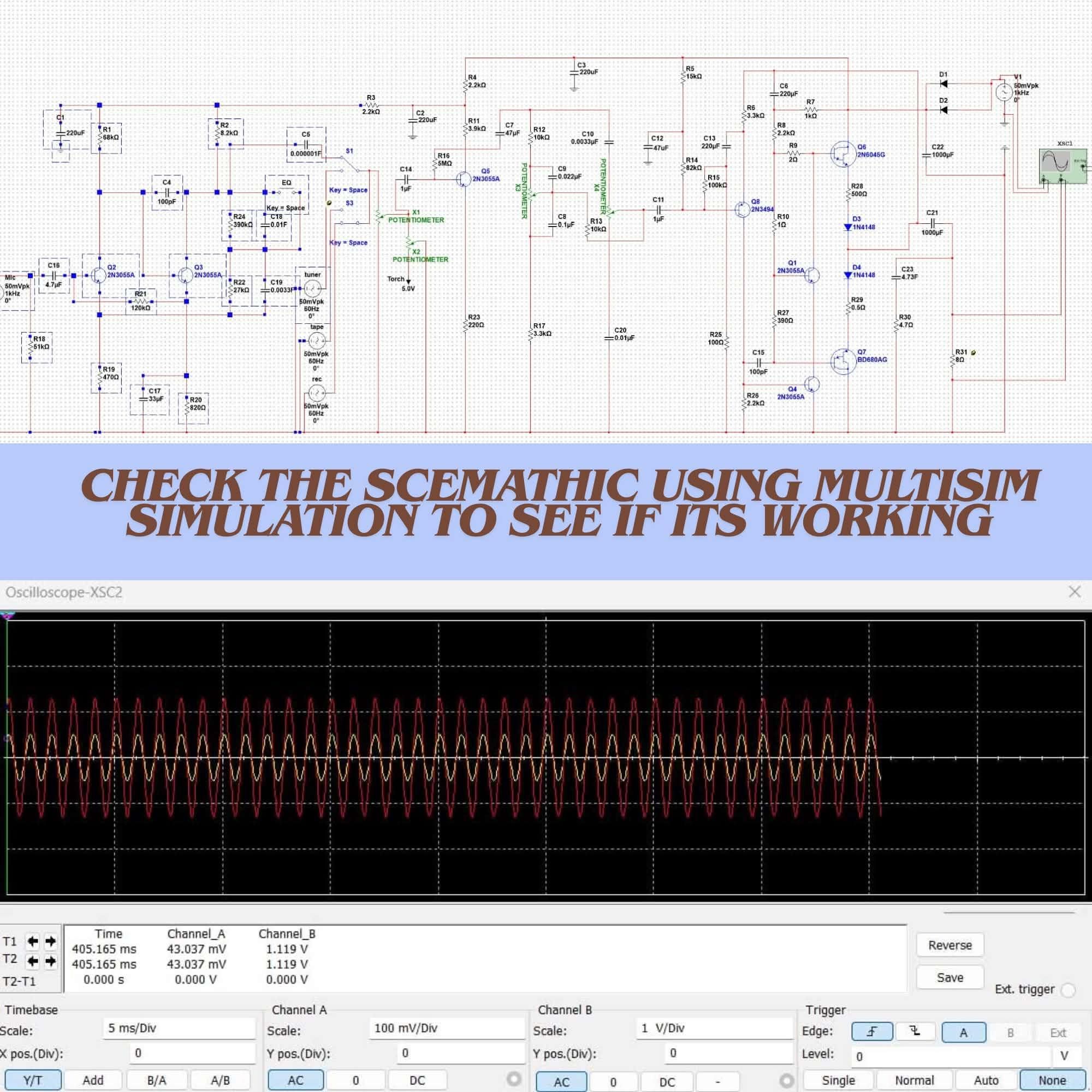
Before we started building the amplifier, we first searched for a suitable schematic diagram from a reliable online source and used it as the foundation for our design. Rather than immediately assembling the circuit, we decided to test the schematic in NI Multisim to verify that it would function properly and to better understand how the amplifier would behave under different conditions. Simulating the circuit allowed us to examine its operation in a controlled environment, helping us identify potential issues before moving on to the actual build.
While reviewing and testing the circuit in Multisim, we discovered a problem related to a 15 kΩ resistor. The amplifier did not operate as expected with this value, which prompted us to investigate further. After several tests, we found that replacing the 15 kΩ resistor with an 18 kΩ resistor improved the circuit's stability and overall performance. Once this adjustment was made, the simulation produced more reliable results, giving us greater confidence in the design.
This experience showed us the value of thoroughly analyzing and simulating a circuit before construction. By making small but important adjustments during the design stage, we were able to avoid potential problems later in the project and ensure that the amplifier would perform more reliably when physically assembled.
Buy the Materials Needed + Case

In this step, it is important to determine the appropriate size of both the enclosure (case) and the copper-clad board before proceeding with the PCB layout and assembly. Proper sizing ensures that all components will fit comfortably and that the final design will be practical and organized.
In our case, we selected the largest available copper-clad board purchased online to make sure it could accommodate the amplifier kit we are working on. The dimensions of the copper board we used are 150 mm (width) × 200 mm (length). This size provides enough space for routing the PCB layout and positioning the components properly without overcrowding the design.
For the enclosure, we also chose the largest case we could find that would reasonably fit the copper board. This is important because the case must not only house the PCB but also provide additional space for other essential components such as transformers, wiring connections, and cooling elements. Adding extra allowance inside the case is highly recommended to ensure proper ventilation, easier assembly, and safer arrangement of internal parts.
By planning the physical dimensions ahead of time, it becomes easier to avoid fitting issues later in the project and ensures a more efficient and well-organized final output. The other required materials for the build are listed below.
Design PCB Layout Using KiCAd

After we verified the amplifier circuit through simulation, we moved on to one of the more challenging parts of the project—designing the printed circuit board (PCB) using KiCad. At this stage, the schematic was imported into KiCad, where we assigned component footprints and began arranging everything into a workable and efficient layout. It quickly became clear that PCB design is not just about placing components, but about carefully balancing space, signal flow, and practicality.
As we worked through the layout, we applied proper routing techniques to reduce noise and interference, while also making sure the signal paths were as clean and direct as possible. We paid close attention to component placement, trace widths, and grounding, since even small layout decisions can have a big impact on the stability and performance of the amplifier. It was a detailed and sometimes difficult process, requiring multiple adjustments to get everything right.
The PCB design was based on an amplifier schematic inspired by a Nakamichi amplifier circuit reference, which gave us a solid and proven foundation to build upon. Using this reference helped guide the overall structure of the circuit, while still allowing us to make improvements based on what we observed during simulation. Once the layout was finalized, we ran KiCad’s design rule checks (DRC) to ensure the board met all electrical and manufacturing requirements before moving forward to fabrication.
Overall, this stage taught us that PCB design is a careful and sometimes time-consuming process, but also one of the most important steps in turning a circuit idea into a real, working system.
Iron the Printed PCB Into the Copper Clad Board

In this step, we transferred the printed PCB layout onto a copper-clad board using the heat transfer (ironing) method, which turned out to be both delicate and very hands-on. Before anything else, we made sure to properly clean and polish the copper surface, removing any oxidation, dirt, or grease. This step was important because even small impurities could affect how well the toner sticks to the board.
Once the surface was ready, we carefully aligned the printed layout (from a laser printer) face-down onto the copper-clad board. With everything in place, we used a household iron to apply steady heat and pressure across the paper. As the heat built up, the toner slowly melted and transferred onto the copper surface, forming the circuit pattern we had designed.
During the ironing process, we had to be extra careful to maintain even pressure and consistent temperature across the entire board. Any uneven heating could result in broken traces or incomplete transfer, so we slowly worked across the surface to ensure all details of the layout were properly printed onto the copper.
After sufficient heating, we allowed the board to cool down before gently peeling off the paper. What remained was the toner pattern firmly attached to the copper, acting as a clear guide for the next stage of the process, which was etching. It was a satisfying moment seeing the design physically appear on the board, knowing it would soon become a working circuit.
Soak the PCB in the Water

In this step, we moved on to revealing the actual PCB pattern by removing the paper layer after the heat transfer process. Once the ironing stage was completed, we allowed the board to cool down fully, making sure the toner had properly bonded to the copper surface. This part always feels a bit tense because the quality of the entire board depends on how well the transfer has held.
After cooling, we carefully submerged the PCB in water and left it to soak for several minutes. Slowly, the paper began to soften and loosen its grip on the copper surface. It was important not to rush this stage, as forcing the paper off too early could damage the delicate circuit traces underneath.
Once the paper was fully soaked, we gently started rubbing the surface with our fingers to remove the paper layer bit by bit. This step required a lot of care and patience because the toner pattern could easily lift or break if too much pressure was applied. We worked slowly across the board, making sure not to disturb the circuit layout.
After most of the paper had been removed, we inspected the board closely to check if the toner pattern was fully intact and clearly visible. Any small remaining paper fibers were carefully cleaned off, leaving behind a clean copper surface with the PCB design transferred perfectly and ready for the etching stage. Seeing the full circuit pattern appear so clearly on the board was a satisfying moment, as it meant the design had successfully made it through the transfer process.
Etch the PCB

In this step, we finally brought the circuit design to life through the etching process, where the unwanted copper was removed and the actual PCB traces began to appear. After carefully confirming that the toner transfer pattern was intact, we prepared the board for chemical etching, knowing that this stage would permanently define the circuit layout.
We submerged the copper-clad board into an etching solution, typically ferric chloride, and watched as the chemical slowly started reacting with the exposed copper areas. The toner acted as a protective layer, shielding the intended circuit paths while the unwanted copper gradually dissolved away. To ensure even etching, we gently agitated the solution at intervals, helping the process move more uniformly across the entire board.
As time passed, we continuously monitored the board, checking the progress until all excess copper had been completely removed. It was a careful balancing act—waiting long enough for full etching, but not so long that it could affect the fine details of the traces. Once everything looked properly etched, we removed the board from the solution and thoroughly rinsed it with water to immediately stop the chemical reaction.
After rinsing, we removed the remaining toner using a suitable cleaning method, revealing the clean and defined copper tracks underneath. This moment was especially satisfying, as the actual circuit pattern we had designed was now physically visible on the board. Finally, we inspected the PCB closely to ensure that all traces were properly formed, with no unwanted copper remaining, preparing it for the next stage: drilling and component installation.
Etched PCB Looks Like

After the etching process, the PCB clearly revealed the final copper traces that form the complete circuit layout. The previously covered areas where toner protected the design remained as solid copper tracks, while all unwanted copper had been completely removed. This created a clean contrast between the insulating board surface and the shiny copper pathways, making the circuit pattern clearly visible.
The traces appeared well-defined and continuous, showing that the transfer and etching process was successful. All signal paths, component pads, and connections were properly formed according to the original design. The board surface around the tracks was smooth and free from excess copper, indicating that the chemical reaction was evenly carried out.
Overall, the etched PCB represented a successful transition from digital design to a physical circuit. At this stage, the board was fully prepared for drilling, component placement, and soldering, marking a major step toward completing the amplifier system.
PCB Drilling Process for Component Mounting

In this step, we moved on to drilling the PCB, which was one of the final and most careful stages before assembly. After confirming that the etched circuit was complete and clean, we started marking the board based on the component layout. This helped us ensure that every resistor, capacitor, transistor, and other through-hole component would be placed in the correct position without any misalignment. Once everything was marked, we used a precision drill to start creating the holes on the PCB. This part required a steady hand because even a slight slip could damage the copper traces or shift the alignment. We slowly worked through each marked point, carefully drilling one hole at a time while making sure the drill stayed perpendicular to the board.
As the drilling progressed, the PCB gradually transformed from a flat copper layout into a fully prepared board ready for assembly. It was satisfying to see all the drilled points matching the design perfectly, especially knowing that each hole represented a future component connection in the circuit.
After finishing the drilling process, we thoroughly cleaned the board to remove all dust and debris left behind. A final inspection was done to ensure that all holes were properly aligned and cleanly drilled, with no damage to the surrounding copper traces. At this stage, the PCB was fully prepared and ready for component placement and soldering, bringing us one step closer to completing the amplifier.
PCB Component Soldering and Assembly Process

In this step, we finally reached the part where the PCB started turning into a real working circuit—soldering the components. After making sure all the drilled holes were clean and properly aligned, we began placing each component onto the board according to the layout and schematic. It was like assembling a puzzle, where every resistor, capacitor, and transistor had its exact position.
Once everything was placed, we started the soldering process using a soldering iron and solder wire. We carefully heated both the component lead and the copper pad to make sure the solder would flow properly and form a strong electrical connection. It was important to be precise here, as mistakes like cold joints, solder bridges, or overheating components could affect the entire circuit.
We worked step by step, starting with the smaller components first since they are easier to handle and help stabilize the board early in the process. Gradually, we moved on to larger components, taking our time to ensure each joint was clean and properly formed. As we progressed, the PCB slowly transformed from a bare board into a fully assembled amplifier circuit.
After completing all soldering work, we carefully inspected every connection under good lighting. We checked for loose joints, unwanted solder connections, and proper alignment of all components. Once everything looked solid and clean, the assembly stage was complete, marking a major milestone in building the amplifier system from scratch.
Installing Bluetooth Module, FM Tuner & Auxiliary Input to Selector Switch

In this step, we brought everything together by installing and wiring the audio input system inside the enclosure. We started by securely mounting the Bluetooth module, FM tuner, auxiliary input connector, and the 2-pole 3-way selector switch. At this stage, it already felt like the project was becoming a complete audio system rather than just individual parts.
Next, we connected the Left (L) and Right (R) audio outputs from each source to their respective terminals on the selector switch. This setup allowed us to switch between different audio inputs easily. We also made sure that all ground (GND) terminals were properly connected to a common ground point. In particular, the Bluetooth module and FM tuner grounds were tied directly to the amplifier’s AUX input ground to maintain a stable reference and reduce unwanted noise in the signal.
After that, we soldered insulated wires to the amplifier’s Left and Right AUX input terminals and connected them to the center terminals of the selector switch, which act as the common output. This way, whichever source was selected would be routed directly into the amplifier input without interruption.
Once the input side was complete, we moved on to the speaker connections. We carefully connected the amplifier’s left and right output terminals to the corresponding speakers, making sure the polarity was correct (+ to + and − to −). Getting this right was important to ensure proper stereo imaging and sound quality.
With all wiring completed, we took time to carefully inspect every connection—checking solder joints, wire routing, and insulation to avoid any short circuits or loose contacts. After doing a quick continuity check, we powered the system on for the first time. Testing each audio source through the selector switch at low volume was a rewarding moment, as we confirmed that the Bluetooth, FM tuner, and AUX input were all working properly through the amplifier and speakers.
Oscilloscope Testing and Signal Verification

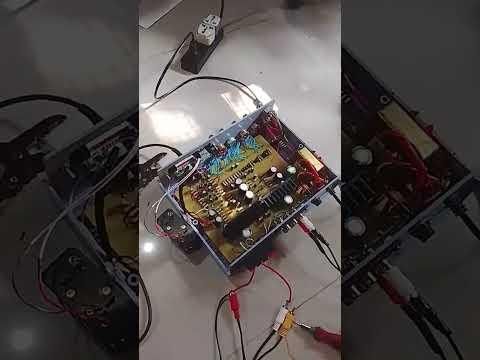
In this step, the completed amplifier circuit was tested using an oscilloscope to evaluate its output signal performance. After assembling and mounting the PCB inside the enclosure, the system was powered on under controlled conditions for initial testing. It is also connected to a speaker to check the sounds.
An input signal (such as a sine wave from a signal generator or audio source) was applied to the amplifier, and the output was connected to the oscilloscope probe. The waveform was then observed to check for proper amplification, signal clarity, and distortion levels.
During testing, key parameters such as waveform shape, amplitude, and noise were analyzed to verify the correct operation of the amplifier. Any abnormalities such as clipping, distortion, or unstable signals were noted for possible troubleshooting and adjustment. This step confirmed the functionality and performance of the amplifier circuit, ensuring that the output signal matched the expected behavior based on the design specifications.
Final Assembled Amplifier System

After completing all stages of the project—from circuit design and simulation to PCB fabrication, assembly, and final testing—we were finally able to bring the amplifier system to life. Seeing the fully assembled unit working as intended was both exciting and deeply satisfying, as every step of the process contributed to this final outcome.
The completed stereo amplifier system successfully delivers clear and powerful audio output while supporting multiple input sources, including Bluetooth, FM tuner, and AUX. Switching between inputs through the selector switch works smoothly, and the sound output remains stable and clean across all modes. The oscilloscope testing further confirmed that the amplifier produces a properly amplified and distortion-controlled signal, matching the expected design performance.
What makes this project especially rewarding is that it was built entirely through hands-on effort—from designing the PCB and etching the board to carefully soldering each component and troubleshooting along the way. Every challenge encountered during the build contributed to a better understanding of real-world electronics and circuit behavior.
In the end, this project is more than just a working amplifier—it is a complete learning experience that transforms theory into a tangible, functional system. Hearing the first clear sound from the finished amplifier felt like the final confirmation that all the planning, effort, and patience had truly paid off.