Smart Parking System With Real-Time Slot Monitoring, and Payment Using Raspberry Pi and Arduino
by yasasmi2003 in Circuits > Raspberry Pi
235 Views, 2 Favorites, 0 Comments
Smart Parking System With Real-Time Slot Monitoring, and Payment Using Raspberry Pi and Arduino
.png)

This project demonstrates a Smart Parking System prototype developed using Raspberry Pi, Arduino Nano 33 IoT, ultrasonic sensors, IR sensors, a Raspberry Pi camera module, OpenCV, Flask, SQLite, and a servo motor.
The system automates vehicle entry and exit, parking-slot monitoring, payment handling, and gate control in real time. Registered users can monitor parking sessions and make payments through the dashboard, while guest users can still use the parking system with admin approval.
The project was developed to demonstrate how embedded systems can solve a real-world parking management problem using affordable hardware and software technologies.
The purpose of this project is to address common parking-management issues such as inefficient space monitoring, manual gate control, lack of real-time parking visibility, and inefficient payment handling. The system combines embedded hardware, sensor integration, camera processing, real-time dashboard monitoring, and automated decision-making into a complete embedded systems solution.
The prototype also demonstrates several embedded systems concepts including real-time processing, serial communication, multi-sensor validation, fault tolerance, modular architecture, and embedded-to-web integration. The project was designed to provide a practical, scalable, and responsive parking-management solution suitable for smart transport and smart infrastructure environments.
This article is submitted as part of the assessment requirements for Deakin University, School of Information Technology, SIT210/SIT730 – Embedded Systems Development.
Supplies
.jpeg)

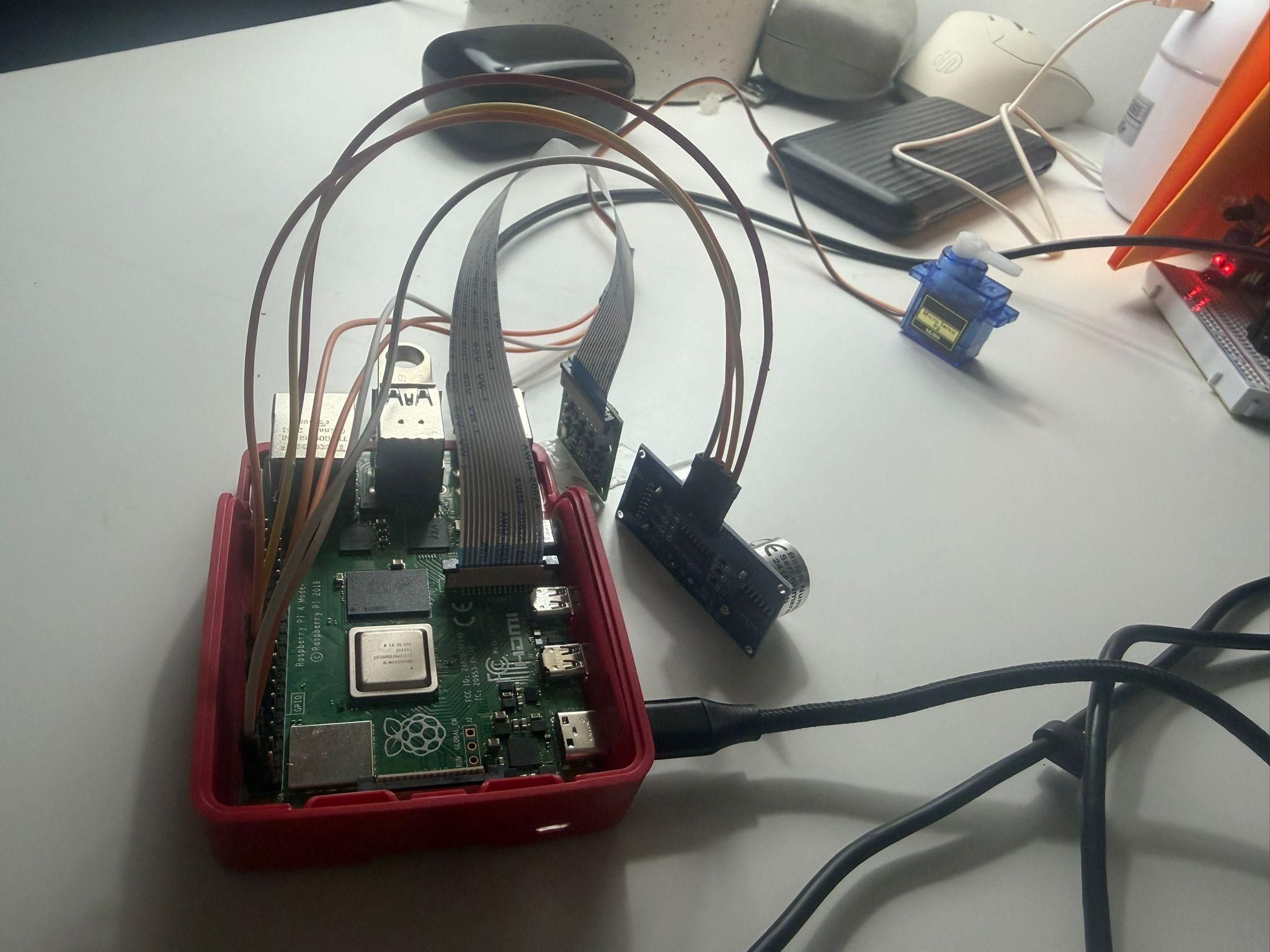
Hardware Components
• Raspberry Pi
• Arduino Nano 33 IoT
• Ultrasonic Sensor HC-SR04
• Raspberry Pi Camera Module
• IR Sensors
• Servo Motor
• Breadboard and jumper wires
Software Components
• Python
• Flask
• OpenCV
• SQLite
• Arduino IDE
• PySerial
• RPi.GPIO
Project Overview and Problem Statement
This project demonstrates a Smart Parking System developed using Raspberry Pi, Arduino Nano 33 IoT, ultrasonic sensors, IR sensors, a Raspberry Pi camera module, OpenCV, Flask, SQLite, and a servo motor.
The system automates vehicle entry and exit, parking-slot monitoring, payment handling, and gate control in real time.
The main problem addressed by this project is inefficient parking management in places such as shopping malls, universities, and commercial buildings. Traditional parking systems often require manual monitoring and provide limited real-time information.
The proposed system improves efficiency by:
• Automatically detecting vehicles
• Monitoring parking-slot occupancy
• Managing parking payments
• Providing a real-time dashboard
• Reducing manual operations
The project also demonstrates embedded systems concepts including sensor integration, serial communication, real-time processing, fault tolerance, and modular system design.
Hardware Components and Wiring
The Smart Parking System uses multiple hardware components connected together to automate parking operations.
Main Hardware Components:
• Raspberry Pi
• Arduino Nano 33 IoT
• Ultrasonic Sensor HC-SR04
• Raspberry Pi Camera Module
• IR Sensors
• Servo Motor
• Breadboard and jumper wires
The Raspberry Pi acts as the main controller of the system. It processes sensor data, controls the gate, manages the database, and hosts the Flask web dashboard.
The Arduino Nano 33 IoT is responsible for monitoring parking-slot occupancy using IR sensors. Slot information is continuously sent to the Raspberry Pi using serial communication.
The ultrasonic sensor is used to confirm whether a vehicle is physically near the gate, while the camera is used for colour-based vehicle identification.
The servo motor controls automatic gate opening and closing.
System Architecture and Communication Flow
The Smart Parking System follows a modular embedded systems architecture where each component performs a specific task while communicating with other components in real time.
The Raspberry Pi acts as the main processing unit of the system. It receives sensor data, processes vehicle detection logic, manages the database, controls the gate, and hosts the Flask web dashboard.
The Arduino Nano 33 IoT monitors parking-slot occupancy using IR sensors. The Arduino continuously sends slot-status updates to the Raspberry Pi through serial communication (UART).
The system uses both ultrasonic detection and camera detection before processing entry or exit requests. This multi-sensor validation improves reliability and reduces false triggers.
System Communication Flow:
IR Sensors → Arduino → Serial Communication → Raspberry Pi
Ultrasonic Sensor + Camera → Raspberry Pi
Raspberry Pi → SQLite Database + Flask Dashboard
Raspberry Pi → Servo Motor (Gate Control)
The database stores:
• User information
• Parking sessions
• Slot occupancy
• Payment status
The Flask dashboard displays parking-slot status, active parking sessions, and payment handling in real time.
Arduino Slot Monitoring System
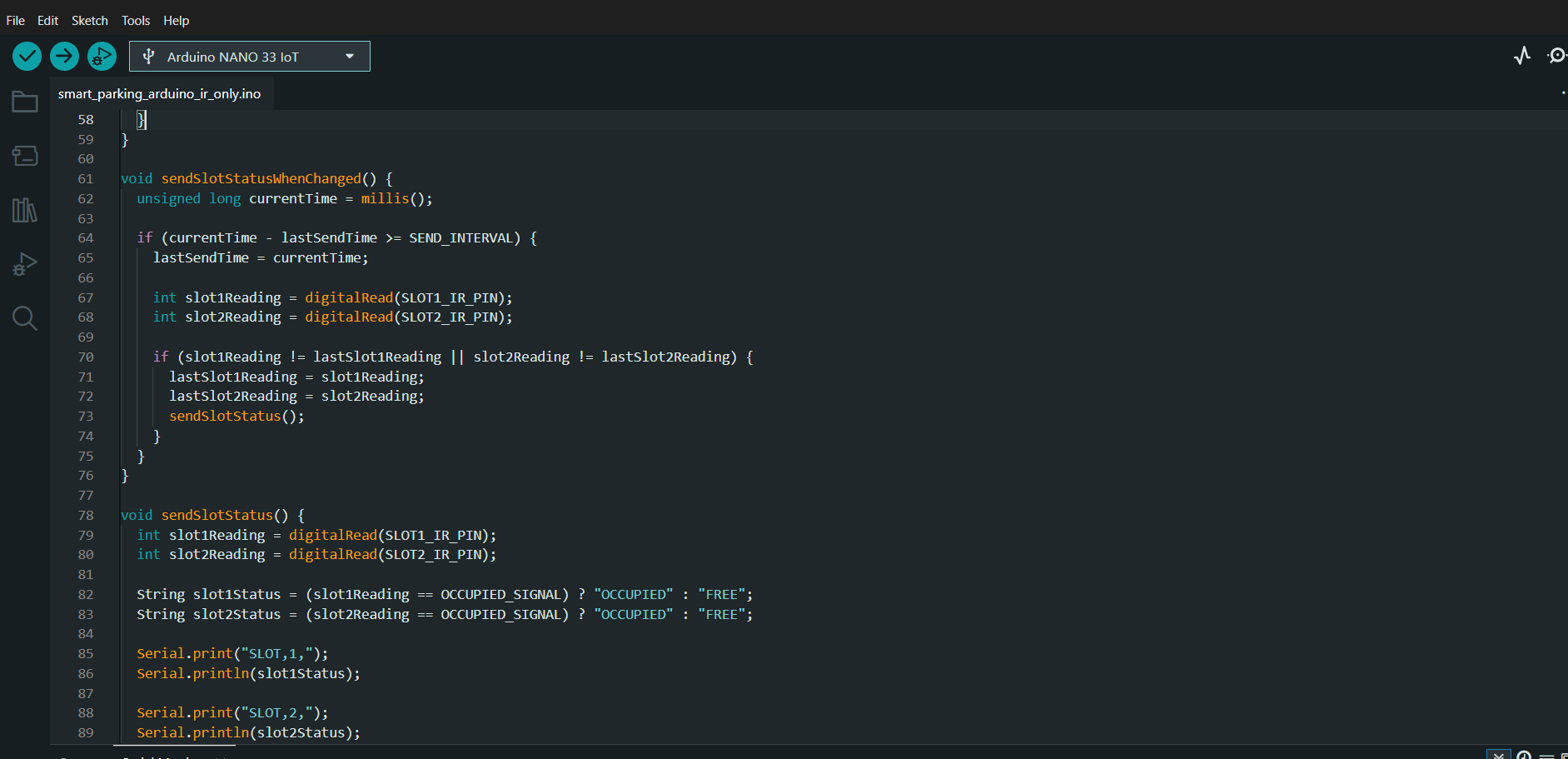
The Arduino Nano 33 IoT is responsible for monitoring parking-slot occupancy using IR sensors.
Each parking slot contains an IR sensor that detects whether a vehicle is present. When a vehicle blocks the IR sensor, the slot is marked as OCCUPIED. If no vehicle is detected, the slot is marked as FREE.
The Arduino continuously reads sensor values and sends slot-status updates to the Raspberry Pi using serial communication.
Example serial messages:
SLOT,1,FREE
SLOT,2,OCCUPIED
The Raspberry Pi reads these messages and updates the SQLite database and Flask dashboard in real time.
This separation of responsibilities improves system performance because the Arduino handles low-level sensor monitoring while the Raspberry Pi handles processing, database management, and the web interface.
The Arduino code continuously checks sensor values inside the loop function and sends updates only when slot states change. This reduces unnecessary serial communication and improves responsiveness.
Raspberry Pi Gate Detection and Camera System

The Raspberry Pi acts as the main controller of the Smart Parking System. It processes sensor input, controls the gate, manages the database, and hosts the Flask web dashboard.
At the parking gate, the system uses both an ultrasonic sensor and a Raspberry Pi camera module to detect vehicles.
The ultrasonic sensor is used to confirm that a vehicle is physically near the gate. Once the vehicle is detected within a predefined distance, the camera captures an image of the vehicle.
Vehicle identification is implemented using colour detection instead of number plate recognition. During development, the Raspberry Pi camera module did not provide reliable number plate clarity under different environmental conditions. In addition, number plate recognition requires heavier image-processing algorithms that would reduce real-time performance on Raspberry Pi hardware.
To maintain lightweight and responsive processing, OpenCV HSV colour detection was implemented.
Vehicle Detection Process:
1. Ultrasonic sensor detects vehicle presence.
2. Camera captures vehicle image.
3. OpenCV converts image into HSV colour space.
4. The system compares the image against predefined HSV colour ranges.
5. The dominant vehicle colour is identified.
6. The database checks whether the detected colour already has an active parking session.
If an active session exists, the system treats the vehicle as exiting. Otherwise, the vehicle is treated as entering.
The servo motor controls automatic gate opening and closing based on the system decision.
Flask Dashboard and Database System
The Smart Parking System includes a Flask-based web dashboard that allows users and administrators to monitor and manage parking operations in real time.
The Flask application runs on the Raspberry Pi and communicates directly with the SQLite database and hardware-control functions.
The dashboard displays:
• Parking-slot occupancy
• Active parking sessions
• Payment status
• Gate status messages
SQLite is used as the local lightweight database system. The database stores all important system information, including:
• Registered users
• Vehicle colours
• Parking sessions
• Slot occupancy
• Payment information
The project uses several database tables:
users
Stores registered-user information including email and vehicle colour.
slots
Stores slot occupancy status such as FREE, OCCUPIED, and RESERVED.
parking_sessions
Stores entry time, exit time, payment status, parking amount, and session state.
The Flask application continuously updates the dashboard in real time as sensor information changes. This allows users to see parking availability instantly without refreshing the system manually.
The project also includes login functionality for registered users. Registered users can:
• Monitor parking sessions
• View parking charges
• Make payments
Administrators can:
• Monitor parking activity
• Open the gate manually
• Manage guest-user exits
Payment Logic

The Smart Parking System includes payment management for both registered users and guest users.
The project includes a dynamic payment-management system that calculates parking charges based on parking duration.
Payment Features:
• Free parking period
• Dynamic amount calculation
• Warning email notifications
• Online payment handling for registered users
• Manual guest-user approval
For demonstration purposes:
• Free parking period = 2 minutes
• Warning email sent at 1 minute 50 seconds
Registered users receive email notifications and can pay directly through the Flask dashboard.
The Pay Now button becomes available only when:
• The ultrasonic sensor detects the vehicle at the exit gate
• The camera confirms the registered vehicle colour
• An active parking session exists
• The session status changes to WAITING_EXIT
This prevents users from paying before reaching the exit gate.
Guest users are handled differently because their email addresses are not stored in the system. If a guest user exceeds the free parking time, the admin manually approves gate opening after payment collection.
The project also implements a controlled exit mechanism. After payment, the gate opens for a limited period. If the user does not leave within the allowed time, the gate closes again and admin intervention is required. This prevents misuse of the parking system.
If all parking slots are occupied, the system displays a PARKING FULL message and prevents the gate from opening for new vehicles.
Entry and Exit Logic
The Smart Parking System uses real-time sensor processing and database logic to determine whether a vehicle is entering or exiting the parking area.
The system uses both ultrasonic detection and camera-based colour detection before processing any gate operation. This multi-sensor validation improves reliability and reduces false triggers.
ENTRY PROCESS
1. A vehicle approaches the gate.
2. The ultrasonic sensor confirms that a vehicle is physically near the gate.
3. The Raspberry Pi camera captures an image.
4. OpenCV identifies the vehicle colour using HSV colour ranges.
5. The system checks the database for an existing active parking session.
If no active session exists:
• The vehicle is treated as entering.
• The system checks for available parking slots.
• If the user has an active booking, the reserved slot is assigned.
• A new parking session is created.
• The gate opens automatically.
• The slot status changes to OCCUPIED.
EXIT PROCESS
When the same vehicle colour is detected again:
• The database finds the active parking session.
• The system treats the vehicle as exiting.
• Parking duration is calculated.
• The parking amount is generated.
If the amount is $0.00:
• The gate opens automatically.
• The parking session ends.
• The slot becomes FREE again.
If payment is required:
• Registered users must complete payment through the dashboard.
• Guest users require admin approval.
• The gate opens after payment confirmation.
To prevent misuse of the parking system, the project includes a controlled exit mechanism. After payment, users are given a limited exit window. If the vehicle does not leave within the allowed time, the gate closes again and admin intervention becomes necessary.
This session-based logic allows the system to use a single camera for both entry and exit detection.
Running the System
- Upload Arduino code
- Connect Arduino to Raspberry Pi
- Install Python packages
- Setup SQLite database
- Enable camera
- Run Flask app
- Open dashboard
Fault Tolerance and Design Principles
Fault tolerance and reliability were important design goals during development of the Smart Parking System.
The project was designed according to embedded systems design principles including modularity, maintainability, hardware-aware design, responsiveness, scalability, and real-time processing.
MULTI-SENSOR VALIDATION
The system does not rely on a single sensor for decision making. Both ultrasonic detection and camera identification are required before processing entry or exit requests. This reduces false triggers and improves reliability.
MANUAL OVERRIDE
The project includes a manual gate override function for administrators. This allows the gate to be opened manually if automatic logic fails or emergency situations occur.
TIMEOUT-BASED CONTROL
Timeout mechanisms were added to avoid hardware hangs and infinite waiting conditions. Timeout handling is used for:
• Camera capture
• Ultrasonic sensor readings
• Gate operation
• Booking expiry
CAMERA RECOVERY
During development, continuous camera usage caused repeated camera crashes while running Flask and background threads together. To improve stability, the system was redesigned using stable single-image capture with rpicam-still instead of continuous camera streaming.
This reduced camera crashes and improved real-time reliability.
REAL-TIME RESPONSIVENESS
The system continuously monitors parking slots, gate sensors, bookings, and parking sessions in real time. The dashboard updates dynamically as parking conditions change.
MULTI-THREADING
Multiple threads are used for:
• Serial communication
• Email notifications
• Sensor monitoring
• Gate control
This allows the Flask dashboard to remain responsive while background processing continues simultaneously.
MODULARITY
The project separates:
• Hardware handling
• Booking logic
• Payment logic
• Database management
• Dashboard routes
• Gate control
This improves maintainability and simplifies future upgrades.
HARDWARE-AWARE DESIGN
Colour-based vehicle detection was selected instead of heavy number plate recognition algorithms because Raspberry Pi hardware limitations required lightweight real-time processing.
SCALABILITY
The project architecture supports future improvements such as:
• RFID integration
• Number plate recognition
• Cloud databases
• Mobile applications
• AI-based parking analytics
Testing and Validation
Several tests were conducted during development to validate the functionality, reliability, and responsiveness of the Smart Parking System.
ENTRY TESTING
The entry process was tested to verify:
• Ultrasonic vehicle detection
• Camera colour detection
• Vehicle validation
• Automatic gate opening
• Parking-session creation
• Slot assignment
• Parking-full detection
The system successfully created parking sessions, validated vehicle detection, and updated slot occupancy in real time.
EXIT TESTING
Exit logic was tested for:
• Vehicle re-detection
• Parking-duration calculation
• Automatic free exit
• Payment-required scenarios
• WAITING_EXIT session handling
• Session completion
• Slot release
The system successfully identified active parking sessions and processed exit conditions correctly.
PAYMENT TESTING
Payment handling was tested for:
• Free parking period
• Dynamic amount calculation
• Warning email notifications
• Registered-user payment flow
• Guest-user manual approval
• Controlled exit timing
The Pay Now button was tested to ensure it only appeared after:
• Ultrasonic detection at the exit gate
• Camera confirmation of the registered vehicle
• Active session verification
• WAITING_EXIT session activation
The system successfully generated parking amounts and handled controlled exits after payment.
FAULT-TOLERANCE TESTING
Several fault-tolerance mechanisms were tested:
• Camera recovery
• Manual gate override
• Sensor timeout handling
• Multi-sensor validation
• Session recovery logic
• Parking-full handling
The redesigned camera system using rpicam-still significantly improved camera stability during continuous operation.
REAL-TIME PERFORMANCE TESTING
Real-time responsiveness was tested by monitoring:
• Slot updates
• Dashboard refresh behaviour
• Gate response time
• Serial communication
• Multi-threaded execution
• Live admin camera preview
The system remained responsive while handling simultaneous sensor processing, dashboard updates, payment handling, and live vehicle detection.
Problems Faced and Future Improvements
Several challenges were encountered during development of the Smart Parking System. These challenges provided valuable practical experience in embedded systems integration, debugging, and real-time system design.
CAMERA STABILITY ISSUES
One of the biggest challenges was stabilising the Raspberry Pi camera during continuous operation. Initially, the project used continuous camera streaming with Picamera2. However, repeated camera crashes occurred when Flask, threading, and camera processing operated simultaneously.
To solve this issue, the camera system was redesigned using stable single-image capture with rpicam-still. This improved camera reliability and reduced crashes significantly.
NUMBER PLATE RECOGNITION LIMITATIONS
The original idea was to use number plate recognition for vehicle identification. However, the Raspberry Pi camera module did not provide reliable number plate clarity under different environmental conditions.
In addition, number plate recognition would require heavier image-processing algorithms that could reduce real-time performance on Raspberry Pi hardware.
To maintain lightweight and responsive embedded processing, colour-based vehicle identification was implemented instead.
FALSE VEHICLE DETECTION
Another challenge occurred because the system initially detected white backgrounds and surrounding objects as vehicles. This caused incorrect gate operations and false parking sessions.
To improve reliability:
• White colour detection was removed
• Multi-sensor validation was implemented
• Ultrasonic detection and camera validation were both required before gate operation
The system now verifies whether the detected object is a valid vehicle before processing entry or exit logic.
PARKING-FULL MANAGEMENT
Initially, the gate opened even when all parking slots were occupied. This issue was solved by adding parking-capacity validation before gate opening.
If all parking slots are occupied:
• The dashboard displays a PARKING FULL message
• The gate remains closed
• No new parking session is created
SENSOR SYNCHRONISATION
Synchronising ultrasonic detection, camera processing, slot management, and database operations required multiple redesigns during development. Multi-threading and session-based logic were introduced to improve real-time responsiveness.
PAYMENT AND EXIT CONTROL
Another challenge involved preventing users from paying and remaining inside the parking area for extended periods. To address this issue, a controlled exit mechanism was implemented where users receive only a limited exit window after payment.
The Pay Now button was also restricted so that it only becomes available when:
• The vehicle reaches the exit gate
• Ultrasonic detection confirms vehicle presence
• Camera detection confirms the registered vehicle
• The session status changes to WAITING_EXIT
This improved security and prevented early payment misuse.
FUTURE IMPROVEMENTS
Several future improvements can further enhance the system:
• RFID integration
• Automatic number plate recognition
• Cloud database integration
• Mobile application support
• QR-code payment systems
• AI-based parking analytics
• IoT cloud monitoring
• Smart parking statistics and reporting
These improvements would improve scalability, automation, and system intelligence.
Reflection and Conclusion
This project provided valuable practical experience in designing and implementing a real-time embedded systems solution using both hardware and software components.
Throughout development, I gained experience in:
• Sensor integration
• Serial communication
• Real-time processing
• Database management
• Flask web development
• Multi-threading
• Fault tolerance
• Embedded systems debugging
• Camera-based vehicle detection
One of the most important lessons learned during the project was the importance of system reliability and hardware-aware design. Several redesigns were required to stabilise the Raspberry Pi camera, synchronise sensor processing correctly, and improve vehicle-detection accuracy.
The project also improved understanding of modular embedded systems architecture. Separating the project into hardware control, payment logic, dashboard routes, database handling, and session management significantly improved maintainability and scalability.
Developing the Smart Parking System helped demonstrate how embedded systems technologies can solve real-world automation problems using affordable hardware and lightweight software solutions.
Another valuable experience was learning how to handle real-world system limitations and unexpected situations. Examples included preventing false vehicle detection, handling parking-full conditions, implementing controlled payment logic, and improving fault tolerance using multi-sensor validation.
If given another opportunity, future versions of the system would include:
• RFID integration
• Number plate recognition
• Mobile application support
• Cloud database integration
• AI-based analytics
• Smart parking statistics and reporting
Overall, the Smart Parking System successfully demonstrates a responsive, fault-tolerant, scalable, and practical embedded systems solution suitable for intelligent transport and smart infrastructure applications.
This article is submitted as part of the assessment requirements for Deakin University, School of Information Technology, SIT210/SIT730 – Embedded Systems Development.