Solar Powered Smart Garden Light

by Supernova09 in Outside > Backyard

118 Views, 1 Favorites, 0 Comments

Solar Powered Smart Garden Light
SolarGlow.png
Solor Glow intro.png
Solor Glow intro 2.png

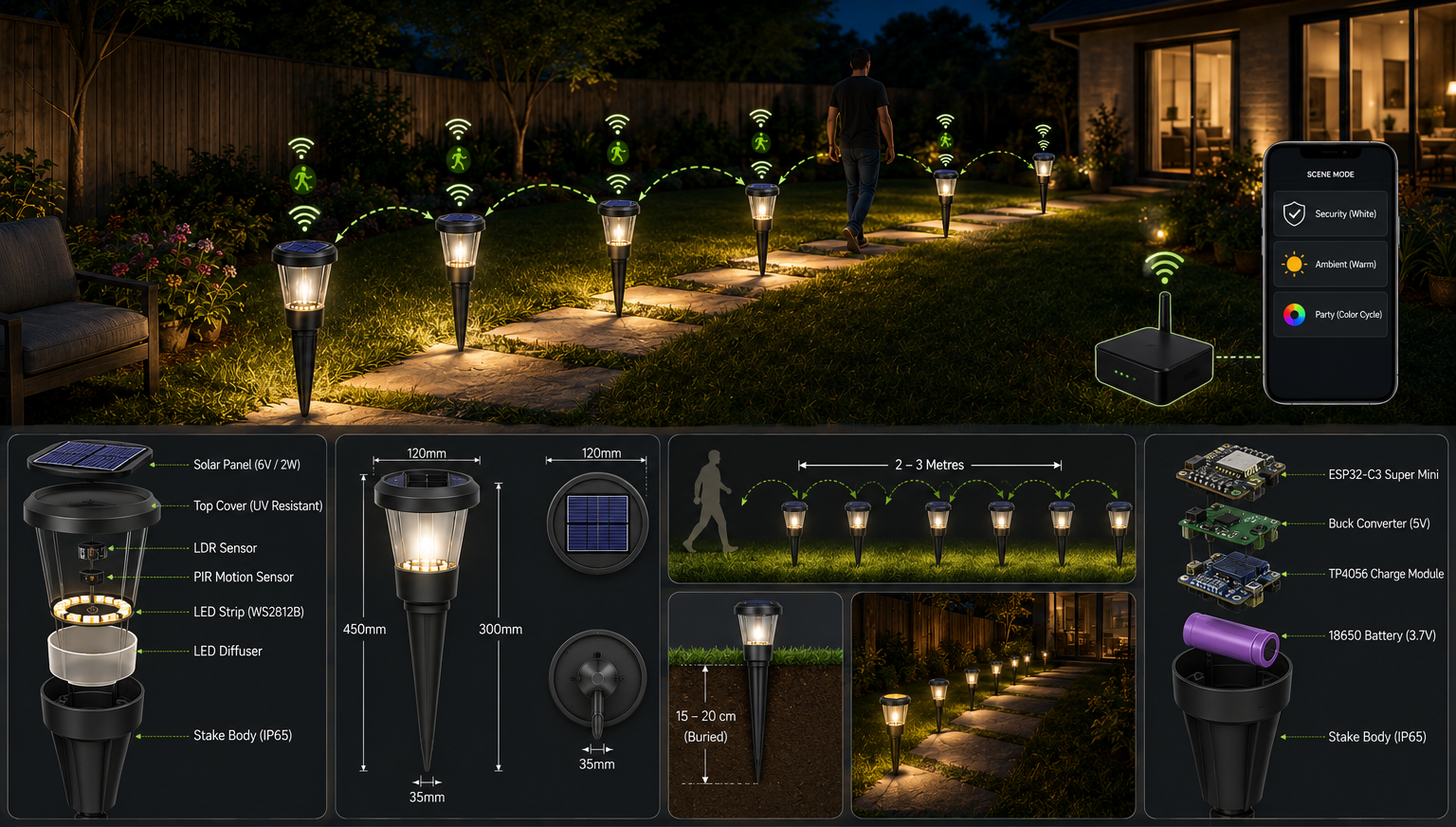
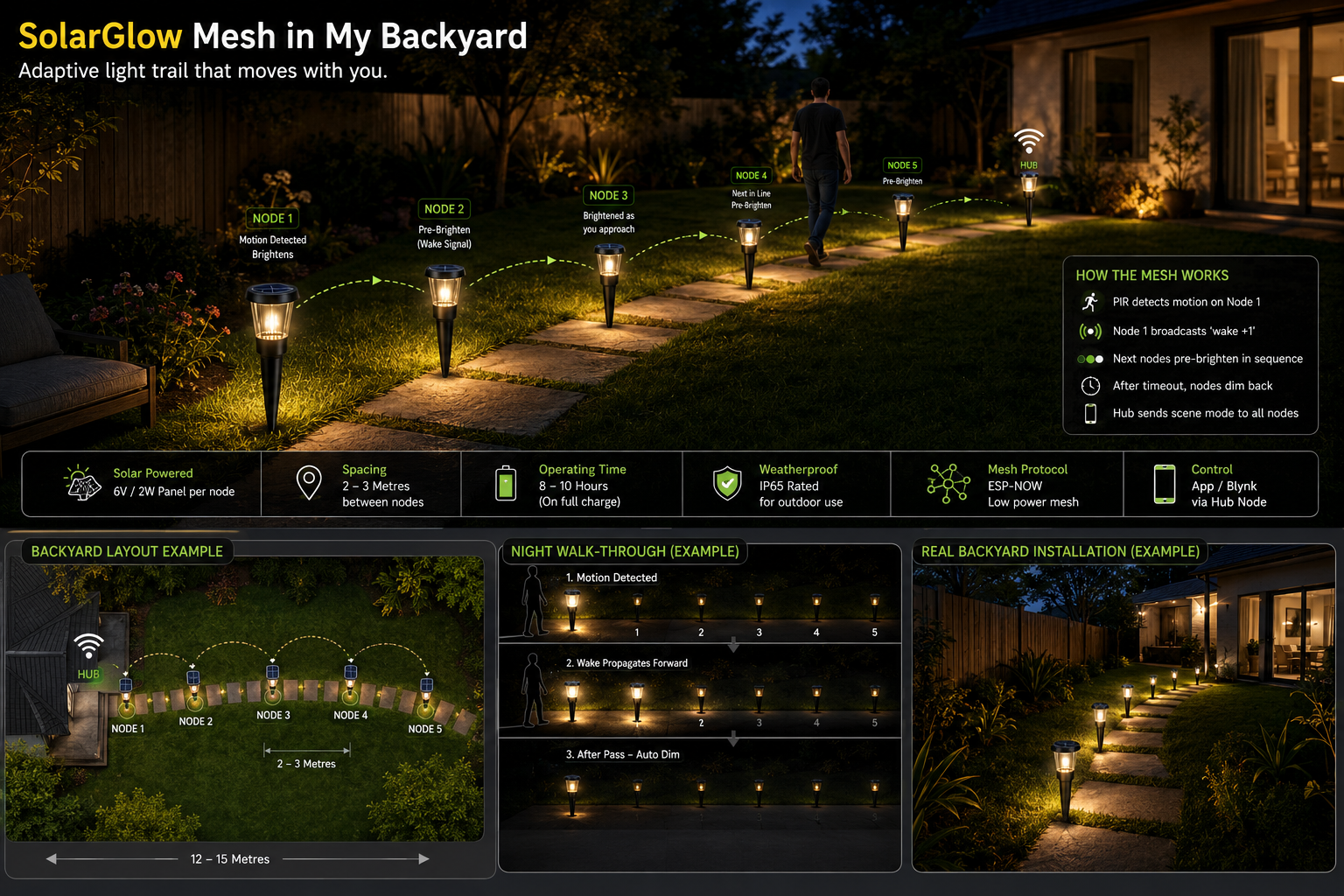
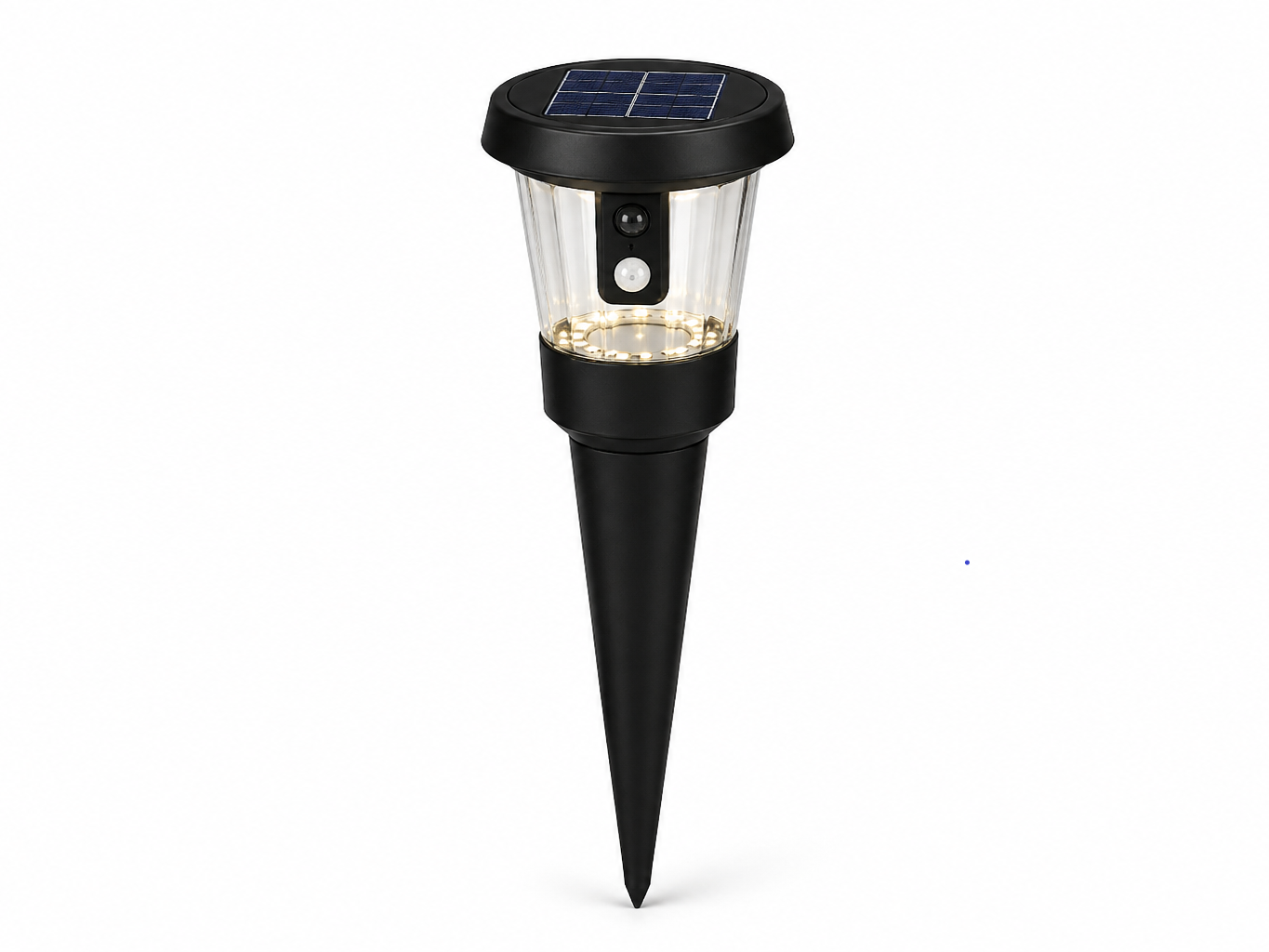
SolarGlow is an intelligent, energy-efficient backyard lighting system designed to transform traditional outdoor illumination into a smart, responsive experience. Unlike conventional lights that remain continuously on or require manual control, SolarGlow uses a network of solar-powered smart nodes that automatically react to human presence and environmental conditions.

At its core, SolarGlow combines motion sensing, ambient light detection, and wireless mesh communication (ESP-NOW) to create a dynamic β€œlight-following” pathway. As a person walks through the garden or backyard, nearby lights illuminate instantly while neighboring nodes activate in sequence aheadβ€”guiding the user safely while minimizing unnecessary energy use. Once the path is clear, the lights gradually dim, conserving stored solar power.

Each lighting node operates independently using solar energy and onboard battery storage, making the system fully off-grid and sustainable. A central hub enhances user control by allowing customization of lighting modes such as security lighting, warm ambient glow, or colorful party effects through a mobile interface.

SolarGlow is more than just lightingβ€”it is a smart outdoor ecosystem that improves safety, enhances aesthetics, and promotes sustainable energy usage. Designed for modern homes, it demonstrates how embedded systems and IoT can seamlessly integrate into everyday life to create smarter, greener environments.


Supplies
Solor Glow Hardware.png

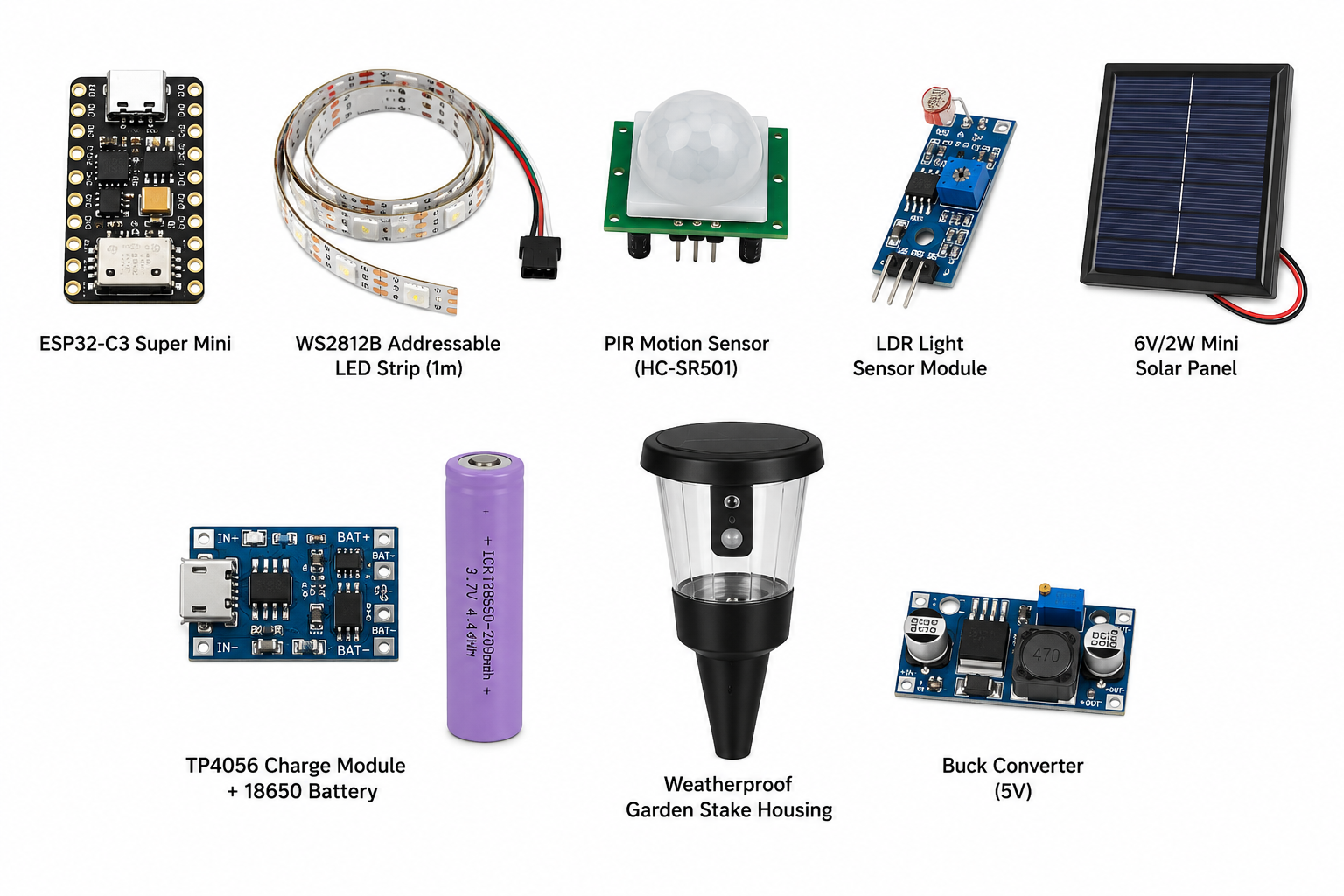
Component Quantity

ESP32-C3 Super Mini 6 (5 nodes + 1 hub)

WS2812B Addressable LED Strip (1m) 6

PIR Motion Sensor (HC-SR501) 6

LDR Light Sensor Module 6

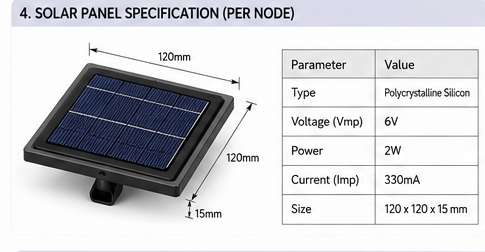
6V/2W Mini Solar Panel 6

TP4056 Charge Module + 18650 Battery 6 sets

Weatherproof Garden Stake Housing 6

Buck Converter (5V) 6

System Architecture
Solor Glow System.png

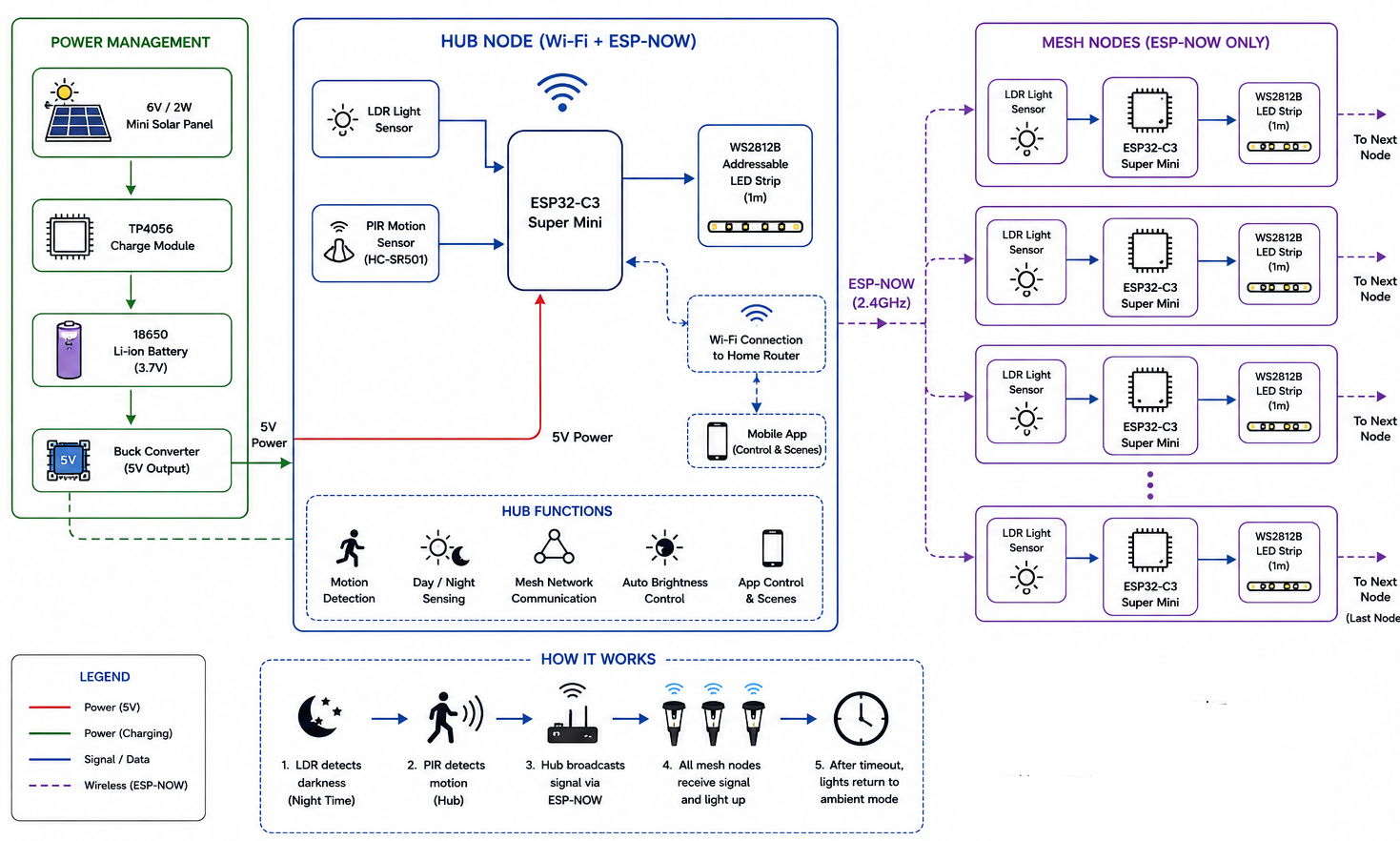
1. Power System

  1. A solar panel collects sunlight during the day.
  2. It charges a battery using a charging module.
  3. A converter makes sure the system gets stable 5V power.

πŸ‘‰ In short:

Sunlight β†’ Battery β†’ Power for the system

2. Hub Node

This is the main controller of the system.

It does 3 important things:

  1. πŸŒ™ Checks light (LDR sensor)
  2. β†’ Detects if it’s day or night
  3. 🚢 Detects motion (PIR sensor)
  4. β†’ Knows when someone is nearby
  5. πŸ“‘ Sends signals to other lights
  6. β†’ Uses ESP-NOW (wireless communication)
  7. πŸ“± Optional: App control via Wi-Fi
  8. β†’ You can control settings from your phone

πŸ‘‰ In short:

Hub = Brain that decides when lights should turn ON/OFF

3. Mesh Nodes

These are the other garden lights placed around your backyard.

Each node:

  1. Has an ESP32-C3 (small controller)
  2. Has an LED strip
  3. Receives signals from the hub

❌ No PIR sensor here (as you specified)

πŸ‘‰ They just follow the hub’s command

πŸ‘‰ In short:

Mesh Nodes = Lights that listen and react

4. How the System Works

  1. β˜€οΈ During the day
  2. β†’ Battery gets charged
  3. πŸŒ™ When it becomes dark
  4. β†’ Hub detects night using LDR
  5. 🚢 When motion is detected
  6. β†’ Hub detects movement using PIR
  7. πŸ“‘ Hub sends signal
  8. β†’ All mesh lights turn ON
  9. πŸ’‘ Lights glow for some time
  10. β†’ Then go back to dim/off mode


Wiring the Circuit
Screenshot 2026-07-31 164427.png

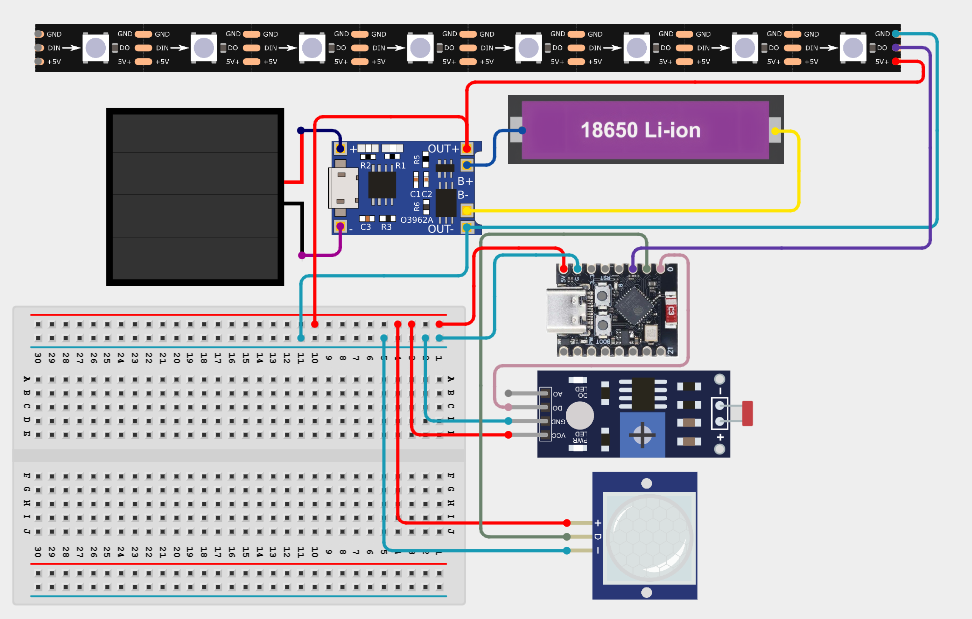
ESP32-C3 Super Mini Connections

LDR Light Sensor

  1. VCC β†’ 3.3V
  2. GND β†’ GND
  3. OUT β†’ GPIO 0

PIR Motion Sensor (HC-SR501)

  1. VCC β†’ 5V
  2. GND β†’ GND
  3. OUT β†’ GPIO 1

WS2812B LED Strip

  1. VCC β†’ 5V
  2. GND β†’ GND
  3. DIN β†’ GPIO 2

Add a 330Ξ© resistor between GPIO and DIN (recommended)

Power System

  1. Battery β†’ TP4056 β†’ Buck Converter β†’ 5V Output
  2. 5V β†’ ESP32-C3 5V pin
  3. GND β†’ Common Ground


Hub ESP32 Code

Upload this to your HUB ESP32


#include <WiFi.h>
#include <WebServer.h>
#include <WebSocketsServer.h>
#include <esp_now.h>

// ===== WIFI =====
const char* ssid = "YOUR_WIFI";
const char* password = "YOUR_PASS";

// ===== SERVERS =====
WebServer server(80);
WebSocketsServer webSocket = WebSocketsServer(81);

// ===== STRUCTS =====
typedef struct {
uint8_t type;
uint8_t targetId;
bool light;
uint8_t brightness;
char mode[10];
} CommandPacket;

typedef struct {
uint8_t type;
uint8_t nodeId;
bool motion;
uint8_t battery;
int rssi;
uint32_t uptime;
} StatusPacket;

// ===== NODE STORAGE =====
#define MAX_NODES 10

struct NodeState {
bool online;
bool motion;
uint8_t battery;
unsigned long lastSeen;
};

NodeState nodes[MAX_NODES];

// ===== GLOBAL STATE =====
bool globalLight = false;
uint8_t globalBrightness = 255;
String globalMode = "Ambient";

// ===== HTML DASHBOARD =====
String webpage = R"rawliteral(
<!DOCTYPE html>
<html>
<head>
<meta name="viewport" content="width=device-width, initial-scale=1">
<title>Mesh Dashboard</title>
<style>
body { font-family: Arial; background:#0f172a; color:white; text-align:center;}
.card { background:#1e293b; padding:15px; margin:10px; border-radius:10px;}
button { padding:10px; margin:5px; border:none; border-radius:8px;}
</style>
</head>
<body>

<h2>Mesh Control HUB</h2>

<div class="card">
<button onclick="send('toggle')">Toggle All</button>
<input type="range" min="0" max="255" value="255" onchange="send('brightness:'+this.value)">
<br><br>
<button onclick="send('mode:Ambient')">Ambient</button>
<button onclick="send('mode:Security')">Security</button>
<button onclick="send('mode:Party')">Party</button>
</div>

<div class="card">
<h3>Nodes</h3>
<div id="nodes"></div>
</div>

<script>
let ws = new WebSocket("ws://" + location.hostname + ":81/");

ws.onmessage = function(e){
let data = JSON.parse(e.data);
let html = "";

data.nodes.forEach(n=>{
html += `<p>Node ${n.id} | Battery: ${n.battery}% | Motion: ${n.motion ? 'YES':'NO'} | ${n.online?'🟒':'πŸ”΄'}</p>`;
});

document.getElementById("nodes").innerHTML = html;
}

function send(cmd){
ws.send(cmd);
}
</script>

</body>
</html>
)rawliteral";

// ===== SEND TO NODES =====
void sendCommand(uint8_t target) {
CommandPacket cmd;
cmd.type = 1;
cmd.targetId = target;
cmd.light = globalLight;
cmd.brightness = globalBrightness;
strcpy(cmd.mode, globalMode.c_str());

// broadcast
esp_now_send(NULL, (uint8_t*)&cmd, sizeof(cmd));
}

// ===== RECEIVE FROM NODES =====
void onReceive(const uint8_t * mac, const uint8_t *incomingData, int len) {
StatusPacket st;
memcpy(&st, incomingData, sizeof(st));

if (st.type != 2) return;

if (st.nodeId < MAX_NODES) {
nodes[st.nodeId].online = true;
nodes[st.nodeId].motion = st.motion;
nodes[st.nodeId].battery = st.battery;
nodes[st.nodeId].lastSeen = millis();
}
}

// ===== WEBSOCKET EVENTS =====
void onWebSocketEvent(uint8_t num, WStype_t type, uint8_t * payload, size_t length) {
String msg = String((char*)payload);

if (msg == "toggle") {
globalLight = !globalLight;
}

if (msg.startsWith("brightness:")) {
globalBrightness = msg.substring(11).toInt();
}

if (msg.startsWith("mode:")) {
globalMode = msg.substring(5);
}

sendCommand(255);
}

// ===== SEND UI DATA =====
void sendUI() {
String json = "{ \"nodes\": [";

for (int i=0;i<MAX_NODES;i++) {
if (nodes[i].lastSeen == 0) continue;

bool online = millis() - nodes[i].lastSeen < 10000;

json += "{";
json += "\"id\":" + String(i) + ",";
json += "\"battery\":" + String(nodes[i].battery) + ",";
json += "\"motion\":" + String(nodes[i].motion ? "true":"false") + ",";
json += "\"online\":" + String(online ? "true":"false");
json += "},";
}

json += "]}";

webSocket.broadcastTXT(json);
}

// ===== SETUP =====
void setup() {
Serial.begin(115200);

WiFi.begin(ssid, password);
while (WiFi.status() != WL_CONNECTED) delay(500);

Serial.println(WiFi.localIP());
Serial.println(WiFi.macAddress());

// Web server
server.on("/", [](){
server.send(200,"text/html",webpage);
});
server.begin();

webSocket.begin();
webSocket.onEvent(onWebSocketEvent);

// ESP-NOW
WiFi.mode(WIFI_STA);
esp_now_init();
esp_now_register_recv_cb(onReceive);
}

// ===== LOOP =====
void loop() {
server.handleClient();
webSocket.loop();

static unsigned long last = 0;
if (millis() - last > 2000) {
sendUI();
last = millis();
}
}


Setup Instructions

1. Upload HUB Code

2. Open Serial Monitor

You’ll see:

  1. IP address β†’ open in browser
  2. MAC address β†’ copy to nodes

3. Put HUB MAC into Node Code


uint8_t HUB_MAC[] = {0x24,0x6F,0x28,0xXX,0xXX,0xXX};

4. Power Multiple Nodes

Each node will:

  1. Auto connect via ESP-NOW
  2. Start sending data


ESP32 Mesh Node Code


#include <WiFi.h>
#include <esp_now.h>

// ===== USER CONFIG =====
#define NODE_ID 1 // CHANGE for each node (1,2,3...)
uint8_t HUB_MAC[] = {0x24,0x6F,0x28,0xAA,0xBB,0xCC}; // <-- PUT HUB MAC

// ===== PINS =====
#define LED_PIN 2
#define PIR_PIN 4
#define BAT_PIN 34

// ===== STATE =====
bool lightState = false;
uint8_t brightness = 255;
String mode = "Ambient";

unsigned long lastSend = 0;

// ===== STRUCTS =====
typedef struct {
uint8_t type;
uint8_t targetId;
bool light;
uint8_t brightness;
char mode[10];
} CommandPacket;

typedef struct {
uint8_t type;
uint8_t nodeId;
bool motion;
uint8_t battery;
int rssi;
uint32_t uptime;
} StatusPacket;

// ===== RECEIVE CALLBACK =====
void onReceive(const uint8_t * mac, const uint8_t *incomingData, int len) {
CommandPacket cmd;
memcpy(&cmd, incomingData, sizeof(cmd));

if (cmd.type != 1) return;

// Check if message is for this node or broadcast
if (cmd.targetId != NODE_ID && cmd.targetId != 255) return;

lightState = cmd.light;
brightness = cmd.brightness;
mode = String(cmd.mode);

applyOutput();
}

// ===== SEND STATUS =====
void sendStatus() {
StatusPacket st;
st.type = 2;
st.nodeId = NODE_ID;
st.motion = digitalRead(PIR_PIN);

// Battery reading (scaled 0–100%)
int raw = analogRead(BAT_PIN);
st.battery = map(raw, 1800, 3000, 0, 100);
st.battery = constrain(st.battery, 0, 100);

st.rssi = WiFi.RSSI();
st.uptime = millis() / 1000;

esp_now_send(HUB_MAC, (uint8_t*)&st, sizeof(st));
}

// ===== APPLY OUTPUT =====
void applyOutput() {
if (lightState) {
ledcWrite(0, brightness);
} else {
ledcWrite(0, 0);
}

// Mode behavior
if (mode == "Security") {
if (digitalRead(PIR_PIN)) {
ledcWrite(0, 255); // full brightness on motion
}
}

if (mode == "Ambient") {
ledcWrite(0, brightness / 3);
}
}

// ===== SETUP =====
void setup() {
Serial.begin(115200);

pinMode(PIR_PIN, INPUT);
pinMode(LED_PIN, OUTPUT);

ledcSetup(0, 5000, 8);
ledcAttachPin(LED_PIN, 0);

WiFi.mode(WIFI_STA);
WiFi.disconnect();

if (esp_now_init() != ESP_OK) {
Serial.println("ESP-NOW Init Failed");
return;
}

esp_now_register_recv_cb(onReceive);

// Add HUB as peer
esp_now_peer_info_t peerInfo = {};
memcpy(peerInfo.peer_addr, HUB_MAC, 6);
peerInfo.channel = 0;
peerInfo.encrypt = false;

esp_now_add_peer(&peerInfo);

Serial.println("Node Ready");
}

// ===== LOOP =====
void loop() {
applyOutput();

// Send status every 5 sec
if (millis() - lastSend > 5000) {
sendStatus();
lastSend = millis();
}
}


What You Need to Modify

Change Node ID (IMPORTANT)


#define NODE_ID 1

Each device must have a unique ID.

πŸ”Ή Set HUB MAC Address

On your hub ESP32, print MAC:


Serial.println(WiFi.macAddress());

Convert to hex array:


uint8_t HUB_MAC[] = {0x24,0x6F,0x28,0xXX,0xXX,0xXX};


Prototype Desigen

Solor Glow - Copy (2).png
Solor Glow - Copy - Copy.png

Outdoor Installation

Solor Glow - Copy - Copy (2).png
Solor Glow - Copy.png
  1. Place solar panel facing sunlight
  2. Use waterproof enclosure
  3. Mount LEDs along path or stake
  4. Keep PIR facing walking direction

Safety Tips

Never connect solar panel directly to ESP32

Use TP4056 with protection

Ensure all grounds are common

Use capacitor for LED stability

Final Result

You now have a fully autonomous smart garden light system that:

  1. Runs on solar
  2. Reacts to motion
  3. Works only at night
  4. Uses efficient ESP32 control