The Believer Button (stop Procrastination, Stop the Fear of Starting)
by Eekaman in Craft > Cardboard
59 Views, 0 Favorites, 0 Comments
The Believer Button (stop Procrastination, Stop the Fear of Starting)
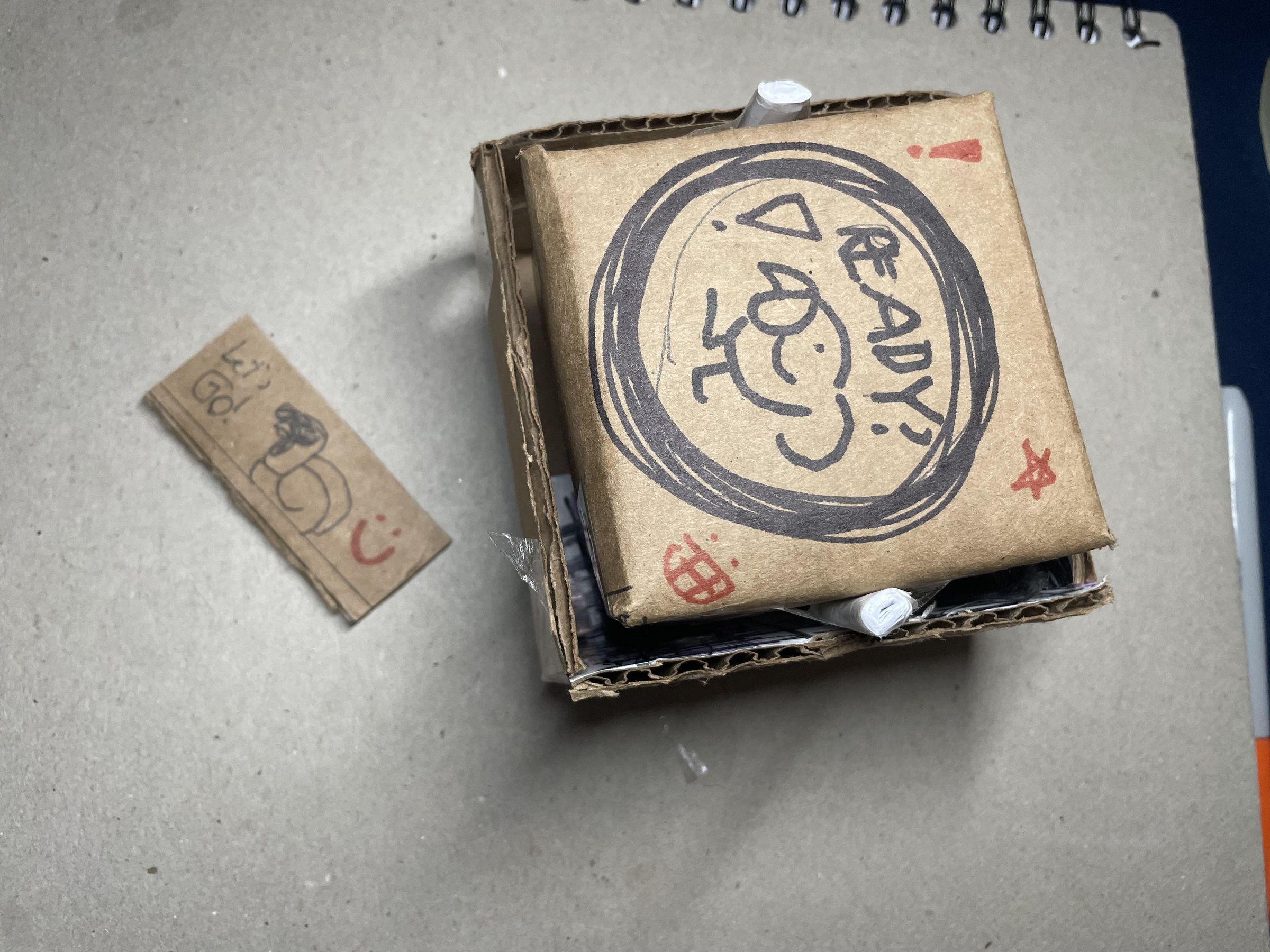
The fear of starting, trying, or failing can be paralyzing. There have been many times where I have left myself stuck on a project or assignment for months all because I struggled to start! So, to give myself a physical and emotional boost, I created the "Believer Button"- an easy craft to get motivation initiated and locked in! Make a button that is ready for you to smash, so you can focus! (trust me you got this!)
The "Believer Button" is inspired by game shows, getting that large rush of energy by tapping yourself into your next challenge. The button will serve not only as an agreement with yourself and the assignment to start, but will also dispense a message to keep your inner voice positive! The button is durable, so you can hit it as hard as you need, taking away any stress or anger before starting. The button locks into place, so only you can decide when it's time for a break. The button also dispenses a message that you save for yourself, so you can give yourself the motivation you need.
The "Believer Button" helped me ground myself before work by being able to touch something before I start working, giving my brain the cue to start, not stall. The message also helps keep my inner voice positive and happy. This button is a step in the right direction for me to grow my confidence.
Supplies
Cardboard
- 1, 5"x5" cardboard square
- 1, 7.5"x7.5" cardboard square
Paper
- 2 sheet of regular sized printer paper (8.5"x11")
Tape or Glue
12" Ruler
Box Cutter or Scissors
Make the Button


Take or draw the 5"x5" square and draw a straight line 1" away from each corner. Your square should have a 3"x3" square in the middle with 4 1"x1" squares in the corner.
Cut off the 1"x1" squares in the corner, leaving you with a cross shape. (save those scraps for later!!)
Using a ruler, fold the outer parts of the cross inwards, leaving you with a box like shape. Tape or glue the corners together (if using tape, tape both the outside and inside to keep it secure).
Make the Button Base


.jpeg)

Take the 7.5"x7,5" square and draw a straight line 2" away from each corner. Your square should have a 3.5"x3.5" square in the middle with 4 2"x2" squares in the corner.
Cut off the 2"x2" square in the corner. Then cut off one of the flaps on the cross, leaving you with a "T" shape (kind of like the Tetris "T" block). (save those scrap pieces for later!!)
Using a ruler, fold the outer parts of the cross inwards, leaving you with a 3 sided box like shape. Tape or glue the corners together.
With one of the flaps you cut off (the 2"x3.5" flap), cut in half and, using tape or glue, suspend the flap above the open gap of the box. This will make a box with a rectangular hole.
Make the Button Mechanism


Take 1 sheet of printer paper and fold in half "hotdog style" 3 times, then fold "hamburger style" once. Unfold and tape the paper so it stays in one piece.
Take one half of the folded paper and glue or tape it into the button as shown. The other half should stick out.
Using your 1"x1" scraps, wedge them between the paper and the button. The fold half that is sticking out should lean forwards slightly.
Keep the Button in Place


With the other printer paper, cut in half (folding hamburger style). Then roll one of the halves into a pole, tape together.
Cut the pole in half twice, giving you 4ths. Keep two 4ths, you don't need the rest.
On the sides of the button (parallel to the paper spring), tape or glue the rod in the center.
You can now place the button into the base with the wedged part facing the back, and the 2 rod parts facing the sides.
Decorate and Motivate


Cut one of the 2"x2" cardboard scraps in half, making a 1"x2" rectangle. That will be your message! write or draw anything onto the scrap (you can also cut and glue paper onto the scrap if your art medium doesn't write well on cardboard). Place the message into the slot of the Button frame.
Now that everything is in order, you can draw and decorate the button as you please!
Then, when you are ready to start anything, hit that button and watch the message shoot out!
Watch the video attached to see it in action!
Now, you may begin!