The Conservatory: a Community Healing Center
by Levi Holt in Design > Architecture
144 Views, 0 Favorites, 0 Comments
The Conservatory: a Community Healing Center

A few decades ago, my grandpa and his brothers started their own construction company. They did everything from renovating bathrooms to constructing houses. Many of their customers were from the Westside of Los Angeles. But over a year ago, the Palisades fire devastated the region. My grandpa and his brothers watched the news as houses they built burned to the ground. For 31 days, the fire raged across more than 23,000 acres of the California coastline. A few months ago, my grandpa drove to the Palisades area to see the homes he built. He was upset at the loss by so many people, and the beautiful homes he built for them. While rebuilding is in process, those who lost their homes have yet to return to the Palisades.
In light of this destruction, I have done my best to follow in my grandpa's footsteps and design a public space that will unite a community. Using TinkerCAD, Fusion 360, and my 3D Printer, I have created The Conservatory. The main pavilion utilizes transparent walls and roofs to provide a natural, bright atmosphere. There are tables and chairs in the main area, while the back exhibits a reading corner and kitchen. Attached to the pavilion is a deck that looks out onto the playground. Every area of the pavilion uses ramps to make it accessible to all. To the left of the pavilion is the greenhouse. With forest on the outside and foliage within, people can enjoy a warm and tranquil stroll around the fountain. In front of the greenhouse lies the amphitheater. Its curved walls and open-air setting promote creative freedom.
These structures can be easily assembled in both the replica and life-size versions. Its straightforward layout makes for a quick build with minimal materials.
The Conservatory can help a community heal after a disaster.
Supplies
To make the model, I used:
- Personal Laptop
- Tinkercad
- Fusion 360
- 3D Printer
- Cardboard
- Acrylic Paint
- Cellophane
- Miniature trees
If constructing in real life, you could use:
- PBC pipe
- Particle Board
- plexiglass
- Metal Pipe
Planning


My grandpa taught me the value of planning before building. Above are my hand-drawn blueprints for The Conservatory. All units are in centimeters and represent the dimensions of the scaled-down model. It has a scale of 1 mm: 1m. The TinkerCAD website can automatically scale the model from the Settings menu.
Build Pavilion in Tinkercad


I began with the Healing Learning Space template from the corresponding TinkerCAD challenge. It had the green base, pavilion foundation, and drawings for the walls. I edited the foundation to give it a wood texture, and redrew the walls to create the open space I desired in the model.
A. Cut lines into the foundation to give it a wood texture. Shape boxes into small, thin lines. Select the "Hole" option in the mini menu and group with the foundation.
B. Use triangles from the Basic Shapes menu on the right to create the two ramps. Both make the pavilion wheelchair-accessible.
C. Use the extrude sketch from the right menu to build the walls. You can draw precise lines with exact measurements to enclose the pavilion. Some of the walls are transparent to represent the plexiglass portions of the wall.
D. Construct the roof by using rectangles. Once again, some are transparent to allow light into the room. At the top, the two sides of the roof form a 22.5° angle.
Build Greenhouse, Amphitheater, and Playground in Tinkercad


A. Greenhouse: Start with the interior and work your way out. I created plants based on some of the trees and flowers from the community objects. The fountain and stones are my own designs. Use cylinders to create the structure around the greenhouse.
B. Amphitheater: I built this using objects provided in the Healing Learning Space template. I resized or duplicated most of the objects to fit this design. The arches in the greenhouse walkway were also a part of this design.
C. Playground: I used basic geometric shapes from the right menu (rectangles and cylinders) to model this structure.
Create Objects in Fusion 360


Fusion 360 gives exact measurements and modifications for small objects. I used it to model objects such as a bench and folding chair. I also modeled the ramp up to the deck of the Pavilion using Fusion 360. It allows wheelchair users to access the deck. The ramp complies with ADA regulations, which specify that a grade should be no greater than 1:12 (or 4.76°). This ramp has a grade of 4.45°, which allows wheelchair uses to safely reach the deck. The solar panels will power the lamp and microwaves inside the pavilion. Assuming each microwave uses 1 kW and is in use for a total of 1 1/2 hours per day, they require a total of 4.5 kWh per day. The average LED lamp requires 0.001 kW, and if it is use for 3 hours per day, it needs 0.003 kWh. Combined, the microwaves and lamps will draw 4.503 kWh per day. The average solar panel can generate at least 1.6 kWh of energy per day, according to nrg clean power. Therefore, 3 solar panels are required. The extra energy is stored in a battery on a nearby wall.
Print on 3D Printer
I divided each object into its 2D components so they could lie flat on the 3D printer bed. This makes for an overall smoother final product. I used PLA and PETG plastic. While these are some of the easiest to work with, any other 3D printer filament would work as well. The printer I used is a Qidi X Plus II, although most 3D printers would suffice.
If constructing this in real life, PBC pipe and plexiglass will be used to make the greenhouse. The amphitheater is easily constructed from spare lumber or particle board. The main pavilion uses wooden planks for the foundation. First construct a wooden frame, and then nail planks into it. The walls will consist of plexiglass and plastic sheeting (e.g. Vinyl or PVC privacy screen). The roof will have similar materials. Both the walls and roof will be supported by metal columns. The playground will be constructed from a kit. All wheelchair ramps can also be constructed from kits created by companies such as EZ-ACCESS (although the ramp leading up to the deck would require a more elaborate support system).
Paint and Assemble


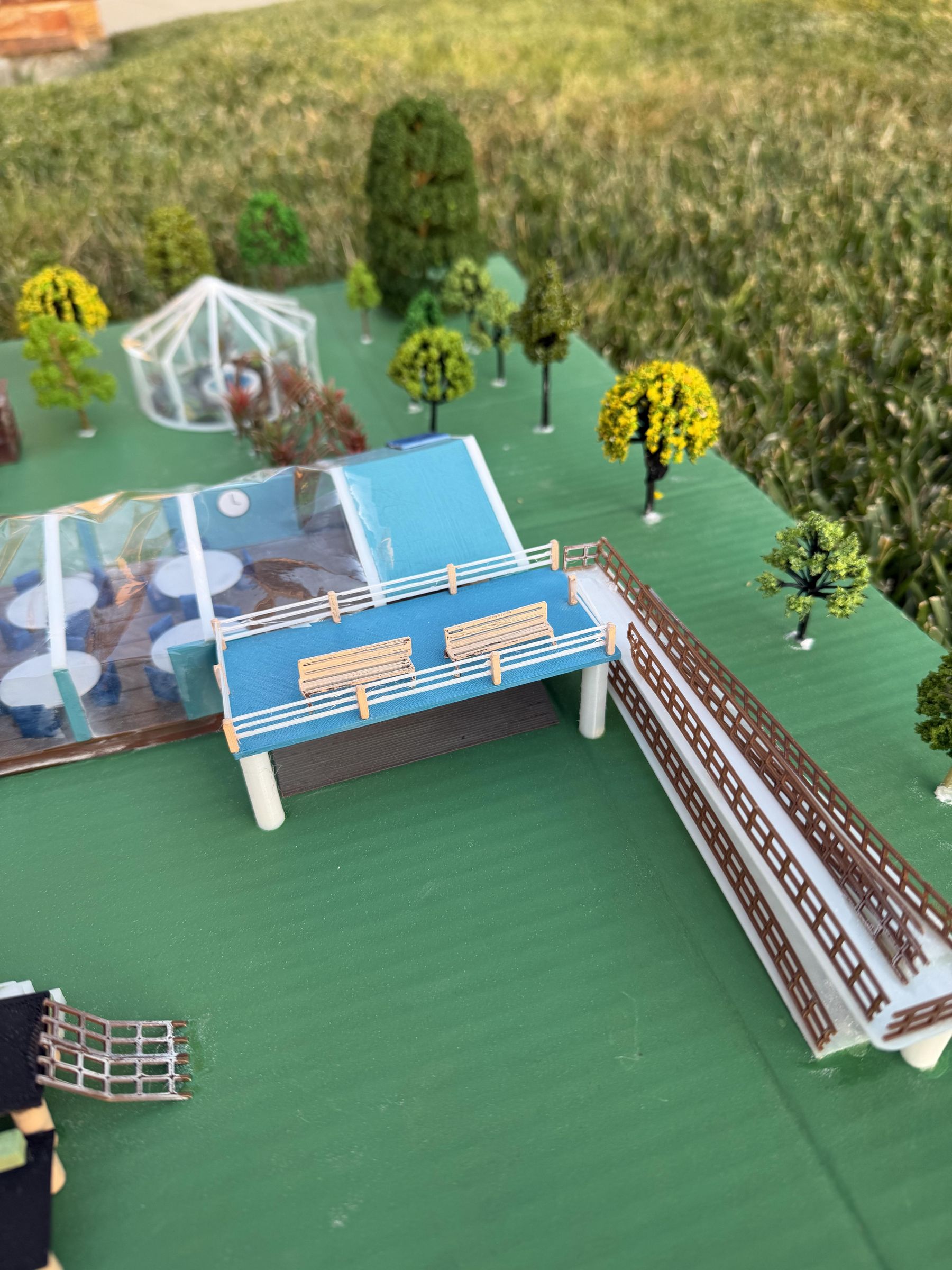


After designing and printing The Conservatory, this is the last step in creating the model. Use a large piece of cardboard or wood about 18" x 31" as the base. Paint the cardboard and 3D printed elements using acrylic paint. I followed the colors in the model. Use superglue to assemble the chairs, attach walls to their foundations, and affix any other features specified in the Tinkercad model. For the greenhouse and pavilion, attach cellophane to the walls or supports. I surrounded the Conservatory with miniature plastic trees. Community members can enjoy the natural beauty of a forest through the floor to ceiling windows.
The Conservatory provides an effective and efficient means of healing a community after a disaster. Its open layout promotes at atmosphere of unity while surrounded by the serenity of nature. A community can be burned, flooded, shaken, and dampened, but never defeated. With a sound plan and enough determination, a community can unite in healing. In her 1903 essay "Optimism", Helen Keller declared, "Although the world is full of suffering, it is also full of the overcoming of it." Together, a community can be rebuilt.