The Highwater Haven
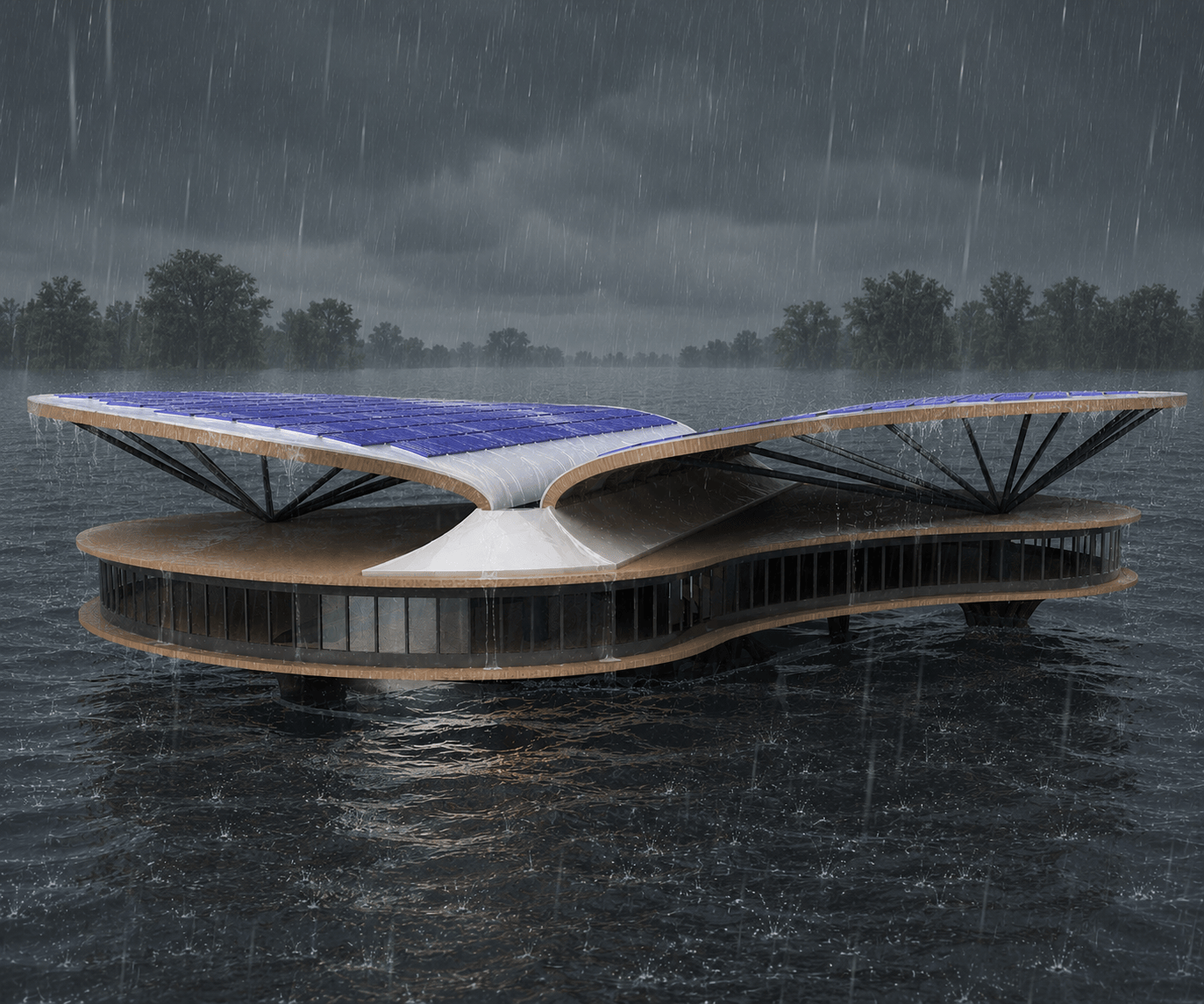


Living in Houston, Texas, the rhythm of life is often dictated by extreme weather. Having survived the devastating floods of Hurricane Harvey, the bitter grid failures of Winter Storm Uri, and the sudden impact of Hurricane Beryl, I’ve seen firsthand how quickly infrastructure collapses. When disaster strikes, the immediate aftermath is often the most dangerous. People desperately need a place to charge medical devices, access clean water, triage minor injuries, and coordinate neighborhood recovery—but existing community centers are often flooded or without power.
According to recent climate data, almost a million residents in Greater Houston live in overlooked 100-year flood zones, with marginalized communities facing disproportionate risks. We cannot simply rebuild the same vulnerable concrete boxes.
The Goal: To design a structure that heals the community by providing a self-sustaining, flood-proof sanctuary during crises, while serving as a vibrant makerspace and gathering hub during times of peace.
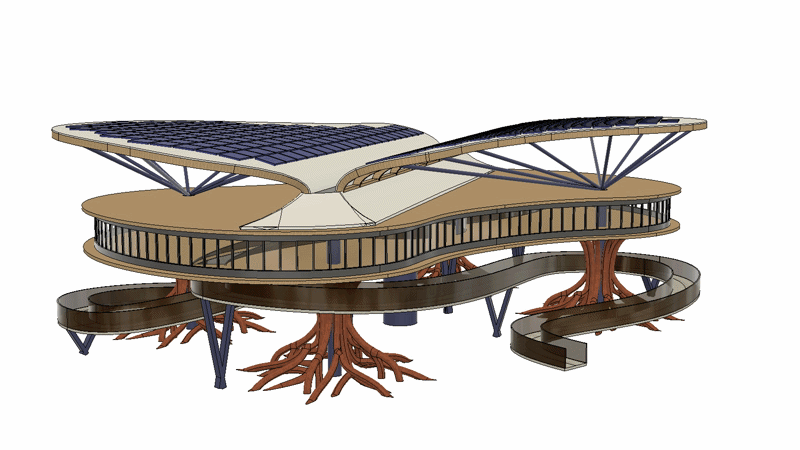
The Solution: Enter The Highwater Haven. Inspired by the deep, stabilizing roots of the bald cypress tree native to Texas bayous, this elevated facility is designed to withstand hurricane winds and storm surges while actively protecting the surrounding ecosystem.
To align with the "Make it Heal" mission, the Haven is engineered with the following core principles:
- Biomimetic Stability & Ecological Healing: Standard concrete pilings create turbulent water flow, leading to soil erosion. The Haven instead mimics the flared buttress roots and pneumatophores (knees) of the bald cypress tree. In nature, this geometry reduces water velocity, stabilizes waterlogged soils, and provides a natural buffer against floodwaters. By adopting this shape, the Haven heals the landscape by preventing erosion during heavy surges.
- Circular Materials & Affordability: To push back against carbon-heavy concrete and steel, the primary structure of the Haven is designed for Mass Timber (cross-laminated timber). Mass timber is a renewable, circular material that sequesters carbon. Because it is lighter than steel, it requires a less invasive foundation, significantly driving down the overall cost of the build.
- Manufacturability & Modular Assembly: A disaster relief solution must be scalable. The complex, organic shapes of the Haven's root-stilts and roof canopy aren't meant to be hand-carved on site. They are designed to be broken down into modular panels that can be CNC-milled or robotically manufactured off-site, flat-packed, and assembled rapidly. This ensures high manufacturability and allows different neighborhoods to deploy variations of the Haven affordably.
- Self-Sustaining Autonomy: The aerodynamic, wing-like roof canopy is specifically angled to allow hurricane-force winds to pass over with minimal drag. The roof’s valley acts as a massive rainwater funnel, directing water into central storage columns that treat and store a surplus of freshwater . Combined with a robust solar-panel array, the Haven operates entirely off-grid, ensuring power and potable water are available exactly when the municipal grid fails.
The Highwater Haven isn't just a building; it is a template for circular, resilient architecture. It operates as an active community center 99% of the year, and a vital, healing lifeline during the 1% of the time when the city needs it most.
This submission was made solo.
Supplies


For this project, I utilized the following digital stack:
- TinkerCAD: I used TinkerCAD for rapid volumetric massing and proportional studies. By quickly blocking out spatial volumes with basic primitives, I was able to test the height of the flood plane against the width of the roof canopy. This ensured the architectural scale felt grounded and visually balanced before committing hours to complex CAD work.
- Autodesk Fusion 360: Bringing the final Highwater Haven to life required pushing the boundaries of Fusion 360. I had to integrate three distinctly different modeling paradigms to handle the diverse geometric challenges of the structure:
- Solid Modeling
- Form Workspace (T-Splines): Used for the advanced sculpting of organic shapes. T-splines allowed me to ‘sculpt’, organic shapes capable of true nature-inspired design, geometry that would be nearly impossible to achieve with standard parametric sketches.
- Surface Modeling: To map out lightweight, complex curvatures before eventually thickening those faces into solid, manufacturable bodies.
- Rendering Workspace + Generative AI (for changing the backgrounds of my renders)
- Animation Workspace
Conceptualization & Planning

Before opening any software, I looked to native ecosystems that naturally survive extreme weather to inform the Haven's core architecture:
- The Roots (Erosion Control): The flared buttress roots of the native bald cypress tree survive deep flooding by dissipating the kinetic energy of rushing water. Mimicking this geometry prevents the soil erosion typically caused by standard concrete pilings, allowing the building to protect the park's landscape during storm surges.
- The Canopy (Resource Capture): Instead of a traditional pitched roof that sheds water away, the Haven's roof is modeled after broadleaf plants. Its inward curvature captures and funnels torrential rain into a central storage system to provide potable water to the community.
I used Tinkercad to perform a rapid architectural massing study:
- Using basic primitives, I blocked out the primary volumes of the building.
- I established a hypothetical flood plane and added a standard human figure for scale.
- This allowed me to quickly adjust the height-to-width ratio, ensuring the massive roof canopy didn't look structurally top-heavy compared to the foundational roots.
The Top-Down CAD Strategy (Fusion 360)
With the proportions validated, I moved into Autodesk Fusion 360. Because the organic components of the Haven's need to interact seamlessly, I utilized a Top-Down Modeling approach.
Rather than relying on a single, distributed design to drive the entire assembly, I structured the workflow contextually. I the project into four distinct structural milestones:
- Tree Columns
- Main Deck
- Roof Canopy
- Central Column & Paths
Designing the Bald-cypress Inspired Columns
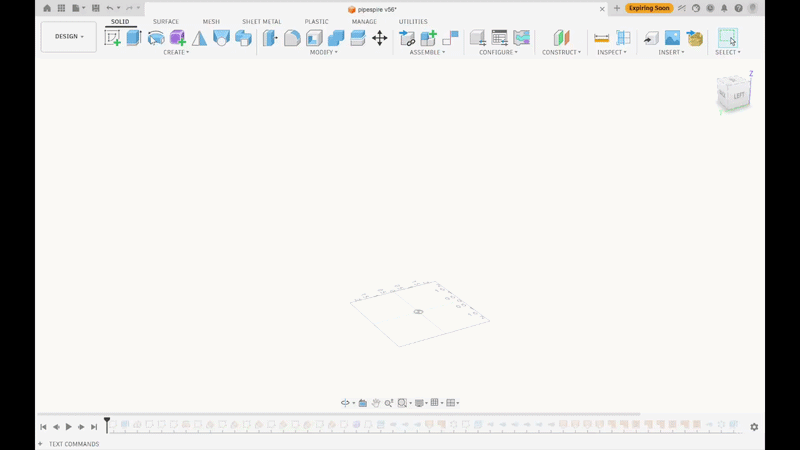
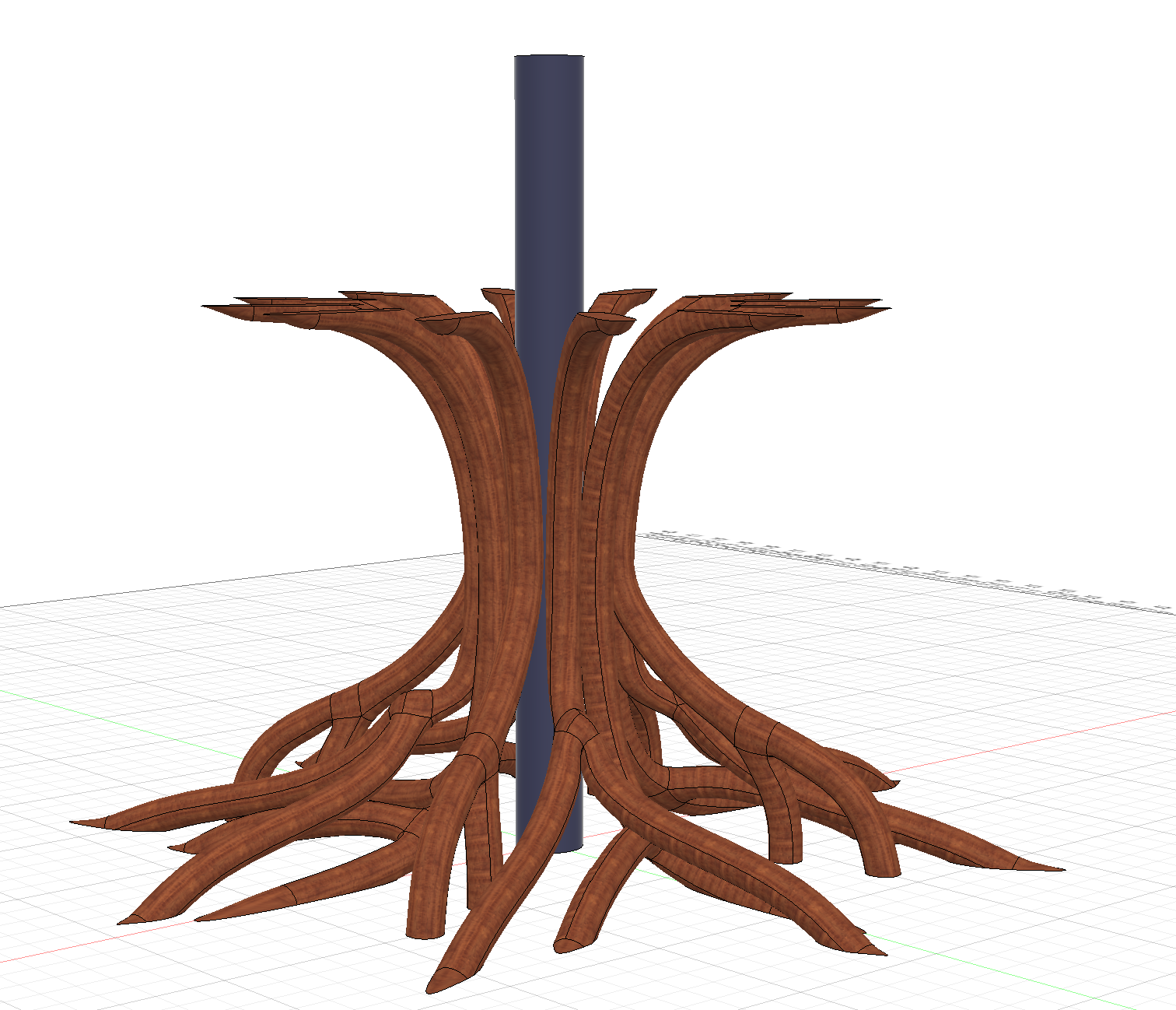
The most challenging part of this component is sculpting the natural-looking branches.
- Sketch and extrude the central column for each "tree" support.
- Define the outer boundaries for the root branches using a reference sketch.
- Create a sketch to define the first limb of a root branch.
- Construct a plane at angle corresponding to the next segment of that limb.
- Sketch the next limb on this new plane. Enable 3D Sketch to connect the splines using tangent or curvature constraints for a smooth transition.
- Activate the Form (T-Splines) workspace. Use the Pipe command to sweep along the branch's sketched lines, leaving the ends open.
- Adjust the resulting T-spline form until you achieve the desired organic shape, then click Finish Form.
- Create a new plane for the second branch and repeat the previous steps to build it. (Note: I created three distinct branch designs and used a Circular Pattern around the column. You can add more for greater variety).
- Next, convert the branches from surface bodies to solid bodies. Because the pipes were left open with zero thickness, they default to surfaces. The native pipe-closing options look unnatural here, so we will trim them manually.
- Use the Split Body command to trim the branches, using the top plane (where the deck begins) and the ground plane as your cutting tools.
- Remove the excess trimmed bodies.
Making the Main Deck

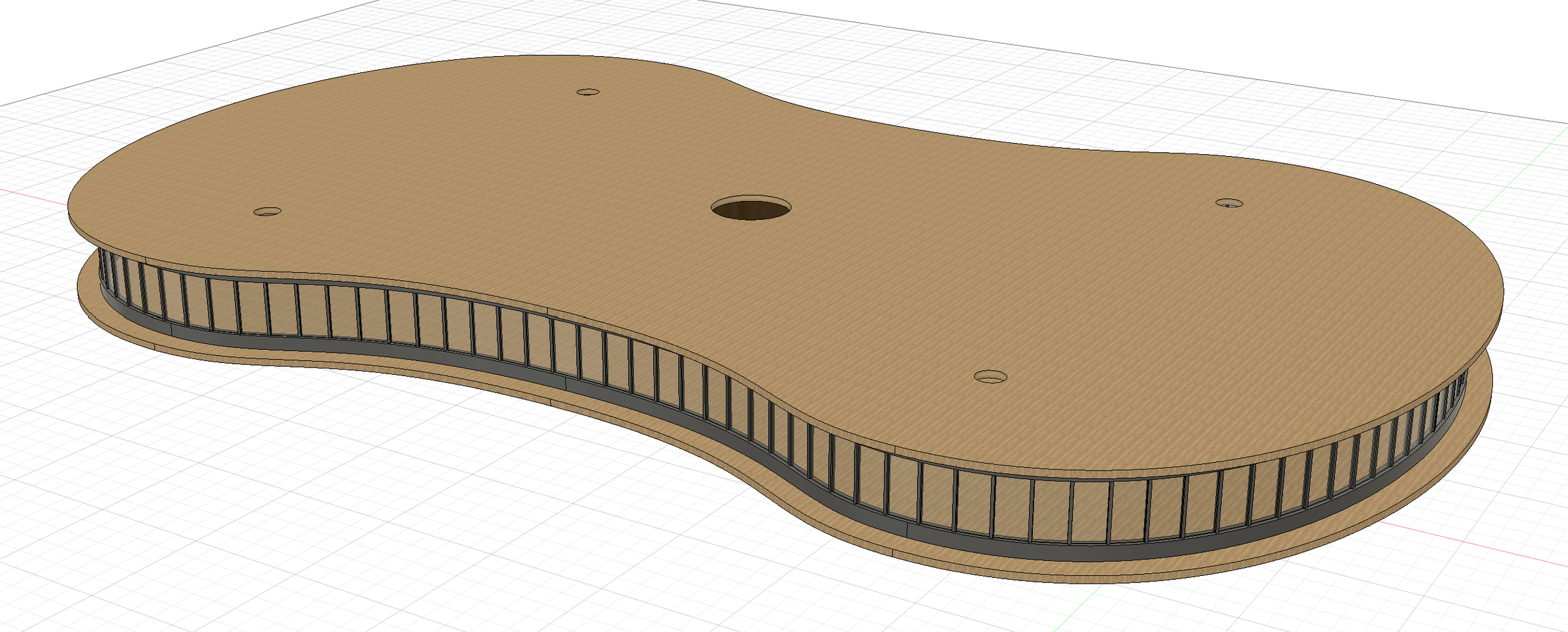
The deck is the most straightforward component of the design, providing the primary floor plan for the community space.
- Sketch the floor footprint and extrude it to your desired deck thickness.
- In a new or existing sketch, define the boundary path for the glass facade.
- Sketch the top-facing profile of a single window pane and its frame. You only need one instance, as we will use a pattern tool later.
- Extrude a base ring along the boundary path to serve as the bottom sill for the windows.
- Extrude your single window pane and frame upward from this base ring.
- Use the Pattern on Path tool (set to the "Spacing" distribution) to duplicate the window and pane along the base ring.
- Extrude a top ring to serve as the upper frame and ceiling boundary.
- Cap the deck with a simple extruded flat roof (the main canopy will sit above this).
Creating the Canopy Roof
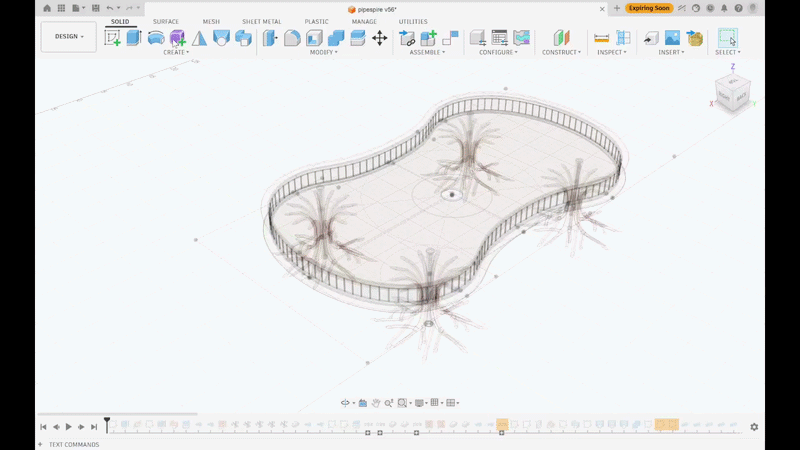
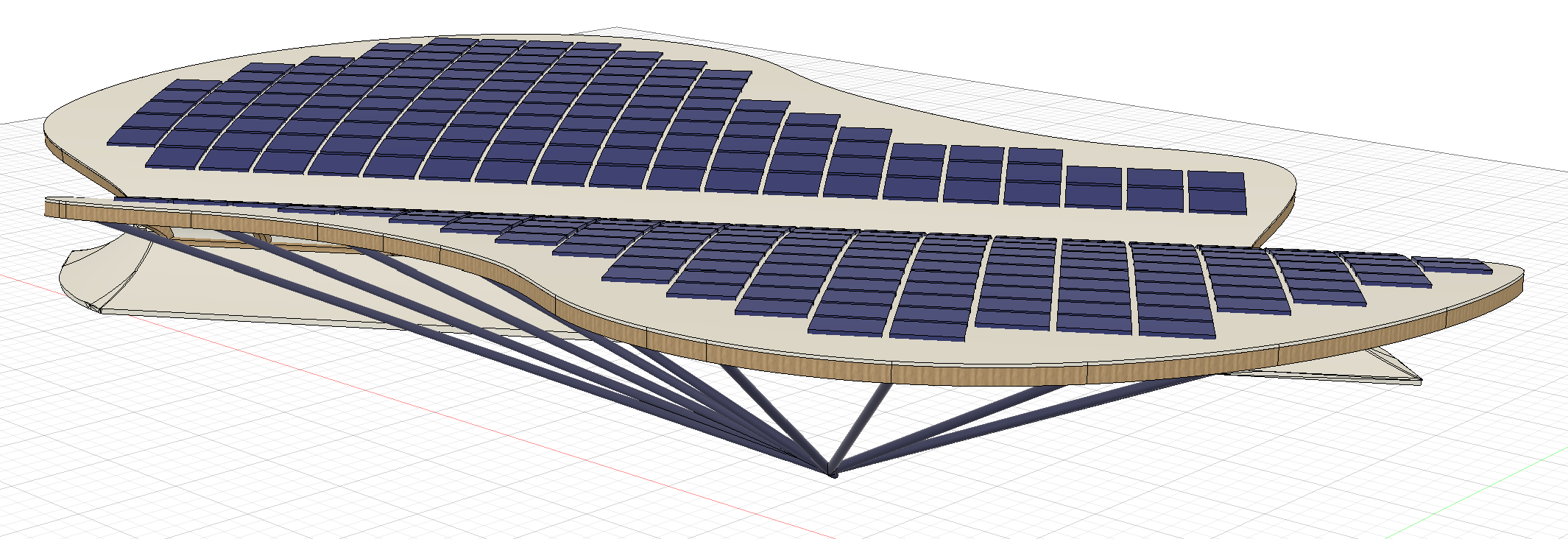
The roof is the most challenging component to model. In the end, it acts as both a solar generator and a rainwater funnel.
- First, model the central structural spine of the roof. This will later be edited to channel rainwater into the columns. (Note: I deviated from my initial Tinkercad massing draft by placing the roof structure at an angle to optimize water flow and solar exposure).
- Sketch a spline to define the sweeping curvature of the roof, then extrude it as a Surface Body.
- Create a sketch on the bottom plane outlining the deck's perimeter. Use this to trim away excess roof surfacing that overhangs too far.
- Create another bottom plane sketch to design the layout of the mass-timber support ribs under the roof.
- To build the supports: split the roof surface using the rib layout sketch, create Ruled Surfaces downward from the split lines, and then Thicken them into solid wooden beams.
- Once the supports are finished, Stitch the roof surface back together and Thicken it into a solid body.
- The angled struts connecting the roof to the deck are made by drawing lines in a 3D Sketch and applying the solid Pipe command.
- The solar panel array is created using a combination of Rectangular Pattern and Pattern on Path to ensure the panels follow the tangency and curvature of the roof.
Modeling the Paths
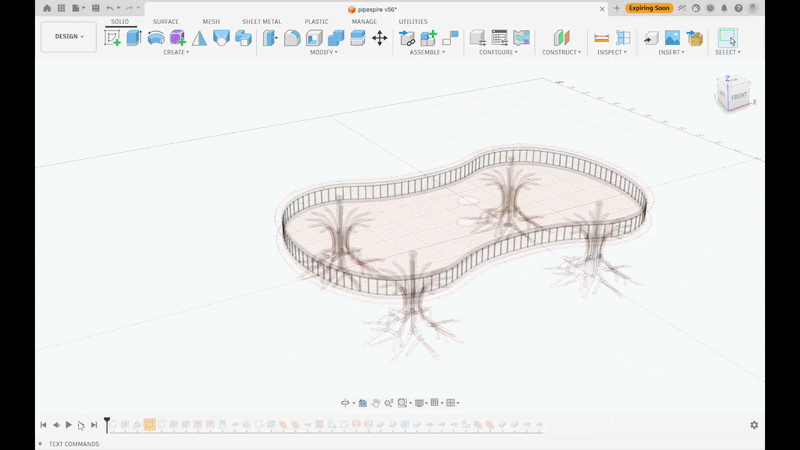

- By intersecting two perpendicular surface bodies, create a manual 3D intersection curve. This serves as the baseline to generate the sloping, ADA-compliant pathway using the Ruled Surface command.
- Create additional ruled surfaces pulling upward from the pathway edges to form the safety railings.
- To generate the ramp supports, use the Loft command to create surfaces beneath the pathway. Trim them using the Split Body tool and thicken them into solid structures.
- Finally, model the internals of the central column to include an elevator shaft (for accessibility during normal operations) and the central drainage pipe for rainwater collection.
Finishing Touches
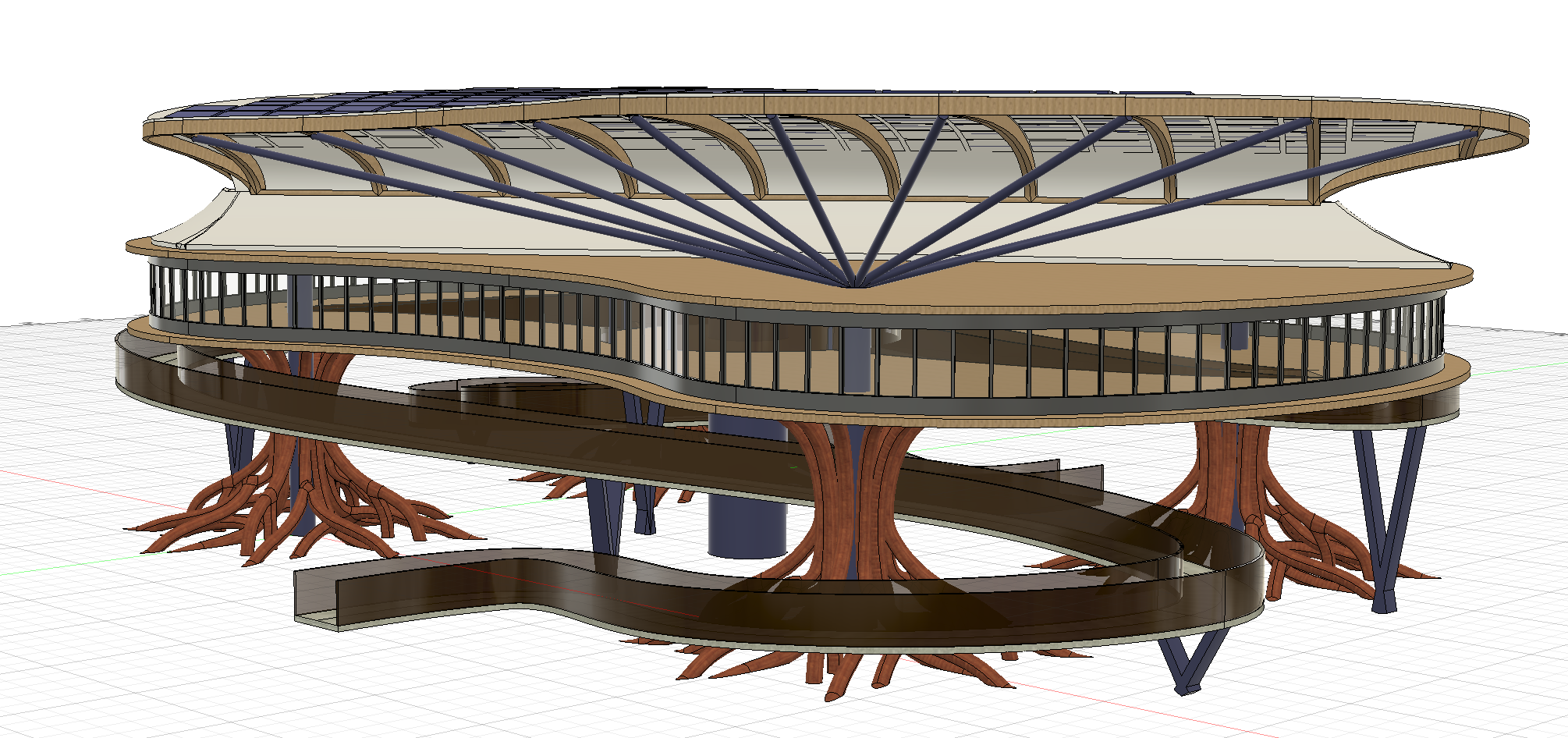
Some properties of the above components cannot be made until another component's geometry has been made. In this final step, we can tie up the loose ends. This flexibility is a benefit of the top-down design approach (see Step 1)
- Main deck cutouts for the pathways
- Smooth transition surfaces for water funneling on the roof connecting to the pipes of the columns (especially the asymmetrically placed pipe of the central column).
- Interior walls in the main deck
- Assigning physical materials/appearances.
- Creating renders and animations.
Conclusion, Results


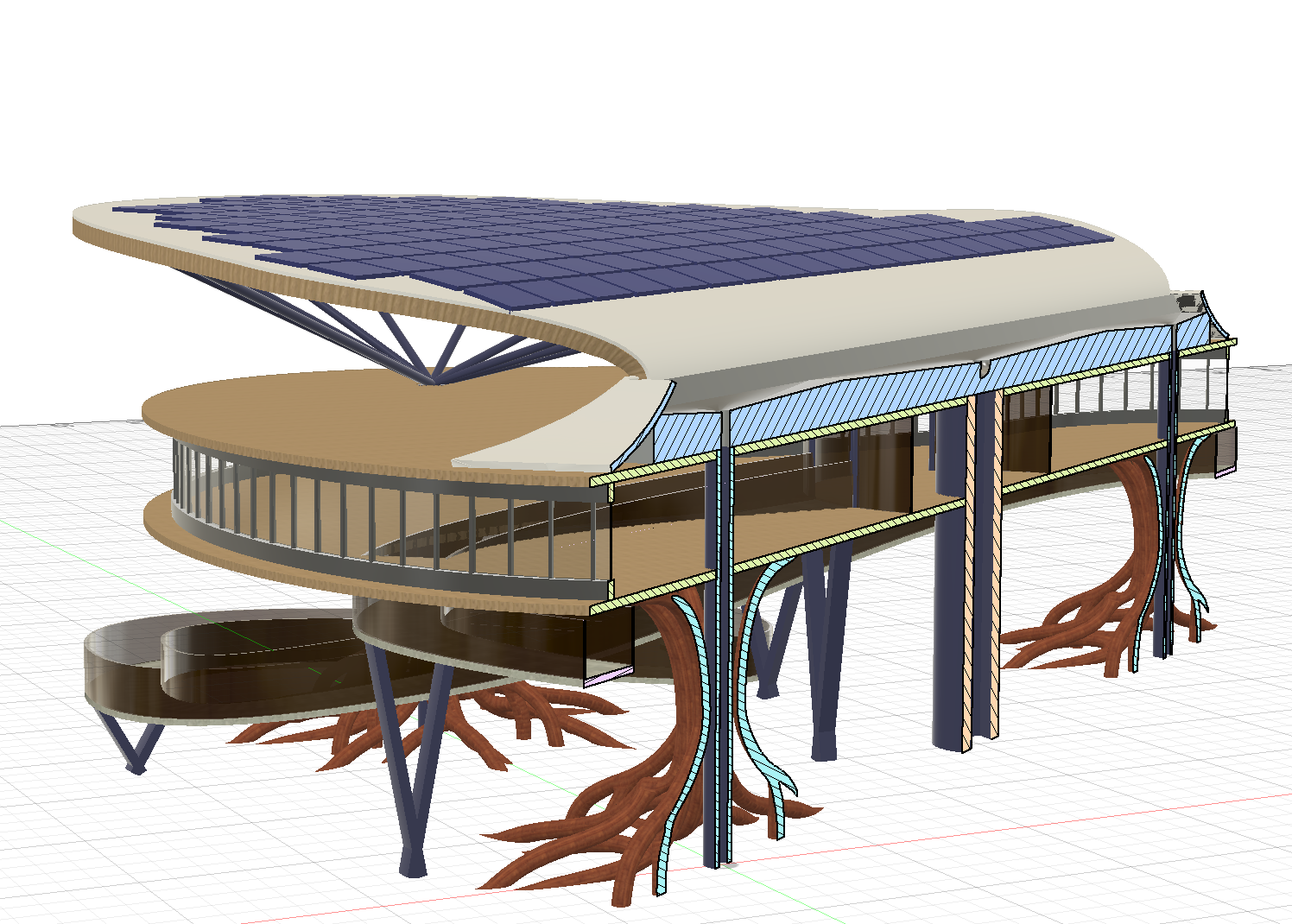
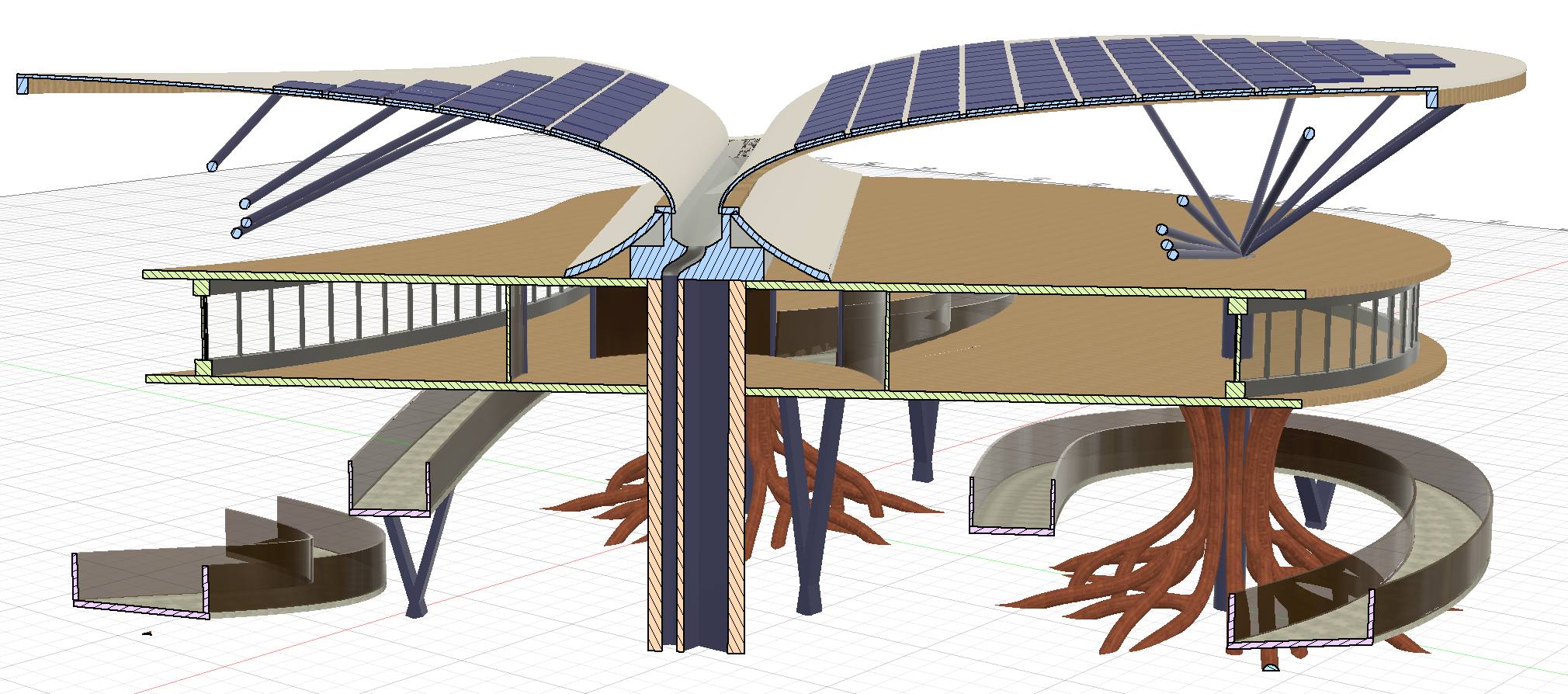
The Highwater Haven demonstrates how advanced CAD, biomimicry, and biophilic design can bridge the gap between architecture and disaster recovery. When placed in its originally inspired location, the clearing of Buffalo Bayou Park in Houston, it stands as a testament to building with nature rather than fighting it.
Resilience to the Environment: The design actively heals the landscape during catastrophic weather. Rather than relying on traditional concrete pilings that displace water and cause severe soil erosion, the Highwater Haven's T-spline molded roots mimic the native bald cypress tree. They safely disperse the kinetic energy of floodwaters, preserving the park's fragile ecosystem. Furthermore, the reliance on modular Mass Timber construction promotes a circular, carbon-sequestering economy, avoiding the massive carbon footprint of a steel-and-concrete monolith. Most importantly, the Highwater Haven will withstand future disasters to come, ensuring that it's still standing when the community needs it most.
Healing the Community: By raising the primary structure above historical flood lines, the Highwater Haven serves as an invaluable sanctuary when the municipal grid fails. The sweeping, aerodynamic roof canopy does more than just deflect hurricane winds—it funnels rainwater into a central filtration core while generating 100% of its own power via the solar array. This allows the building to independently provide clean water, light, and a triage space for vulnerable populations immediately following a disaster, complete with ADA-compliant ramps that remain functional even without electricity.