The Oasis Haven Hub


The spaces we are in have a significant impact on our overall well-being, especially during times of stress, uncertainty, or disruptions. These spaces can influence how we feel, inflicting either positive or negative emotions into our everyday lives. While I am inspired by the need to create supportive community spaces, I am aiming to further create a space where individuals also feel welcomed and at peace. And so, my goal is to design a library in the form of a haven, promoting tranquility, comfort, and emotional well-being by utilizing thoughtful architectural and interior design choices. Overall, libraries are often associated with only learning and studying. However, beyond their practical purpose, they could also serve as a space for comfort, reflection, and healing while providing a space for collaborations and learning.
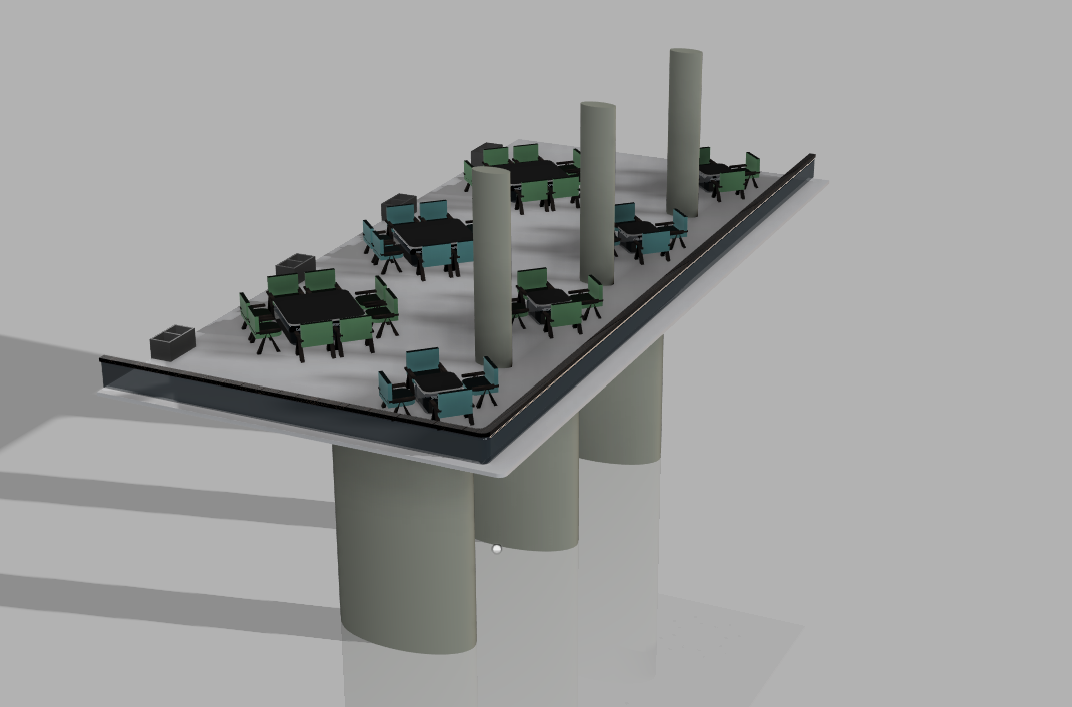
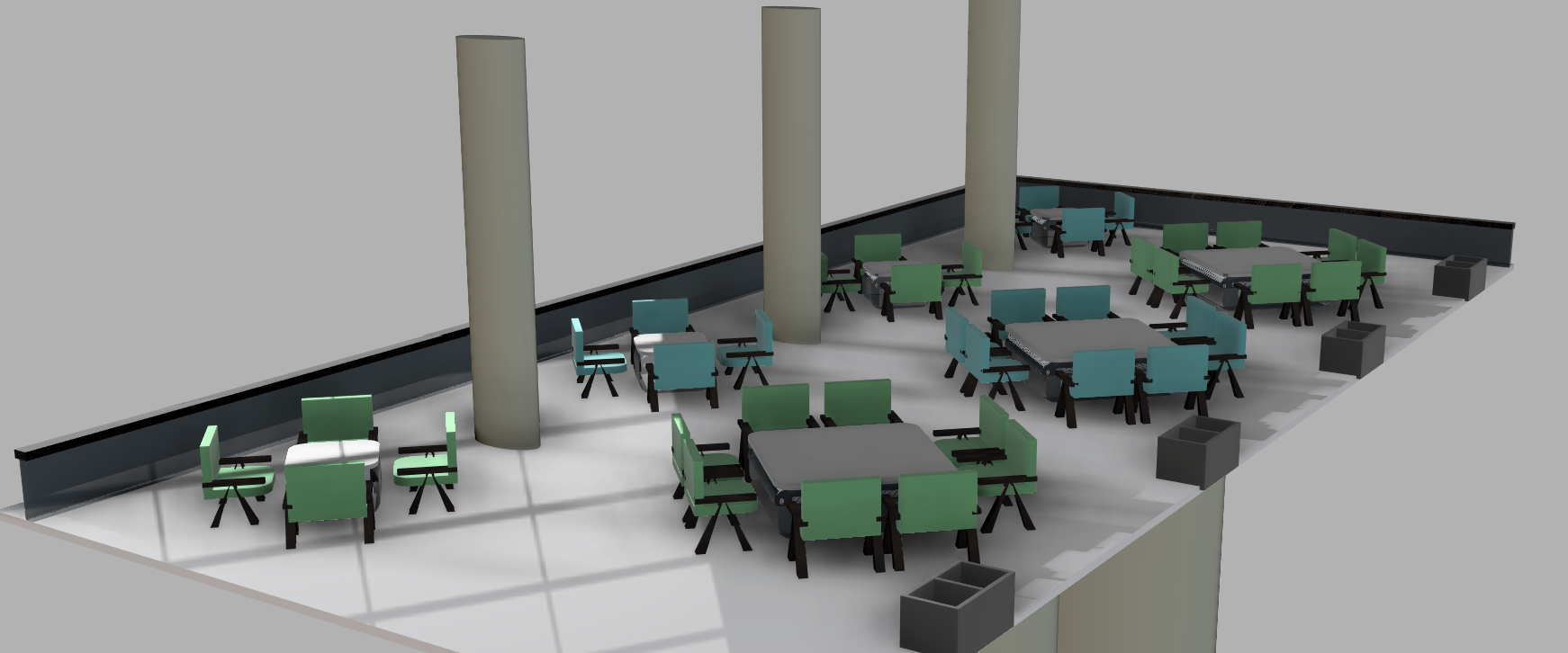
During difficult times, access to a safe and calming space becomes a pivotal need for most individuals, desiring to find solace amidst the chaos they are in. By implementing countless design choices, such as predominantly utilizing soft pastel colors to create a gentle and calming environment, compared to monochromatic elements, as well as rounded edges to avoid institutional appearances associated with rigid public buildings, incorporating greenery and natural lighting throughout my design to encourage one’s connection with nature, and putting high emphasis on the implication of open spaces to reduce feelings of confinement, as well as foster a sense of freedom and stability amidst the difficulties individuals are facing. Due to these reasons, I had exclusively selected the balcony open space section in the Oasis Haven Hub in TinkerCAD for a detailed development in Fusion 360, a pivotal section that best represents my project’s overall design intent on how small architectural choices contribute to mental wellness.
Supplies
Software:
- TinkerCAD
- Autodesk Fusion 360
Planning:
- Grid Paper
- Pen
- Ruler
Skills Applied:
- 3D Modeling
- Component Assembly
- Digital Design
- Interior Space Planning
Initial Concepts & Design Ideas

For this project, my initial goal was to create a modern-like space while promoting the concept of mental wellness, an inviting library space encouraging both self-reflection and group collaborations. Early concepts were predominantly focused on creating an open space, a haven for more than just being an instructional setting.
During my planning stage, several components were resized and redesigned to improve proportions, as I had initially sketched out my rough idea on the balcony section I wanted to simulate in Fusion 360, a pivotal feature within my overall design. As countless pieces of furniture and building dimensions were constantly being adjusted to create a more balanced and realistic design. Ultimately, my final design highly emphasizes the importance of accessibility, organization, comfort, and collaboration while promoting a haven open to all individuals.
Fusion 360 Steps - Outdoor Chairs


Outdoor Chairs:
- *Note: Make this component in a separate Fusion file for easier assembly later.
Chair Legs:
- Sketch a tent-like side profile for the chair legs using 1mm horizontal base lines and two diagonal supports with 6mm rise and 2mm run.
- Extrude the sketch to 1mm.
- Duplicate the leg and move it 8mm forward. Group both legs as a rigid component.
Cushions:
- Create a rounded 7 X 8mm seat cushion and move it upward by 4mm.
- Add a 1 X 8mm backrest and extrude it to 5mm before grouping both cushions as a rigid group.
Arm Rests:
- Create two thin 6.5 X 1mm rounded armrests over each of the chair’s legs and extrude to 0.5mm.
- Move both components 5.5mm above the chair legs and group them.
Apply:
- Chrome material for the cushions.
- Bamboo Dark - Semigloss appearance to the legs and armrests.
- Group all chair components together.
- Repeat the process to create both blue and green chair variations.
Fusion 360 Steps - Tables


4 Group Table:
- *Note: Make this component in a separate Fusion file for easier assembly later.
- Create a rounded 10 X 10mm square base and extrude it to 6mm.
- Add a 10mm X 8mm recessed cut 1mm up into the middle of the table and create a thin 10 X 10mm rounded tabletop above it with an extrusion of 0.5mm.
Apply:
- White Chrome to the tabletop and inside of the table’s recessed cut
- Light Blue Glass to the table base
- Group the table components together.
- Insert one chair and position it evenly around the table using the “Pattern on Path” feature with a quantity of four chairs.
- Group the completed table set as a rigid component.
- Repeat the process for both blue and green chair variations.
8 Group Table:
- *Note: Make this component in a separate Fusion file for easier assembly later.
- Create a rounded 20 X 20mm table base and extrude it to 6mm.
- Add a 20mm X 18mm recessed cut 1mm up into the middle of the table and create a thin 20mm X 20mm rounded tabletop above it with an extrusion of 0.5mm.
- Add a recessed cut and create a thin tabletop above the base.
Apply:
- White Chrome to the tabletop and inside of the table’s recessed cut
- Light Blue Glass to the table base
- Group the table components together.
- Position two chairs beside the table and group them.
- Use the “Pattern on Path” feature to duplicate the grouped chairs evenly around the table with a quantity of eight chairs.
- Group the completed table set as a rigid component.
- Repeat the process for both blue and green chair variations.
Fusion 360 Steps - Balcony & Assemblies


Balcony:
- *Note: Make this component in a separate Fusion file for easier assembly later.
- Create a 233mm X 109mm balcony base using a rounded rectangular platform and extrude it to 1mm.
- Sketch and extrude an L-shaped glass railing around the balcony perimeter with a width of 1mm and a height of 7mm.
- Duplicate the railing to create a 1mm layered glass effect and apply rounded edges using fillets on the main railing.
- Create three evenly spaced 20mm X 40mm elliptical support pillars and extrude them 80mm upward.
- Raise the balcony platform 80mm above the pillars to create the floating balcony structure.
- Design 10mm X 5mm small decorative trash cans using shelled rectangular extrusions and duplicate them evenly across the balcony to create four trash cans.
- Add three evenly spaced, smaller 5mm X 10mm decorative elliptical pillars and extrude them 50mm upward.
Apply:
- Light Blue Glass to the railings
- Bamboo Dark - Semigloss to the railing tops
- Concrete appearance to the six pillars
- White Marble on the balcony floor
Assembly:
- Insert all completed table components into the balcony assembly file.
- Position the four-group tables evenly along the lower section of the balcony, 10mm from the railing.
- Use the “Move” and “Rectangular Pattern tools” to create a total of 4 four-group tables with interchangeable color patterns.
- Position the eight-group tables evenly along the upper and middle sections of the balcony, 10mm from the top edge.
- Use the “Move” and “Rectangular Pattern tools” to create a total of 3 eight-group tables with interchangeable color patterns.
- Rotate all seating arrangements 45° to create a more open and natural layout.
- Finalize the assembly by grouping all components.
Fusion 360 - Final Renders
TinkerCAD Steps - Plain Walls
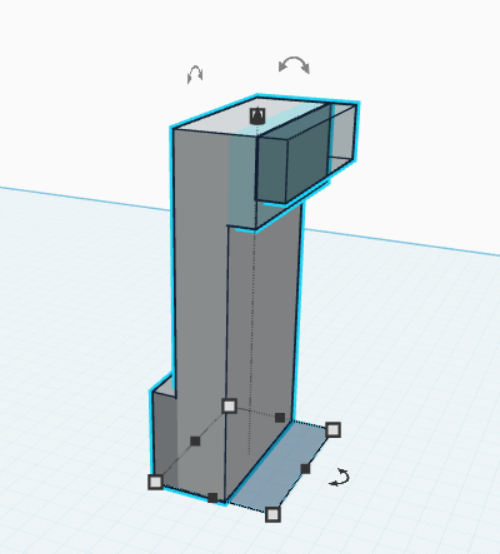


Plain Straight Wall:
- Make a 7.1m X 2m X 14m white wall with a grey border on the outside with a width of 1m and a height of 4m.
- Make a light blue backdrop on the front top section of the wall with a width of 1m and a height of 3m.
- On the outer face of the blue backdrop, make a blue-stained light source with a width of 1m and a height of 2m.
- Union all components after.
Double-Sided Plain Straight Wall:
- Make a 7.1m X 2m X 14m white wall.
- Make a light blue backdrop on the front top section of the wall with a width of 1m and a height of 3m.
- On the outer face of the blue backdrop, make a blue-stained light source with a width of 1m and a height of 2m.
- Repeat the light source components on the other side of the wall.
- Union all components after.
Plain Inward Curved Wall:
- Make a 7m X 7m X 14m white quarter cylinder, with a 5m X 5m X 14m cut on its bottom corner section.
- Make two 0.1m X 2m X 14m brown polygons on both ends of the curved wall, protruding outside.
- Make a grey curved border on the outside with a width of 1m and a height of 4m.
- Make a light blue curved backdrop on the front top section of the wall with a width of 1m and a height of 3m.
- On the outer face of the blue curved backdrop, make a blue-stained light source with a width of 1m and a height of 2m.
- Union all components after.
- Attach a “Plain Straight Wall” on both sides of the wall.
- Union all components after.
Plain Outward Curved Wall:
- Make a 7m X 7m X 14m white quarter cylinder, with a 5m X 5m X 14m cut on its bottom corner section.
- Make two 0.1m X 2m X 14m brown polygons on both ends of the curved wall, protruding inside.
- Make a grey curved border on the inside with a width of 1m and a height of 4m.
- Make a light blue curved backdrop on the back top section of the wall with a width of 1m and a height of 3m.
- On the outer face of the blue curved backdrop, make a blue-stained light source with a width of 1m and a height of 2m.
- Union all components after.
- Attach a “Plain Straight Wall” on both sides of the wall.
- Union all components after.
TinkerCAD Steps - Windows

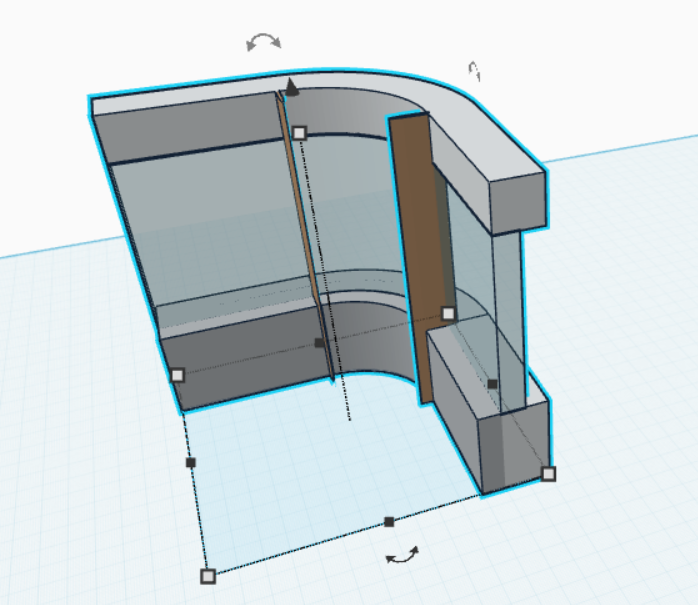
Straight Window:
- Make a 7.1m X 2m X 4m white base with a grey border on the outside with a width of 1m and a height of 4m.
- On top of the top edge of the white base, make a 7.1m X 1m X 8m blue-stained window.
- Duplicate the bottom white base to make an enclosure for the top, changing it to a height of 2m.
- Union all components after.
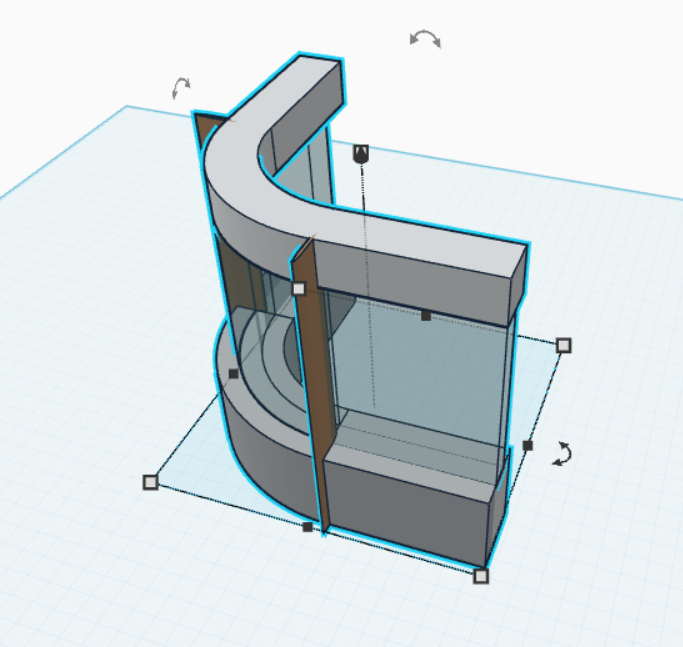
Inward Curved Window:
- Make a 7m X 7m X 4m white quarter cylinder, with a 5m X 5m X 4m cut on its bottom corner section.
- Make two 0.1m X 2m X 14m brown polygons on both ends of the curved wall, protruding outside.
- Make a grey curved border on the outside with a width of 1m and a height of 4m.
- Make a 7m X 7m X 8m blue-stained quarter cylinder glass window, with a 6m X 6m X 8m cut on its bottom corner section.
- Duplicate the bottom white base to make an enclosure for the top, changing it to a height of 2m.
- Union all components after.
- Attach a “Straight Window” on both sides of the wall.
- Union all components after.
Outward Curved Window:
- Make a 7m X 7m X 4m white quarter cylinder, with a 5m X 5m X 4m cut on its bottom corner section.
- Make two 0.1m X 2m X 14m brown polygons on both ends of the curved wall, protruding inside.
- Make a grey curved border on the inside with a width of 1m and a height of 4m.
- Make a 7m X 7m X 8m blue-stained quarter cylinder glass window, with a 6m X 6m X 8m cut on its bottom corner section.
- Duplicate the bottom white base to make an enclosure for the top, changing it to a height of 2m.
- Union all components after.
- Attach a “Straight Window” on both sides of the wall.
- Union all components after.
TinkerCAD Steps - Tall Windows
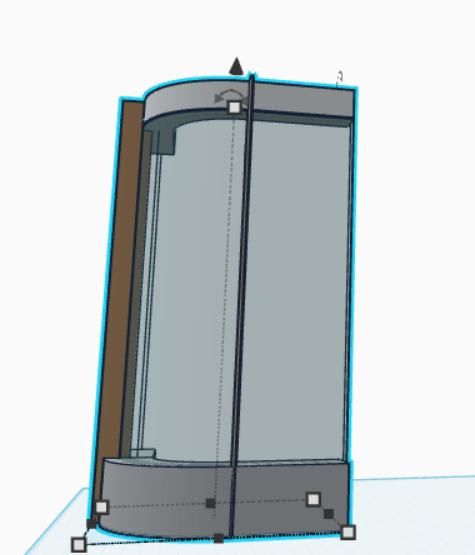
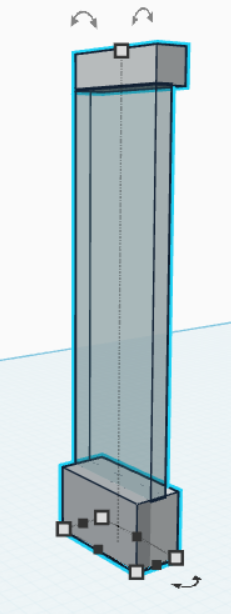

Tall Straight Window:
- Make a 7.1m X 2m X 4m white base with a grey border on the outside with a width of 1m and a height of 4m.
- On top of the top edge of the white base, make a 7.1m X 1m X 23m blue-stained window.
- Duplicate the bottom white base to make an enclosure for the top, changing it to a height of 2m.
- Union all components after.
Tall Inward Curved Window:
- Make a 7m X 7m X 4m white quarter cylinder, with a 5m X 5m X 4m cut on its bottom corner section.
- Make two 0.1m X 2m X 29m brown polygons on both ends of the curved wall, protruding outside.
- Make a grey curved border on the outside with a width of 1m and a height of 4m.
- Make a 7m X 7m X 23m blue-stained quarter cylinder glass window, with a 6m X 6m X 23m cut on its bottom corner section.
- Duplicate the bottom white base to make an enclosure for the top, changing it to a height of 2m.
- Union all components after.
- Attach a “Tall Straight Window” on both sides of the wall.
- Union all components after.
Tall Outward Curved Window:
- Make a 7m X 7m X 4m white quarter cylinder, with a 5m X 5m X 4m cut on its bottom corner section.
- Make two 0.1m X 2m X 29m brown polygons on both ends of the curved wall, protruding inside.
- Make a grey curved border on the inside with a width of 1m and a height of 4m.
- Make a 7m X 7m X 23m blue-stained quarter cylinder glass window, with a 6m X 6m X 23m cut on its bottom corner section.
- Duplicate the bottom white base to make an enclosure for the top, changing it to a height of 2m.
- Union all components after.
- Attach a “Tall Straight Window” on both sides of the wall.
- Union all components after.
TinkerCAD Steps - Patterned Wall
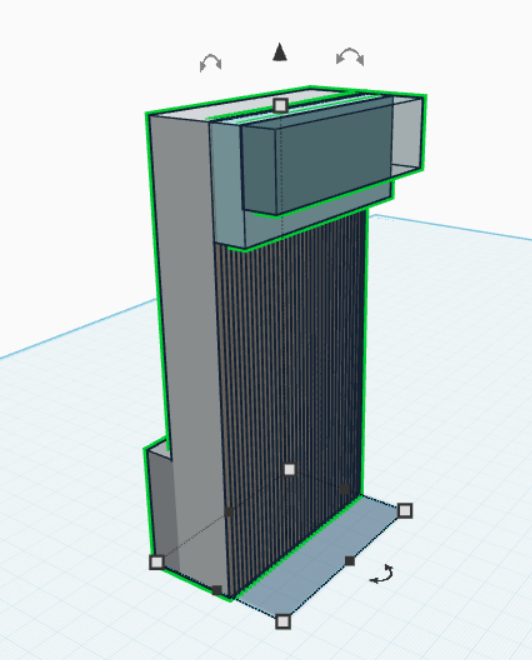
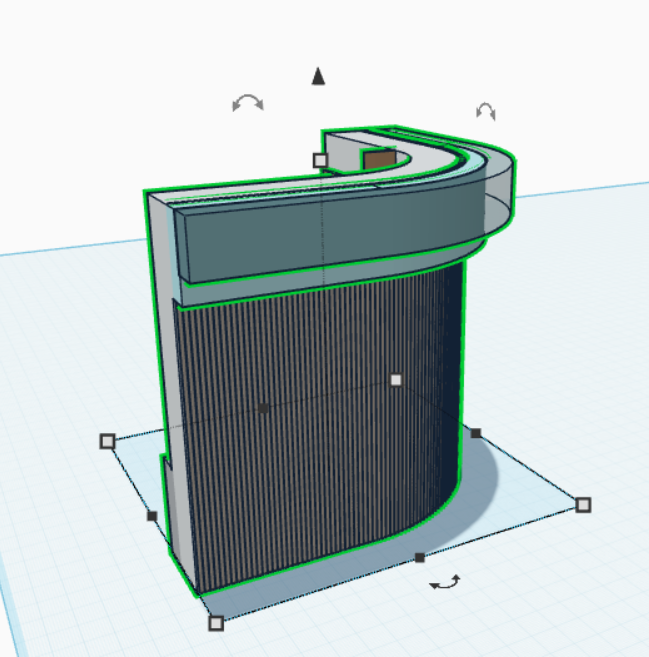

Patterned Straight Wall:
- Make a 7.1m X 2m X 14m white wall with a grey border on the outside with a width of 1m and a height of 4m.
- Make a light blue backdrop on the front top section of the wall with a width of 1m and a height of 3m.
- On the outer face of the blue backdrop, make a blue-stained light source with a width of 1m and a height of 2m.
- Union all components after.
- Make 0.1m X 0.1m X 14m brown transparent cylinder patterns, spaced 0.1m from each other, until the wall is covered, and group all the cylinders together.
- Group the wall and pattern together.
Patterned Inward Curved Wall:
- Make a 7m X 7m X 14m white quarter cylinder, with a 5m X 5m X 14m cut on its bottom corner section.
- Make two 0.1m X 2m X 14m brown polygons on both ends of the curved wall, protruding outside.
- Make a grey curved border on the outside with a width of 1m and a height of 4m.
- Make a light blue curved backdrop on the front top section of the wall with a width of 1m and a height of 3m.
- On the outer face of the blue curved backdrop, make a blue-stained light source with a width of 1m and a height of 2m.
- Union all components after.
- Attach a “Plain Straight Wall” on both sides of the wall.
- Union all components after.
- Make 0.1m X 0.1m X 14m brown transparent cylinder patterns, spaced 0.1m from each other, until the wall is covered, and group all the cylinders together.
- Group the wall and pattern together.
Patterned Outward Curved Wall:
- Make a 7m X 7m X 14m white quarter cylinder, with a 5m X 5m X 14m cut on its bottom corner section.
- Make two 0.1m X 2m X 14m brown polygons on both ends of the curved wall, protruding inside.
- Make a grey curved border on the inside with a width of 1m and a height of 4m.
- Make a light blue curved backdrop on the back top section of the wall with a width of 1m and a height of 3m.
- On the outer face of the blue curved backdrop, make a blue-stained light source with a width of 1m and a height of 2m.
- Union all components after.
- Attach a “Plain Straight Wall” on both sides of the wall.
- Union all components after.
- Make 0.1m X 0.1m X 14m brown transparent cylinder patterns, spaced 0.1m from each other, until the wall is covered, and group all the cylinders together.
- Group the wall and pattern together.
TinkerCAD Steps - Facade Wall
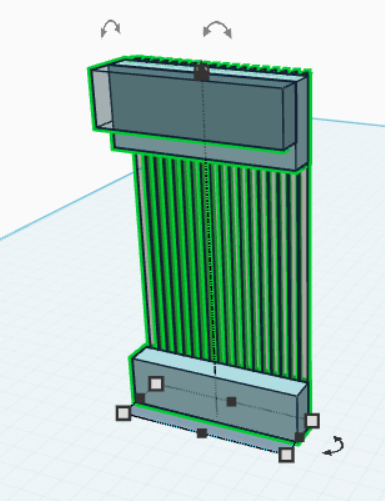

Facade Straight Wall:
- Make a 7.3m X 1m X 2m light blue base.
- Duplicate the bottom light blue base to make an enclosure for the top, changing it to a height of 3m.
- Make a blue-stained light source on the front top section of the wall with a width of 1m and a height of 2m.
- Union all components after.
- Make 0.1m X 0.5m X 14m brown transparent cylinder patterns, spaced 0.3m from each other, until the wall is covered, and group all the cylinders together.
- Group the wall and pattern together.
Facade Inward Curved Wall:
- Make a 5m X 5m X 2m light blue quarter cylinder, with a 4m X 4m X 2m cut on its bottom corner section.
- Duplicate the bottom light blue base to make an enclosure for the top, changing it to a height of 3m.
- On the front top section of the enclosure, make a blue-stained light source with a width of 1m and a height of 2m.
- Union all components after.
- Make 0.1m X 0.1m X 14m brown transparent cylinder patterns, spaced 0.1m from each other, going in a curved pattern, until the wall is covered, and group all the cylinders together.
- Group the wall and pattern together.
- Attach a “Plain Straight Wall” on both sides of the wall.
- Union all components after.
Glass Railings
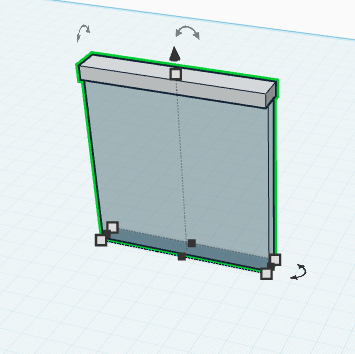
Glass Railing:
- Make a 7.1m X 0.5m X 7m blue-stained glass railing.
- Make a 7.1m X 1m X 0.5m white top railing.
- Union all components after.
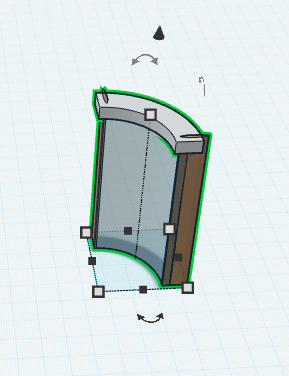
Inward Curved Glass Railing:
- Make a 3m X 3m X 7m blue-stained quarter cylinder glass railing, with a 2.5m X 2.5m X 7m cut on its bottom corner section.
- Make a 3.5m X 3.5m X 0.5m white top quarter cylinder railing, with a 2.5m X 2.5m X 0.5m cut on its bottom corner section.
- Make two 0.1m X 1m X 7.5m brown polygons on both ends of the curved railing, protruding outside.
- Union all components after.
TinkerCAD Steps - Chairs

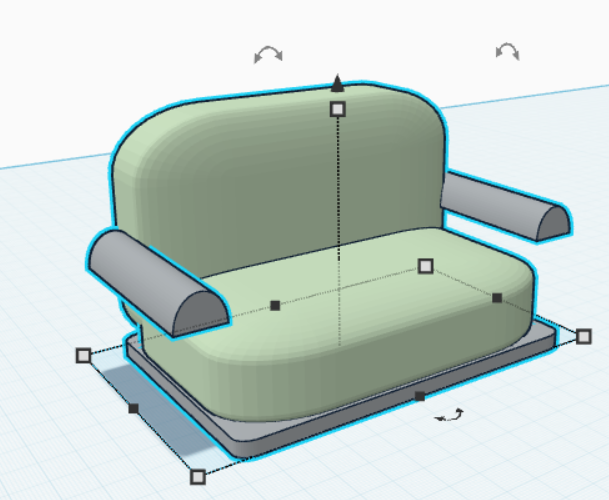
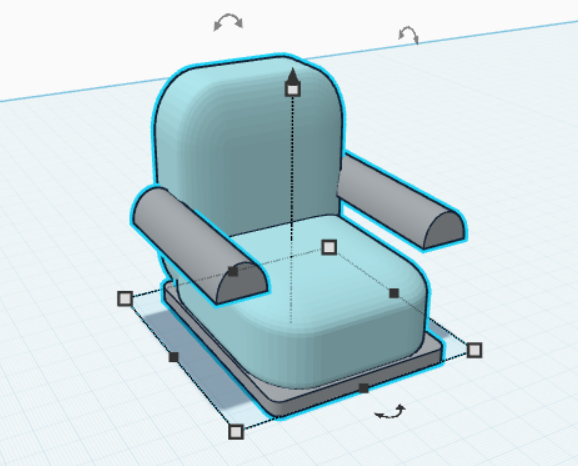

Outdoor Lounge Chair:
- Make a 2m X 6m X 6m grey pyramid with a 6m X 4m X 5m cut extrude hole in the middle to make one of the chair’s legs.
- Make a 1.5m X 6m X 1m grey round roofs on both sides of the chair to act as a hand rest near the top of the chair legs.
- Duplicate the chair components, leaving a 5mm gap in between for the cushions.
- Make a rounded 6m X 8m X 3mm light blue cushion, positioning it near the top of the leg.
- Make a 6m X 3m X 7m light blue cushion backrest near the top edge of the cushion.
- Union all components after.
- Resize the entire chair to 5m X 5m X 7m.
- Repeat the process to create both blue and green chair variations.
Double Floor Chair:
- Make a rounded 12m X 8m X 0.5m grey platform with a rounded 12m X 8m X 3m light blue cushion on top.
- Make a 12m X 3m X 8m light blue cushion backrest near the top edge of the cushion.
- Make two 1.5m X 6m X 1m grey round roofs on both sides of the chair to act as a hand rest near the middle section of the backrest.
- Union all components after.
- Resize the entire chair to 10m X 5m X 5m.
- Repeat the process to create both blue and green chair variations.
Single Floor Chair:
- Make a rounded 6m X 8m X 0.5m grey platform with a rounded 6m X 8m X 3m light blue cushion on top.
- Make a 6m X 3m X 8m light blue cushion backrest near the top edge of the cushion.
- Make two 1.5m X 6m X 1m grey round roofs on both sides of the chair to act as a hand rest near the middle section of the backrest.
- Union all components after.
- Resize the entire chair to 5m X 5m X 5m.
- Repeat the process to create both blue and green chair variations.
Stool Chair:
- Make four grey 0.5m X 0.5m X 6.5m all tilted at 22.5° to the middle.
- On top, make a 6m x 6m x 1m light blue cylindrical cushion.
- Union all components after.
- Resize the entire chair to 4m X 4m X 4m.
- Repeat the process to create both blue and green chair variations.
TinkerCAD Steps - Tables
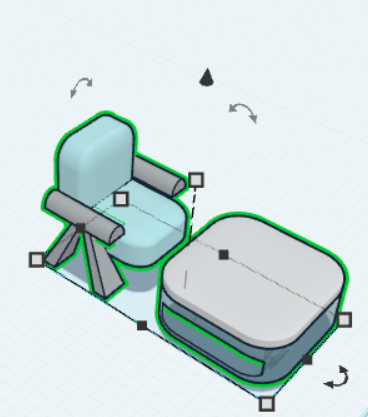



Single Table:
- Make a rounded 6m X 6m X 4m glass blue-stained table base with a 4m X 10m X 2m cut extrude hole in the middle of the base.
- Make a rounded 6m X 6m X 1m white table top on top.
- Union all components after.
- Resize the entire table to 6m X 6m X 5m.
- Make two variations of a Single Table with outdoor chair color variations.
- Use the align tools and group them.
- Using the align tools, ensure each chair has 1m of space from the table and group them.
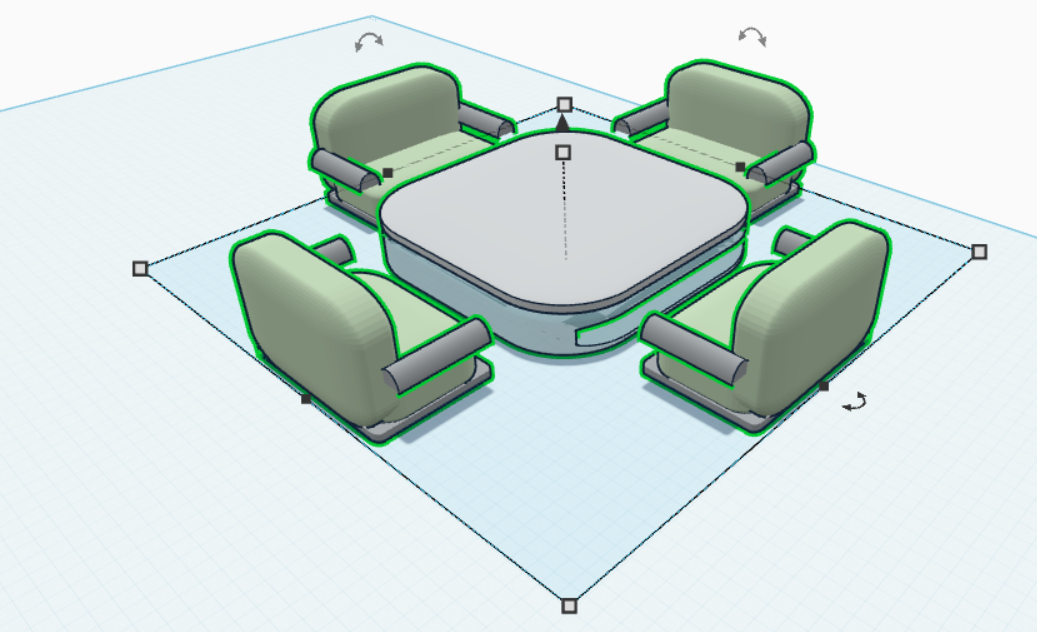
4 Group Table:
- Make a rounded 6m X 6m X 4m glass blue-stained table base with a 4m X 10m X 2m cut extrude hole in the middle of the base.
- Make a rounded 6m X 6m X 1m white table top on top.
- Union all components after.
- Resize the entire table to 6m X 6m X 3m.
- Make four variations of a 4-Group-Table with outdoor chair and single floor chair color variations.
- Using the align tools, ensure each chair has 1m of space from the table and group them.
- *Note: For the outdoor chair variations, change the height of the 8-Group Table to 5m.
6 Group Table:
- Make a rounded 12m X 6m X 4m glass blue-stained table base with a 10m X 14m X 2m cut extrude hole in the middle of the base.
- Make a rounded 12m X 6m X 1m white table top on top.
- Union all components after.
- Resize the entire table to 12m X 6m X 3m.
- Make two variations of a 6-Group-Table with a mix of single and double floor chair color variations.
- Using the align tools, ensure each chair has 1m of space from the table and group them.
8 Group Table:
- Make a rounded 12m X 12m X 4m glass blue-stained table base with a 10 m X 14m X 2m cut extrude hole in the middle of the base.
- Make a rounded 12m X 12m X 1m white table top on top.
- Union all components after.
- Resize the entire table to 12m X 12m X 3m.
- Make four variations of an 8-Group-Table with outdoor chair and double floor chair color variations.
- Using the align tools, ensure each chair has 1m of space from the table and group them.
- *Note: For the outdoor chair variations, change the height of the 8-Group Table to 5m and ensure each chair is 2m from each other.
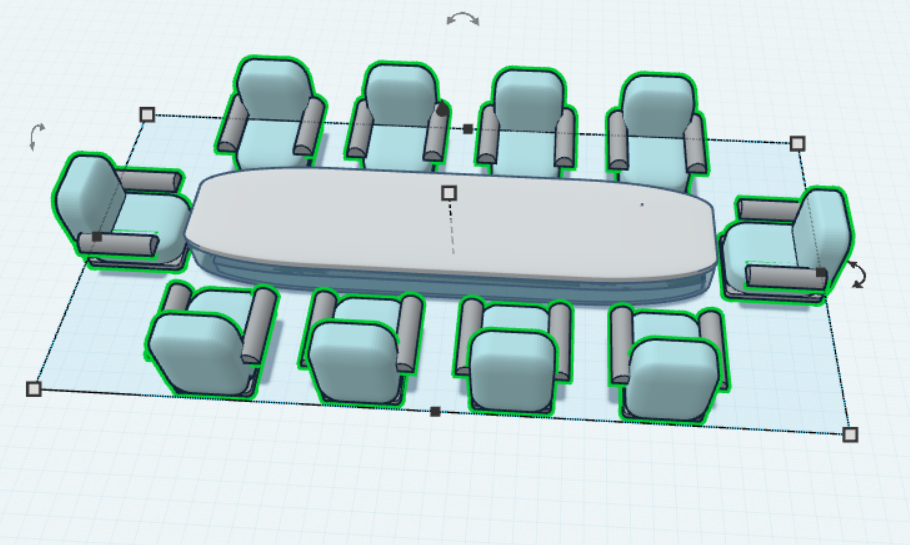
10 Group Table:
- Make a rounded 26m X 6m X 4m glass blue-stained table base with a 24m X 10m X 2m cut extrude hole in the middle of the base.
- Make a rounded 26m X 6m X 1m white table top on top.
- Union all components after.
- Resize the entire table to 26m X 6m X 3m.
- Make four variations of an 8-Group-Table with single floor chair color variations, and ensure each chair has 1m of space from each other.
- Using the align tools, ensure each chair has 1m of space from the table and group them, and ensure each chair is 2m from each other.
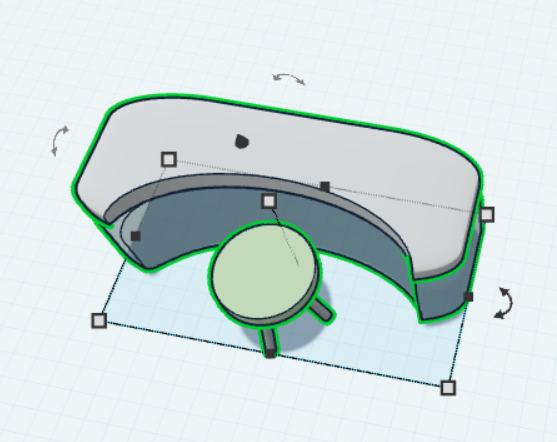
Receptionist Table:
- Make a rounded 15m X 6m X 5m glass blue-stained table base.
- Make a rounded 15m X 6m X 1m white table top on top.
- Make a 12m X 6m X 8m cylindrical extrude from the bottom of the table, 3m away from the top edge.
- Union all components after.
- Make two variations of the receptionist table with blue and green stool color variations, and the chair being 4m from the top center edge of the table.
- Using the align tools, ensure each chair has 2m of space from the table and group them.
TinkerCAD Steps - Decorations


Modern Double Glass Door:
- Make a 10m X 2m X 12m brown block.
- Make two 4.5m X 5m X 12m hole blocks and position them with a 0.3m gap while aligning them in the center of the block to make the doors.
- Make a 9.5m X 0.4m X 11.6m blue stained glass panel and align it to the base of the door.
- Make two 0.3m X 0.8m X 2m grey cylinders, positioning their heights at the center of the stained glass near the center of the door.
- Union all components after.
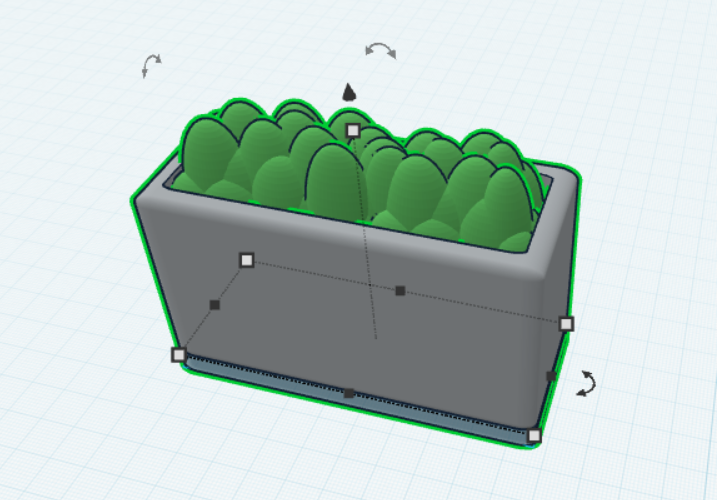
Large Wall Plant:
- Make a rounded 10m X 4m X 0.5m blue-stained platform.
- Make a grey, rounded 10m X 4m X 5.5m block on top of it with a 9m X 3m X 2m extrude cut from above using the “union” feature.
- Make a bundle of green spheres of varying sizes to create a bush, ensuring they can fit within the pot.
- Group all components together.
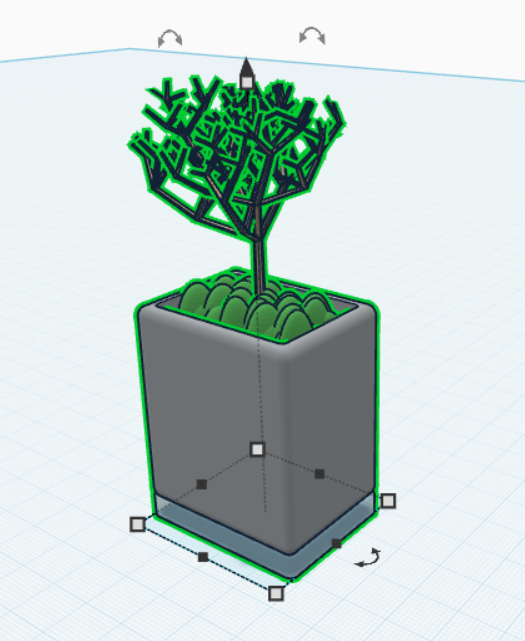
Single Pot of Plant:
- Make a rounded 4m X 3m X 0.5m blue-stained platform.
- Make a grey, rounded 4m X 3m X 4.5m block on top of it with a 3.5m X 2.5m X 2m extrude cut from above using the “union” feature.
- Make a bundle of small green spheres to create a bush, ensuring they can fit within the pot.
- Use the “Tree” shape and duplicate it by using the randomizer to create a fuller tree, and group them together.
- Group all components together.
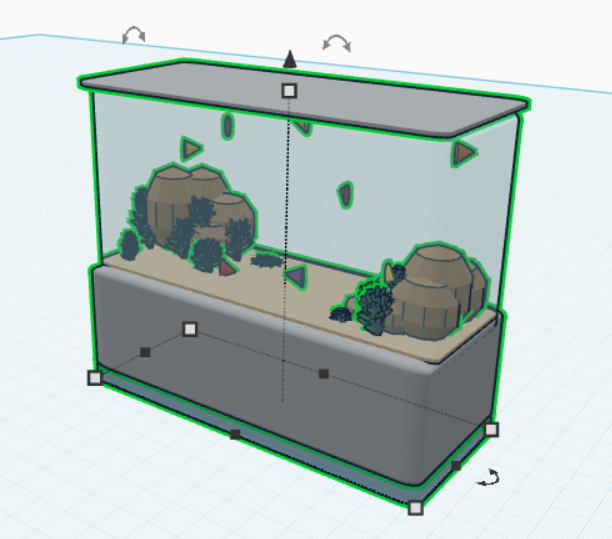
Aquarium:
- Make a rounded 12m X 5m X 0.5m blue-stained platform.
- Make a grey, rounded 12m X 5m X 3.5m block on top of it with a 12m X 4m X 0.1m beige sand bed on top of the grey platform.
- Make a bundle of small brown spheres to act as rocks, preferably in the outer edges of the sand bed.
- Spread small green “Crystal Formation” shapes in the crevices of the rocks to act as grass.
- Use 0.5m X 0.1m X 0.5m cones tilted sideways to act as a fish; use different colors for fish varieties.
- Make a rounded 12m X 4m X 6.4m light blue glass centered in the middle on top of the sand bed with a rounded 12m X 5m X 0.1m grey lid on top.
- Group all components together.
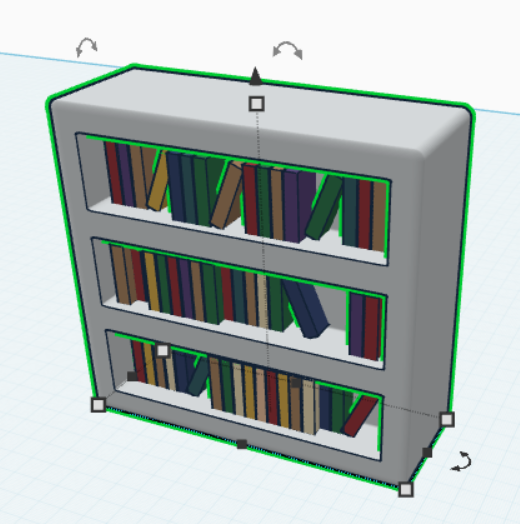
Bookshelf:
- Make a rounded 14m X 5m X 13m white block with three hole extrudes of 12m X 3m X 2m, evenly spaced out vertically to the front and back faces of the block.
- Make groups of 0.5m X 1.9m X 2.5 books with varying colors and positions to fill the shelves.
- Group all components together.
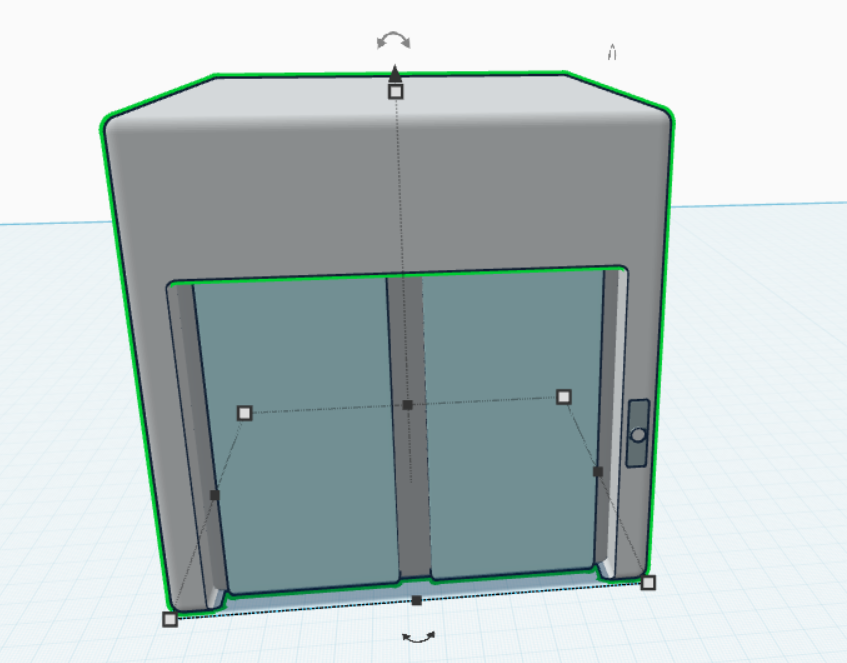
Elevator:
- Make a rounded 14m X 14m X 14m white block with a 12m X 2m X 10m cut extrude in the center on the front face.
- Make a rounded 12m X 0.7m X 10m grey block with two 5m X 0.2m X 10m light blue panels evenly spaced out on the front face of the grey block to make the elevator’s door.
- Move the door component into the extruded cut front face.
- Make a rounded 0.5m X 0.05m X 2m blue-stained glass panel with a 0.4m X 0.1m X 0.4m white cylinder to make a button centered in the middle.
- Group all components together.
Toilet:
- Make a rounded 5m X 5m X 5m white cylinder.
- Make a 7m X 8m X 3m white cylinder on top with a 6m X 6.5m X 3m cut extrude in the center of the toilet bowl.
- Make a 5m X 2m X 6m white block positioned next to the back end of the white cylindrical base of the toilet.
- On top of the rectangular base, make an 8m X 4m X 5m block with a 0.8m X 0.8m x 0.02 m flush button with a black border around it.
- Group all components together.
Bathroom Faucet:
- Make a 10m X 4m X 0.2m grey platform.
- On top of it, make a rounded 10m X 4m X 1m blue-stained glass sink with a cut extrude of 9m X 2.5m X 0.8 on its centre.
- Use the “Faucet” shape two times and resize it to 1.5m X 1m X 1.5m, ensuring they are evenly spaced out 15mm away from the side edges of the sink.
- Group all components together.
Single Door:
- Make a 5m X 2m X 12m brown block with a 4m X 2m X 11.5m couple in the middle of the box.
- Make a 4.5m X 0.4m X 11.6m white panel and align it to the center base of the door.
- Make a 0.3m X 0.8m X 2m grey cylinder, positioning its height at the center of the door.
- Union all components after.
Trashcan:
- Make a rounded 4m X 3m X 0.5m blue-stained platform.
- Make a grey, rounded 4m X 3m X 4.5m with a 3.5m X 2.5m X 3.8m extrude cut from above.
- Group all components together.
TinkerCAD Steps - 1st Floor Assemblies


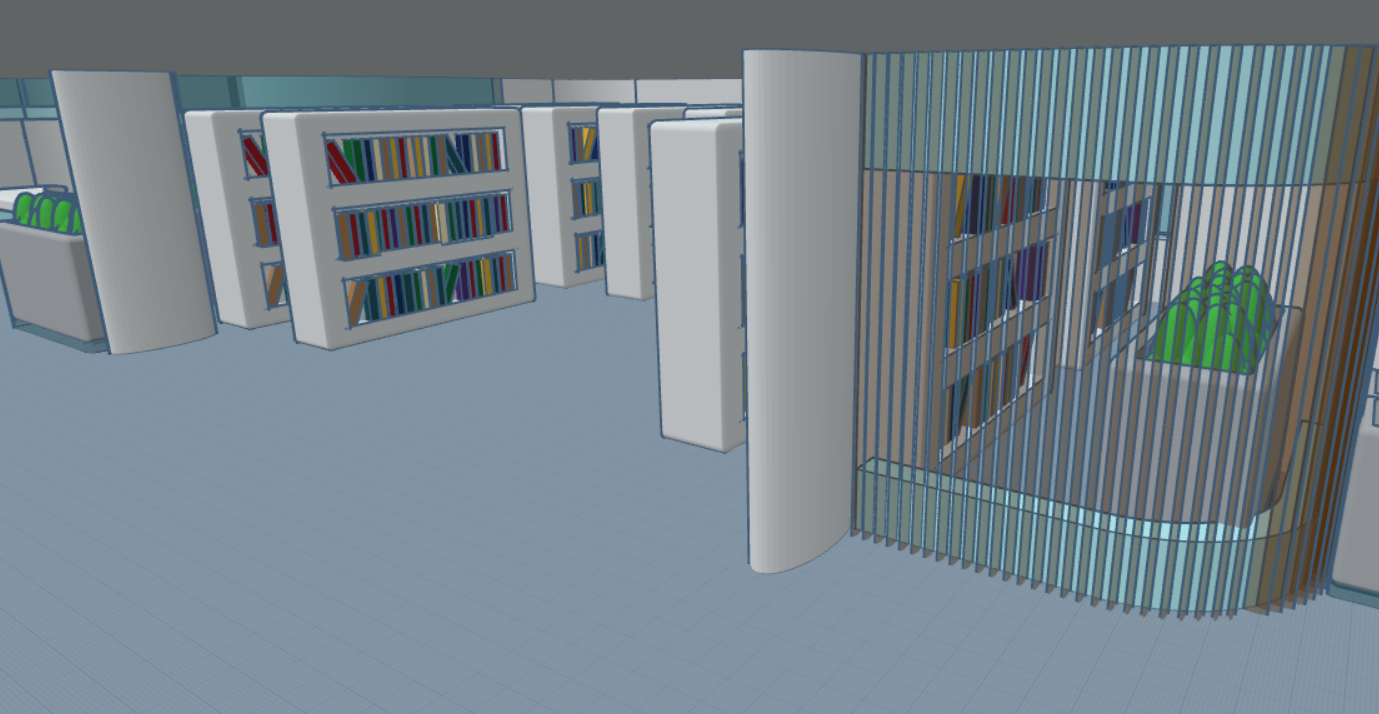
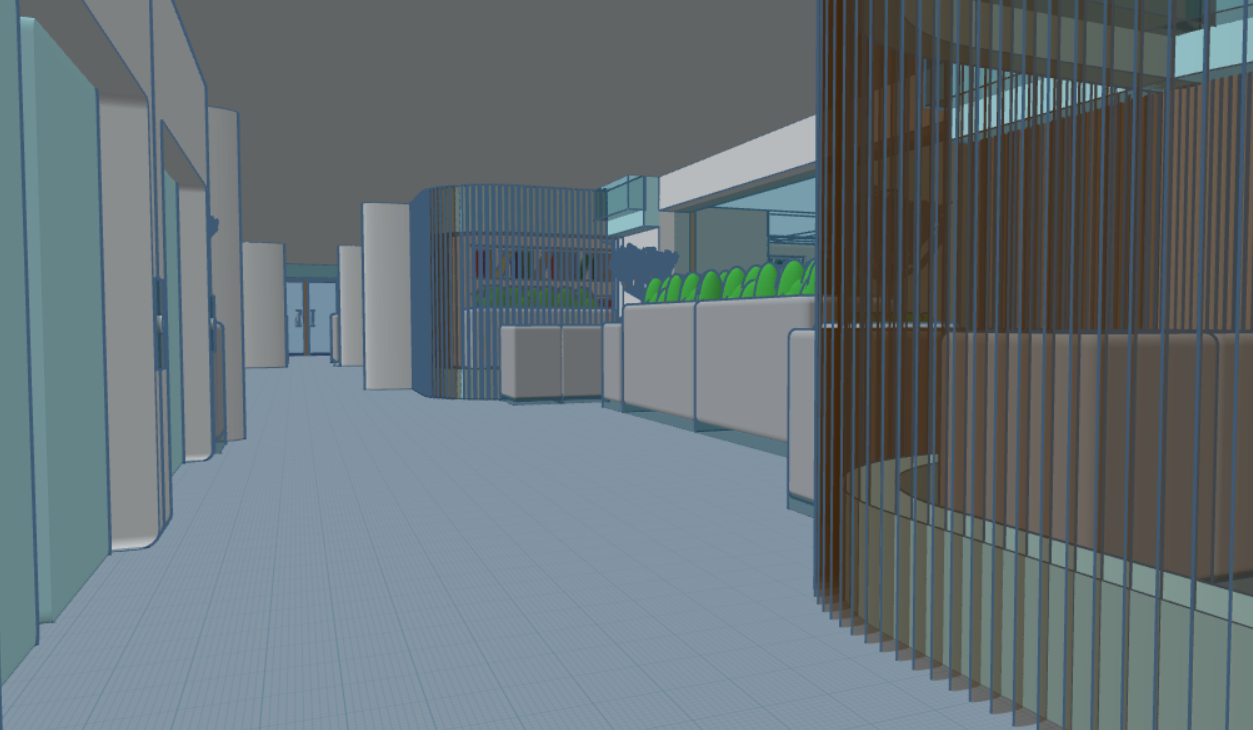
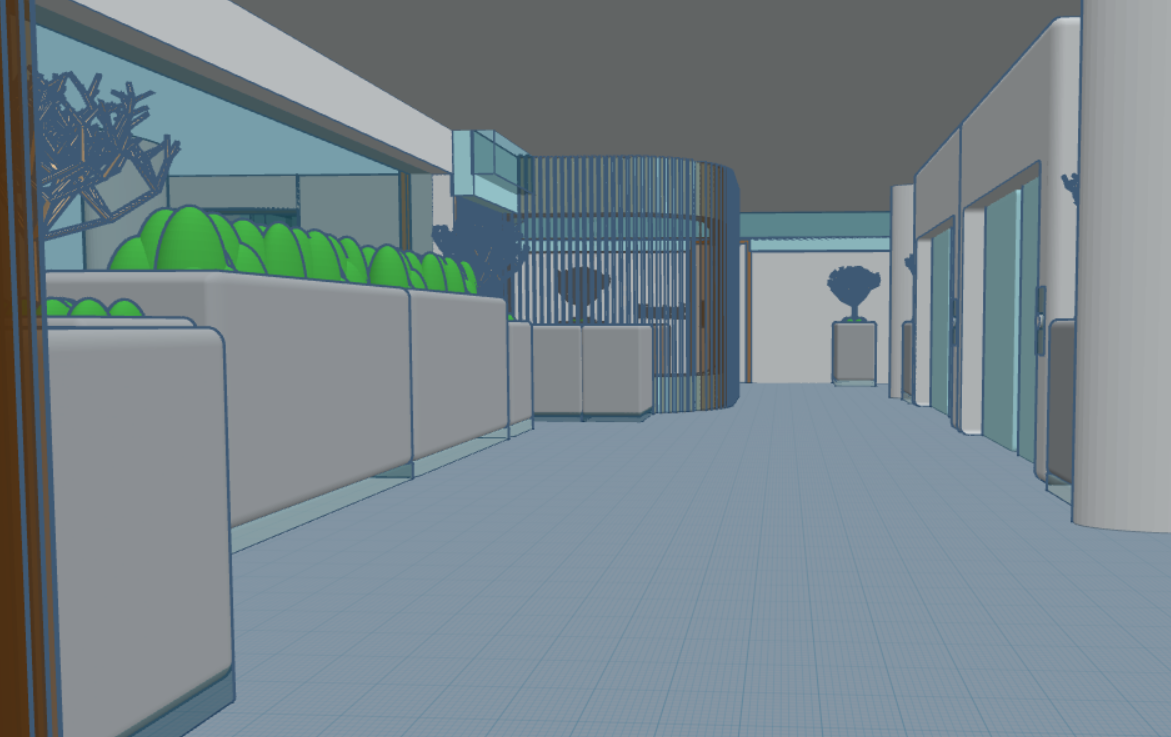

Entrance:
- Make a rounded 184.7m X 197.2m X 1m white floor.
- Build a rounded entrance using straight, inward-curved, and outward-curved plain walls; place a modern double door centered.
- Add two Facade Inward Curved Walls at the entrance center, with large wall plants and two 5m X 2m X 14m white cylindrical pillars on each side.
- Place a trash can inside the right facade wall curve.
- Add a 2m X 5m X 14m white cylindrical pillar left of the entrance.
- Union all walls.
- Place receptionist tables on both sides of the entrance, centered vertically.
Raised Platform:
- On the entrance’s right side, create a large wraparound window using tall straight and inward-curved windows.
- Connect the top of the Tall Inward Curved Window with a Straight Window on the left.
- Add three evenly spaced 2m X 5m X 29m white cylindrical pillars outside near the tall windows.
- Add three evenly spaced 2m X5m X 14m white cylindrical pillars outside along the top of the Straight Window.
- In the bottom-right corner, create a white circular platform with wraparound blue stained-glass stairs (4m total height).
Add:
- Four evenly spaced 4-Group Tables with indoor chair color variations.
- Three evenly spaced 8-Group Tables with indoor chair color variations.
- Rotate all tables by 45°.
- Add three evenly spaced 2m X 5m X 14m white cylindrical pillars between chair groups and place trash cans near the wraparound window.
- Along the top section, create four evenly spaced, almost-enclosed rooms using facade straight and inward-curved walls.
In each room:
- Add a 6-Group Table with indoor chair color variations.
- Place a trash can in the bottom-right corner.
- Place an aquarium near the entrance.
- Union all walls.
Hallway & Accessibility:
- Add a combination of patterned walls beside the Straight Window and unite them.
- Next to the final Facade Wall, add grey stairs to the second floor and a modern wall plant nearby.
- Beside the stairs, create a curved elevator lobby using facade straight and inward-curved walls.
- Place 2 elevators centered within the space.
- Add a single potted plant and a 2m X 5m X 14m white cylindrical pillar on each side.
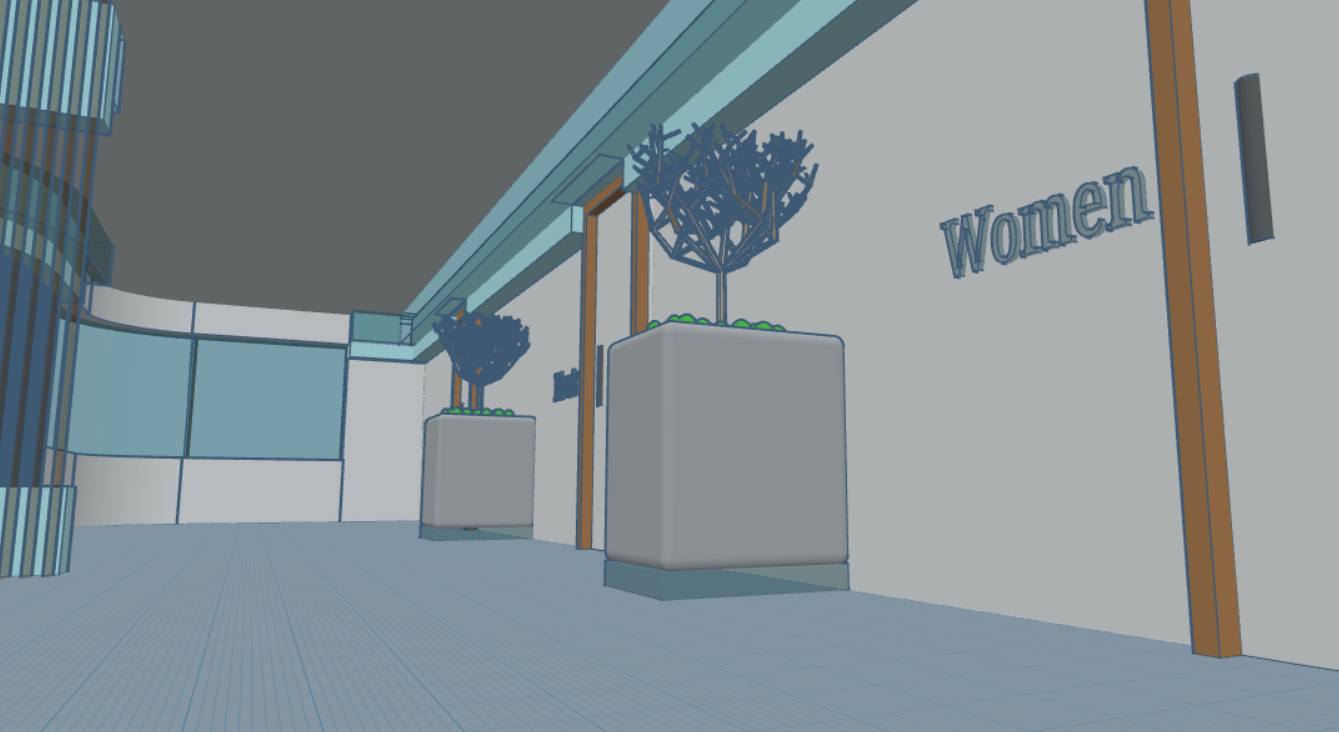
Bathrooms:
- Along the upper-left exterior, use plain straight, inward-curved, and outward-curved walls.
- Using mainly Double-Sided Plain Straight Walls, create Men’s, Women’s, and Neutral bathrooms, each with 3 stalls.
- Add Single Doors to every bathroom entrance and stall.
- Near bathroom entrances, two evenly spaced Single Pots of plants and Men, Women, and Neutral signs.
- In each bathroom, add a sink and place a trash can in the bathroom’s bottom-left area.
- In each stall, add a toilet and place a trash can in the stall’s top-right corner.
- Near the Women’s bathroom, place a Facade Inward Curved Wall and a nearby trash can.
- Use a combination of straight and inward curved windows along with a system of patterned walls near the bathroom stalls.
- Near the elevators, use straight windows along with a pot of plants, modern wall plants, and trash cans in that hallway.
- Install a vertical Straight Window, followed by an Inward Curved Window, then another Straight Window.
- Union all walls and doors.
Library:
- Use a combination of plain-straight and outward curved walls and windows to lead to the library section, nearly enclosed by a Facade Inward Curved Wall.
- Union all walls.
- Add two evenly spaced 2m X 5 m X 14m white cylindrical pillars outside facing the elevators.
- Add seven evenly spaced shelves along the library’s top section, along with two bookshelves on each bottom side.
- In each lower curved section, place a large wall plant centered.
TinkerCAD Steps - 2nd Floor Assemblies


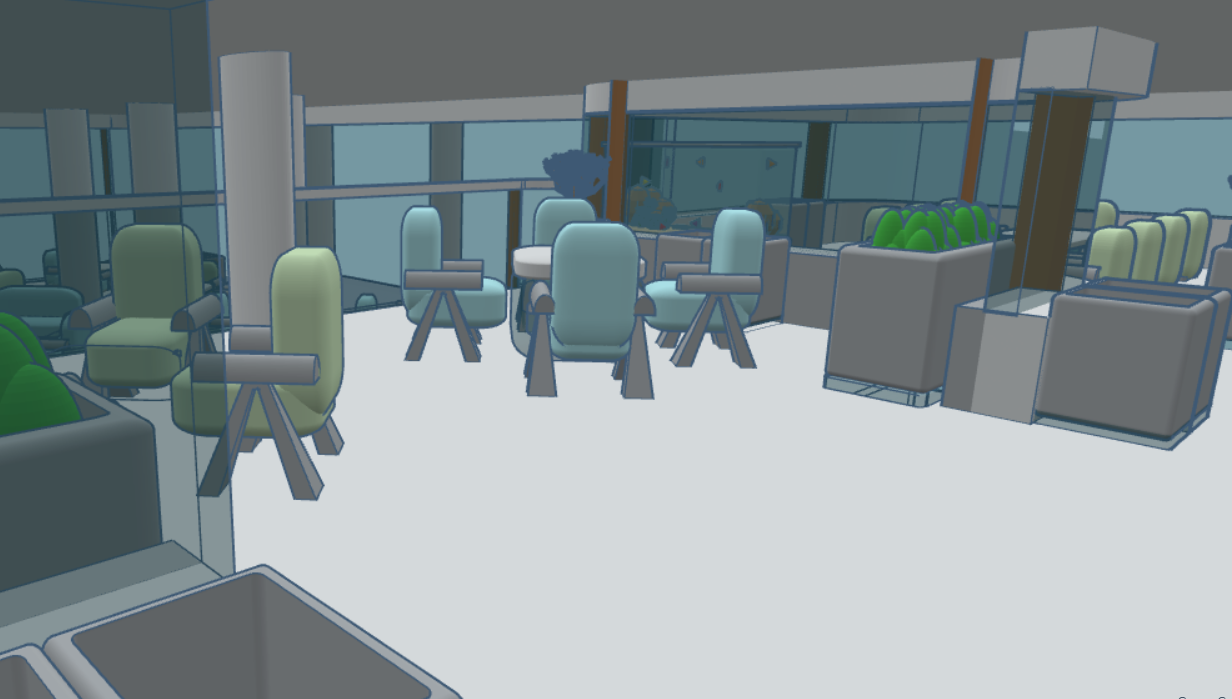

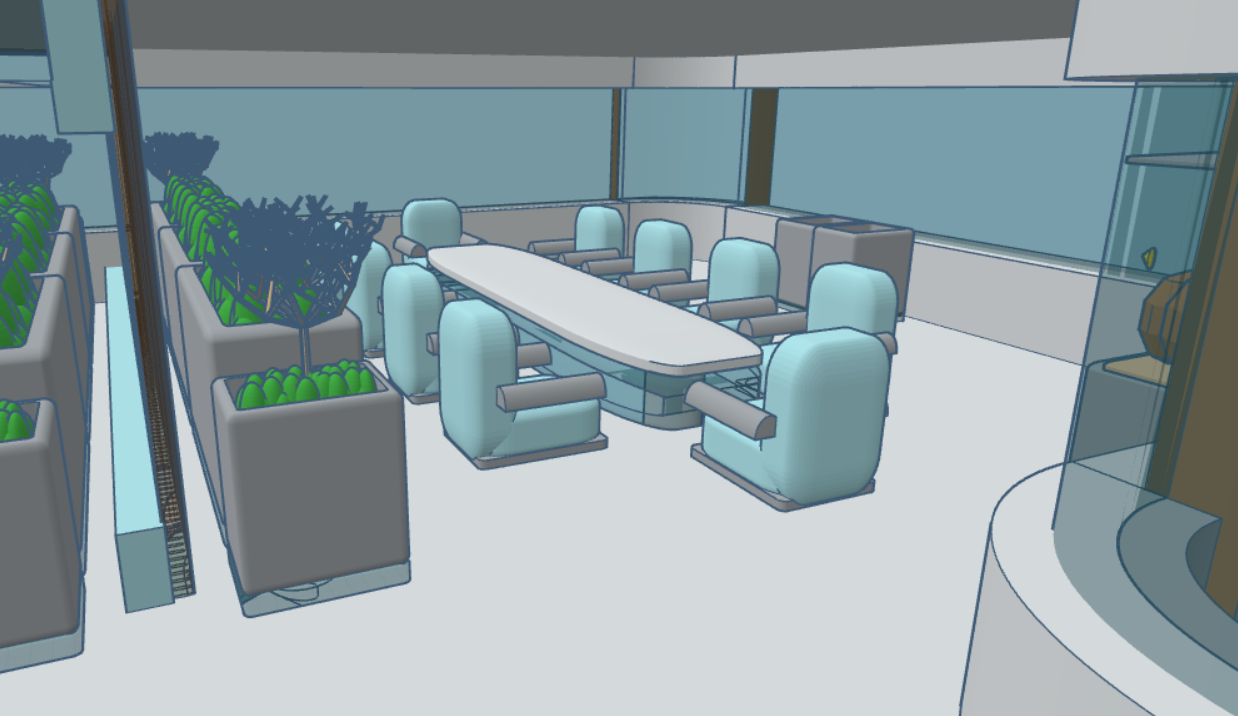

Elevator:
- Make a rounded 170m X 200m X 1m L-shaped roof.
- Along inner edges near the balcony and stairwell, use straight, outward-curved, and inward-curved windows.
- Add a Straight Window on the left side of the stairs and end with an Inward Curve Window.
- Add two elevators in the middle within the enclosed space, along with a single pot of Plant, and a 2m X 5m X 14m white cylinder pillars on both sides.
Outdoor Balcony:
- Install glass railings along all outer balcony edges.
- Along the Straight Window, add two 8-Group Tables with outdoor chair color variations and three evenly spaced trash cans.
- Near the railings, add four 4-Group Tables with outdoor chair color variations, and place a 5m X 2m X 14m white cylindrical pillar between the tables.
- Rotate all tables 45°.
Solitude Reading Space:
- Use straight, outward-curved, and inward-curved windows along the outer edges of the upper-right section.
- Add a Facade Inward Curved Wall on the bottom-right side.
- Place five Single Tables with the indoor chair color variations.
- Add a 5m X 2m X 14m white cylindrical pillar between the tables.
- Place a trash can and a modern wall plant on both sides of the space.
Bathroom:
- Add Plain Straight Walls vertically along the left exterior edge.
- Using primarily Double-Sided Plain Straight Walls, create Men’s, Women’s, and Neutral bathrooms, each with three stalls.
- Add Single Doors to each bathroom entrance and every stall.
- Near bathroom entrances, add 2 evenly spaced Single Pots of Plant and add Men, Women, and Neutral signs.
- In each bathroom, add a sink and place a trash can in the bathroom’s bottom-left area.
- In each stall, add a toilet and place a trash can in the stall’s top-right corner.
- Near the Women’s bathroom, add a Facade Inward Curved Wall with a nearby trash can.
Shared Breakout Rooms:
- Use facade walls, outward-curved windows, and straight windows to create a nearly enclosed room.
- Add two 6-Group Tables with indoor chair color variations.
- Place modern wall plants and a trash can on both sides of the room.
Meeting Rooms:
- Create the entrance design using straight, outward-curved, and inward-curved windows.
- Divide the space into two rooms with a facade wall.
- Add a row of Single Pot Plants and modern wall plants along the divider.
- In each room, add a 10-Group Table with indoor chair color variations, and place a trash can and an aquarium on the outer side.
Indoor Balcony:
- Install glass railings along the edges overlooking the first floor.
- Add two 4-Group Tables with outdoor chair color variations.
- Place a 5m X 2m X 14m white cylindrical pillar between the tables.
- Rotate tables 45°.
- On both sides of the balcony, add a trash can, a single pot of plant, a modern wall plant, and a trash can near the balcony entrance.
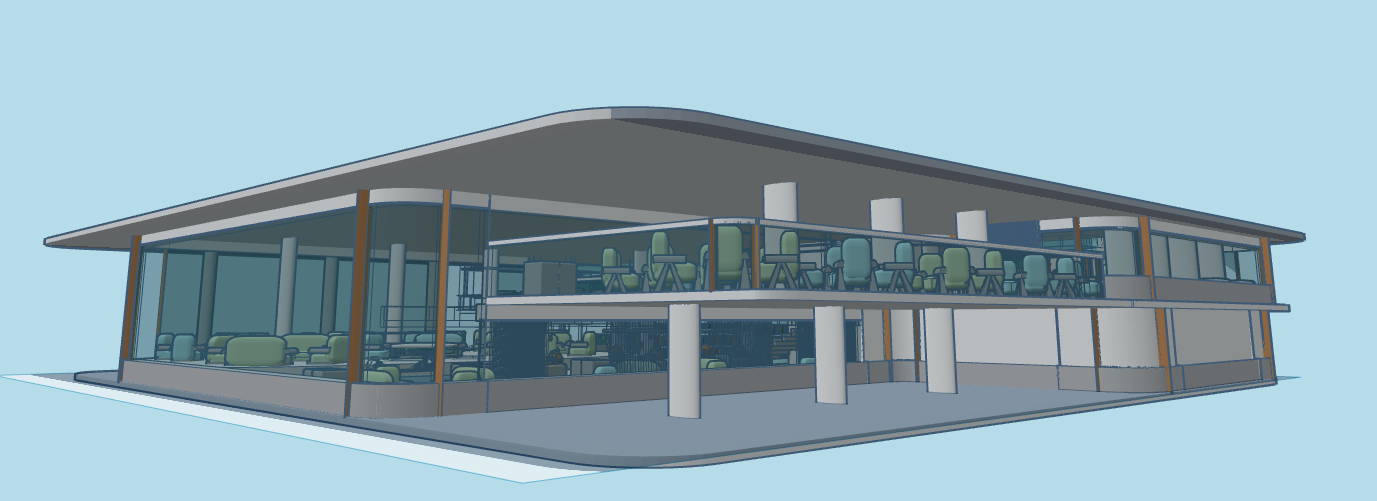
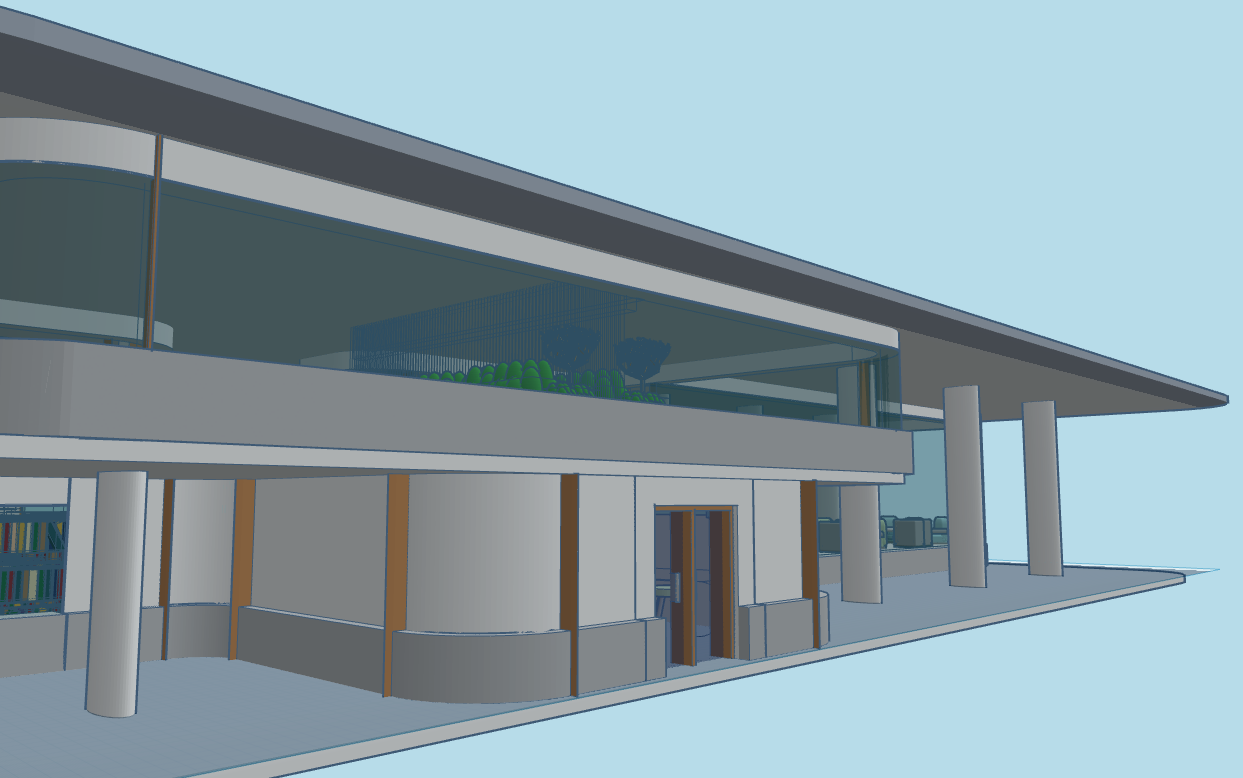
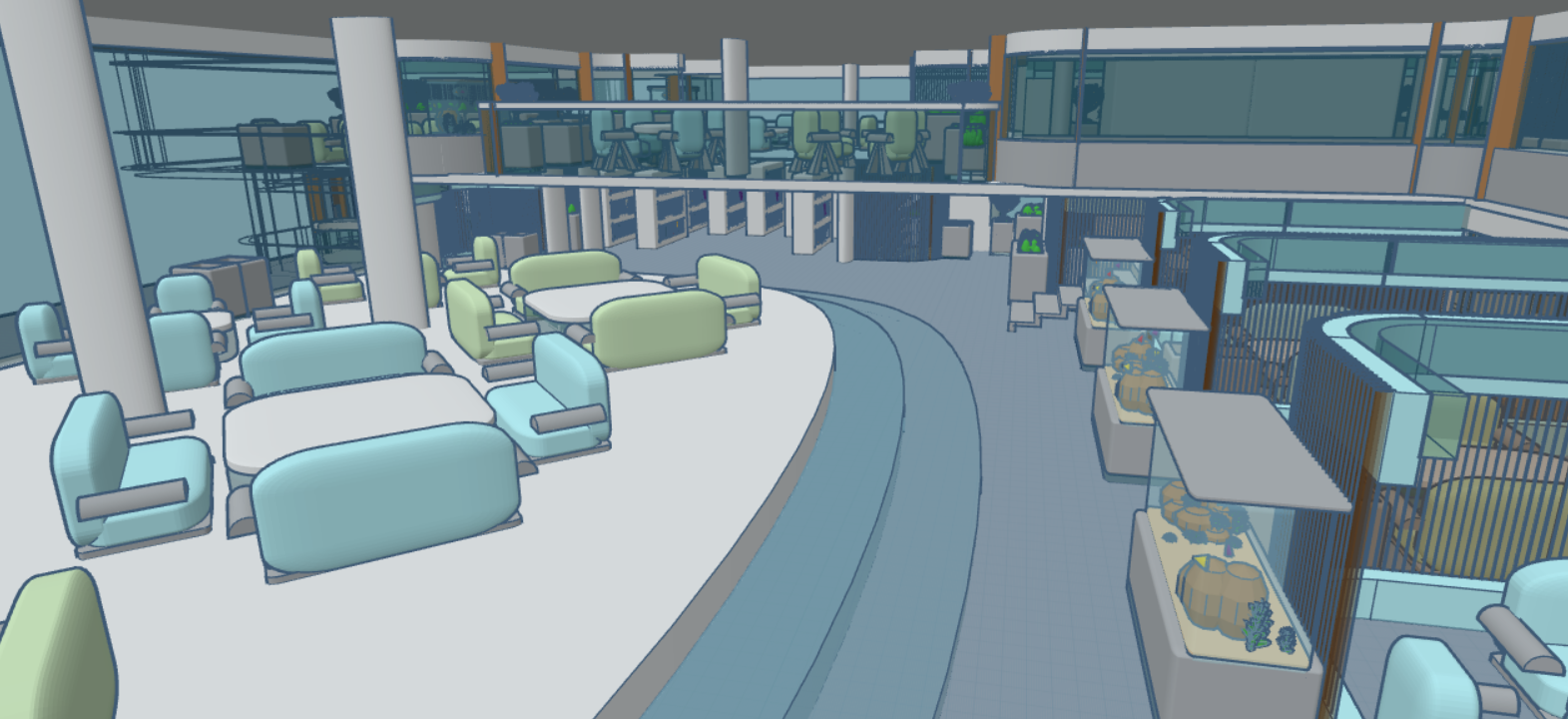
- Make a 200m X 210m X 1m round roof to finish off the build!
TinkerCAD - Final Renders

Reflection
During my design processes, I found myself reflecting on what types of environments I find solace, comfort, and support in — how these design choices can influence the way people feel within a space. Eventually, I realized that I personally gravitate towards open and welcoming spaces, often avoiding crowded or restrictive areas. And so, my ultimate goal was to incorporate natural lighting, greenery, soft colors, rounded edges, and open spaces within this project. However, as a first-time user of both Autodesk Fusion 360 and TinkerCAD, I soon stumbled upon countless learning curves in each software that vastly differ from each other. As I learned to work and operate between them, both have different approaches to their modelling, organization, and assembly features. Due to their differences, I had to keep on resizing and redesigning furniture that would appropriately fit and complement within their designated space, while uniformly contributing to the overall tranquility of the space.
My process of designing the Oasis Haven Hub was predominantly made up of unionizing issues and design conflicts, requiring unyielding patience and strong problem-solving skills. Nevertheless, due to these learning curves, it had nonetheless strengthened my understanding and fundamental knowledge of CAD software as a high school student, further reinforcing my belief that spaces not only serve a practical purpose, but can also positively impact those who use them through their respective experiences within these thoughtfully curated spaces.
Conclusion
Overall, this project ultimately demonstrates how small architectural and interior designs can extend beyond their respective practical functionality, as they may further encourage mental well-being and serve as a haven of sanctuary amidst life’s chaos, creating meaningful experiences for those who use them — The Oasis Haven Hub being a living proof. Through the use of soft pastel colors, rounded edges, natural lighting, greenery, and open spaces, it encourages peace and comfort, influencing how people feel within a haven of an environment. These design choices provide a welcoming environment for learning, reflection, and community connection — my central goal for this project.
The use of both TinkerCAD and Fusion 360 has helped me explore how digital modelling tools can be used to transform design concepts into detailed three-dimensional spaces — despite the headaches I’ve gained from these learning curves. Consequently, The Oasis Haven Hub is more than a place where individuals can learn and study, as it also serves as a calm and supportive haven where individuals can be connected to nature, experience a sense of openness, and find moments of peace amidst the challenges and uncertainties in everyday life.