Traffic Signal Smart Quiz

Traffic Signal Smart Quiz is a creative and educational project designed to teach students and beginners about traffic rules, road signs, and road safety through an interactive quiz system. This project aims to make learning about traffic signals more engaging by using questions, multiple-choice answers, animations, and instant feedback.
The system helps users understand the significance of traffic lights such as red for stop, yellow for wait, and green for go, along with important road safety practices like zebra crossing usage, pedestrian awareness, and following road signs. By transforming traditional learning into a fun quiz format, the project improves both knowledge and participation.
Developed using platforms like Scratch or PictoBlox, this project also introduces students to basic programming concepts, logical thinking, and problem-solving skills. Overall, Traffic Signal Smart Quiz is an innovative STEM project that promotes safer road habits while combining education with technology.
Supplies
Laptop
Pictoblox Software: Download PictoBlox | Windows, MacOS, Linux, Chromebook, Android & iOS
Sprites
Quiz Question List
PictoBlox and Planning the Quiz Structure
Begin by opening Scratch or PictoBlox on your computer and creating a new project. Plan the overall structure of your Traffic Signal Smart Quiz by deciding the quiz format, number of questions, traffic signal topics, and scoring system. Add suitable backgrounds, traffic signal sprites, and road sign images to make the project visually engaging. Organize questions related to traffic lights, road signs, and safety rules, ensuring the quiz is both educational and interactive. This planning stage forms the foundation for building an effective and user-friendly smart quiz system.
Designing Quiz Questions and Answer Options
Create multiple-choice questions based on traffic signals, road signs, and road safety rules. Design clear and simple questions such as identifying the meaning of red, yellow, and green lights or recognizing important traffic symbols. Add answer options for each question and ensure only one correct answer is programmed. Use engaging visuals, sound effects, and interactive buttons to make the quiz more attractive. This step helps build the educational core of the project while improving user engagement and learning effectiveness.
Coding the Quiz Logic and Score System


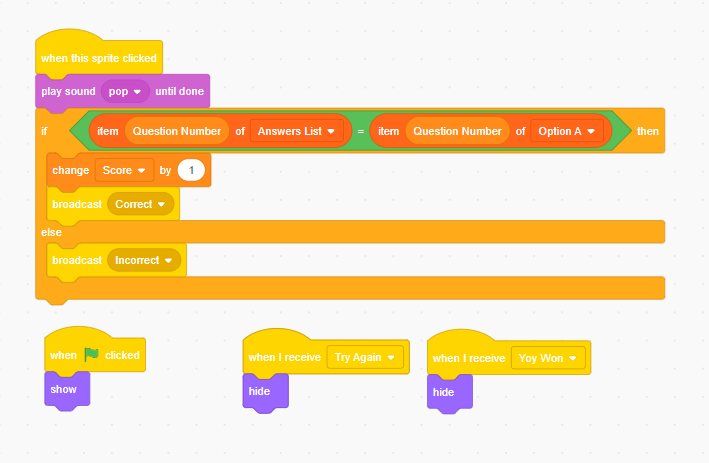
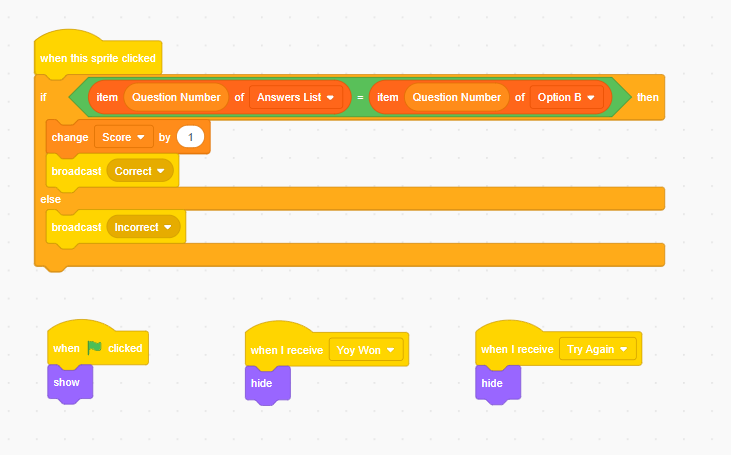


Program the quiz functionality using coding blocks in Scratch or PictoBlox. Use conditional statements like “if-else” to check whether the selected answer is correct or incorrect. Add score variables to track user performance throughout the quiz. Display positive feedback for correct answers and informative corrections for wrong responses. Include transitions between questions and create a final score display at the end of the quiz. This step brings interactivity to the project and ensures smooth operation of the Traffic Signal Smart Quiz.
https://drive.google.com/file/d/1D5kT8OqgGNMtb89K_vx6zHTg4wVrTHNf/view?usp=drive_link
Applications
Road Safety Education for Children
Public Safety Campaigns
Interactive Learning Tool
Conclusion

Traffic Signal Smart Quiz is an effective educational project that combines technology, coding, and road safety awareness in an engaging way. It helps users learn traffic rules, road signs, and safe road practices through interactive quizzes, making the learning process enjoyable and informative.