TrailNAV: a Low-power Off-grid Assistive Navigation Device
by Mr_Electronaut in Circuits > Assistive Tech
2548 Views, 39 Favorites, 0 Comments
TrailNAV: a Low-power Off-grid Assistive Navigation Device

Modern navigation systems are powerful, but they often depend heavily on smartphones, internet connectivity, and frequent charging. During hiking, trekking, cycling, camping, or emergency situations, these dependencies can become limitations. Phones drain quickly outdoors, screens are difficult to read in sunlight, and power availability becomes uncertain in remote areas.
TrailNAV was created as an attempt to build a simple, reliable, and energy-efficient navigation companion designed specifically for off-grid outdoor use.
Instead of focusing on complex maps or heavy interfaces, TrailNAV focuses on the essentials:
- direction
- destination guidance
- low power operation
- readability in sunlight
- long endurance
The device combines a sunlight-readable ePaper display, GPS navigation, digital compass sensing, solar charging, and ultra-low-power embedded electronics into a compact handheld form factor.
What makes TrailNAV special is that it was designed and built entirely as a DIY hardware project using simple materials like PVC sunboard sheets and hand-crafted assembly methods, proving that practical outdoor technology can be built with accessible tools and components.
Supplies
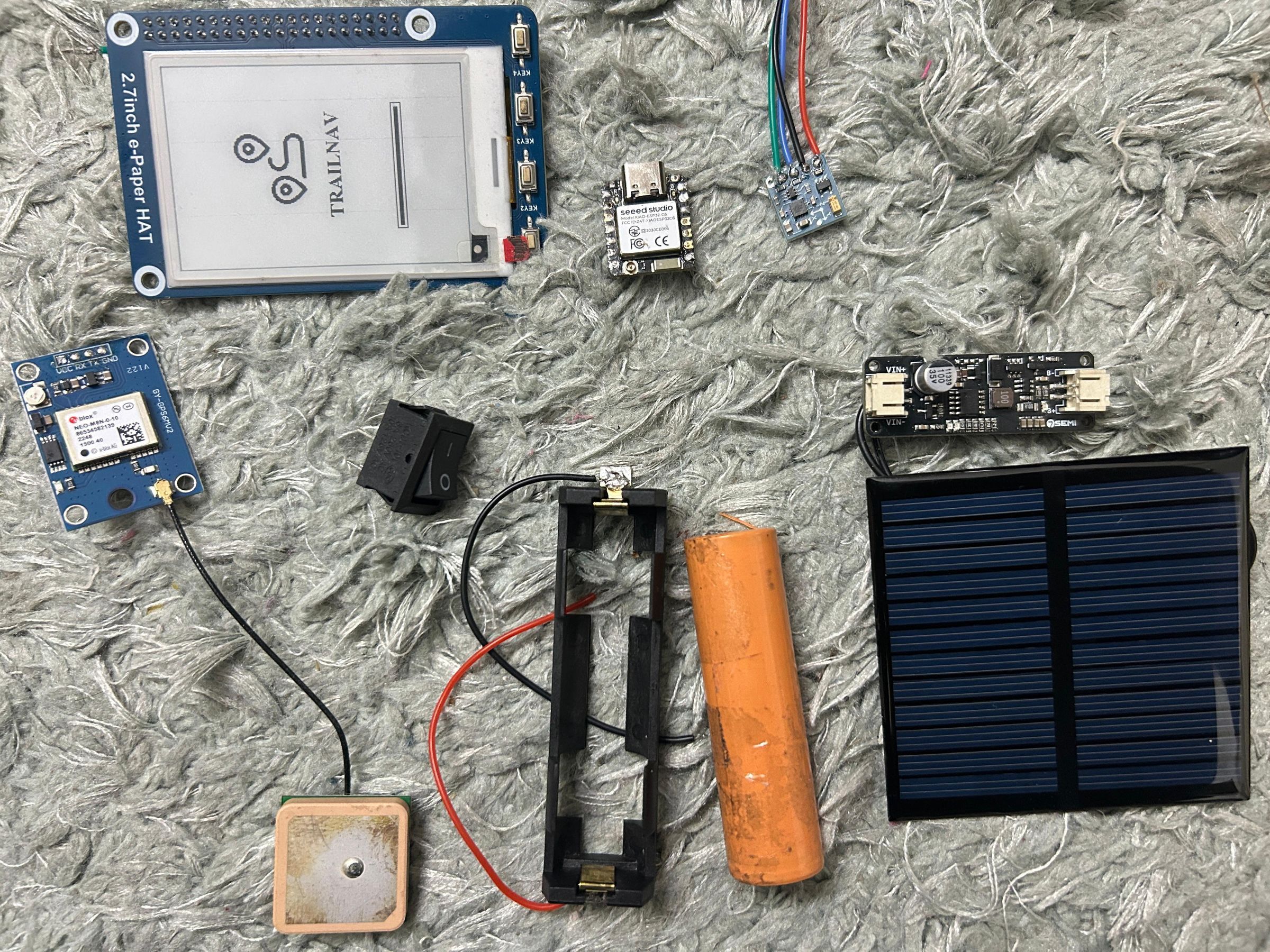
- Seeed Studio XIAO ESP32-C6
- 2.7" Waveshare ePaper Display (264×176)
- NEO-M8N GPS Module
- QMC5883L Magnetometer
- 3.7V Li-ion Battery & battery Holder
- MPPT Solar Charging Module
- 6V Mini Solar Panel
- On/Off Switch
- Jumper Wires
- PVC Sunboard
- Soldering Iron
- Paper Cutter
- Glue
Features


The idea behind TrailNAV came from a simple question:
"What if there was a lightweight navigation device that could continue working for days outdoors without depending on mobile networks or frequent charging?"
While smartphones provide excellent navigation features, they are not always ideal for remote outdoor environments: battery drains rapidly with GPS usage, bright sunlight reduces visibility, touchscreens become inconvenient in rain or gloves, network dependency limits usability in remote areas.
TrailNAV was designed to solve these problems through:
Ultra Low Power ePaper Display: The 2.7-inch Waveshare ePaper display consumes power only during updates, allowing long battery life while remaining perfectly readable in direct sunlight.
GPS Navigation: Using the NEO-M8N GPS module, TrailNAV provides: destination guidance, directional navigation, heading information & distance estimation, without requiring internet connectivity.
Digital Compass: The integrated QMC5883L magnetometer enables real-time directional heading and compass visualization.
Solar Assisted Charging: A rear-mounted solar panel continuously charges the internal Li-ion battery through an MPPT charging module, extending operating time during outdoor use.
Physical Button Interface: Three tactile buttons allow simple and reliable interaction even while wearing gloves or during motion.
Off-Grid Operation: TrailNAV is designed to work independently of: cellular networks, cloud services, online maps & continuous charging infrastructure making it suitable for trekking, cycling, camping, field exploration & emergency navigation.
The goal was not to replace smartphones, but to create a focused navigation companion that remains dependable in outdoor environments.
Enclosure Design & Assembly Process
.jpeg)
.jpeg)
.jpeg)
.jpeg)

.jpeg)
The first step was deciding the overall dimensions of the device based on the size of the electronic components. A compact handheld size of 10 cm x 6.5 cm was selected to make the device comfortable to hold and suitable for outdoor carrying. To improve appearance and ergonomics, the corners were chamfered at 45 degrees.
The enclosure was designed using a PVC sunboard sheet. The structure included a central base section, four foldable side walls and a top cover. The design was first sketched digitally and then converted into a printable A4 cutting template. The enclosure was fabricated manually using PVC sunboard sheet (3 mm), hobby cutter, steel ruler and cutting mat.
All module connections were completed manually using soldering iron and jumper wires. You can refer the connection diagram attached in the next step.
Connections

The ESP32-C6 acts as the main controller and communicates with all peripherals including the ePaper display, GPS module, compass sensor, buttons, and power system.
The ePaper display is connected using SPI communication. GPIO18 is used for MOSI, GPIO19 for SCK, GPIO21 for CS, GPIO22 for DC, GPIO23 for RST, and GPIO2 for BUSY. The display operates at 3.3V and is responsible for rendering all UI screens.
The QMC5883L magnetometer is connected over the I2C bus. GPIO0 is used as SDA and GPIO1 as SCL. The sensor provides real-time heading data for compass and navigation functionality.
The NEO-M8N GPS module communicates through UART. GPIO17 is connected to GPS TX and GPIO16 to GPS RX. The GPS provides latitude, longitude, speed, altitude, UTC time, satellite count, and navigation course.
Three push buttons are connected between GPIO pins and GND using INPUT_PULLUP mode. GPIO6 is used for the LEFT button, GPIO5 for the RIGHT button, and GPIO7 for the OK button. These buttons are used for screen navigation and destination selection.
A 3.7V lithium-ion battery powers the entire system through a MPPT charging module with protection circuitry. The battery connects to the B+ and B− terminals of the charging module, while the OUT+ and OUT− terminals power the ESP32-C6 system.
An ON/OFF toggle switch is placed between the battery positive line and system power input to completely disconnect power when the device is not in use.
A solar panel connected to the charging module input to recharge the battery during outdoor operation, making TrailNAV a fully solar-powered offline navigation device.
Arduino Code and Architecture


GPS and Compass Working
- TrailNAV combines GPS navigation and magnetometer heading data to create a fully offline outdoor navigation system. Both sensors work together to provide real-time location tracking, direction guidance, and navigation assistance without requiring internet connectivity.
- The GPS module is responsible for providing real-world positioning data. It continuously sends latitude and longitude coordinates to the ESP32-C6 through UART communication. The firmware uses TinyGPS++ to parse this incoming NMEA data and extract important parameters such as current location, speed, altitude, UTC date and time, satellite count, HDOP accuracy, and movement course. This information is displayed on the status screen and is also used by the navigation engine.
- When a destination is selected, the firmware calculates the distance and bearing between the current GPS location and the destination coordinates. The distance calculation determines how far the user is from the target, while the bearing calculation determines the direction of the destination relative to the current position. This allows the firmware to continuously guide the user toward the selected waypoint.
- The compass subsystem uses the QMC5883L magnetometer to measure the Earth’s magnetic field and determine the device heading. Unlike GPS course data, the compass heading works even when the user is stationary. This is important because the navigation arrow must always know the device orientation in real time. The magnetometer continuously provides heading values between 0° and 360°, which are then converted into cardinal directions such as North, East, South, and West.
- The navigation system combines both GPS bearing and compass heading to generate navigation instructions. The firmware calculates the relative angle between the current heading and the target bearing using:
- This relative angle determines whether the user should move straight, turn left, or turn right. The navigation arrow on the display rotates dynamically according to this calculated angle, giving the user live directional guidance toward the destination.
- TrailNAV also implements a simplified breadcrumb-style navigation visualization. Instead of rendering complex geographic maps, the firmware displays symbolic navigation elements such as the destination point, user position, and navigation arrow.
GPS Initialization and Satellite Lock
- When TrailNAV is powered on, the GPS module begins searching for nearby satellites to establish a valid location fix. Since GPS signals are received directly from satellites, the device should be used in an open outdoor environment with a clear view of the sky for faster and more accurate satellite acquisition. Indoor environments, dense buildings, or heavy obstructions can reduce signal strength and delay GPS lock.
- During the initial startup phase, the GPS module continuously scans for available satellites and starts collecting navigation data such as coordinates, speed, altitude, and UTC time. Once enough satellites are acquired and a stable GPS fix is achieved, the onboard blue LED on the GPS module starts blinking continuously. This blinking LED indicates that the GPS has successfully locked onto satellites and is actively providing valid navigation data to the ESP32-C6.
- After the GPS lock is established, TrailNAV begins displaying live GPS information including latitude, longitude, speed, altitude, heading, satellite count, and real-time date and time on the ePaper display. This GPS data is then used by the navigation system for waypoint guidance, bearing calculations, and real-time directional navigation.
The firmware development begins with configuring the Arduino IDE for the ESP32-C6 platform. The ESP32 board package from Espressif Systems is installed, and the “ESP32C6 Dev Module” board is selected. The project uses multiple libraries for hardware communication and rendering.
- GxEPD2: ePaper Display Library
- TinyGPS++: GPS Library
- DFRobot QMC5883L: Magnetometer Library
Include Libraries in Arduino IDE
Add these headers at the top of the firmware.
Initialize Hardware
Inside setup():
- initialize serial monitor
- initialize GPS UART
- initialize display
- initialize compass
- initialize buttons
Create Screen System
Define screen modes.
Checkout the full code on Github.
Final Device Workflow
Conclusion

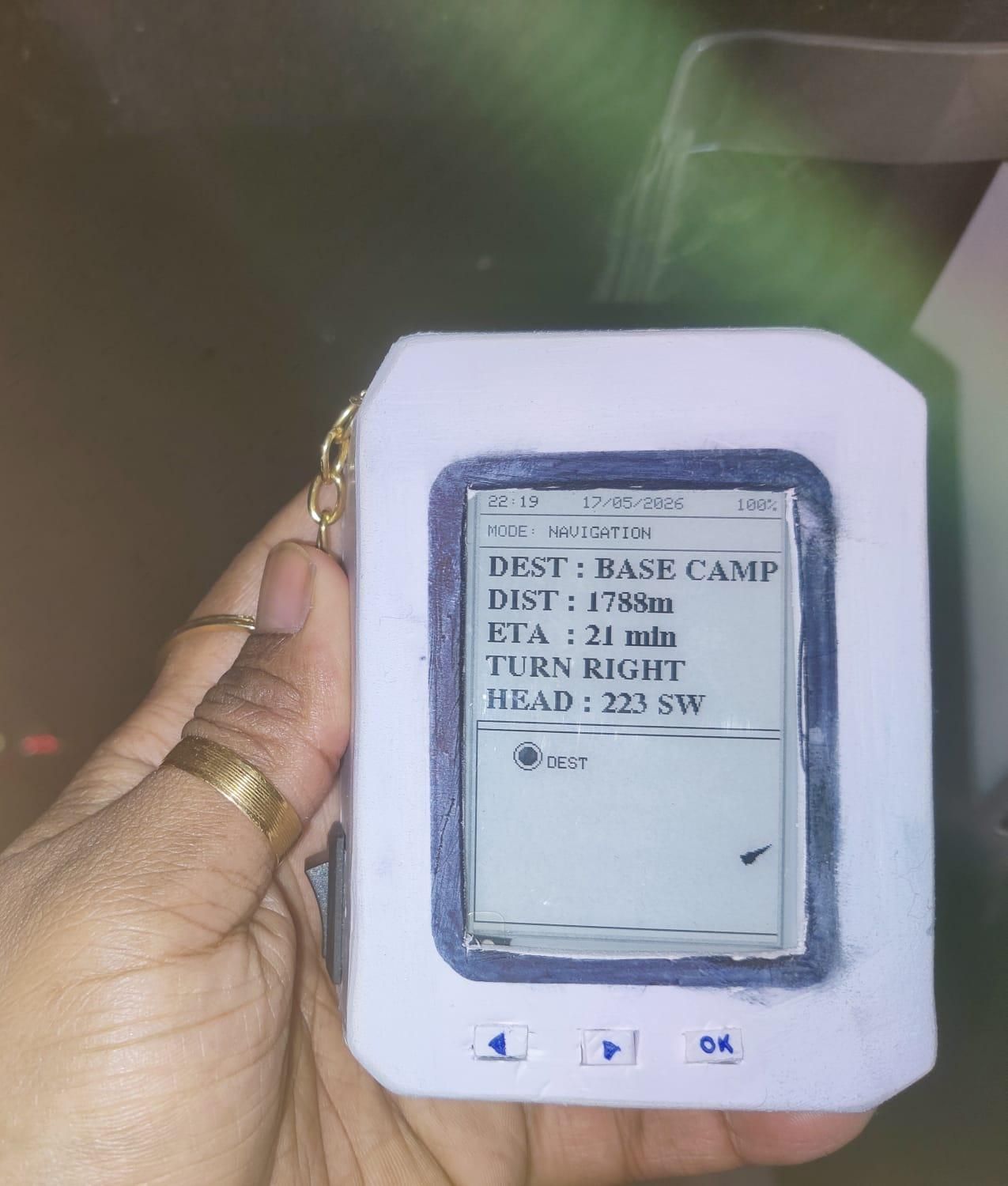
So, we have built a compact solar-powered offline navigation device designed for outdoor exploration and off-grid travel. By combining GPS positioning, compass-based heading detection, and a low-power ePaper display, the system provides real-time navigation without relying on internet connectivity or cloud services.
The device directly connects to the concept of Maps by using live GPS coordinates, waypoint navigation, bearing calculation, and directional guidance to help users move from one location to another. Instead of rendering heavy online maps, TrailNAV uses lightweight symbolic navigation, distance calculation, heading orientation, and real-time directional arrows to create an efficient offline mapping and navigation experience.
The project demonstrates how embedded systems, sensor integration, and efficient firmware design can be combined to build a reliable portable navigation platform optimized for remote environments, trekking, hiking, and outdoor exploration.
Happy Building 🚀🧭☀️