Uncooperative Mirror


Do you want the perfect eyeliner? Absolute precision? A calm and stable mirror that helps you look your best?
Too bad...
The Uncooperative Mirror is an interactive "useless machine" designed to do exactly the opposite of what a mirror is supposed to do. A mirror normally gives control and clarity, but this one takes them away.
As soon as you approach the mirror, its small mirrored panels begin to shake and fragment your reflection. The closer you get, the more unstable it becomes. Trying to apply makeup or focus on your appearance quickly turns into a frustrating battle against a mirror that refuses to cooperate.
The project explores themes of self-perception, perfectionism, and anxiety through a playful but uncomfortable interaction.
Below you will find the full instructions on how to build the Uncooperative Mirror, all necessary 3D models and the complete code.
Have fun building your own emotionally unstable mirror!
This project was developed by Phoebe Kleinau, Chrysanthi Pipini and Danica Kostić as part of the Computational Design and Digital Fabrication Seminar in the Integrative Technologies & Architectural Design Research (ITECH) M.Sc. Program.
Supplies


To build the Uncooperative Mirror, we used a combination of 3D-printed parts, simple electronic components, and basic craft materials.
Structural Components
- 3D-printed frame parts
- 3D-printed panel connectors
- 30 x 5 cm wooden sticks
- 30 x mirror panels (5 x 5 cm)
- 30 x M6 nuts
- Thread / string
- Rubber bands
- Super glue
- Optional: cardboard or foam board for an outer frame
Electronics
- Arduino UNO R3
- Breadboard
- Jumper wires / cables
- 1 x ultrasonic sensor (HC-SR04)
- 4 x micro servo motors (SG90 or similar)
- Adjustable DC power supply (3–24V)
Tools
- 3D printer
- Super glue
- Laptop with Arduino IDE installed
3D Print
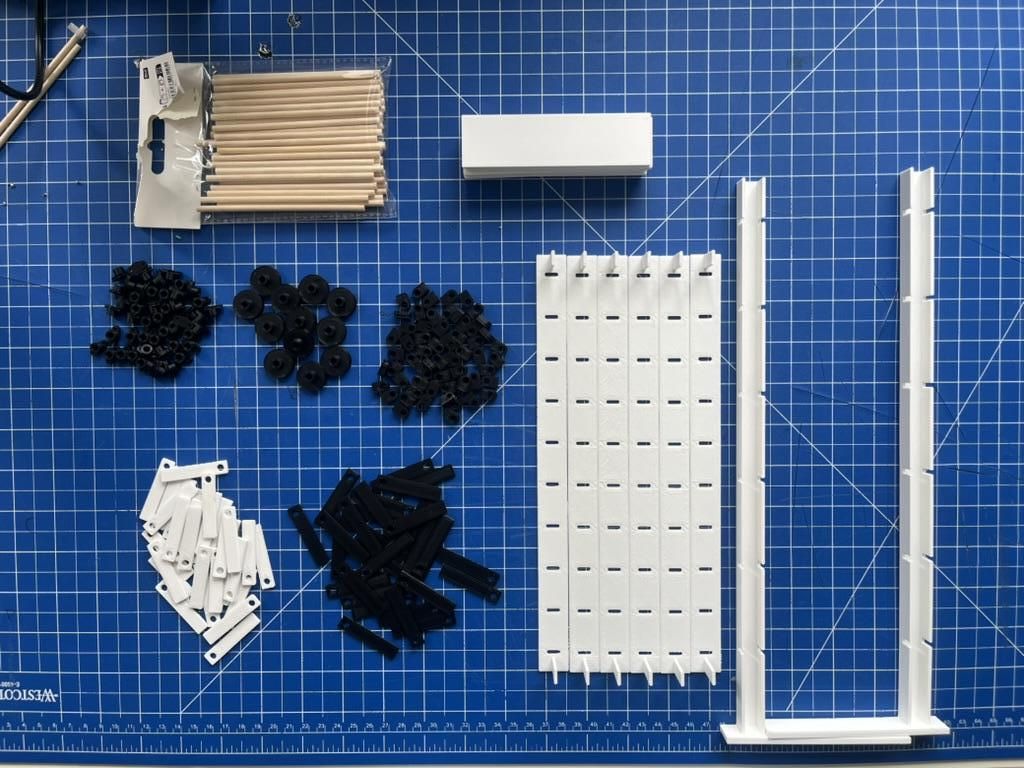
The printed parts include:
- the outer support frame,
- panel connectors,
- hinge elements,
- servo attachments
All parts were printed in PLA. After printing, remove any support material and test-fit the components before assembly. Since many of the connections are repeated across the structure, organizing the printed parts beforehand will make the assembly process much easier.
Downloads
Assemble the Structural Parts & Mirror Panels


- Assemble the outer support frame and insert the panel connectors
- Create the individual mirror modules: Insert one wooden stick through four hinge elements and glue one M6 nut onto each of the two middle hinge elements (The nuts act as counterweights that help keep the mirror panels vertically aligned) - Repeat this process 30 times
- Glue one mirror panel onto the two outer hinge elements of each module - Repeat this process 30 times
- Arrange five completed mirror modules side by side on a flat surface. Connect neighboring panels using short pieces of thread glued between them. Leave approximately 5 mm of slack in the thread so the panels can move freely - Repeat this process 6 times
- Insert all assembled modules into the panel connectors of the main frame structure
Install the Servo Motors & Gear Transmission System

.jpg)

In this step, the actuation system of the mirror is assembled. Instead of using one motor for every row of panels, the system uses a combination of gears and rubber bands to distribute movement across multiple rows using fewer servo motors.
- Attach rotating elements to the wooden stick axes of the mirror rows
- Attach matching rotating elements to the servo motors
- Use rubber bands as belt drives between neighboring rotating elements (These rubber-band connections transfer rotational movement between rows, allowing multiple mirror rows to move simultaneously using only a few motors)
- Adjust the alignment and tension of the rubber bands so the system rotates smoothly without slipping
- Finally, secure the servo motors to the frame (You can do this by building supports out of cardboard)
The motors directly move only a few mirror rows, while the rest of the mirror distributes the movement through the thread connections between adjacent panels
Wiring & Arduino Setup

With the frame and panels in place, here is how the electronics work (see Wiring diagram). Other pins can be used, but these are the ones defined in the script below. The wiring and code need to match, otherwise it won't run.
- The ultrasonic sensor connects to pin 2 (Echo) and pin 3 (Trig), powered via 5V and GND.
- The four servo motors connect to digital pins 10, 11, 12, and 13.
- Since servos can draw significant current and more than two are used, it is recommended to power them through an external 5V supply rather than directly from the Arduino to avoid instability. Also keep in mind that the GND of the sensor, Arduino,and servos must be shared. Once everything is connected, upload the code below to the Arduino board.
Arduino Code

.jpg)
The script is built around one core idea: the closer the viewer, the more chaotic the mirror becomes. The behavior is driven by four main components:
- Distance sensing: The HC-SR04 sensor continuously measures the distance to the closest object. If something is detected within 120 cm, the mirror activates. Beyond that range, all panels return to their resting position. To adjust the trigger distance, change the value in line 47.
- Dynamic speed mapping: The detected distance is mapped to a movement speed using map(distance, 60, 1, 1, 15). At 60 cm the panels move slowly, at 1 cm they reach maximum intensity. These values can also be adjusted in line 50.
- Independent servo movement: Each of the four servos oscillates between 0° and 90°. To avoid synchronized movement, each servo runs at a slightly different speed, creating a fragmented, unsettling effect.
- Reaction delay: A short delay(5) inside the active loop produces abrupt, twitchy movement rather than smooth motion, reinforcing the uncooperative character of the mirror.
Build an Optional Outer Frame

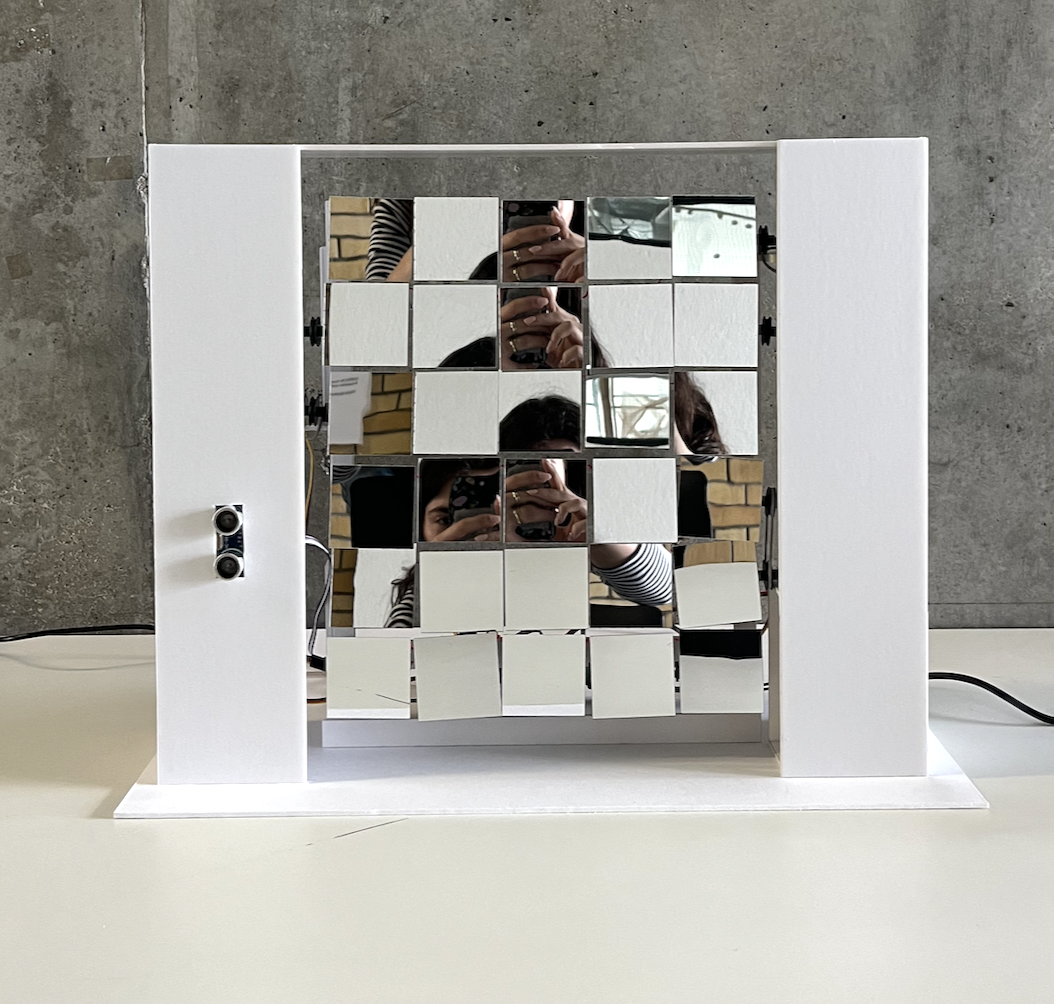
To hide the motors, wiring, and mechanical components, an additional outer frame can be added around the mirror structure.
In our prototype, we used simple white cardboard panels to create a clean enclosure around the mechanism while still allowing enough space for the moving parts to operate freely.
This step is optional, but it helps:
- improve the visual appearance of the project,
- protect the electronics,
- and focus attention on the mirror movement itself rather than the internal mechanism
Depending on your fabrication tools and materials, the enclosure could also be made from:
- acrylic,
- wood,
- foam board,
- or 3D-printed panels
Make sure the frame does not interfere with the movement of the mirror rows or rubber-band transmission system.
Activate the Mirror

Congratulations! You have successfully built an emotionally unstable mirror :) Power up the system and stand in front of the mirror. The closer you get, the more unstable and chaotic the mirror becomes, shaking and fragmenting your reflection instead of helping you see yourself clearly.