Use Any Old Power Brick As Your New Bench Power Supply!
by CHWTT in Circuits > Arduino
3155 Views, 30 Favorites, 0 Comments
Use Any Old Power Brick As Your New Bench Power Supply!

Hello there and welcome to my Instructable. In this Instructable, I'll show you how to make an inexpensive device (~25 USD in parts) that allows you to take practically any old power brick you have laying around and use it as an adjustable benchtop power supply, with an adjustable output that ranges from 1.25-30V, a voltage readout display, and a switch that allows you to enable and disable the output.
Supplies

Electronic Components:
1x LED Voltage and Current Display
2x Binding Post (One for positive, one for negative)
1x 1N5408 Diode (Or 1N5406 or 1N5404)
1x Power Brick - I'm not going to link to anything here, because this is supposed to be whatever random power brick you have laying around. Anything within the accepted input voltage range of the buck-boost converter should work for this. Just be aware that your maximum total output power from this power supply will be ~85% of the total maximum output power of the power brick used, due to the inefficiencies inside the converter. If, for whatever reason, you're building this project and are planning to purchase a power brick specifically for it, something like a 24V 5A brick will be one of the best options.
3D Printed/Mechanical Parts:
1x 3D Printed Main Chassis - I recommend using PETG or a similar filament that's more heat-resistant than something like PLA, as the buck-boost converter will get relatively warm. STL file attached at the bottom of the Supplies section.
1x 3D Printed Lid - Same story here - I recommend PETG or another temperature resistant filament. STL file attached at the bottom of the Supplies section.
Note: If you don't have a 3D Printer, I recommend using the 3D Printing Service from PCBWay (My YouTube sponsor).
Watch the YouTube Video!
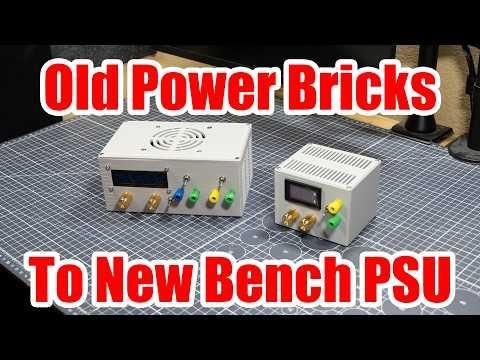
Give the video on this project (and its brother) a watch! It gives a good idea of what the end result will be as well as the process needed to get there, and will definitely come in handy during your build process.
Mount the Barrel Jack and Main Power Switch

The first step to building this project is to take your 5.5x2.5mm barrel jack and one of the toggle switches and mount them in the two holes in the back of the main enclosure piece. I recommend mounting the toggle switch so that it is ON when flipped upwards, and off when flipped downwards, as this switch orientation makes the most sense to me. However, if you don't care about that, the orientation of the switch doesn't matter.
Wire the Barrel Jack and Switch

Next, use some short lengths of wire with heat shrink tubing to wire the central pin of the barrel jack (positive) to one of the switch's contacts. Then, both the outer terminal of the barrel jack (negative) and the other contact of the switch (positive) can each get a ~3 inch long piece of wire soldered to them. The other ends of these cables can be stripped, but we won't connect them anywhere just yet.
Prep the New Potentiometers

Next, grab your two 200k potentiometers and a total of 6 ~4 inch lengths of hookup wire and 6 pieces of heat shrink. At this stage, all you're going to do is solder one wire to each of the three pins on each of the potentiometers, and then isolate the connections with some heat shrink. Set these aside, as we'll use them a little later.
Install the Output Switch and Binding Posts


Now, you can install the two binding posts on the front panel and add the second toggle switch right next to them to form the output I/O for this power supply. I also recommend mounting this toggle switch so that it's ON when flipped up, and OFF when flipped down, and I recommend mounting the positive binding post on top and the negative binding post on the bottom so that your build aligns with mine as shown in the photos.
Intall the Reverse Voltage Protection Diode

Now solder the 1N5408 diode across the output binding posts in reverse so that when power is normal, no current will flow through the diode. Be sure to get this orientation right, otherwise your power supply will end up internally shorted. This diode will provide reverse voltage protection in case you're charging a battery with this unit and connect it backwards accidentially.
Wire the Switch

Go ahead and, just like with the barrel jack switch, connect a wire between the positive binding post and one of the contacts of the switch. To the second contact of the switch, you can then attach another piece of wire that's about 3 inches in length, and the other end of this wire can be left unconnected for now.
Solder Potentiometers to Buck-Boost Converter


Before moving on to mounting the buck-boost converter in the enclosure, we should first solder the new potentiometers to where the original trimmers are. This comes as a two-step process, the first step being to desolder the old trimmer potentiometers. This can be done easily by adding a bunch of fresh solder to the three solder joints on each pot, and then by moving this blob of solder back and forth with your iron, you can heat all three joints at the same time and the trimmer will just fall out.
Once both trimmers have been removed, the new potentiometers can be soldered, and the order their wires connect to the PCB matters so that they'll rotate the right direction, so pay attention here.
I've found that to get the correct rotation direction with the new pots, the wiring needs to go in this order for both the current and voltage potentiometer (marked CC and CV respectively on the buck-boost converter's PCB):
(With the output terminal block of the converter module facing towards you): For each pot, pin 1 of the new pots (leftmost) connects to pin 3 (rightmost) of where the old trimmer was. The center pin still goes to the center pad. Then, the rightmost pin (pin 3) of the new potentiometer connects to pin 1 (leftmost) of the old trimmer.
Mount the Buck-boost Converter and Its Potentiometers

At this point, we can drop the buck-boost converter and its attached potentiometers into the enclosure and mount everything in place. We can mount the two potentiometers using their included nuts and washers to the front panel, and I like to place the voltage knob on the left and the current knob on the right, but you can switch this if you want. Then, after the potentiometers have been mounted, go ahead and screw the buck-boost module into the enclosure with four M3x6 screws.
Wiring Time!
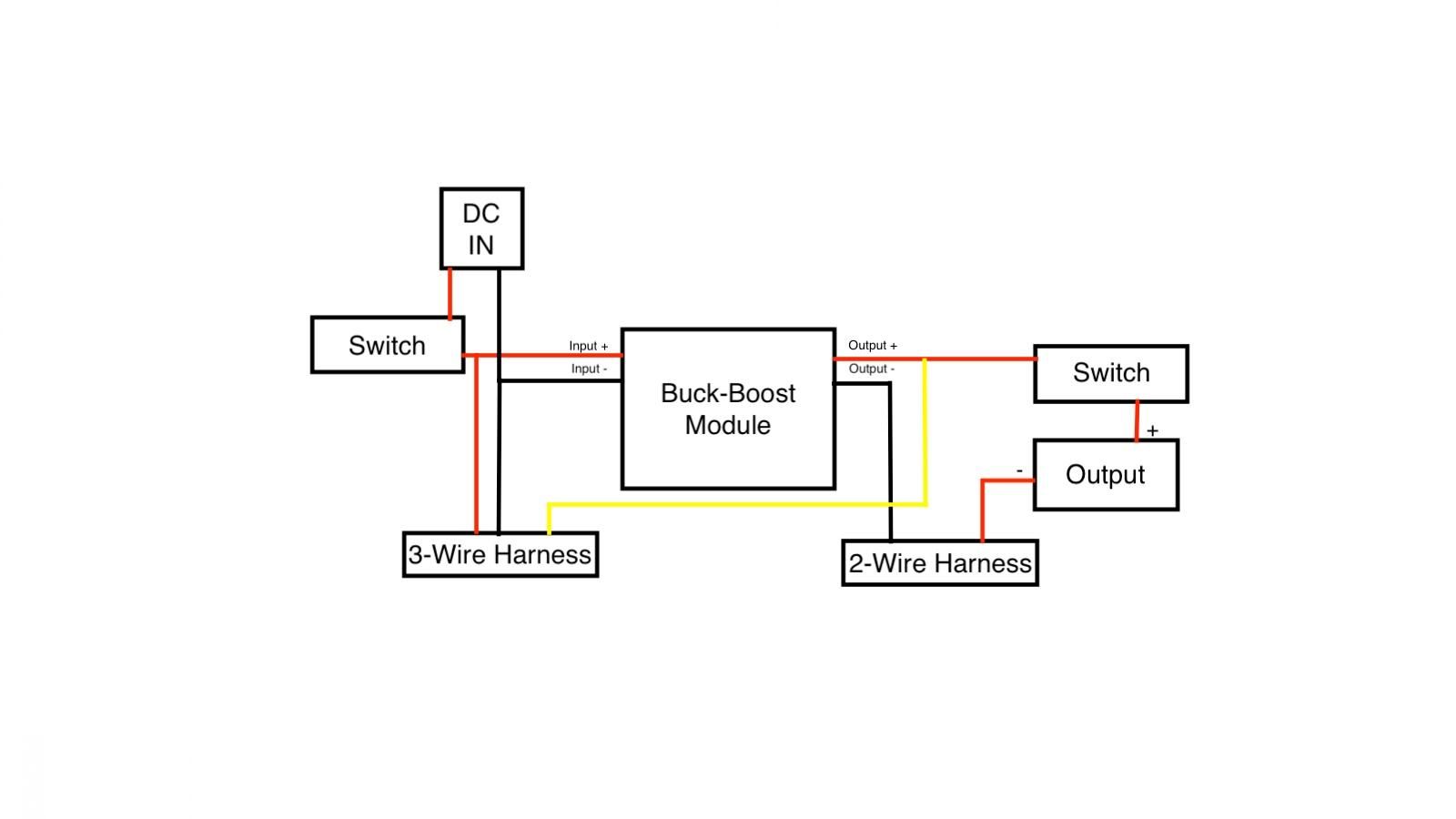
Now it's time to wire everything up! This is the trickiest part of the whole project, especially to solder and heatshrink inside the enclosure, but you've got this. I'll write out each of the connections so you can read through them, and I've also provided a diagram of the wiring to reference. Also, a small tip, for all of the wiring with the voltage and current display, to keep more room free inside the enclosure for working, I recommend just connecting the two small wiring harnesses it comes with, without connecting the display module yet. Then, at the end, you can plug the wiring harnesses into the display itself and install it, but for now this keeps the enclosure less cramped.
Connections:
- On the small, three wire harness for the LED display, connect the red and black wires to the positive and negative wires coming from the barrel jack and switch assembly by clamping both black and both red wires together in the input terminal block for the buck-boost converter. This will power the display directly from the power brick and also provide the main input power to the buck-boost module.
- Connect the unconnected wire from the output switch to the positive output terminal of the buck-boost converter alongside the yellow wire from the three-wire harness, you can connect these by clamping them both in the screw terminal as well.
- Take the two-wire wiring harness from the LED display (should have thicker wires than the three-wire one, as this is where the current it measures flows through), and connect the red wire to the negative binding post for the power supply's output, and the black wire to the negative output terminal on the buck-boost converter.
Double Check Your Connections! (And Install the Display)

Before moving on, double-check your connections! Make sure positives go to positves, negatives to negatives, and that you didn't short-circuit anything. Wouldn't want you to fry your converter module or power brick!
At this time, you can also press the LED display through the hole in the front panel and connect its wires.
Close the Lid

Use four M3x8 screws to secure the lid onto the box, and you're done with the build for this project!
Power It On!

Grab any old power brick that's center positive (most of them) and within the input range of the buck-boost module (should be 5-30VDC), and plug it in! Hit the power switch at the back, and mess with the voltage adjustment knob to make sure that it's powered on and changing output voltage as it should. Then, you can connect a load, switch the output on, and you should see current start to flow. As for setting a current limit, unlike a commercial bench power supply, you can't just twist the current knob and see what value you've set the limit to on the screen. Instead, you have to load the power supply with something, and then move the knob until you're claming the current down to the amount that you want, and since current will actively be flowing, this will be visible on the display.
And that's all I've got for you! I hope you enjoyed this project/Instructable, and please share an I Made It! if you made this project, because I'd love to see it!