Vape Synth: Novelty Musical Instrument
by paperbagteam in Circuits > Reuse
8088 Views, 35 Favorites, 0 Comments
Vape Synth: Novelty Musical Instrument

With over 11 million disposable vapes sold per month, the impact of their e-waste, including discarding rechargeable lithium ion batteries, is outsized. To highlight the salvageable parts, and divert them into Open Source Hardware projects, we are developing two models of Vape Synthesizers roughly inspired by an ocarina. Both models make use of the original batteries, charging circuit with LED, and case. The novelty model keeps its original low pressure sensor, meaning you need to suck on the instrument to play, and has an onboard speaker to jam anywhere. The (forthcoming) MIDI Electronic Wind Controller model uses a wireless connection to your existing instruments or computer music programs with audio samples to act as an alternate input device. Digital fabrication plays a role in this project for making 3D printed or laser cut jigs. Part of the underlying ethos is to make an eco-friendly hardware choice also a joyful choice.
Supplies
Equipment information:
The model ElfBars we used are BC5000, and some models are branded with just the model number
Lost Mary Vape BM600 has the same form factor, but not the same parts.
There are knockoff versions that should have the same form factor and hardware, like “Leaf Bar,” which you could probably use for this project, but they are generally not recommended and can be riskier because of unknown vape ingredients and unverified hardware components.
1 - Elfbar BC5000, or similar Disposable Vape
- Case
- Battery
- Charging Circuit
- Low Pressure Sensor
(DigiKey Parts List for 10 Vapes)
1 - 555 timer IC
1- 1k Resistor
6 - 3mm Plastic Bevel LED Holder holders
1 - Thin Speaker - 4 Ohm, 2.5W, 28mm, COM-21311
*Still in stock but will be discontinued soon. Is this a viable alternative? Same dimensions but it’s 1.5W: https://www.digikey.com/en/products/detail/soberton-inc/SP-2804L/8600817
Single Sided Perforated Circuit Board
Wire (Solid Core 22 gauge & stranded soft 26 gauge)
Heat Shrink Tubing (1/16” or 3/32” Rec)
Solder
Heat Shrink Tubing (1/16” or 3/32” Rec)
Hot Glue
1/8" Carbide O Flute End Mill -Up Cut (if Milling)
Super Glue
Equipment information:
3D printer (OR Laser cutter)
Small CNC Mill or Drill Press
Deburring tool
Box Cutter
Metal Ruler
Pliers (vice optional)
Wire Stripper
Wire Cutter
USB-C Charger
Mini Jewelry Vise from Amazon (optional for milling)
Vape Disassembly Safety Tips
Wear Gloves - Vape juice can make you absorb nicotine through skin and it is hard to remove the smell
Recommend working outside or wearing a ventilation mask
Battery Safety - Do not nick or otherwise damage the wrapping, do not allow the battery to get hot
Battery Storage - Please store batteries not touching each other in a protective storage container. For us the best storage option was an ammo box with a large gap cut into the gasket to prevent accidental projectiles in case of fire. Another option is a lipo storage bag, or even put small lipo storage bags in your ammo box! There are also Lipo battery safes, which seem like a good option we have not yet tried.
Wash Vape Case - We washed ours with dish soap and a straw brush, but intend to try the dishwasher in the future.
Here’s Becky Stern's excellent video content on vape battery reuse:
Opening the Vape


We found a vice and chisel to be the smoothest method for removing the end caps without damaging the plastic or the aluminum. Once it was loose we then used our hands to remove the end caps. And then used pliers to gently pry out the parts.
Contents of the ElfBar & Case


3D Models of the ElfBar Case
ElfBar Plastic Mouthpiece Model
ElfBar Plastic Tailpiece Model
We hope these files will be useful for you to make other salvage vape projects!
STL made in reference to the work by TheBanditOfRed on Sketchfab.
Case Alteration


Jigs for Milling/Drilling:
Mini Jewelry Vise from Amazon (Optional)
3D Printed Jig Files:
OR
Speaker Hole Jig (make 2)
Tilt Jig Right (make 1)
Tilt Jig Left (make 1)
For laser cut jig, cut out the inner ovals out of ¼” plywood, for the base laser etch the inner ovals, and cut the outer rectangles. Glue the ovals to the bases on the etched line with wood glue.
Files for Hole Layout
SVGs for hole size/placement:
The Speaker Hole was milled as a cut inside the vector line while clamped in the mini jewelry vise.
The Button Holes were milled as a deep etch while in the Tilt Jigs(right/left).
Here is all of the SVGs for this project in a single Adobe Illustrator file for reference.
Drilling information for case
We really just roughly hacked our first case by clamping it to the drill press bed while in the jigs. We used ¼” bits for the “button” holes, and a ⅞” bit for the speaker hole
CNC Milling information for the vape body
Tool - 1/8" Carbide O Flute End Mill (Up Cut)
Feed rate: 7.087 in/min (180 mm/min)
Plunge rate: 0.591 (15 mm/min)
Spindle speed: 12,000 RPM
Max pass depth: 0.002" (0.25 mm)
(these are conservative settings for milling novices, for people more experienced with CNC milling, you can increase your feeds and speeds to your comfort level for aluminum)
We cut our final version on a Bantam Desktop CNC using the 2.5D SVG feature, and utilized the automated material probing by strategically sticking copper tape onto the aluminum case to provide the connection. (Hat Tip to Katie Mills at NYC Resistor and Ian Cox at NYU ITP for setting us up for success!)



The Circuit

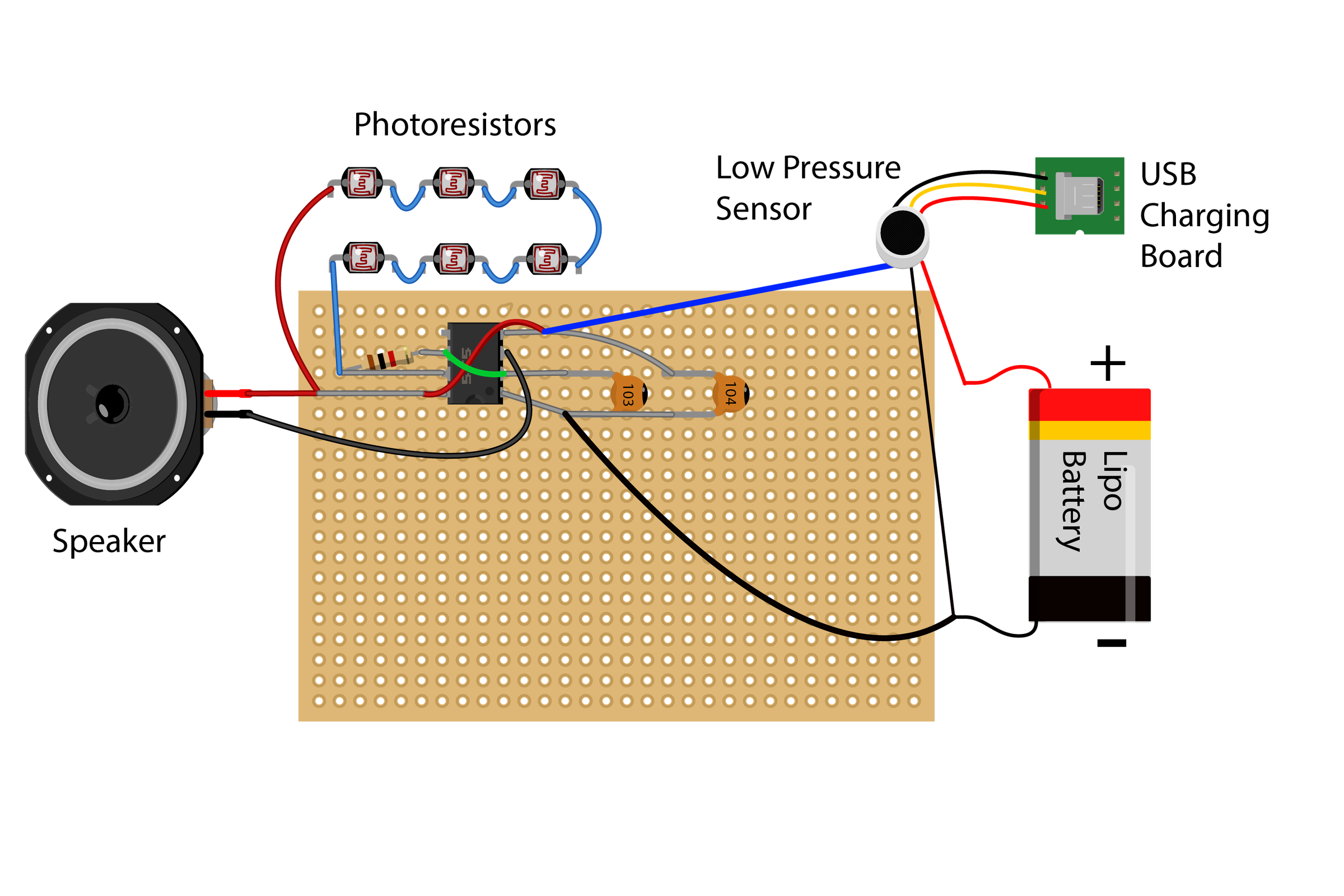
Electronics Schematic
Although we’re sharing the whole schematic here, it is important to note that it must be assembled in the correct order of operations to fit back into the case. This circuit is highly influenced by the work of Forrest Mims in his "Timers Op-Amp's and Optoelectronic Circuit Projects" from his Engineer's Notebook series.
Prep Perf Board

Using the metal ruler and box cutter, score and snap perf board into a full 5 x 16 hole grid.
Solder the Front of Board


Only 4 components get added at this time, the 555 integrated circuit, the resistor, and the 2 capacitors (please double check capacitor orientation, swapping positions can result in a crackling/popping sounds later rather than a tone).
Solder the Back of Board


There are also a few solder bridges and wires on the back of the board. Check against the schematic for placement.
Disconnect Battery, Sensor, Charger, and Heating Element


Carefully cut the wires between the battery and the USB charging circuit one by one leaving enough slack on each side to re-attach later.
SAFETY WARNING: DO NOT cut all the wires simultaneously. This may cause the battery to short circuit and may spark, ignite, damage the battery, or damage the existing circuit.
Discard the heating element and vape juice cartridge. You should prepare three long stranded wires for a later step.
Move the Breath Sensor Housing


Superglue the low pressure sensor housing into the mouthpiece side (double check your orientation that you can still insert the sensor!), and let it dry at least 1 hour.
Insert LED Holders

Insert your LED holders into the Button Holes.
Prepare Resistor Ladder Wires


Pre-cut wires to make threading and trimming easier. Leave a longer (and ideally a flexible) wire for the beginning and end of your photoresistor ladder.
Thread wires through the holes as pictured. Thread a small piece of heat shrink tubing to both ends of each wire (for covering connections later).
Connecting the First Resistor Ladder With Crimp Beads


Using crimp beads for a strong mechanical connection in a small space is inspired by the work on Kobakant How To Get What You Want. With about 1/4" of wire exposed, the bead is crimped around both wires together. To strengthen the connection the ends are bent back and then trimmed. [Optional: solder over this joint. Then slide the heat shrink tubes over each side of the resistor wire to insulate them from each other.]
Connect the Full Resistor Ladder


Assemble the resistor ladder by connecting wire from the previous photoresistor to its neighboring photoresistor in a “U” shape, keeping wires tucked neatly along the internal walls of the case once the photoresistors are pushed into the LED holders. Make each U-shaped piece of wire as short as you can while still being able to crimp and heat shrink the connection points. The ladder wires should only cross the case once when bridging the third and fourth photoresistor at the top of the case. At the bottom of the case there should be two unattached wires (one from each end of the ladder).
Remove Charging Circuit From Housing

Pull on the holder tabs and push the USB charging circuit board out of the housing.
Thread Speaker Wires


Run the speaker wires through the case facing the same direction of the resistor ladder lead ends (at the bottom of the case). Leave wire in place, this sets us up to have everything to install properly into the case.
Extend Charging Circuit Wires


The goal is to extend the charging circuit so you have the right amount of wire to work with. After disconnecting the circuit wires, solder the longer wires onto the original wire and shrink wrap the soldering joint (See the top circuit in the first image). Trim wires slightly longer than the case length and add heat shrink as needed (2nd image)
If you accidentally ripped the thin wires down from the charging circuit. It is still salvageable. You may directly solder a better stranded wire back to the soldering point (See the 3rd image).
Connect the Battery and Charging Circuit

Solder and shrink tube wrap the 3 charging circuit wires to the sensor wires.
Extend and Connect Breath Sensor Wires

Carefully cut the wires connecting the sensor to the battery.
Solder (or crimp) the Ground (black wire) of the sensor to the - of the battery
Solder (or crimp) the Vcc (red wire) of of the sensor to the + of the battery
Extend the sensor’s Vout (blue wire) to be soldered into the 555 IC
Insulate all exposed joints with heat shrink
Complete the Circuit


Solder one of the loose leads of the resistor ladder to the Vcc pin of the 555 timer (either pin 4 or 8).
Solder the other loose lead of the resistor ladder to pin 7 of the 555 timer.
Solder the Ground (black wire) of the Sensor to pin 1 of the 555 timer.
Solder the V-out (blue wire) of the Sensor to the Vcc pin of the 555 timer (either pin 4 or 8).
Solder the Speaker +(red) Wire to the Vcc pin of the 555 timer (either pin 4 or 8).
Solder the Speaker -(black) Wire to pin 3 of the 555 timer.
Test
Test for short circuits before powering or enclosing everything by sucking air near the sensor. The LED on the charging circuit should light up when you suck air near the sensor. If the LED does not light up your battery might be dead.
If your speaker only makes popping noises or crunching sounds:
- Check to see if there is adequate light in the room and that there is light on the photoresistors
- Check to see if you’ve reversed the position of any of the capacitors.
Close Up Vape Case
Carefully thread the sensor from the bottom of the case through to the top, and insert the sensor into the glued silicone holder by the mouthpiece. Close the case top (plastic mouthpiece). Fit the battery and circuit into the body and insert the case bottom.
Troubleshooting
If your previously working synth doesn’t make any sound, shine a flashlight to see if lighting conditions are too dark! Also try charging your synth battery.
Developers/Contact
Names & Websites:
Kari Love, David Rios, Shuang Cai
Email:
paperbagteam4ever(at)gmail.com
Affiliation:
NYU ITP/IMA
Social media:
Instagram: ikyotochan, riosriosyeah, fkialmostforgot