Veteran Wellness Pavilion
.jpg)
.jpg)
.jpg)
The concept behind this safe space design lies in ensuring that comfort, recovery and sustained support is provided for war veterans. Rounding off structural forms and creating walkways with open and accessible circulation paths were essential in creating a safe and relaxing atmosphere. All sharp edges were excluded so as to avoid creating any stressful situations for users of the safe space.
The safe space will be set up within the midst of serene landscapes to allow veterans to take advantage of the soothing effects brought about by nature. Walkways surrounded by vegetation, sunlight and scenic natural surroundings all contribute towards the creation of a relaxed mood within the safe space.
Emotional support for veterans can be ensured through the provision of various spaces in which veterans can engage in medical treatment, counseling, wellness activities as well as community activities. This allows veterans to feel secure and included while undergoing the process of emotional recovery.
The main principles behind the design of this safe space are that of accessibility, safety and therapeutic architecture
Supplies
.jpg)
.jpg)
.jpg)
.jpg)
.jpg)
.jpg)
.jpg)
.jpg)
Materials List
3d print material – PLA (buildings/rooms and frame)
Black Bristol board (hills and ground)
Clear Plastic (windows)
Super Glue (assembly)
Acrylic Sheets
Black Foam Boards
Model Trees
Tools
Pencil
Meter Stick
X-Acto Knife
Cutting Mat
Ruler
3d-Printer
Laser Cutter
Building the Model in Fusion 360 - Designing the Topography(Hillside Base)
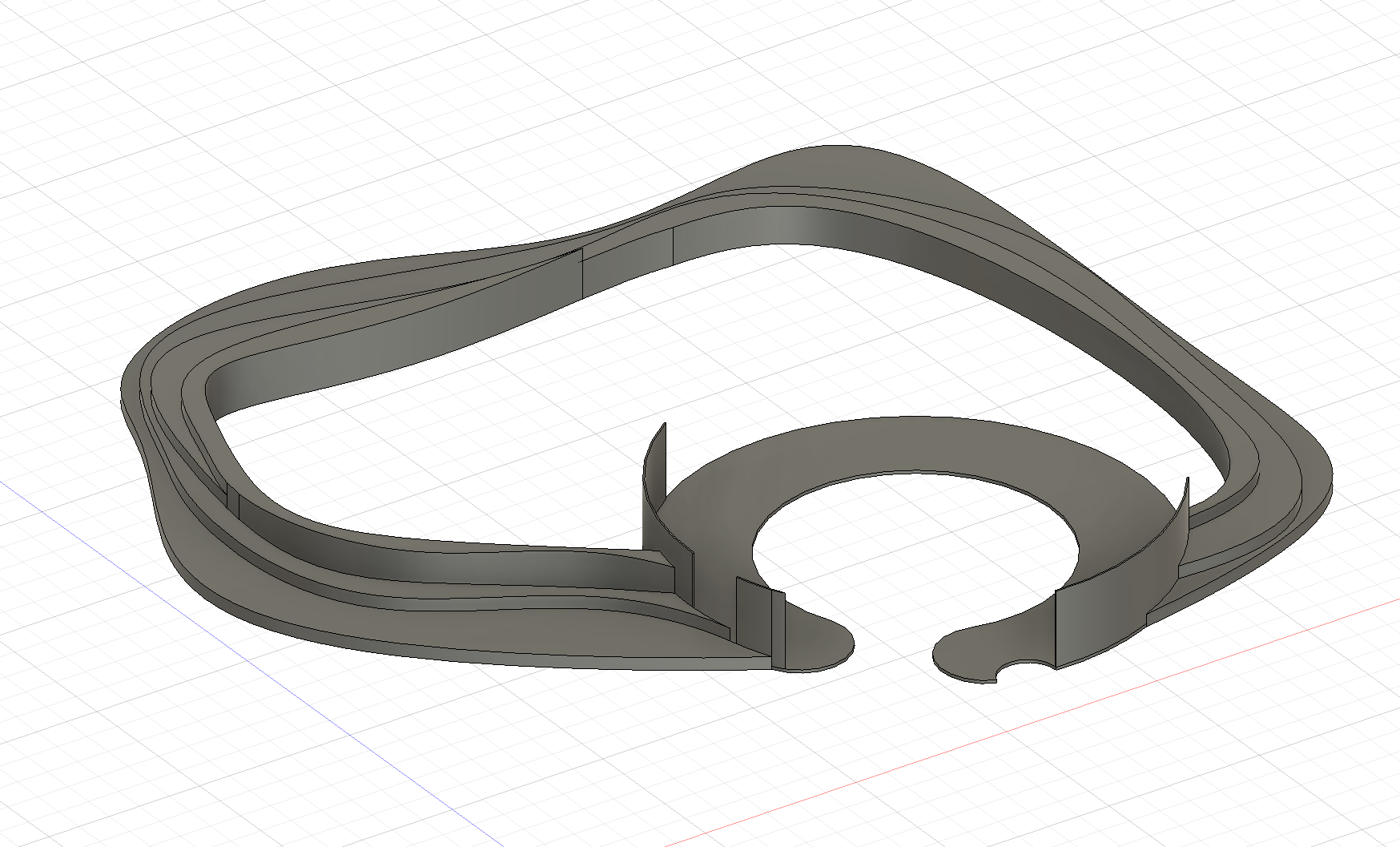
We employed the technique of staggered extrusions for creating the natural environment into which our pavilion will be integrated within Autodesk Fusion 360:
- Sketching Contours: The first step was to sketch out the organic curves that would define the various elevation levels within the hillside.
- Extruding Levels: Various closed sketches of curved sections were extruded at differing heights to create the realistic effect of staggered topography. This was our digital representation of the exact topography that we needed to cut into our physical model's hillside base made of Bristol board.
Building the Model in Fusion 360 - Creating the Ground Floor Building and Its Arc Shape Balcony
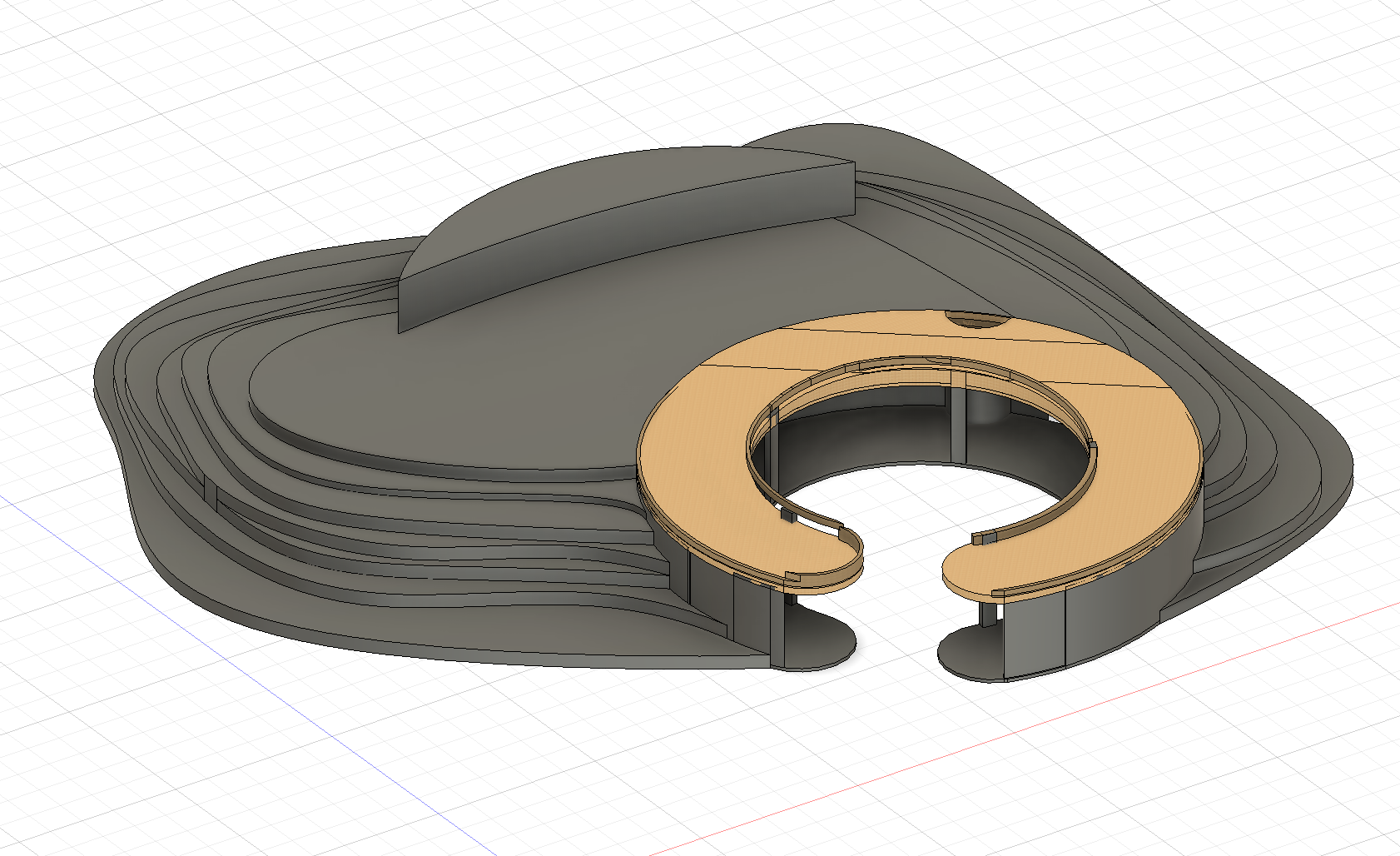
For the first building, which is positioned entirely at the ground floor level, we have created a structure with a unique sloped balcony:
- Base Structure: For maintaining the same design philosophy of rounded shapes, we created the structure using circles and arcs.
- Sloped Balcony: To create sloped balconies, we have generated an arc-based geometry and used it to cut through the building at a certain angle.
Building the Model in Fusion 360 - Making the Balcony Railings

Making the Balcony Railings
Making the railing with exact fit according to the changes in slopes and curvature of the balcony needed an approach of multiple plane 3D sketching:
Planes Construction: We created planes by offsetting the balcony in multiple places along its length and constructed additional planes in order to create reference points on different heights.
Guide Path Sketching: We sketched the 3D guides through which 3D lines could pass and connect together for the formation of guide path.
Profile Sweeping: We then made the cross-section profile of the railings and swept it through the guide path using the Sweep command.
Building the Model in Fusion 360 - Creation of Upper Structure and Support Pole in Shape of X


To design the structure on the second floor, there is a complex supporting structure that can be seen using the transparent glass panels:
- Designing Support Pole: We drew the cross section and center line of the support pole; then, we created its shape using the Sweep command.
- Patterning the Support Pole Around Circle: Rather than designing the individual support poles, we have patterned the X-shaped support pole around the whole circle.
Building the Model in Fusion 360 - Connecting and Integrating the Parts
.png)
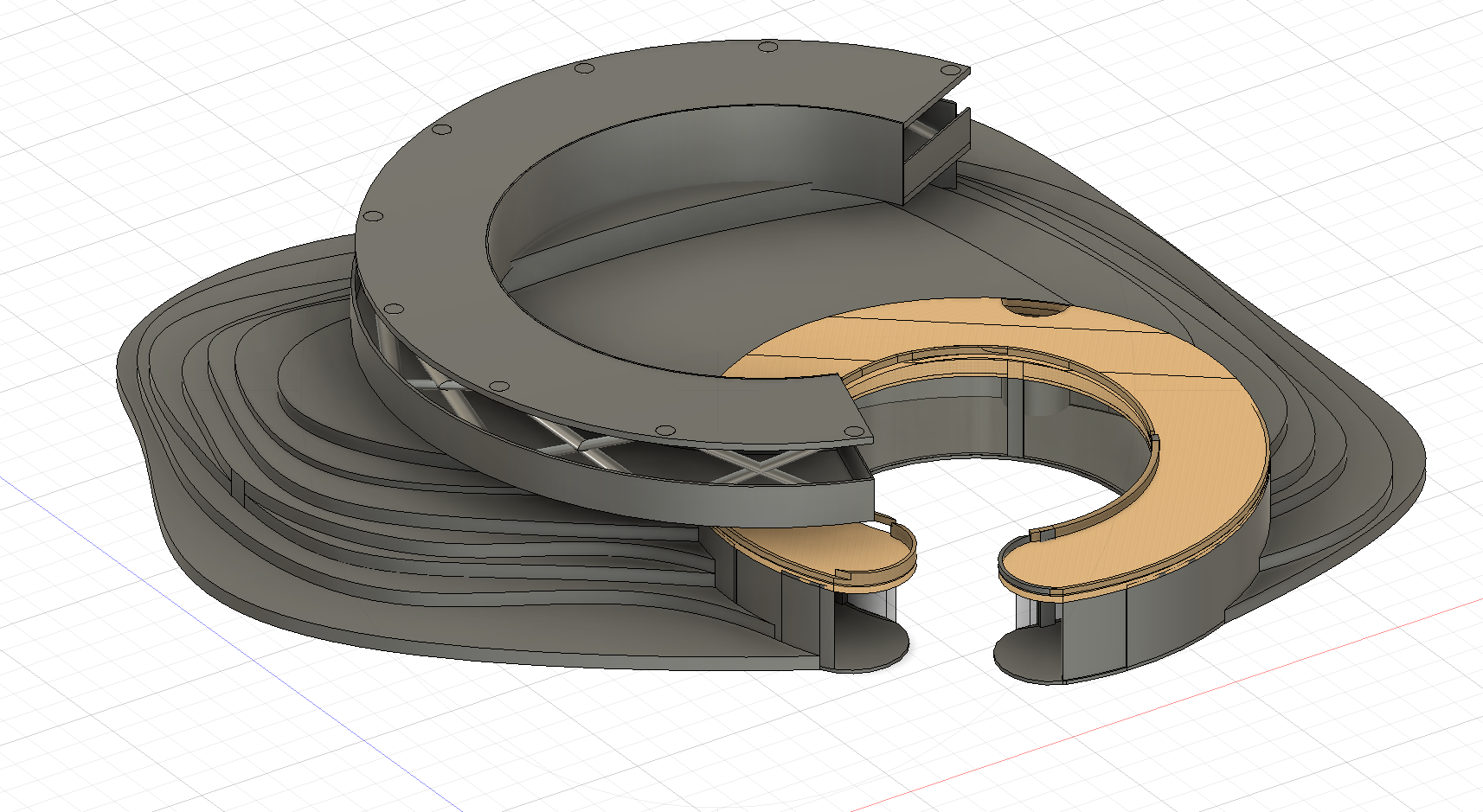
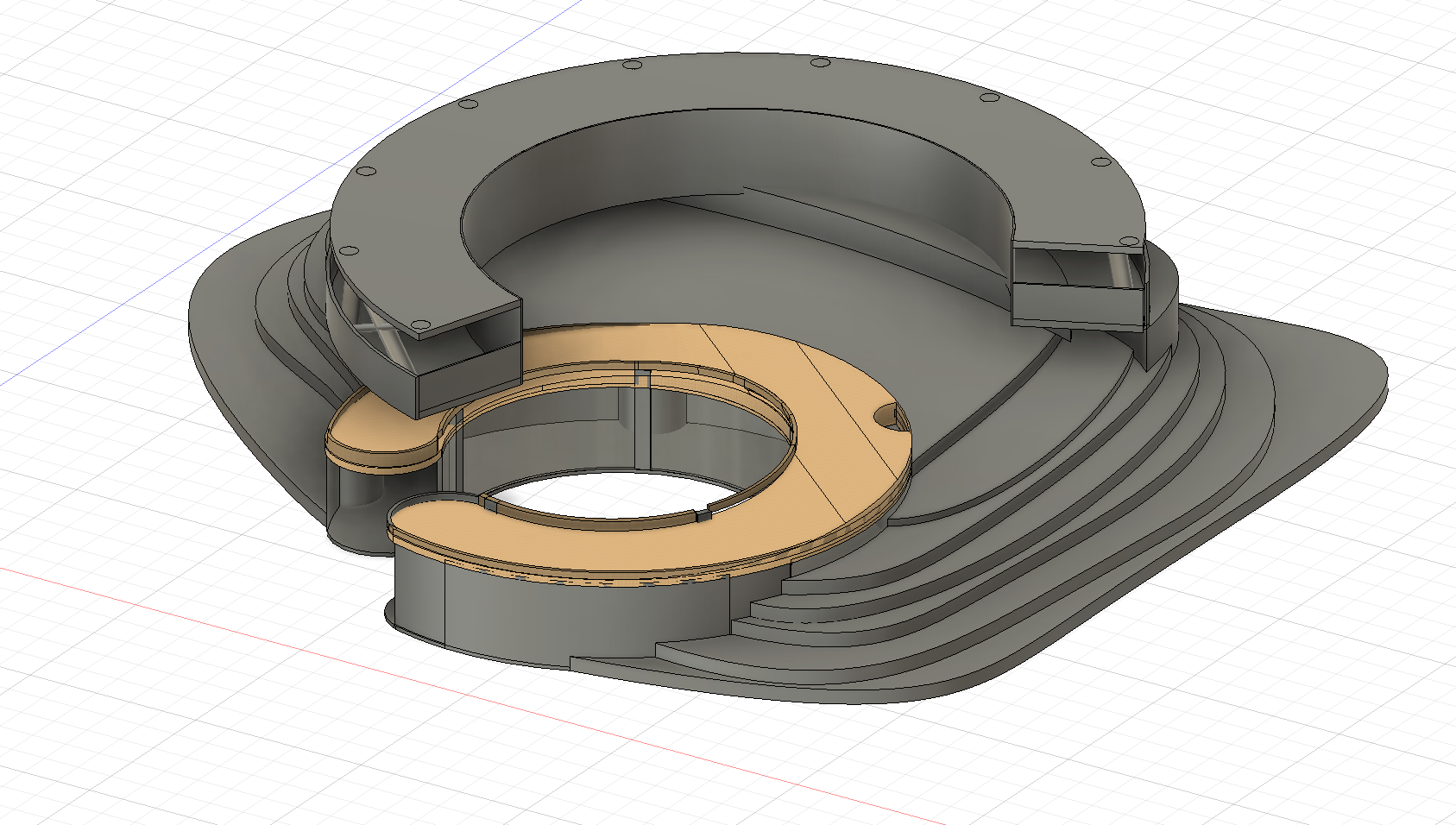
The last part of the digital model design process involved integration between all parts:
- Alignments and Tolerances: We took our measurements at the points where there were intersections between the topography, the building on the ground floor, and the one above it on the upper floor.
- Structural Supports: We designed the connection supports and joints that would hold the two buildings in place as they sat atop the hill for future 3D modeling
Making the Physical Model - Laser Cutting Bristol Boards for Topography
.jpg)
.jpg)
The terrain layers were then cut from black Bristol board sheets.
- The Bristol board was placed securely on a cutting mat to protect work surfaces and improve cutting precision.
- Using a laser cutter, the contour shapes were cut carefully along the digital outline
- Additional cuts were made to create spaces where the pavilion structure would later sit within the hills.
Making the Physical Model - Assembling the Base
.jpg)
.jpg)
After cutting the contour pieces, the terrain was assembled into a layered topographic form.
- The layers were arranged from bottom to top according to elevation height.
- Each layer was test-fitted before gluing to ensure proper alignment.
- The gradual layering technique successfully recreated the terrain contours while also strengthening the physical base of the model.
Once the terrain layers were organized correctly, permanent assembly began.
- Super glue was applied carefully between each layer.
- Pressure was applied evenly to prevent gaps or shifting while the glue dried.
- The completed terrain structure was mounted onto a black foam board base for additional support and stability.
Making the Physical Model - 3D Printing the Buildings
.jpg)
.jpg)
.jpg)
- Each component was printed separately to improve accuracy and reduce the risk of print failures.
- Once printing was completed, the pieces were allowed to cool fully before removal to avoid deformation or damage.
- Any excess filament, strings, or printing artifacts were carefully removed using precision tools.
Making the Physical Model - Testing & Assembling the 3D Printed Buildings
.jpg)
.jpg)
.jpg)
Before permanently assembling the structure, all printed sections were test fitted together.
- Measurements were checked against the terrain base to ensure the pavilion would fit properly into the hillside sections.
- Minor adjustments were made where necessary to improve alignment or remove small gaps between components.
After confirming that all parts fit together correctly, the pavilion structure was permanently assembled.
- Super glue was applied carefully along the connection points between components.
- Walls and floor sections were aligned slowly to preserve the curved geometry and overall symmetry of the design.
- Pressure was applied gently while the glue dried to maintain accurate positioning.
- The second floor and balcony sections were attached carefully to avoid damaging thin structural elements.
- The roofless central courtyard was left open as intended to preserve the design’s focus on openness, light, and connection to nature.
- Once assembly was complete, the structure was inspected again for stability and visual consistency.
Making the Physical Model - Making Transparent Window Panels
.jpg)
.jpg)
Before cutting the clear plastic sheets, the dimensions of each window section had to be measured carefully.
- A ruler was used to measure the height and width of each window opening within the 3D printed structure.
- Special attention was given to curved wall sections where the dimensions varied slightly.
Once measurements were finalized, the transparent panels were cut.
- The clear plastic sheets were placed on a cutting mat to prevent scratches and damage during cutting.
- Using a ruler and X-Acto knife, the plastic was cut into sections matching the measured dimensions.
- Straight cuts were made slowly and carefully to maintain clean edges.
After cutting the panels, they were attached to the structure.
- Small amounts of super glue were applied carefully along the edges of the window openings.
- Additional adjustments were made to ensure the panels remained flush with the curved walls.
- Excess glue was removed immediately to preserve the transparent appearance of the windows.
Making the Physical Model - Landscape Details & Decorative Elements
.jpg)
.jpg)
.jpg)
Model trees and greenery were then added to the terrain.
- Trees were placed around pathways and gathering spaces to create shaded and peaceful outdoor areas.
- Vegetation was arranged to soften the appearance of the terrain and strengthen the connection between the structure and nature.
- Additional greenery was added around the hillside sections to create a more natural transition between architecture and landscape.
Final Checks & Completion!

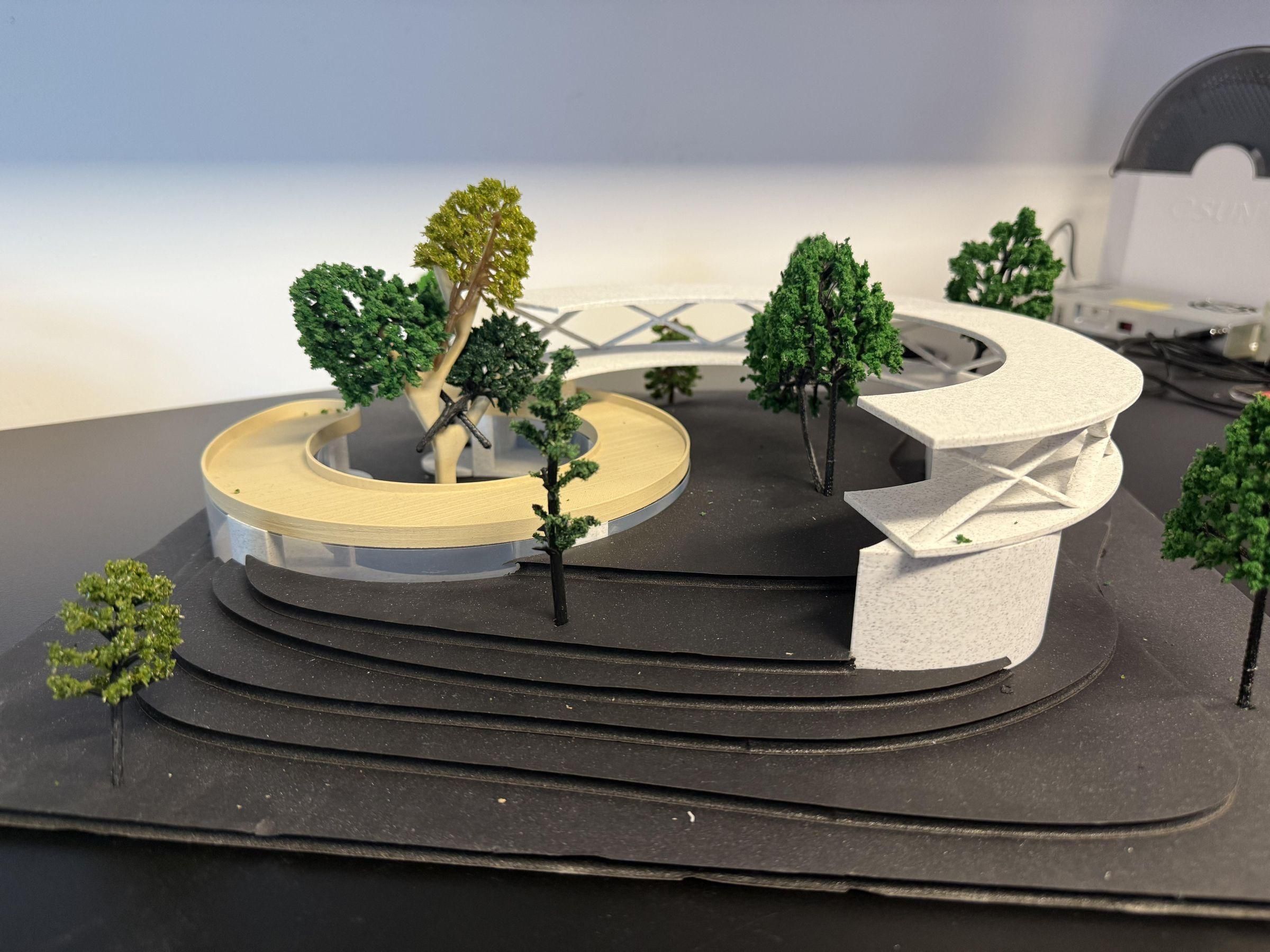

Before completing the model, all components were inspected and refined.
- Loose pieces were secured using additional glue where necessary.
- The structure and landscape were checked to ensure proper alignment and stability.
- Minor adjustments were made to improve the overall presentation quality of the model.
THE MODEL IS DONE!